


- Company
- Products
- Catalogs
- News & Trends
- Exhibitions
Identifying and Controlling Vibration

Identifying and Controlling Vibration
The document discusses the importance of minimizing environmental vibrations for optimal performance of NewView™ optical profilers. It highlights the use of ZYGO’s MetroPro™ software tools to identify and control vibration sources, ensuring accurate measurement data.
Vibrations can significantly affect data integrity, with effects ranging from undetectable to highly visible. The document illustrates this with images showing the impact of vibrations on an SIC optical flat.
Key sources include improperly installed isolation systems, poorly routed cables, proximity to air handling systems, mechanical pumps, and acoustic coupling. These sources can often be visually detected on the fringe monitor.
Initial checks should focus on the isolation system and cable routing. Proper installation and configuration of the isolation system, including ensuring all isolator legs are floating, are crucial. Cable routing should allow for slack to absorb vibrations.
Version 8.0.1 of the software includes an environment test feature that uses a narrowband filtered light source to identify vibration frequencies and magnitudes. The test results in a plot of vibration amplitude versus frequency, helping to diagnose vibration issues.
The procedure involves setting up the environment test in the microscope application, using a focus filter, and selecting appropriate camera modes. The test identifies vibration problems, with high magnitude peaks indicating potential issues.
Vibrations can also occur through acoustic coupling, driven by sample or fixture design. The MetroPro™ software can diagnose these issues, and solutions include removing fixtures or using acoustic enclosures.
Most vibration issues can be traced to a few common causes and effectively diagnosed using the MetroPro™ software. Simple troubleshooting methods can eliminate these problems, ensuring a quiet measurement environment.
For further assistance, contact ZYGO representatives or visit their website.
Catalog excerpts
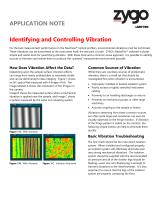
APPLICATION NOTE Identifying and Controlling Vibration For the best measurement performance on the NewView™ optical profilers, environmental vibrations must be minimized. These vibrations can be transmitted to the instrument itself, the test part, or both. ZYGO’s MetroPro™ software includes simple and useful tools for quantifying vibration. With these tools and a common sense approach, it is possible to identify sources of vibration and isolate them to produce the “quietest” measurement environment possible. How Does Vibration Affect the Data? Common Sources of Vibration Depending upon the sample surface, vibration effects can range from nearly undetectable to extremely visible and can be detrimental to data integrity. Figure 1 shows an SIC optical flat measured with 4 fringes of tilt. The image labeled A shows the orientation of the fringes on the camera. Image B shows the measured surface when a mechanical vibration is applied near the sample, and Image C shows a surface measured by the same non-vibrating system. While there are countless sources of problematic vibration, there is a small set that should be investigated first when vibration is encountered. Improperly installed or leveled isolation system Poorly routed or tightly stretched instrument cabling Proximity to air handling discharges or returns Proximity to mechanical pumps or other large machinery Acoustic coupling to the sample or fixture Figure 1 A. With vibration Vibrations stemming from these common sources are often quite large and sometimes can even be visually observed on the fringe monitor. If vibration of the fringe pattern is visible on the monitor, the following simple checks can help to eliminate them quickly. Basic Vibration Troubleshooting Figure 1 B. With Vibration Figure 1 C. Vibration Removed The first check should be the instrument isolation system. When installed and configured properly, an isolation system will effectively eliminate even very strong mechanical vibrations. The isolation system should be supplied with the recommended air pressure and all of the isolator legs should be floating—even one non-floating leg is enough to transmit vibrations to the interferometer. It is also important to ensure that the legs of the isolation system are properly
Open the catalog to page 1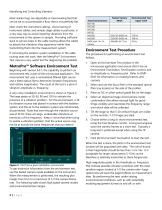
Identifying and Controlling Vibration Most isolator legs are adjustable or have leveling feet that can be set to accommodate a floor that is not perfectly flat. Next, check the instrument cabling. Good routing of instrument cables, and sample stage cables in particular, is a very easy way to avoid imparting vibrations from the environment to the system or sample. Providing sufficient slack or service loops in the cable routing allows the cables to absorb the vibrations they experience rather than transmitting them into the measurement system. If correcting the isolation system installation or...
Open the catalog to page 2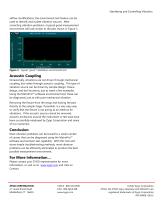
Identifying and Controlling Vibration airflow modifications, the environment test feature can be used to identify and isolate vibration sources. After correcting vibration problems, a typical good measurement environment will look similar to the plot shown in Figure 3. Figure 3. Typical “good” installation environment test Acoustic Coupling Occasionally, vibrations are not driven through mechanical coupling, but rather through acoustic coupling. This type of vibration source can be driven by sample design, fixture design, and tool locations, just to name a few examples. Using the MetroPro™ software...
Open the catalog to page 3All Zygo catalogs and technical brochures
 Zygo Nano Position Sensors
20 Pages
 Zygo Precision Optics & Systems
20 Pages
 Zygo Laser Interferometers
28 Pages
 Zygo 3D Optical Profilers
24 Pages
 Zygo Service Brochure
12 Pages
 Compass2 1-sheet - Optimized
2 Pages
 Compass 2™ Specifications
2 Pages
 Mx Surface Texture Parameters
28 Pages
 SubAngstrom Surface Texture
3 Pages
 PMI vs Fringe Analysis
2 Pages
 Mx Films Analysis Software
2 Pages
 Interferometer Scale Facton
2 Pages
 Coherent Artifact Reduction
3 Pages


- Automation software solution
- Windows software
- Optical microscope
- Industrial software
- Interface software
- Quality software
- Inspection microscope
- Glass lens element
- Spectrum lens element
- Optical window
- Surface measuring machine
- Optical lens element
- Compact microscope
- Visible lens element
- Digital microscope
- Metrology software
- Industrial surface measuring machine
- Instrument software
- Fluorescence microscope