
- Catalogs
- ZRT Technology
- MSC-2401


MSC-2401

MSC-2401
Catalog excerpts
MSC-2401 Medical AI All-in-one PC USER Manual V1.3
Open the catalog to page 1
Disclaimer The contents of this manual are subject to change without prior notice. The company makes no express or implied guarantees or warranties regarding the applicability of this manual for any specific purpose or any other matter. Therefore, the company shall not be liable for any errors in the manual's content, or for any direct, indirect, incidental, or consequential damages arising from the use of this manual, whether through display modifications or any other means. Copyright Notice: All rights reserved by Shenzhen ZRT Technology Co., Ltd. No part of this manual may be reproduced, excerpted,...
Open the catalog to page 2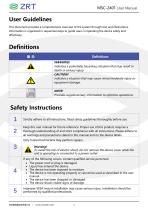
This document provides a comprehensive overview of the system through text and illustrations. Information is organized in sequential steps to guide users in operating the device safely and effectively. indicates a potentially hazardous situation that may result in death or serious injury. indicates a situation that may cause minor/moderate injury or equipment damage. Provides supplementary information to optimize operations.
Open the catalog to page 3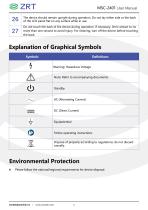
The device should remain upright during operation. Do not lay either side or the back of the LCD panel flat on any surface while in use. Do not touch the back of the device during operation. If necessary, limit contact to no more than one second to avoid injury. For cleaning, turn off the device before touching the back. ■ Please follow the national/regional requirements for device disposal.
Open the catalog to page 6
Before installing the medical all-in-one PC, please ensure you have received the below materials: Warning! There are no user-serviceable parts inside. Repairs should be handled by qualified personnel. Only the accessories listed above have been tested and approved for use with the device. Therefore, it is strongly recommended to use only these accessories with the specific device; otherwise, the proper functioning of the device may be affected. If you need further assistance, please contact your dealer or sales representative for technical support. Before calling, have the following information...
Open the catalog to page 7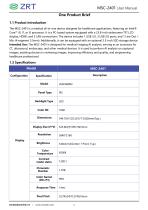
The MSC-2401 is a medical all-in-one device designed for healthcare applications, featuring an Intel® Core™ i9, i7, or i5 processor. It is a PC-based system equipped with a 23.8-inch widescreen TFT LCD display, HDMI, and 2 LAN connections. The device includes 1 USB 3.0, 3 USB 2.0 ports, and 1 Line Out + Mic (4-segment 3.5mm). Additionally, it can be equipped with an optional 2.5-inch SSD storage device. Intended Use: The MSC-2401 is designed for medical imaging AI analysis, serving as an accessory for CT, ultrasound, endoscopy, and other medical devices. It is used to perform AI analysis on captured...
Open the catalog to page 9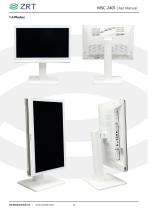
MSC-2401 User Manual 1.4 Photos
Open the catalog to page 13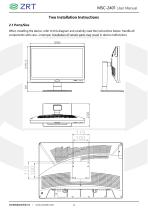
MSC-2401 User Manual Two Installation Instructions 2.1 Ports/Size When installing the device, refer to this diagram and carefully read the instructions below. Handle all components with care—improper installation of certain parts may result in device malfunction.
Open the catalog to page 14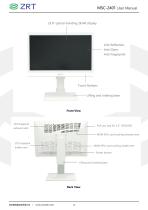
Touch Buttons Lifting and rotating base Back View I www.zrt-tech.com
Open the catalog to page 15
2. The power switch is the main system switch. After connecting power, press the switch to start the system, then use the front panel LCD power button to turn on the display (refer to Front Panel Button Functions).
Open the catalog to page 16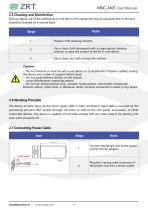
MSC-2401 User Manual 2.5 Cleaning and Disinfection During regular use of the medical all-in-one device, the equipment may accumulate dust or dirt and should be cleaned on a routine basis. Prepare mild cleaning solvents Use a clean cloth dampened with an appropriate cleaning solution to wipe the surface of the all-in-one device. Use a clean, dry cloth to wipe the surface. Caution! -- Do not immerse or rinse the all-in-one device or its peripherals. If liquid is spilled, unplug the device and contact IT support before reuse. -- Do not spray cleaners directly on the chassis. -- Avoid disinfectants...
Open the catalog to page 18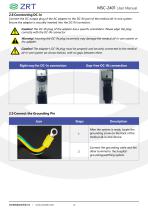
MSC-2401 User Manual 2.8 Conntecting DC-In Connect the DC output plug of the AC adapter to the DC-IN port of the medical all-in-one system. Ensure the adapter is securely inserted into the DC-IN connector. Caution! The DC-IN plug of the adapter has a specific orientation. Please align the plug correctly with the DC-IN connector. Warning! Inserting the DC-IN plug incorrectly may damage the medical all-in-one system or the adapter. Caution! The adapter's DC-IN plug must be properly and securely connected to the medical all-in-one system (as shown below), with no gaps between them. Right way for...
Open the catalog to page 19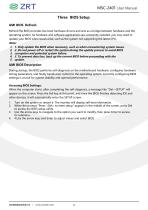
RefreshThe BIOS provides low-level hardware drivers and acts as a bridge between hardware and the operating system. As hardware and software applications are constantly updated, you may need to update your BIOS when issues arise, such as the system not supporting the latest CPU. 1. 1. Only update the BIOS when necessary, such as when encountering system issues. 2. 2. Do not power off or restart the system during the update process to avoid BIOS 3. corruption and potential system failure. 4. 3. To prevent data loss, back up the current BIOS before proceeding with the During startup, the BIOS performs...
Open the catalog to page 20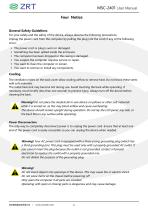
MSC-2401 User Manual Four Notice General Safety Guidelines For your safety and the safety of the device, always observe the following precautions. Unplug the power cord from the computer by pulling the plug (not the cord) if any of the following occur: The power cord or plug is worn or damaged. Something has been spilled inside the enclosure. The computer has been dropped or the casing is damaged. You suspect the computer requires service or repair. You want to clean the computer or screen. You want to remove or install any components. Cooling The ventilation holes on the back cover...
Open the catalog to page 21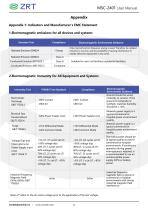
Appendix 1: Indicators and Manufacturer's EMC Statement 1.Electromagnetic emissions for all devices and systems Note: UT refers to the AC mains voltage prior to the application of the test voltage.
Open the catalog to page 22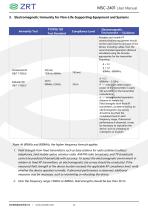
Compliance Level Electromagnetic Environment — Guidance Portable and mobile RF communications equipment should not be used closer to any part of the device, including cables, than the recommended separation distance calculated using the formula appropriate for the transmitter frequency: 800MHz - 2.5GHz P — maximum rated output power of thfftransmitter in watts (W) according to the transmitter manufacturer; d — recommended separation distance in meters (m) Field strengths from fixed RF transmitters, as determined by an electromagnetic site survey, should be less than the compliance level in each...
Open the catalog to page 23All ZRT Technology catalogs and technical brochures
 MIN-EC07
18 Pages
 MIN-EC07B
22 Pages
 Edge AI Box PC Series Catalogue
16 Pages
 MIN-EC02
7 Pages
 EFC-D201
5 Pages
 MM3080TIB6-16G
7 Pages
 MM4050A6-6G
17 Pages
 MM4080B6-12G
17 Pages
 MDC-C2201
2 Pages
 MMR5000B6-16G
1 Page
 RTX4090m 16GD6 3PH
1 Page
 ECM-TGL6U2
1 Page
 MMA5000B6-16G
1 Page
 EFC-D203
1 Page
 MIN-EC10
1 Page
 MSC-2401
7 Pages
 ZRT-EMA-1301H
6 Pages
 ZRT Medical Display Solution
19 Pages
 EMA-1301H
4 Pages
 EMA-1301
4 Pages
 MIN-EC10
5 Pages
 MD5230A3-1G
1 Page
 MD550A5-4G
1 Page
 MD560A5-4G
1 Page
 E16EMF-EPU
1 Page
 MMA4500B6 16G
1 Page
 MMP2000A5-4G
1 Page
 MMP1000A5-4G
1 Page
 MMR3500B6-12G
1 Page
 MMR3000B6-6G
1 Page
 MMP5000B5-16G
1 Page
 MMP4000B5-8G
1 Page
 MMP3000B5-6G
1 Page
 MMA1000A6-4G
1 Page
 MMT1000A6-4G
1 Page
 MMA2000B6-8G
1 Page
 MMR2000A6-8G
1 Page
 MM4090B6-16G
1 Page
 MIN-EC09C
1 Page
 MIN-EC09B
1 Page
 MIN-EC09A
1 Page
 MIN-EC05E
6 Pages
 MIN-EC05B
5 Pages
 MIN-EC05A
5 Pages
 MIN-EC10
7 Pages
 ECM-6121
5 Pages
 ZRT COMe Module Catalogue
13 Pages
 R1 RK3588
15 Pages
 MMA4500A6-16G
3 Pages
 MM3080B6-16G
3 Pages


