
- Catalogs
- ZRT Technology
- MIN-EC07


MIN-EC07
MIN-EC07
The MIN-EC07 User Manual provides detailed information on the specifications, installation, and troubleshooting of the MIN-EC07 edge computing device. The document is structured into several key sections, including product specifications, installation instructions, image installation guidelines, and troubleshooting tips.
Product Specifications
The MIN-EC07 series includes various models such as Xavier NX 16G, Xavier NX 8G, TX2 NX, and NANO, each with different AI performance capabilities ranging from 21 TOPS to 472 GFLOPS. The devices feature NVIDIA Carmel ARM architecture, with varying CPU cores and memory configurations. The GPU architecture varies from Volta to Maxwell, with different CUDA core counts. The devices support multiple video encoding and decoding formats and offer expansion slots for M.2 and Mini PCIe, as well as various I/O ports including HDMI, DP, USB, and Ethernet.
Installation Instructions
The installation section provides detailed steps for assembling the device, including attaching the chassis bracket, installing M.2 hard drives, and configuring 4G/5G modules. It emphasizes the importance of using anti-static gloves to prevent damage to components. The section also includes jumper settings for power and COM port configurations.
Image Installation Guidelines
This section outlines the process for installing system images on Jetson Xavier NX, Jetson Nano, and Jetson TX2 devices. It includes steps for preparing a host machine, downloading necessary tools from NVIDIA, and flashing the image onto the device. The guide advises on selecting the correct image version and provides troubleshooting tips for installation failures.
Troubleshooting
The troubleshooting section addresses common issues such as DRAM compatibility and software image updates. It recommends updating the software image to include necessary changes for memory devices.
Conclusion
The manual provides comprehensive guidance for setting up and maintaining the MIN-EC07 device, ensuring users can effectively utilize its capabilities in edge computing applications.
Catalog excerpts

SHEN ZHEN ZRT TECHNOLOGY CO., LTD.
Open the catalog to page 1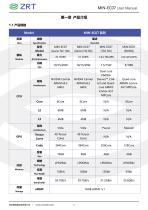
MIN-EC07 User Manual 第一章 产品介绍 1.1 产品规格 Model Dual-core NVIDIA 架构 Architecture NVIDIA Carmel NVIDIA Carmel ARM® Cortex- core ARM®
Open the catalog to page 5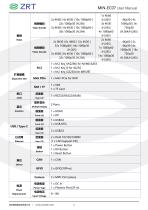
Video Encode 2x 8K30 | 6x 4K60 | 12x 4K30 | 视频解码 Video Decode 扩展插槽 Expansion Slot 1 x Mini PCIe for WIFI 1 x SIM 1 x TF Card 1 x RS232/RS422/RS485 2 Ports Multiple Display 1 x Power Button 1 x RV Button 1 x Reset Button Power Type 电源电压 Input Voltage
Open the catalog to page 6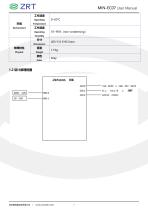
□Dio □Dll CLEi EViT i CAH iPC ASVT H,2 Kty-B 1 AUDIO coorc
Open the catalog to page 7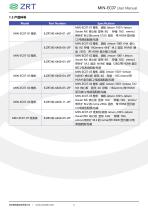
MIN-EC07 User Manual 1.3 产品料号 Model Part Number 带外扩 M.2 的 nvme 512G 固态 带 HDMI 显示接 口/电源适配器/包装 MIN-EC07-02 整机 底板 Jetson-1001+NX 核心 板 8G 存储 16Gemmc+外扩 M.2 固态 NVME 硬 盘 250G 带 HDMI 显示接口/包装 带外扩 M.2 固态 NVME 硬盘 128G/带 HDMI 显示 接口/电源适配器/包装 MIN-EC07-03 整机 底板 Jetson-1001+Jetson NANO 核心板 显存: 4G 存储 : 16G emmc/带 HDMI 显示接口/电源适配器/包装 MIN-EC07-04 整机 底板 Jetson-1001+Jetson TX2
Open the catalog to page 8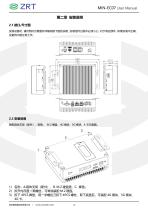
MIN-EC07 User Manual 第二章 安装说明 2.1 接口/尺寸图 安装设备时,请对照此示意图并详细阅读下面的说明,安装组件过程中必须小心,对于有些部件,如果安装不正确, 设备将不能正常工作。
Open the catalog to page 10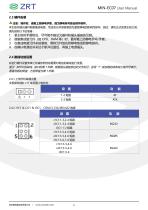
MIN-EC07 User Manual 2.3 硬件安装 注意:操作时,请戴上防静电手套,因为静电有可能会损坏部件。 本主板关键元器件都是集成电路,而这些元件很容易因为遭受静电的影响而损坏。因此,请在正式安装主板之前, 请先做好以下的准备: 拿主板时手握板边,尽可能不触及元器件和插头插座的引脚。 接触集成路元件(如 CPU、RAM 等)时,最好戴上防静电手环/手套。 在集成电路元件未按装前,需将元件放在防静电垫或防静电袋内。 在确认电源的开关处于断开位置后,再插上电源插头。
Open the catalog to page 11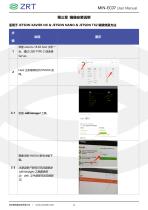
MIN-EC07 User Manual 第三章 镜像安装说明 适用于 JETSON XAVIER NX & JETSON NANO & JETSON TX2 镜像烧录方法 步 Host 主机联网访问 NVIDIA 官 网。
Open the catalog to page 14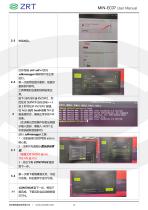
第一次使用会提示更新,按提示 更新软件即可。 工具界面如右图则说明安装正 常。 按下 SERVER 端 RV/SW2,然 后在对 SERVER 进行加电==3 至 5 秒后松开 RV/SW2 按键。 在 host 端用 lsusb 查看 NX 设 备连接状态,确保正常识别 NX 设备。 (此步骤以后的操作如若出现提 示输入密
Open the catalog to page 15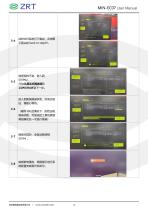
此时文件系统已下载完,点击图 示箭头处 back to step01。 CONTINUE 到下一步。
Open the catalog to page 16
MIN-EC07 User Manual 第四章 故障问题排除 故障 排除 Update software image flashed to the Jetson Nano (See DRAM: Micron Recommended Action section below) to include: Appropriate BCT and DVFS changes required by the Micro
Open the catalog to page 17
BiBBl m^ausine^p. ntffiacm##,
Open the catalog to page 18All ZRT Technology catalogs and technical brochures
 MSC-2401
27 Pages
 MIN-EC07B
22 Pages
 Edge AI Box PC Series Catalogue
16 Pages
 MIN-EC02
7 Pages
 EFC-D201
5 Pages
 MM3080TIB6-16G
7 Pages
 MM4050A6-6G
17 Pages
 MM4080B6-12G
17 Pages
 MDC-C2201
2 Pages
 MMR5000B6-16G
1 Page
 RTX4090m 16GD6 3PH
1 Page
 ECM-TGL6U2
1 Page
 MMA5000B6-16G
1 Page
 EFC-D203
1 Page
 MIN-EC10
1 Page
 MSC-2401
7 Pages
 ZRT-EMA-1301H
6 Pages
 ZRT Medical Display Solution
19 Pages
 EMA-1301H
4 Pages
 EMA-1301
4 Pages
 MIN-EC10
5 Pages
 MD5230A3-1G
1 Page
 MD550A5-4G
1 Page
 MD560A5-4G
1 Page
 E16EMF-EPU
1 Page
 MMA4500B6 16G
1 Page
 MMP2000A5-4G
1 Page
 MMP1000A5-4G
1 Page
 MMR3500B6-12G
1 Page
 MMR3000B6-6G
1 Page
 MMP5000B5-16G
1 Page
 MMP4000B5-8G
1 Page
 MMP3000B5-6G
1 Page
 MMA1000A6-4G
1 Page
 MMT1000A6-4G
1 Page
 MMA2000B6-8G
1 Page
 MMR2000A6-8G
1 Page
 MM4090B6-16G
1 Page
 MIN-EC09C
1 Page
 MIN-EC09B
1 Page
 MIN-EC09A
1 Page
 MIN-EC05E
6 Pages
 MIN-EC05B
5 Pages
 MIN-EC05A
5 Pages
 MIN-EC10
7 Pages
 ECM-6121
5 Pages
 ZRT COMe Module Catalogue
13 Pages
 R1 RK3588
15 Pages
 MMA4500A6-16G
3 Pages
 MM3080B6-16G
3 Pages


