
- Catalogs
- YOKOGAWA Europe
- SMARTDAC+ Data Acquisition & Control Paperless recorder GX/GP


- Products
- Catalogs
- News & Trends
- Exhibitions
SMARTDAC+ Data Acquisition & Control Paperless recorder GX/GP

SMARTDAC+ Data Acquisition & Control Paperless recorder GX/GP
The SMARTDAC+ GX/GP is a paperless recorder designed for efficient data acquisition and control, featuring a smart touch interface for enhanced usability. It is tailored for clear, intelligent, and accessible measurement, display, and recording of process data.
The GX/GP series is adaptable and user-friendly, with a touch screen interface. It supports long-term multi-channel recording, redundancy with internal and external media, and secure binary data storage. The modular system allows for expandable input/output, supporting up to 450 channels.
The recorder offers customizable display functions, remote monitoring, and control via a web browser. It includes various display formats and data search functions, with options for freehand messages and user-defined reports.
Data can be printed, analyzed, and saved in binary or text format. The system supports SLMP communication and offers robust networking functions for centralized data management.
The GX/GP features a flexible architecture with modular inputs and outputs, supporting a wide range of I/O modules. It can expand to accommodate up to 1000 channels, including MATH and communication channels.
The recorder includes AI capabilities for predicting data trends, allowing proactive problem identification. It supports future alarms and user notifications via email or digital output.
The GX/GP is suitable for applications like chemical injection control, industrial furnace management, and engine endurance testing. It supports PID and program control, with remote operation and monitoring capabilities.
The SMARTDAC+ GX/GP paperless recorder is a versatile tool for modern data acquisition and control, offering advanced features and adaptability for various industrial applications.
The document provides a guide on using the GX/GP paperless recorder in heat treatment applications within the automotive industry, focusing on high-speed measurement, data acquisition, and networking capabilities.
The GX/GP system supports dual interval measurement for efficient data capture of slow and fast-changing signals, with high-speed measurement capabilities down to 1 ms.
The system measures temperature fluctuations, transient currents, and detects abnormalities in temperature and vibration, using high-speed analog input modules and proprietary A/D converters.
The GX/GP includes a MATH function for complex computations, supports event-triggered actions, and can generate reports automatically in various data formats.
The recorder supports Modbus TCP/IP and RTU for Ethernet and serial communications, enabling integration with power analyzers and other devices.
The system features robust data security measures, including compliance with US FDA 21 CFR Part 11, and offers high-capacity internal memory with secure data formats.
The GX/GP is designed for harsh environments, with dust and splash-proof construction, multitouch operation, and efficient heat dissipation.
The GX/GP paperless recorder is a reliable tool for heat treatment applications in the automotive industry, offering advanced measurement, data processing, and networking capabilities.
The document outlines specifications for various models of paperless recorders, including GX10, GX20, GP10, and GP20, detailing withstand voltage types, terminal types, weight, and construction details.
The document details different input and output modules such as analog input, digital input/output, pulse input, and PID control modules, each with specific features like measurement intervals and input types.
The recorders support communication functions including Ethernet, Modbus/TCP, and optional serial communications, with features like email notifications and web server capabilities.
The recorders operate on a rated supply voltage of 100 to 240 VAC or 12 VDC, with specific power consumption limits and safety specifications.
The document lists optional features and suffix codes for customization, such as advanced security functions and communication channel functions.
There are specific limitations and requirements for setting certain features based on the type of input or module used, with detailed suffix codes for model customization.
The document outlines various modules and their specifications for the GX/GP series paperless recorders, including the GX90YA Analog Output Module and GX90UT PID Control Module.
Standard accessories include mounting brackets, an SD memory card, and a stylus. Optional accessories and application software like DAQStudio and GA10 Data Logging Software are also mentioned.
The document provides configuration examples for panel mounting and highlights features like easy web browser access and mobile connectivity.
The GA10 software allows for real-time data acquisition from multiple devices, supporting centralized data management and monitoring across multiple facilities.
Catalog excerpts

Go-innovating tomorrow™ YOKOGAWA OpreX™ Data Acquisition
Open the catalog to page 1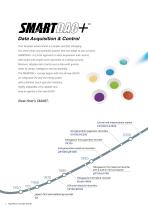
Your business environment is complex and fast changing. You need smart and powerful systems that can adapt to your process. SMARTDAC+ is a fresh approach to data acquisition and control, with smart and simple touch operation as a design priority. Measure, display and record process data with greater levels of clarity, intelligence and accessibility. The SMARTDAC+ concept begins with the all-new GX/GP, an integrated I/O and recording system with a familiar touch operator interface. Highly adaptable, very capable and easy to operate is the new GX/GP. Control and measurement station CX1000/CX2000...
Open the catalog to page 2
AI Equipped Paperless Recorder GX10/GX20, GP10/GP20 4th generation paperless recorders 3rd generation paperless recorders DXAdvanced DX1000/DX2000 3rd generation industrial recorders Paperless recorder GX/GP
Open the catalog to page 3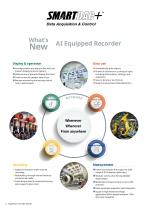
Data Acquisition & Control Display & operation • Arrange screens any way you like with the Custom Display function (option) • Wide variety of powerful display functions • Touch screen for greater ease of use • Remote monitoring and setting control from a web browser Data use • Automatically print reports • Powerful software for a variety of tasks including data analysis, settings, and acquisition • Save to binary or text format • SLMP Communication (Mitsubishi PLC) Recording • Supports long term multi-channel recording • Redundancy through internal memory and external media • Saves binary data...
Open the catalog to page 4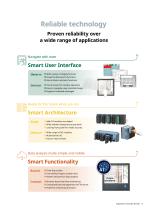
Reliable technology Proven reliability over a wide range of applications Navigate with ease Smart User Interface Observe • Wide variety of display formats • Powerful data search functions • Alarm/Status indicator functions Interact •Touch screen for intuitive operation • Easy-to-navigate, user-oriented design • Supports freehand messages Ready for the future when you are Adapt •Add I/O modules as needed • Wide ambient temperature operation • Locking front panel for media security Measure •Wide range of I/O modules • Multichannel I/O • Easy-to-read screens Data analysis made simple and mobile...
Open the catalog to page 5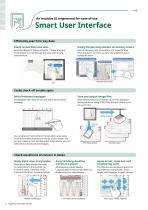
An intuitive UI engineered for ease-of-use Smart User Interface Efficiently search for key data Easily review historical data Quickly find data using calendars and summary screens Seamless display of historical trends―flick or drag the trend display to scroll through the data, even during measurement. From a calendar, jump to waveforms of a specific date. From the alarm summary, jump to the waveform active during the alarm. Search from a calendar Search from a variety of summary screens Desired screen Historical trend screen Easily check off trouble spots Write freehand messages Save and output...
Open the catalog to page 6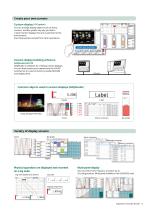
Create your own screens Custom display (/CG option) You can arrange display objects such as trend, numeric, and bar graphs any way you like to create monitor displays that are customized to the environment. Start/stop pumps and perform other operations. Start/stop operation Custom display building software DAQStudio DXA170 DAQStudio is software for creating custom displays. You can load screens you created onto the GX/GP via Ethernet or external memory media (SD/USB) and display them. Common objects used in custom displays (DAQStudio) Alarm summary Image (displays PNG files) Bar graph Variety...
Open the catalog to page 7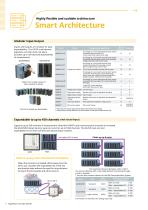
Highly flexible Modular input/output Inputs and outputs are modular for easy expandability. The GX/GP multichannel paperless recorder main unit alone provides up to 100 channels (GX20/GP20) of measurement. GX20/GP20 GX10/GP10 * = Mounting restrictions apply. See the general specifications for details. *1: Large memory model required if the total number of channels installed exceeds 100. Supports up to 450 channels of measurement. Note that if MATH and communication channels are included, the GX20/GP20 large memory type can record on up to 1000 channels. The GX/GP main unit and expandable I/O...
Open the catalog to page 8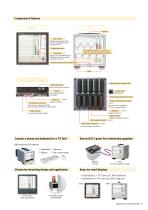
LCD screen Displays operating screens such as trend graphs, and setting screens. Operation panel The START/STOP key can be used when the operation panel is closed. MENU key Simply press the MENU key to display a menu for access to a variety of screens. Front panel door lock mechanism With front panel door open Input/output module slots START/STOP key Starts and stops recording. For writing freehand messages. USB port SD memory card slot Power and protective ground Serial communications port SD memory card (up to 32 GB) (format: FAT32 or FAT16), 1 GB included Power switch The main unit power switch....
Open the catalog to page 9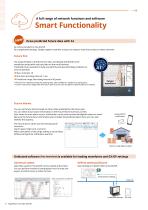
A full range of network functions and software Draw predicted future data with AI AI comes standard on the GX/GP. No complicated settings. Simply register channels, and you're ready to draw future data on those channels. Future Pen Use acquired data to predict future data, and display predicted future waveforms along with real time data on the trend monitor. Predicted future waveforms help you identify and deal with likely problems as soon as possible. ●Max. channels: 10 ●Shortest recording interval: 1 sec. ●Prediction range: Recording interval x 60 points * Effective for relatively slowly fluctuating...
Open the catalog to page 10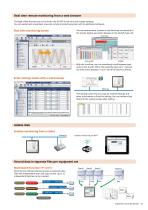
Real time remote monitoring from a web browser Through a Web browser you can monitor the GX/GP in real time and change settings. You can easily build a seamless, low-cost remote monitoring system with no additional software. Real time monitoring screen You can view monitor screens in real time that are identical to the trends, digital, and other displays on the GX/GP main unit. Overview With the scroll bar, you can seamlessly scroll between past and current trends. When the sampling interval is 1 second, the instrument displays 1 hour's worth of historical trends. Enter settings online with a...
Open the catalog to page 11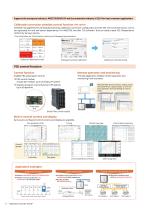
Supports the aerospace industry's AMS2750/NADCAP and the automotive industry�s CQI-9 for heat treatment applications Calibration correction schedule control function (/AH option) Schedule management for periodically executing calibration correction configuration and the like. The correction factor can be set separately for unit and sensor dependency. For AMS2750, we offer TUS software* that can easily create TUS (Temperature Uniformity Survey) reports. * For information on TUS software, contact your Yokogawa representative. Calibration Reminder Screen Calibration schedule setting Message to prompt...
Open the catalog to page 12All YOKOGAWA Europe catalogs and technical brochures
 YS1500
20 Pages
 UM33A/S006
2 Pages
 YTA610
20 Pages
 FA-M3V
19 Pages
 RAMC
RAMC24 Pages
 GS610 Source Measure Unit
12 Pages
 EJXC40A Digital Remote Sensor
135 Pages
 TB750G EXAxt
3 Pages
 VPSRemote Remote Solution
2 Pages
 SENCOM Degital Sensor
3 Pages
 Product Solution Catalog
8 Pages
 Data Logging Software GA10
4 Pages
 JUXTA VJ series
7 Pages
 µR10000/µR20000
8 Pages
 OX400
OX4002 Pages
 PR300 Power and Energy Meter
4 Pages
 CENTUM RIO System Upgrade
4 Pages
 Autonomous Controller FCN-RTU
17 Pages
 MW100
MW1005 Pages
 FieldMate
5 Pages
 AMADAS
4 Pages
 Exapilot
5 Pages
 Exaquantum
5 Pages
 BUCA150_E_050
4 Pages
 BUAQ7280-01
12 Pages
 BUXL120_E_030
8 Pages
 BU7603_00E_060
20 Pages
 BUAQ2200
8 Pages
 NR800 Near Infrared Analyzer
8 Pages
 GD402 Gas Density Analyzer
3 Pages
 DT450G Dust Monitor
3 Pages
 SCADA Software VDS
7 Pages
 Batch Control
9 Pages
 FieldMate catalogs
5 Pages
 DPharp for The Digital World
9 Pages
 RAGN Rotameter
2 Pages
 HART Communicator YHC5150X
2 Pages
 Catalog_YMI130_EN
86 Pages
 Bulletin11G04G01-01E
3 Pages
 Bulletin11B03A03-01E
10 Pages
 FY01A08A08-E-E
2 Pages
 Ultrasonic Flowmeter US300FM
2 Pages
 AXF Verification Tool
2 Pages
 ADMAG Series
9 Pages
 Exaplog
2 Pages
 AAASuite
2 Pages
 InfoWell
8 Pages
 Low Power Controller FCN-RTU
3 Pages
 Standalone SIS
3 Pages
 VTSPortal
2 Pages
 CENTUM VP - CAMS for HIS
4 Pages
 GS01E06K02-00E
2 Pages
 U33Q01A01-01E
11 Pages
 BU33K01A01-50E
11 Pages
 Thermometers Catalog
8 Pages
 PH400G 4-Wire Type pH Meter
27 Pages
 SG750 Stack Gas Analyzers
26 Pages
 Clamp-on Testers
12 Pages
 Dust Monitor DT450G
3 Pages
 Handy Calibrators
4 Pages
 CENTUM.VP
11 Pages
 Fieldbus Segment Indicator
5 Pages
 ADMAG AXF
2 Pages
 YTA series
7 Pages
 TEST & mEASUREmENT 2011
28 Pages
 digital multimeter series
12 Pages
 WT 3000 Precision Power Analyzer
19 Pages
 DL850/DL850V SCOPECORDER
14 Pages




![ADMAG AXR Two-wire Magnetic Flowmeters [Type B]](https://img.directindustry.com/pdf/repository_di/19033/admag-axr-two-wire-magnetic-flowmeters-type-b-569006_1mg.jpg)
![ADMAG AXR Two-wire Magnetic Flowmeters [Type A]](https://img.directindustry.com/pdf/repository_di/19033/admag-axr-two-wire-magnetic-flowmeters-type-569005_1mg.jpg)


Archived catalogs


- Flowmeter
- Volume flow monitor
- Liquid flow monitor
- Transformer
- Gas analyzer
- Ethernet switch
- Concentration analyzer
- Automation software solution
- Management software solution
- Dry transformer
- Surge protector
- Industrial network switch
- Pressure transmitter
- Analysis software solution
- Liquids analyzer
- Process software
- Automatic analyser
- Real-time software
- Windows software
- Calibration system