
- Catalogs
- Yaskawa America, Inc. - Drives & Motion Division
- Yaskawa AC Drives Communication


Yaskawa AC Drives Communication

Yaskawa AC Drives Communication
Yaskawa offers network solutions designed for easy integration into industrial systems, addressing the growing need for machine efficiency, predictability, and preventive maintenance through reliable communication protocols.
Yaskawa drives facilitate network connections via plug-in option cards, ensuring quick and seamless integration into existing systems.
Yaskawa provides a range of network protocol options, including DeviceNet™, EtherNet/IP™, EtherCAT®, MECHATROLINK-II, MECHATROLINK-III, PROFIBUS®, PROFINET®, and Modbus TCP/IP, each with specific part numbers for easy identification and installation.
Yaskawa is committed to high-quality standards, earning recognition in North American and global markets. Their products are known for reliability, ensuring efficient system operation.
Yaskawa offers global support 24/7/365, understanding the critical role of drives in OEM equipment. Their experienced sales and engineering teams provide solutions and support for long-term, cost-effective operation. The USA-based manufacturing and distribution facilities ensure timely delivery to meet production schedules.
Catalog excerpts
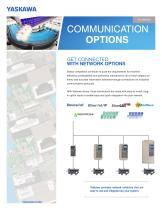
COMMUNICATION OPTIONS GET CONNECTED WITH NETWORK OPTIONS Global competition continues to push the requirements for machine efficiency, predictability, and preventive maintenance, all of which depend on timely and accurate information delivered through connections via industrial communication protocols. With Yaskawa drives, those connections are made with easy-to install, plugin option cards to enable easy and quick integration into your network. ENTER STOP V1000 Freq Reference: FWD/REV Sel : Output Freq : Output Current: Selected Monitor: Monitor : Verify : SetUpGuide : Program : Auto-Tuning : F6000 (Hz) For 6000 (Hz) 00R(A) 00u (v) Mon urFY SrUP PrG ARUN Risk of electric shock. • Read manual before installing. • Wait 1 minute for capacitor discharge after disconnecting power supply. • To conform to CE requirements, make sure to ground the supply neutral for 400V class. Yaskawa provides network solutions that are easy to use and integrate into your system.
Open the catalog to page 1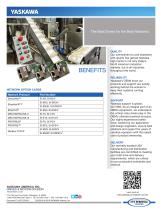
NETWORK OPTION CARDS The Best Drives for the Best Networks QUALITY Our commitment to and obsession with quality has gained Yaskawa high marks in not only today’s North American industrial markets, but in all industries throughout the world. RELIABILITY Yaskawa’s OEMs know our products and support are quietly working behind the scenes to keep their systems running efficiently. SUPPORT Yaskawa support is global, 24/7/365. As an integral part of an OEM’s equipment, we understand the critical roles drives play in the OEM’s ultimate business success. Our highly experienced sales force, backed by our...
Open the catalog to page 2All Yaskawa America, Inc. - Drives & Motion Division catalogs and technical brochures
 U1000
U100017 Pages
 MV1000NEMA 3R
5 Pages
 MV1000
13 Pages
 SG400
SG4002 Pages
 GP7 AND GP8
2 Pages
 INTEGRATED SOLUTIONS
11 Pages
 SIGMA TRAC II
9 Pages
 R1000
R100011 Pages
 iQPUMP AC DRIVE
13 Pages
 FP605
FP60515 Pages
 iQrise
2 Pages
 HV600
HV60019 Pages
 MACHINE CONTROL PRODUCTS
21 Pages
 D1000
D10002 Pages
 GA500
GA5009 Pages
 AC DRIVE SOFTWARE TOOLS
8 Pages
 YASKAWA AC Drive-L1000A
524 Pages
 1000 Series Low Voltage
15 Pages
 Yaskawa IEC Robot Control
5 Pages
 Yaskawa Type 3R Package
6 Pages
 Sigma SD
60 Pages
 GA800
GA8002 Pages
 MicroMax Marathon AC Motors
2 Pages
 L1000A
2 Pages
 BlackMax Marathon AC Motors
2 Pages
 BlueMax Marathon AC Motors
4 Pages
 NEMA Premium Efficiency XRI
2 Pages
 Yaskawa AC Drives PLC
2 Pages
 Deming Award
2 Pages
 SigmaLogic7 Compact
2 Pages
 Single Phase Converter
2 Pages
 Sigma-7 Servo Systems
4 Pages
 Z1000 Family of Drives Catalog
28 Pages
 iQpump Family Catalog
20 Pages
 Z1000 Bypass
2 Pages
 Z1000 Drive, 3HP to 500HP
2 Pages
 IEC - Comm Toolbox
2 Pages
 MP3200iec
2 Pages
 P1000 Catalog
52 Pages
 SGMMV
SGMMV20 Pages
 Bestact
64 Pages
 Sigma II Servo Catalog
202 Pages
 Sigma-5 Series Product Catalog
357 Pages
 A1000 Catalog
58 Pages
 YASNAC 3000G
203 Pages
 LEGEND-MC (SMC-3010)
2 Pages
 YASNAG 2000G
58 Pages
 variable frequency drives
7 Pages
 Sigma-5 Servo Family
8 Pages
 Junma Series Servo
12 Pages


Archived catalogs
 Flyer Yaskawa Factory Repair
2 Pages


- Electromotor
- Synchronous motor
- Industrial robot
- Alternating current motor
- Electric gearmotor
- Automation software solution
- Digital I/O
- Proximity switch
- Electromotor for industrial applications
- Real-time software
- Three-phase motor
- Articulated robot
- Windows software
- IO module
- 6-axis robot
- Servo-motor
- Switching relay
- Analog I/O
- Monitoring software solution
- Handling robot