
- Catalogs
- Xiamen Dexing Magnet Tech. Co., Ltd.
- User Manual of DXMP-300 Power Supply


User Manual of DXMP-300 Power Supply

User Manual of DXMP-300 Power Supply
The DXMP-300 is a high stability bipolar constant current power supply designed for inductive loads such as electromagnets and Helmholtz coils. It features a linear power supply structure with high output current stability, low ripple, and noise. The device supports continuous current changes between positive and negative maximum currents, facilitating smooth magnetic field production. It operates in both current and magnetic field modes, with the latter requiring a high-precision Gauss meter and probe.
- Bipolar constant current output with smooth zero crossing.
- High current stability and low ripple, with a current accuracy of ±0.01% set value + 1mA.
- Two working modes: current mode and magnetic field mode.
- Local and remote control options via RS232, RS485, USB, and LAN.
- Multiple protection functions including input power failure and overcurrent protection.
The front panel includes a power switch, status indicator, and a touch screen. The rear panel features an AC input socket, fuse socket, external fault terminal, RS232 and USB ports, and a DC current output terminal.
- Input: Single-phase, 220VAC ±10%, 50/60Hz.
- Output: Bipolar constant current, ±50A, ±6V, with a 20-bit resolution.
- Environment: Operating temperature 0~30℃, humidity 20~90%RH, air cooling.
- Power input requires AC 220V, 50/60Hz, with a voltage range of 220VAC ±10%.
- Load connection should be firm and capable of handling the rated current.
- Communication options include RS232, RS485, and USB.
- External fault connection uses a 4-core aviation plug for interlock protection.
- Power standby involves confirming connections and using the front panel switch.
- The power operation interface allows setting target current and switching between local and remote control.
- Features include a power off button, remote/local switch, power zero shortcut, and pause function.
- Instructions for RS232 and RS485 communication are provided, with optional USB and LAN interfaces.
A limited one-year warranty is provided, covering instrument replacement or service due to faults, excluding improper maintenance, unauthorized alterations, and non-Dexing Magnet parts. The warranty starts from the delivery date or installation date, with specific exclusions outlined.
The document describes the functionalities of various buttons in the power operation interface, such as 'pause', 'parameter setting', 'failure status', and 'contact us'. The 'power off' button initiates the shutdown process, leading to a standby interface.
Key parameters include the power communication address (1-255), communication baud rate (default 9600), current change rate, and working mode (current or magnetic field mode). The interface allows zero calibration of the Gauss meter and returning to the original interface.
The fault status interface displays specific fault information, with black font indicating no fault and red font indicating a fault. It includes control state, power module status, and parameters. A 'fault reset' button is available for troubleshooting.
Common instructions include querying equipment model (*IDN?), reading limit values (LIMIT?), power switch (POWER <ON|OFF>), and setting output current (Curr<output target current>). Other commands manage current change rate, magnetic field settings, and mode queries.
The document's test methods and standards are proprietary to Xiamen Dexing Magnet Tech. Co., Limited. Unauthorized reproduction or commercial use is prohibited, and the company reserves the right to modify product functions without notice.
Catalog excerpts

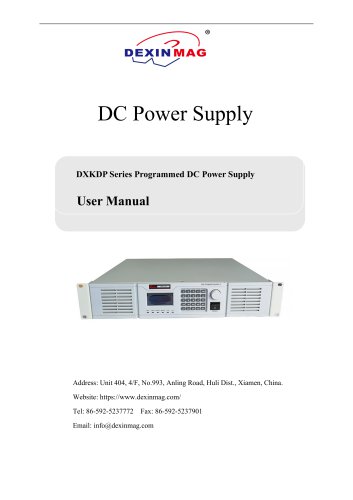
Bipolar Programmable Power Supply user’s manual Xiamen Dexing Magnet Tech. Co., Ltd. Add: No.993, Anling Road, Huli District, Xiamen, China 361012 Tel: (86) 592 5237772 Mobile Phone: 18030236818 Website: https://www.dexinmag.com Email: [email protected]
Open the catalog to page 1
1. Overview The power supply is a high stability bipolar constant current power supply, which is widely used in the excitation of inductive loads such as electromagnets and Helmholtz coils. The power supply adopts linear power supply structure, with high output current stability and low ripple and noise. The output current of the power supply can continuously change between the positive and negative rated maximum current, and the current can smoothly and continuously cross zero, which can make the electromagnet or coil produce a smooth and stable magnetic field. With the company's high-precision...
Open the catalog to page 3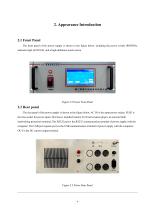
2.1 Front Panel The front panel of the power supply is shown in the figure below, including the power switch (POWER), indicator light (STATUS), and a high-definition touch screen. Figure 2.2 Power Front Panel 2.2 Rear panel The rear panel of the power supply is shown in the figure below. AC IN is the input power socket; FUSE is the fuse socket for power input (10A fuse is installed inside); Ext Fault aviation plug is an external fault interlocking protection terminal; The RS232 port is the RS232 communication terminal of power supply with the computer; The USB port (square port) is the USB communication...
Open the catalog to page 4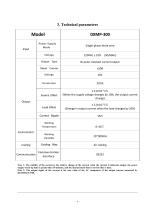
Note 1: The stability of the current is the relative change of the current when the current is full-scale output, the power supply warm-up time is greater than 30 minutes, and the measurement time is not less than 1 hour. Note 2: The output ripple of the current is the rms value of the AC component of the output current measured by KETTHLEY2700.
Open the catalog to page 5
4. Installation and wiring 4.1 Power input connection The power supply of the equipment is required to be AC 220V, 50 / 60Hz power input, and the voltage range is 220VAC ± 10%. The power input interface is located on the rear panel of the power supply, and its identification is AC in. The rated current carrying capacity of the power line shall be greater than 10A. Warning: input voltage out of range may damage the power supply. Note: the power line with less than the rated current carrying capacity may overheat and scorch the power line and cause fire. 4.2 Load connection The power output interface...
Open the catalog to page 6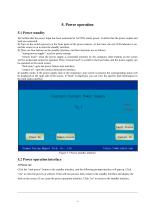
5. Power operation 5.1 Power standby 1) Confirm that the power input has been connected to AC220V mains power; Confirm that the power output and load are connected. 2) Turn on the switch (power) on the front panel of the power chassis. At this time, the red LED indicator is on, and the screen is on to enter the standby interface. 3) There are four buttons on the standby interface, and their functions are as follows: "startup power supply": used for power startup; "remote local": when the power supply is controlled remotely by the computer, other buttons on the screen will be locked and cannot...
Open the catalog to page 7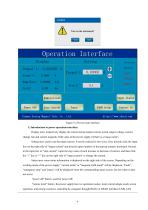
Figure 5.2 Power main interface 1) Introduction to power operation interface: Display area: respectively display the current actual output current, actual output voltage, current change rate and current magnetic field value of the power supply (if there is a Gauss meter). Setting area: used to set the target current. It can be realized in two ways: first, directly click the input box on the right side of "target current" and directly input numbers in the pop-up numeric keyboard; Second, in the input box of "step current", input the step value of each increase or decrease of current, and then...
Open the catalog to page 8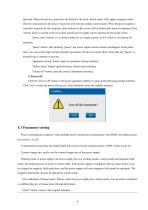
optional). When the power is turned on, the default is the local control mode. If the upper computer sends effective instructions to the power, the power will enter the remote control mode. When the power supply is controlled remotely by the computer, other buttons on the screen will be locked and cannot be operated. Press "remote local" to switch to the local state, and the power supply can be operated on the touch screen. "power zero" button: it is a shortcut button to set "target current" to 0A, which is convenient for operation. "pause" button: after pressing "pause", the power output...
Open the catalog to page 9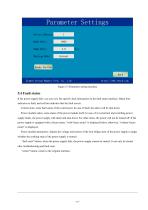
Figure 5.3 Parameter setting interface 5.4 Fault status If the power supply fails, you can view the specific fault information in the fault status interface. Black font indicates no fault, and red font indicates that the fault occurs. Control state: some fault states of the control part. In case of fault, the alarm will be shut down. Power module status: some states of the power module itself. In case of 4 overcurrent and switching power supply faults, the power supply will alarm and shut down; For other items, the power will not be turned off. If the power supply is equipped with a Gauss...
Open the catalog to page 10
Figure 5.4 Fault Status Interface Figure 5.5 Contact interface Matters needing attention: 1) If the power supply is not used for a long time, turn off the power switch on the front panel after shutdown. 2) If the power switch on the front panel is turned off, it needs to wait about 20 seconds before it can be powered on again, otherwise it will not start normally due to incomplete discharge of the internal switching power supply. If there is a fault that cannot be eliminated in the power supply, please call the after-sales service department of Xiamen Dexing Magnet Tech. Co., Limited.
Open the catalog to page 11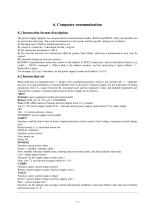
6. Computer communication 6.1 Instruction format description The power supply supports two remote control communication modes: RS232 and RS485. Only one interface can be used at the same time. The control command is in text mode, and the specific settings are as follows: 1) The baud rate is 9600 by default and can be set. 2) 1 start bit, 8 data bits, 1 odd check bit and 1 stop bit. 3) The instruction terminator is CRLF. 4) The interval between two instructions shall be greater than 100ms, otherwise communication error may be caused. 5) Command strings are not case sensitive. 6) RS485 communication...
Open the catalog to page 12All Xiamen Dexing Magnet Tech. Co., Ltd. catalogs and technical brochures
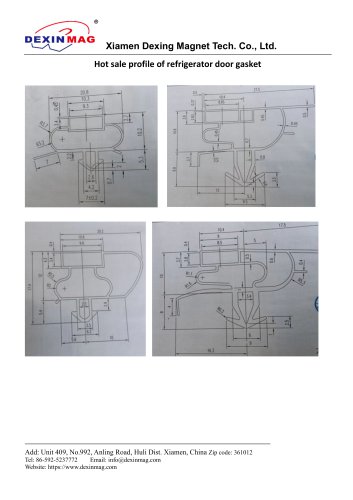 Common door gasket profile
6 Pages
 DXME-15C10 Operation manual
18 Pages
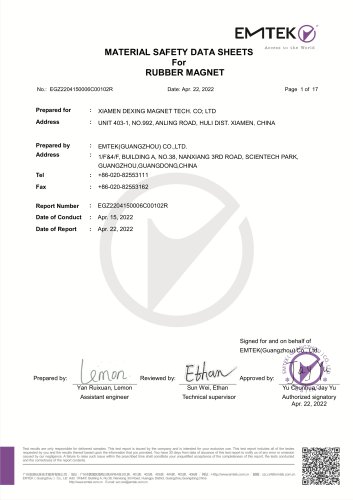 Rubber Magnet MSDS
18 Pages
 Impulse Magnetizer ROHS
18 Pages
 Dexinmag Product Categories
32 Pages
 DX-1205F Gaussmeter
16 Pages
 Three Dimensional Hall Probe
6 Pages
 Two-dimensional Hall Probe
7 Pages
 Axial Probe
8 Pages
 Transverse Probe
12 Pages
















- Cutting system
- Industrial press
- Kiln
- DC power supply
- AC/DC power supply
- Welding system
- Chamber kiln
- Forming press
- Hydraulic press
- Measuring device
- Automatic cut-off machine
- Heat treatment kiln
- Monitoring analyzer
- Knife cutting system
- Automatic welding machine
- Measuring machine
- Automatic analyser
- Microscope
- Making machine