- Catalogs
- Xiamen Dexing Magnet Tech. Co., Ltd.
- User Manual of DX6200 Series Power Supply


User Manual of DX6200 Series Power Supply
User Manual of DX6200 Series Power Supply
Xiamen Dexing Magnet Tech. Co., Ltd offers a universal DC power supply with adjustable voltage and current features. This document details the specifications, operation procedures, and settings for the power supply.
The front plate includes keys for setting voltage (V), current (I), overvoltage (OV), and overcurrent (OI) protection, along with menu, enter, local operation lock, power on/off, and navigation keys.
The back plate supports 1U and 3U models with output terminals and communication interfaces like RS485/RS232. The default interface is a DB9 female connector, configurable for RS-485, RS-232, and analog functions.
Voltage compensation addresses voltage drops in long or thin wires. Remote measurement terminals allow load-side voltage adjustments. Proper wiring is emphasized to prevent damage.
Ensure correct connections before powering on. The device enters preset mode upon startup, displaying preset values.
The rotary encoder allows numerical adjustments of voltage and current, supporting both coarse and fine adjustments.
Settings include buzzer control, reboot settings, communication port and baud rate settings, address settings for multiple machine communication, protocol settings, factory reset, and software version viewing.
The power supply uses MODBUS RTU format, supporting function codes for reading and writing registers. Protocol format and examples for interpreting readings are provided.
- Device addresses range from 1 to 247, with 0 as the broadcast address.
- Voltage and current settings use specific decimal places, e.g., 38V as 3800 and 25.6A as 256.
- Communication uses MODBUS RTU standard with CRC-16 for error checking.
- Reading Data: Use codes 0x03 or 0x04 to query output voltage and current.
- Writing Data: Use code 0x10 to set reference voltage and current.
- Starting Output: Commands are provided to start or stop the power supply output.
- Read-only registers: output voltage (1000) and current (1001).
- Writable registers: device address (2000), reference voltage (2001), and current (2002).
- Additional registers control overvoltage, overcurrent, baud rate, and operating mode.
- Output Control: [SOURce:]OUTPut[:STATe] to toggle power supply output.
- Current and Voltage Settings: [SOURce:]CURRent and [SOURce:]VOLTage to set values.
- Protection Levels: Commands to set overcurrent and voltage protection levels.
- Measurement: Commands to read current and voltage values, and check output conditions.
- Status registers indicate constant voltage or current mode and any faults.
- Protection features include overvoltage and overcurrent settings.
Includes CRC-16 calculation code in C language for reference.
Catalog excerpts
Xiamen Dexing Magnet Tech. Co., Ltd Unit 409, 4/F, No. 992, Anling Road, Huli District, Xiamen, China 361012 Website: www.dexinmag.com/www.ydxcd.com
Open the catalog to page 1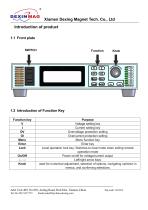
Xiamen Dexing Magnet Tech. Co., LtdIntroduction of product1.1 Front plate 1.2 Introduction of Function Key Function key Add: Unit 409, No.992, Anling Road, Huli Dist. Xiamen,China. Tel: 86-592-5237772 Email:[email protected]
Open the catalog to page 2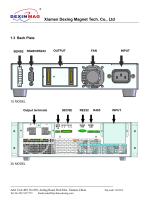
Xiamen Dexing Magnet Tech. Co., Ltd 1U MODEL Output terminals Add: Unit 409, No.992, Anling Road, Huli Dist. Xiamen,China. Tel: 86-592-5237772
Open the catalog to page 3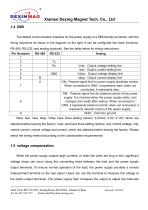
Xiamen Dexing Magnet Tech. Co., Ltd1.4 DB9 The default communication interface for the power supply is a DB9 female connector, with the wiring sequence as shown in the diagram on the right. It can be configured into three functions: RS-485, RS-232, and analog (optional). See the table below for wiring instructions: Note: Iset, Vset, Idisp, Vdisp have three setting options: 4-20mA, 0-5V, 0-10V, which are selected before leaving the factory; Vset, Iset have three setting options: only control voltage, only control current, control voltage and current, which are selected before leaving the factory....
Open the catalog to page 4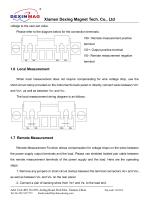
Xiamen Dexing Magnet Tech. Co., Ltd voltage to the user-set value. Please refer to the diagram below for the connection terminals: VS+: Remote measurement positive terminal VO+: Output positive terminal VS-: Remote measurement negative terminal VO-: Output negative terminal When local measurement does not require compensating for wire voltage drop, use the short-circuit clamp provided on the instrument's back panel or directly connect wires between Vo+ and Vs+, as well as between Vo- and Vs-. The local measurement wiring diagram is as follows: 1.7 Remote Measurement Remote Measurement Function...
Open the catalog to page 5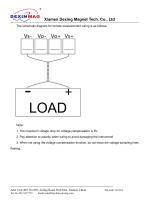
Xiamen Dexing Magnet Tech. Co., Ltd The schematic diagram for remote measurement wiring is as follows: 1. The maximum voltage drop for voltage compensation is 5V. 2. Pay attention to polarity when wiring to avoid damaging the instrument! 3. When not using the voltage compensation function, do not leave the voltage sampling lines floating. Add: Unit 409, No.992, Anling Road, Huli Dist. Xiamen,China. Tel: 86-592-5237772 Email:[email protected]
Open the catalog to page 6
Xiamen Dexing Magnet Tech. Co., Ltd Installation and Connection This product is a universal DC power supply. To facilitate user operation, the adjustment devices provided in this series of products include only voltage adjustment and current adjustment knobs, which can meet the majority of users' requirements for DC power supply. The operation of this product is convenient and simple. Please follow the operation procedure requirements below for specific use. 1. Carefully inspect whether the connections of the output control wires of this product are in accordance with the requirements, and ensure...
Open the catalog to page 7
Xiamen Dexing Magnet Tech. Co., Ltd 2.3 Rotary Encoder Operation Instructions 1. The rotary encoder is equipped with a push-button switch. The knob can be pressed as a button to perform related functions. 2. Current Adjustment Knob, Voltage Adjustment Knob: - In preset mode, rotate clockwise to increase the numerical value. It steps from the lowest digit to the highest digit, returning to the lowest digit after reaching the highest digit. The value ranges from 0 to 9 in a loop. If the voltage or current is adjusted to the maximum rated value and continues to rotate, the adjustment will not continue....
Open the catalog to page 8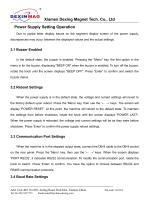
Xiamen Dexing Magnet Tech. Co., Ltd Power Supply Setting Operation Due to partial letter display issues on the segment display screen of the power supply, discrepancies may occur between the displayed values and the actual settings. 3.1 Buzzer Enabled In the default state, the buzzer is enabled. Pressing the "Menu" key, the first option in the menu is for the buzzer, displaying "BEEP ON" when the buzzer is enabled. To turn off the buzzer, rotate the knob until the screen displays "BEEP OFF". Press "Enter" to confirm and switch the buzzer status. 3.2 Reboot Settings When the power supply is in...
Open the catalog to page 9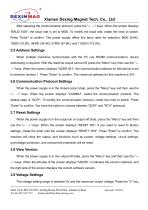
Xiamen Dexing Magnet Tech. Co., Ltd After selecting the communication protocol, press the "← →" keys. When the screen displays "BAUD 9.6K", the baud rate is set to 9600. To modify the baud rate, rotate the knob to switch. Press "Enter" to confirm. The power supply offers five baud rates for selection: 9600 (9.6K), 19200 (19.2K), 38400 (38.4K), 57600 (57.6K), and 115200 (115.2K). 3.5 Address Settings When multiple machines communicate with the PC (via RS485 communication), device addressing is required. With the machine output turned off, press the "Menu" key, then use the "← →" keys. When the...
Open the catalog to page 10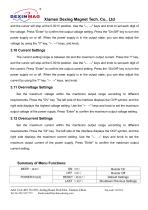
Xiamen Dexing Magnet Tech. Co., Ltd and the cursor will stop at the 0.001V position. Use the "<-->" keys and knob to set each digit of the voltage. Press "Enter" to confirm the output voltage setting. Press the "On/Off" key to turn the power supply on or off. When the power supply is in the output state, you can also adjust the voltage by using the "V" key, "<-->" keys, and knob. The current setting range is between 0A and the maximum output current. Press the "I" key, and the cursor will stop at the 0.001A position. Use the "<-->" keys and knob to set each digit of the current. Press "Enter"...
Open the catalog to page 11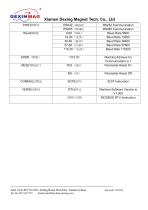
Xiamen Dexing Magnet Tech. Co., Ltd PORT(PGRT) Add: Unit 409, No.992, Anling Road, Huli Dist. Xiamen,China. Tel: 86-592-5237772 Email:[email protected]
Open the catalog to page 12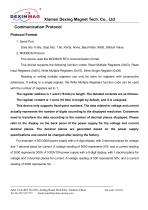
Xiamen Dexing Magnet Tech. Co., Ltd Communication Protocol Protocol Format 1. Serial Port Data bits: 8 bits, Stop bits: 1 bit, Parity: None, Baud Rate: 9600, Default Value. 2. MODBUS Protocol This device uses the MODBUS RTU communication format. This device supports the following function codes: Read Multiple Registers (0x03), Read Input Registers (0x04), Write Multiple Registers (0x10), Write Single Register (0x06). Reading or writing multiple registers can only be done for registers with consecutive addresses. If writing to a single register, the Write Multiple Registers function code can be...
Open the catalog to page 13All Xiamen Dexing Magnet Tech. Co., Ltd. catalogs and technical brochures
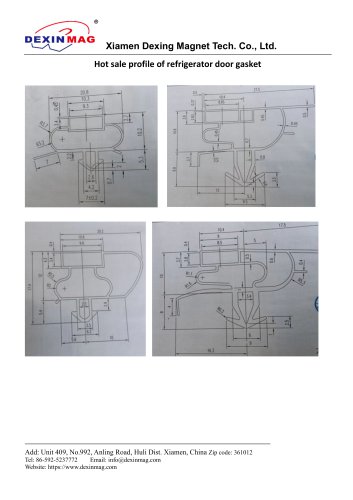 Common door gasket profile
6 Pages
 DXME-15C10 Operation manual
18 Pages
 Rubber Magnet MSDS
18 Pages
 Impulse Magnetizer ROHS
18 Pages
 Dexinmag Product Categories
32 Pages
 DX-1205F Gaussmeter
16 Pages
 Three Dimensional Hall Probe
6 Pages
 Two-dimensional Hall Probe
7 Pages
 Axial Probe
8 Pages
 Transverse Probe
12 Pages