
- Catalogs
- Wuhan Raycus Fiber Laser Technologies Co.,Ltd
- User Instruction RFL-P30MX


User Instruction RFL-P30MX
User Instruction RFL-P30MX
Ensure the Raycus P30MX Pulsed Fiber Laser is connected to a 24V DC power source. The laser emits invisible light (1060nm to 1085nm) and is classified as Class IV. Use appropriate safety eyewear and do not disassemble the device.
The Raycus P30MX features a MOPA structure with a semiconductor laser seed source, offering a wide range of pulse width and frequency options, high single pulse energy, and excellent beam quality. It is air-cooled and suitable for high-end industrial applications.
Operate with a 24VDC±1V power source, ensure proper grounding, and maintain at least 10 cm of airflow space around the device.
The laser operates in pulsed mode with a maximum pulse energy of 1 mJ and an average output power of 30W. Pulse duration ranges from 2 ns to 500 ns, with a repetition rate of 1 kHz to 2000 kHz. It is air-cooled and operates between 0 to 40°C.
Ensure stable mounting and good ventilation. Connect to a 24VDC power source with correct polarity. The delivery fiber's bending radius should not exceed 15 cm.
Features DB9 and DB25 interfaces. The DB25 interface connects the control system to the laser, with power output controlled via pins 1-8.
Conduct pre-inspection and follow procedures carefully. Maintain a pulse repetition rate above 1 kHz and avoid power interruptions.
Maintenance should be performed by Raycus. Warranty is void if the device is tampered with or improperly handled.
Frequency adjustment is required before laser output, with a switching time of no less than 5ms. External frequent mode is recommended at 4ms. Pulse build-up time is typically less than 50 microseconds.
Alarm signals are defined by pin configurations, indicating states like Laser Temperature Alarm and Power Error. Ensure Pin 17 is connected to a +5V power supply.
Pin2, Pin3, and Pin22 on the DB25 port control pulse duration. Commands are sent via Pin2, with a serial clock on Pin3, and enabled by Pin22.
Pre-inspection includes checking device condition and connections. Procedures involve starting the control system before the laser and setting frequency between 1 kHz and 2000 kHz.
Raycus provides a warranty against defects, with options for repair or replacement. Limitations exclude damages from misuse or improper maintenance.
Catalog excerpts

Wuhan Raycus Fiber Laser Technologies CO., Ltd. 2022
Open the catalog to page 1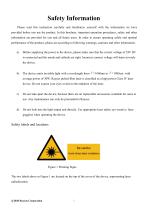
Safety Information Please read this instruction carefully and familiarize yourself with the information we have provided before you use the product. In this brochure, important operation procedures, safety and other information are provided for you and all future users. In order to ensure operating safely and optimal performance of the product, please act according to following warnings, cautions and other information. a) Before supplying the power to the device, please make sure that the correct voltage of 24V DC is connected and the anode and cathode are right. Incorrect connect voltage will...
Open the catalog to page 2
Wuhan Raycus Fiber Laser Technologies CO., Ltd. P30MX Pulsed Fiber Laser User’s Guide V2
Open the catalog to page 3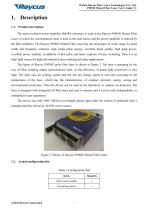
Wuhan Raycus Fiber Laser Technologies CO., Ltd. P30MX Pulsed Fiber Laser User’s Guide V2 \ Raycus1. Description1.1. Product description The main oscillator power amplifier (MOPA) structure is used in the Raycus P30MX Pulsed Fiber Laser, in which the semiconductor laser is used as the seed source and the power amplifier is realized by the fiber amplifier. The Raycus P30MX Pulsed Fiber Laser has the advantages of wider range for pulse width and frequency selection, high single pulse energy, excellent beam quality, high peak power, excellent power stability, availability of first pulse and faster...
Open the catalog to page 4
Wuhan Raycus Fiber Laser Technologies CO., Ltd. P30MX Pulsed Fiber Laser User’s Guide V2 1.3. Environmental requirements and cautions Pulsed laser should be driven by 24VDC±1V power source. a) Caution: Make sure the corresponding wires of the device are properly grounded. b) All the maintenance to the device should only be done by Raycus, because there is no replacement or accessory provided with the device. Please do not try to damage the labels or open the cover in order to prevent against electric shock, or the warranty will be invalid. c) The output head of the product is connected with an...
Open the catalog to page 5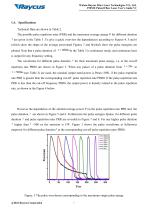
Wuhan Raycus Fiber Laser Technologies CO., Ltd. P30MX Pulsed Fiber Laser User’s Guide V2 1.4. Specifications Technical Data are shown in Table 2. The possible pulse repetition rates (PRR) and the maximum average energy P for different duration are given in the Table 3 .To give a quick overview the dependencies according to Figures 4, 5 and 6 (which show the shape of the average power)and Figures 7 and 8(which show the pulse energies) are plotted. Note that a pulse duration of 600ns in the Table 3 is continuous mode, and continuous laser is output for any frequency setting. The waveforms...
Open the catalog to page 6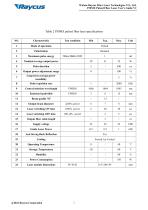
Wuhan Raycus Fiber Laser Technologies CO., Ltd. P30MX Pulsed Fiber Laser User’s Guide V2 Table 2 P30MX pulsed fiber laser specifications
Open the catalog to page 7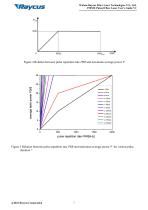
Wuhan Raycus Fiber Laser Technologies CO., Ltd. P30MX Pulsed Fiber Laser User’s Guide V2 Figure 4 Relation between pulse repetition rate PRR and maximum average power P Figure 5 Relation between pulse repetition rate PRR and maximum average power P for various pulse duration
Open the catalog to page 8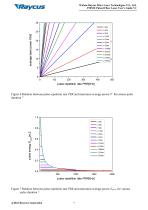
Wuhan Raycus Fiber Laser Technologies CO., Ltd. P30MX Pulsed Fiber Laser User’s Guide V2 Figure 6 Relation between pulse repetition rate PRR and maximum average power P forvarious pulse duration Figure 7 Relation between pulse repetition rate PRR and maximum average power Epulse for various pulse duration @2022 Raycus Corporation
Open the catalog to page 9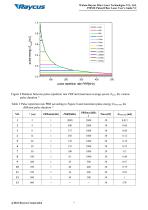
Wuhan Raycus Fiber Laser Technologies CO., Ltd. P30MX Pulsed Fiber Laser User’s Guide V2 Figure 8 Relation between pulse repetition rate PRR and maximum average power Epulse for various pulse duration Table 3 Pulse repetition rate PRR according to Figure 8 and maximum pulse energy EPules,max for different pulse duration NO.
Open the catalog to page 10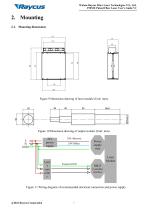
Wuhan Raycus Fiber Laser Technologies CO., Ltd. P30MX Pulsed Fiber Laser User’s Guide V2 2. Mounting 2.1. Mounting dimensions Figure 9 Dimension drawing of laser module (Unit: mm). Figure 10 Dimension drawing of output isolator (Unit: mm). Figure 11 Wiring diagram of recommended electrical connection and power supply
Open the catalog to page 11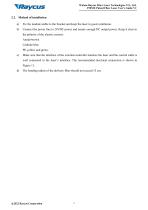
Wuhan Raycus Fiber Laser Technologies CO., Ltd. P30MX Pulsed Fiber Laser User’s Guide V2 a) Fix the module stable to the bracket and keep the laser in good ventilation. b) Connect the power line to 24VDC power and ensure enough DC output power. Keep it clear to the polarity of the electric current: Anode-brown Cathode-blue PE-yellow and green. c) Make sure that the interface of the external controller matches the laser and the control cable is well connected to the laser’s interface. The recommended electrical connection is shown in Figure 11. d) The bending radius of the delivery fiber should...
Open the catalog to page 12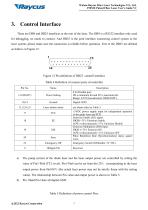
Wuhan Raycus Fiber Laser Technologies CO., Ltd. P30MX Pulsed Fiber Laser User’s Guide V2 There are DB9 and DB25 interfaces at the rear of the laser. The DB9 is a RS232 interface only used for debugging, no needs to connect. And DB25 is the joint interface connecting control system to the laser system, please make sure the connection is reliable before operation. Feet of the DB25 are defined as follows in Figure 12. Table 4 Definition of connect ports of controller a) The pump current of the diode laser and the laser output power are controlled by setting the value of Pin1-Pin8 (TTL level). Pin1-Pin8...
Open the catalog to page 13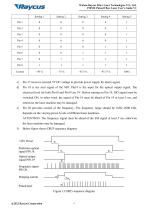
Wuhan Raycus Fiber Laser Technologies CO., Ltd. P30MX Pulsed Fiber Laser User’s Guide V2 c) Pin 17 receives external 5V DC voltage to provide power supply for alarm signal. d) Pin 18 is the start signal of the MO. Pin19 is the input for the optical output signal. The electrical level for both Pin18 and Pin19 are 5V. Before turning on Pin 19, MO signal must be switched ON, in other word, the signal of Pin 18 must be ahead of Pin 19 at least 5 ms, and otherwise the laser machine may be damaged. e) Pin 20 provides control of the frequency. The frequency range should be 1kHz~2000 kHz, depends on...
Open the catalog to page 14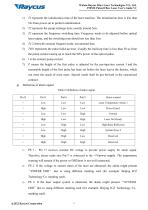
Wuhan Raycus Fiber Laser Technologies CO., Ltd. P30MX Pulsed Fiber Laser User’s Guide V2 1) T1 represent the initialization time of the laser machine. The initialization time is less than 10s from power-on to perform initialization. 2) T2 represent the pump recharge time, usually around 5ms. 3) T3 represent the frequency switching time. Frequency needs to be adjusted before optical laser output, and the switching time should not less than 5ms. 4) T4 2-8mswith external frequent mode, recommend 4ms. 5) TON represents the pulse build-up time. Usually the build-up time is less than 50 us from the...
Open the catalog to page 15All Wuhan Raycus Fiber Laser Technologies Co.,Ltd catalogs and technical brochures
Archived catalogs
 RESHAPE FIBER LASER
16 Pages
 CW Fiber Lasers
2 Pages
