
- Catalogs
- Wuhan Raycus Fiber Laser Technologies Co.,Ltd
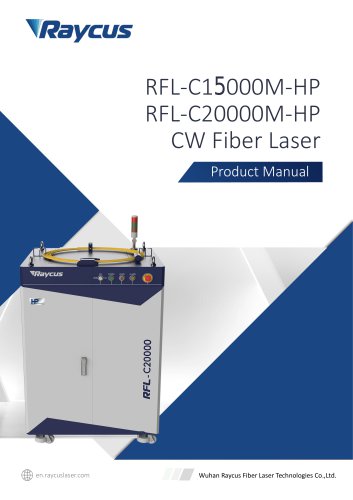
- RFL-C15000M-HP RFL-C20000M-HP CWFiber Laser


RFL-C15000M-HP RFL-C20000M-HP CWFiber Laser
RFL-C15000M-HP RFL-C20000M-HP CWFiber Laser
- Symbols: Warnings indicate potential personal hazards, while cautions refer to potential product hazards.
- Laser Classification: The laser is a Class 4 instrument, emitting invisible radiation at 1080 nm, with power exceeding 300 watts. Proper safety goggles are mandatory.
- Safety Labels: Labels indicate laser apertures, compliance, and electrical hazards.
- Optical Safety: Dust on optical cables can damage the laser.
- Electrical Safety: Ensure proper grounding and correct voltage to avoid damage and personal injury.
- Other Safety Rules: Avoid direct exposure to the laser beam and ensure all maintenance is performed by qualified personnel.
- Features: High beam quality, high power conversion efficiency, and multiple operation modes (CW, PULSE, Wave).
- Applications: Suitable for cutting, welding, and drilling in industrial settings.
- Package Contents: Verify contents against the packing list upon delivery.
- Unpacking and Inspection: Inspect for damage and retain packing materials for future shipping needs.
- Operation Environment: Requires a stable, vibration-free environment with adequate airflow and specific temperature and humidity conditions.
- Announcements: Ensure correct DC voltage and cleanliness of the laser output head to prevent damage.
- Specifications: Includes details on power, modulation frequency, pulse width, and cooling methods.
- Dimensions: Detailed dimensions provided for the laser and optical output head.
- Cooling Requirements: Active cooling with fans is necessary, and sufficient airflow must be maintained.
- Ensure ample space for air circulation at the front and rear panels of the laser.
- Regularly clean the dust-proof cover on the front panel.
- Verify power supply voltage (48±10% V DC) and secure earth connection.
- Connect power and control cables only when the power supply is off.
- Handle the optical output head carefully and ensure a clean environment during installation.
- Maintain a minimum bending radius of 20 cm for the optic fiber cable during transportation and 30 cm during operation.
- Connect the power supply to the DC INPUT socket on the rear panel using the provided power cord.
- Ensure the power supply circuit includes a DC circuit breaker with a capacity greater than 30A.
- The DB-25 interface connector integrates all control signals, including remote laser control and modulation.
- RS-232 and Ethernet interfaces are available for connecting the laser to a PC host.
- The laser operates in CW, PULSE, and Wave modes, with PULSE mode offering higher peak power.
- Sub-modes include Standalone, Modulation, and Gate, with power and emission control via RS-232, Ethernet, or analog signals.
- RS-232 configuration uses a three-wire interface with specific parameters (baud rate: 9,600).
- Ethernet interface supports UDP communication with a default IP address of 192.168.0.10.
- Commands are ASCII character strings, with responses echoing the command back.
Catalog excerpts
Raycus Fiber Laser User Guide RFL-QCW300/3000 Wuhan Raycus Fiber Laser Technologies Co., Ltd
Open the catalog to page 1
Wuhan Raycus Fiber Laser Technologies Co., Ltd User Guide RFL-QCW300/3000
Open the catalog to page 2
Wuhan Raycus Fiber Laser Technologies Co., Ltd User Guide RFL-QCW300/3000
Open the catalog to page 3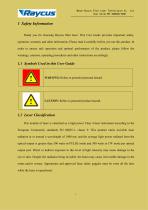
Wuhan Raycus Fiber Laser Technologies Co., Ltd User Guide RFL-QCW300/3000 1 Safety Information Thank you for choosing Raycus fiber laser. This User Guide provides important safety, operation, warranty and other information. Please read it carefully before you use this product. In order to ensure safe operation and optimal performance of the product, please follow the warnings, cautions, operating procedures and other instructions accordingly. 1.1 Symbols Used in this User Guide WARNING: Refers to potential personal hazard. CAUTION: Refers to potential product hazard. 1.2 Laser Classification...
Open the catalog to page 4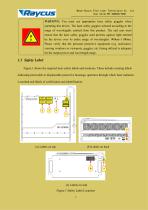
Wuhan Raycus Fiber Laser Technologies Co., Ltd User Guide RFL-QCW300/3000 WARNING: You must use appropriate laser safety goggles when operating this device. The laser safety goggles selected according to the range of wavelengths emitted from this product. The end user must ensure that the laser safety goggles used protects against light emitted by the device over its entire range of wavelengths: 900nm~1100nm. Please verify that the personal protective equipment (e.g. enclosures, viewing windows or viewports, goggles, etc.) being utilized is adequate for the output power and wavelength range....
Open the catalog to page 5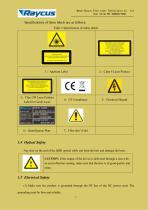
Wuhan Raycus Fiber Laser Technologies Co., Ltd User Guide RFL-QCW300/3000 Specifications of these labels are as follows: Table 1 Specification of safety labels Class 4 Laser Product 3: Class 2M Laser Product Label for Guide Laser MANUFACTURER: Wuhan Raycus Fiber Laser Technologies Co . Ltd. No.999GaoxinAve. East Lake Hi-Tech Devel. Zone, Wuhan. Hubei. P. R. China PC:430073 SERIAL NUMBER: POWER SUPPLY: 7: Fiber don’t Fold 1.4 Optical Safety Any dust on the end of the QBH optical cable can burn the lens and damage the laser. CAUTION: If the output of the device is delivered through a lens with...
Open the catalog to page 6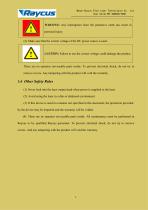
Wuhan Raycus Fiber Laser Technologies Co., Ltd User Guide RFL-QCW300/3000 WARNING: Any interruption from the protective earth can result in personal injury. (2) Make sure that the correct voltage of the DC power source is used. CAUTION: Failure to use the correct voltage could damage the product. There are no operator serviceable parts inside. To prevent electrical shock, do not try to remove covers. Any tampering with the product will void the warranty. 1.6 Other Safety Rules (1) Never look into the laser output head when power is supplied to the laser. (2) Avoid using the laser in a dim or...
Open the catalog to page 7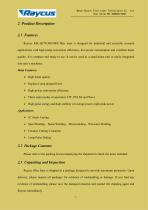
Wuhan Raycus Fiber Laser Technologies Co., Ltd User Guide RFL-QCW300/3000 Raycus RFL-QCW300/3000 fiber laser is designed for industrial and scientific research applications with high pump conversion efficiency, low power consumption and excellent beam quality. It is compact and ready to use. It can be used as a stand-alone unit or easily integrated into user’s machines. Main Features: > High beam quality > Replace Lamp pumped laser > High power conversion efficiency > Three main modes of operation: CW, PULSE and Wave > High pulse energy and high stability of average power, high peak power Applications:...
Open the catalog to page 8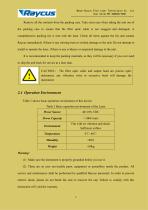
Wuhan Raycus Fiber Laser Technologies Co., Ltd User Guide RFL-QCW300/3000 Remove all the contents from the packing case. Take extra care when taking the unit out of the packing case to ensure that the fiber optic cable is not snagged and damaged. A comprehensive packing list is sent with the laser. Check all items against the list and contact Raycus immediately if there is any missing item or evident damage to the unit. Do not attempt to install or operate the laser, if there is any evidence or suspected damage to the unit. It is recommended to keep the packing materials, as they will be necessary...
Open the catalog to page 9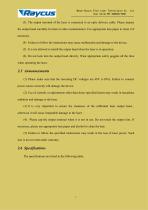
Wuhan Raycus Fiber Laser Technologies Co., Ltd User Guide RFL-QCW300/3000 (3) The output terminal of the laser is connected to an optic delivery cable. Please inspect the output head carefully for dust or other contamination. Use appropriate lens paper to clean it if necessary. (4) Failure to follow the instructions may cause malfunction and damage to the device. (5) It is not allowed to install the output head when the laser is in operation. (6) Do not look into the output head directly. Wear appropriate safety goggles all the time when operating the laser. (1) Please make sure that the incoming...
Open the catalog to page 10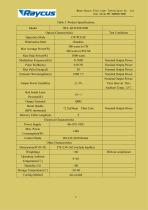
Wuhan Raycus Fiber Laser Technologies Co., Ltd User Guide RFL-QCW300/3000 Table 3: Product Specifications
Open the catalog to page 11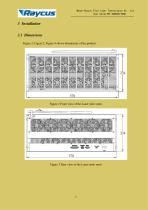
Wuhan Raycus Fiber Laser Technologies Co., Ltd User Guide RFL-QCW300/3000 3 Installation 3.1 Dimensions Figure 2, Figure 3, Figure 4 shows dimensions of the product. Figure 2 Front view of the Laser (unit: mm) Figure 3 Rear view of the Laser (unit: mm)
Open the catalog to page 12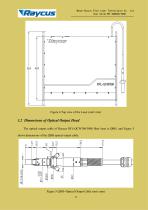
Wuhan Raycus Fiber Laser Technologies Co., Ltd User Guide RFL-QCW300/3000 Figure 4 Top view of the Laser (unit: mm) 3.2 Dimensions of Optical Output Head The optical output cable of Raycus RFL-QCW300/3000 fiber laser is QBH, and Figure 5 shows dimensions of the QBH optical output cable. Figure 5 QBH--Optical Output Cable (unit: mm) 10
Open the catalog to page 13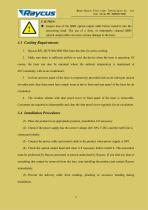
Wuhan Raycus Fiber Laser Technologies Co., Ltd User Guide RFL-QCW300/3000 ♦ Inspect lens of the QBH optical output cable before install it into the processing head. The use of a dirty, or improperly cleaned QBH optical output cable can cause serious damage to the laser. 1. Raycus RFL-QCW300/3000 fiber laser has fans for active cooling. 2. Make sure there is sufficient airflow to cool the device when the laser is operating. Of course, the laser can also be operated where the ambient temperature is maintained at 40 C constantly with an air-conditioner. 3. In front and rear panel of the laser is...
Open the catalog to page 14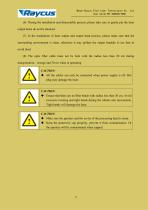
Wuhan Raycus Fiber Laser Technologies Co., Ltd User Guide RFL-QCW300/3000 (6) During the installation and disassembly process, please take care to gently put the laser output head, do not be shocked. (7) In the installation of laser output and output head process, please make sure that the surrounding environment is clean, otherwise it may pollute the output head(do to use fans to avoid dust) (8) The optic fiber cable must not be bent with the radius less than 20 cm during transportation, storage and 30 cm when in operating. ♦ All the cables can only be connected when power supply is off. Hot...
Open the catalog to page 15All Wuhan Raycus Fiber Laser Technologies Co.,Ltd catalogs and technical brochures
 User Instruction RFL-P30MX
20 Pages
Archived catalogs
 RESHAPE FIBER LASER
16 Pages
 CW Fiber Lasers
2 Pages

- Pulsed laser
- Cooled laser
- Visible laser
- Precision laser
- Industrial laser
- Air-cooled laser
- Continuous wave laser
- Continuous laser
- Marking laser
- Laser for medical applications
- High-power laser
- Q-switched laser
- Single-mode laser
- Laboratory laser
- Infrared laser
- Adjustable laser
- Engraving laser
- Cutting laser
- Direct diode laser