
- Catalogs
- Wuhan Raycus Fiber Laser Technologies Co.,Ltd
- RFL-C15000M-HP RFL-C20000M-HP CWFiber Laser


RFL-C15000M-HP RFL-C20000M-HP CWFiber Laser
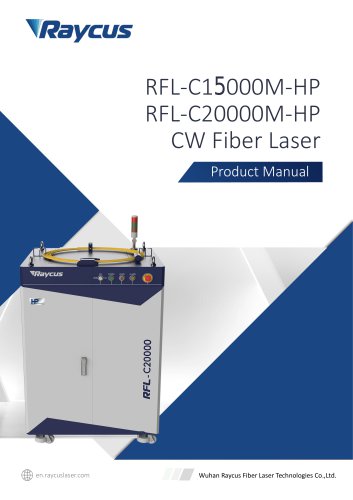
RFL-C15000M-HP RFL-C20000M-HP CWFiber Laser
- Security Label: Contains safety warnings and product certifications. Emphasizes the importance of safety sign locations.
- Laser Safety Grade: Classified as Class 4 laser instruments per EN 60825-1 and GB 7247.1-2012 standards, emitting at 1080 nm with power levels of 15kW and 20kW. Direct exposure can cause damage; laser safety glasses are required.
- Optical Safety: Dust on the collimator can damage the laser. Protective caps should be removed before emission.
- Electrical Safety: Proper grounding is crucial. Incorrect wiring can cause damage.
- Other Safety Rules: Avoid direct viewing of the laser output and do not operate in dim environments.
- Features: High power output, stable performance, and efficient operation.
- Package Parts: Includes all necessary components for installation and operation.
- Operation Environment: Specific conditions required for optimal performance.
- Dimensions: Detailed measurements provided for proper setup.
- Installation Rule: Guidelines for secure and effective installation.
- Cooling Requirements: Adequate cooling is necessary to maintain performance.
- Control Interfaces: Various interfaces including RS232, Ethernet, and analog for control and communication.
- Safety Interlock: Mechanism to ensure safe operation.
- Start Operation Sequence: Step-by-step guide to initiate the laser.
- Multiple modes available for different operational needs, including ON Mode, AD Enable Mode, and Programming Mode.
- Detailed instructions for wiring and operation in various control modes.
- Configuration and protocol details for network and serial communication.
- Software interface and control features for managing laser operations, including multi-laser control, status display, and diagnostic tools.
- Details on warranty coverage, limitations, and repair services.
- Cooling water direction is unidirectional, and connections must follow the marked inlet and outlet directions.
- Water quality should be deionized, distilled, or purified, with monthly replacement recommended.
- PH value should be between 5.5 and 9.
- A filter element with a particle size less than 100um is required, to be cleaned monthly.
- Water temperature should not exceed 35℃ and should be at least 5℃ above the dew point.
- Armored pipe bending radius should be no less than 20cm when not in use and 30cm when in use.
- Vibration should be less than 2G and impact less than 10G.
- Check for water leakage when starting the cooling system for the first time.
- Drain cooling water if the laser is unused for extended periods to prevent damage.
- Use compressed gas below 0.5MPa for draining water.
- Set water temperature according to ambient conditions to avoid laser malfunction or damage.
- The front panel includes controls such as REM/OFF/ON switch, POWER, START, ALARM, STOP, and INDICATOR LIGHT.
- Each control has specific functions related to powering on, indicating status, and emergency stopping.
- Includes INTERFACE, BREAKER, AC INPUT, WATER IN, FILTER, and WATER OUT connections.
- Each connection has specific roles in power supply and water cooling system integration.
- Ensure AC power supply meets specified requirements before connection.
- Incorrect wiring can damage the laser; verify connections before powering on.
- XP2 Safety Interface: Provides remote control and power-on functions with detailed pin definitions.
- XP1 Hardwiring Interface: 64-pin interface for remote mode control signals with specific pin definitions.
- RS232 Serial Interface: 9-pin interface for communication with PC software.
- XP4 Analog Interface: Controls laser output power in AD mode with specific pin definitions.
- XP5 Ethernet Interface: Provides data transmission and acceptance functions.
- Emission Control: Commands like 'EMOFF' and 'EMON' are used to stop and start emissions, respectively.
- Main Power Control: 'MPWROFF' and 'MPWRON' commands manage the main power state.
- Pulse Settings: 'SPW' and 'SPRR' commands set pulse width and repetition rate, with error messages for invalid inputs.
- Diode Current: 'SDC' sets diode current, with constraints on input values.
- Reading Parameters: Commands like 'RCS', 'RPRR', 'RBT', 'RPW', and 'RCT' read various system parameters.
- Error Management: 'PERR' resets errors.
- Main Interface: Displays laser status, power settings, and operational modes.
- Multi-laser Control: Allows adding, deleting, and modifying laser connections via IP address.
- Status Displays: Shows real-time laser output, temperature, and operational readiness.
- Programming Mode: Enables testing and editing of laser programming modes.
- Parameter Settings: Allows setting power rise and fall times, and output parameters.
- Alarm Display: Shows current laser alarms and their causes.
- Log Management: Interfaces for querying and downloading operational logs and fault records.
- Module Parameters: Provides diagnostic data for analyzing laser anomalies.
- Authorization Modes: User and authorization modes for locking/unlocking the laser with codes.
- Interface Status: Displays input/output status of the XP1 interface.
- Language Selection: Options for English and Chinese interfaces.
- About Section: Provides information on laser specifications and system details.
- Stop: Ends the program.
- SPT: Changes power over a specified time.
- SPR: Changes power based on a power change ratio.
- WAIT: Waits for various sync signals.
- GOTO: Jumps to different lines based on sync signals.
- OUT: Outputs sync signal levels.
- EXT: Manages external power.
- General Warranty: Raycus guarantees products against material and technical issues under normal use. They may repair or replace defective products during the warranty period.
- Limitations of Warranty: The warranty excludes issues from tampering, misuse, accidents, or improper maintenance. Accessories and fiber connectors are not covered. Customers must report defects within 31 days of discovery.
- Service and Repair: Only qualified Raycus personnel should perform maintenance. Customers should contact Raycus for warranty-related issues.
- Scrap Requirements: Equipment can be scrapped if it is beyond repair or modification. Raycus reserves the right to change product designs without obligation to update previous units.
Catalog excerpts
RFL-C15000M-HP RFL-C20000M-HP CW Fiber Laser Product Manual Wuhan Raycus Fiber Laser Technologies Co.,Ltd.
Open the catalog to page 1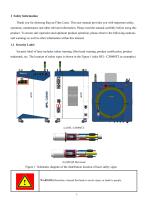
1 Safety Information Thank you for choosing Raycus Fiber Laser. This user manual provides you with important safety, operation, maintenance and other relevant information. Please read the manual carefully before using this product. To ensure safe operation and optimum product operation, please observe the following cautions and warnings as well as other information within this manual. 1.1 Security Label Security label of laser includes safety warning, fiber head warning, product certification, product trademark, etc. The location of safety signs is shown in the Figure 1 (take RFL- C20000TZ as...
Open the catalog to page 6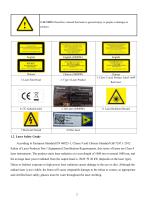
CAUTION: Describes a hazard that leads to general injury to people or damages to product. 2: Type 4 Laser Product Chinese 3: Class 2 Laser Product Label-1mW 6: Laser Radiation Hazard 1.2 Laser Safety Grade According to European Standard EN 60825-1, Clause 9 and Chinese Standard GB 7247.1-2012 Safety of Laser Products Part 1:Equipment Classification Requirements, this series of lasers are Class 4 laser instruments. The product emits laser radiation at a wavelength of 1080 nm or around 1080 nm, and the average laser power radiated from the output head is 15kW 和 20 kW (depends on the laser type)....
Open the catalog to page 7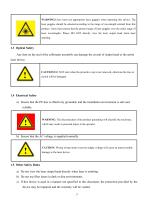
a) Ensure that the PE line is effectively grounded, and the installation environment is safe and reliable. WARNING: The disconnection of the product grounding will electrify the enclosure, which may result in personal injury to the operator. a) Do not view the laser output head directly when laser is emitting. b) Do not use fiber lasers in dark or dim environments. c) If this device is used in a manner not specified in this document, the protection provided by the device may be impaired and the warranty will be voided.
Open the catalog to page 8
d) There are no user serviceable parts, equipment or assemblies inside the product. All service and maintenance shall be performed conducted by a certified Raycus engineer. In order to prevent electric shock, please do not break the seal or uncover the shield. Failure to comply with this instruction will be treated as invalid warranty. 2 Product Description 2.1 Features Fiber lasers are more compact and ready to use than conventional laser structures, with higher electrical and optical conversion efficiency, lower power consumption and better beam quality. Thanks to its flexible laser output,...
Open the catalog to page 9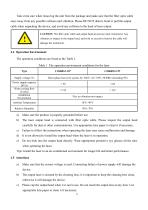
Take extra care when removing the unit from the package and make sure that the fiber optic cable stays away from any possible collision and vibration. Please DO NOT distort, bend or pull the output cable when unpacking the device; and avoid any collision to the head of laser output. CAUTION: The fiber optic cable and output head are precise optic instrument, Any vibration or impact to the output head, and twist or excessive bend to the cable will damage the instrument. The operation conditions are listed as the Table 1. a) Make sure the product is properly grounded before use. b) The laser output...
Open the catalog to page 10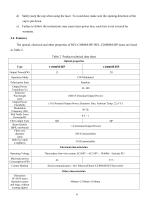
d) Safety keep the cap when using the laser. To avoid dust, make sure the opening direction of the cap is put down. e) Failure to follow the instructions may cause laser power loss, such loss is not covered by warranty. The optical, electrical and other properties of RFL-C4000M-HP/RFL-C20000M-HP lasers are listed in Table 2. Table 2 Product technical data sheet
Open the catalog to page 11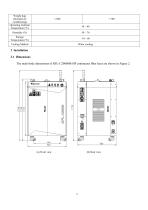
Weight (kg) (Includes air conditioning) Operating Ambient Temperature (°C) Cooling Method Water cooling 3 Installation 3.1 Dimensions The main body dimensions of RFL-C20000M-HP continuous fiber laser are shown in Figure 2.
Open the catalog to page 12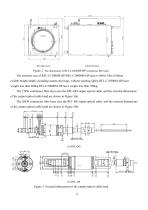
Figure 2 The dimensions of RFL-C20000M-HP continuous fiber laser The structure size of RFL-C15000M-HP/RFL-C20000M-HP laser is 960x1530x1160mm (width×height×depth; including casters and rings, without warning light); RFL-C15000M-HP laser weighs less than 600kg.RFL-C20000M-HP laser weighs less than 700kg. The 15kW continuous fiber laser uses the RFL-QD output optical cable, and the external dimensions of the output optical cable head are shown in Figure 3(a). The 20kW continuous fiber laser uses the RFL-QP output optical cable, and the external dimensions of the output optical cable head are shown...
Open the catalog to page 13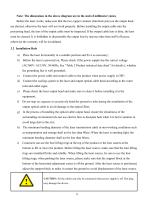
Note: The dimensions in the above diagram are in the unit of millimeter (mm). Before the laser works, make sure that the two copper contacts (Interlock pins) on the output head are shorted, otherwise the laser will not work properly. Before installing the output cable into the processing head, the lens of the output cable must be inspected. If the output cable lens is dirty, the lens must be cleaned. It is forbidden to disassemble the output lens by anyone other than staff in Raycus, otherwise the warranty will be invalidated. 3.2 Installation Rule a) Place the laser horizontally in a suitable...
Open the catalog to page 14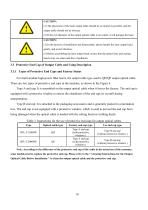
Note: According to the difference of the protective end cap of the cable in the actual use of the customer, some models need to replace the protective end cap. Please refer to the ” Cleaning Instructions for the Output Optical Cable Before Installation ” to clean the output optical cable and the protective end cap.
Open the catalog to page 15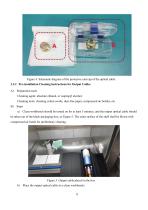
Figure 4 Schematic diagram of the protective end cap of the optical cable 3.3.2 Pre-installation Cleaning Instructions for Output Cables A) Preparation tools Cleaning agent: absolute ethanol, or isopropyl alcohol. Cleaning tools: cleaning cotton swabs, dust-free paper, compressed air bottles, etc. B) Steps a) Clean workbench should be turned on for at least 5 minutes, and the output optical cable should be taken out of the black packaging box, as Figure 5. The outer surface of the shell shall be blown with compressed air bottle for preliminary cleaning. Figure 5 Output cable placed in the box...
Open the catalog to page 16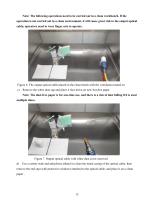
Note: The following operations need to be carried out in a clean workbench. If the operation is not carried out in a clean environment, it will cause great risk to the output optical cable; operators need to wear finger cots to operate. Figure 6 The output optical cable placed in the clean bench with the ventilation turned on c) Remove the white dust cap and place it face down on new lint-free paper. Note: The dust-free paper is for one-time use, and there is a risk of dust falling if it is used multiple times. Figure 7 Output optical cable with white dust cover removed d) Use a cotton swab and...
Open the catalog to page 17All Wuhan Raycus Fiber Laser Technologies Co.,Ltd catalogs and technical brochures
 User Instruction RFL-P30MX
20 Pages
Archived catalogs
 RESHAPE FIBER LASER
16 Pages
 CW Fiber Lasers
2 Pages

- Pulsed laser
- Cooled laser
- Visible laser
- Precision laser
- Industrial laser
- Air-cooled laser
- Continuous wave laser
- Continuous laser
- Marking laser
- Laser for medical applications
- High-power laser
- Q-switched laser
- Single-mode laser
- Infrared laser
- Laboratory laser
- Adjustable laser
- Engraving laser
- Cutting laser
- Direct diode laser