
- Catalogs
- Wuhan Raycus Fiber Laser Technologies Co.,Ltd
- Global Version Continuous-Wave Fiber Laser User Guide RFL-C8000S-CE


Global Version Continuous-Wave Fiber Laser User Guide RFL-C8000S-CE
Global Version Continuous-Wave Fiber Laser User Guide RFL-C8000S-CE
- Symbols: Warnings indicate potential hazards leading to injury or death; Cautions indicate potential hazards leading to injury or product damage.
- Laser Classification: The laser is a Class 4 instrument, emitting invisible radiation at 1080 nm with power over 8000W. Proper safety eyewear is mandatory.
- Safety Labels: Various labels indicate warnings, apertures, and compliance certifications.
- Optical Safety: Dust on the collimator can damage the laser; ensure lenses are clean.
- Electrical Safety: Ensure proper grounding and correct voltage to avoid damage and injury.
- Other Safety Rules: Do not look into the laser output, avoid dim environments, and ensure maintenance is performed by qualified personnel.
- Features: High efficiency, low power consumption, excellent beam quality, and maintenance-free operation. Suitable for cutting, welding, and scientific research.
- Package Contents: Check the packing list for included items and inspect for damage upon delivery.
- Operation Environment: Requires a stable, vibration-free surface, with specific temperature and humidity conditions.
- Precautions for Use: Ensure correct power supply, maintain cleanliness of the output head, and follow instructions to avoid damage not covered by warranty.
- Specifications: Includes details on operation mode, output power, wavelength, modulation frequency, and fiber technical index.
- Dimensions and Installation: Follow guidelines for output head installation and cooling requirements.
- Installation Procedure: Detailed steps for setting up the laser system.
- Panel Descriptions: Overview of front and rear panel features.
- Power Connection and Interface Definitions: Instructions for connecting power and understanding interface functions.
- Control Modes and Programming: Details on clientware functions, control modes, and waveform editing.
- Laser Timing and Modulation: Requirements for modulation signals and timing diagrams.
- Alarms Display: Explanation of alarm indicators and solutions for troubleshooting.
- General Warranty: Coverage details and limitations.
- Service and Repair: Guidelines for obtaining service and repair from Raycus.
1. Power Supply: 380±15% VAC, 50/60Hz
2. Control Interfaces: AD/RS-232/Ethernet
3. Power Consumption: Nominal Output Power 20 W
4. Water Flow Requirement: 72 L/min
5. Water Temperature Requirement: 21-23 ℃
6. Dimensions: 560×990×1100 mm
7. Weight: 220-250 g
8. Operating Ambient Temperature: 10~40 ℃
9. Operating Ambient Humidity: 30~70%
10. Storage Temperature: -10~60 ℃
1. Dimensions and installation details are provided with figures for reference.
2. The laser output head uses a standard QBH interface.
3. Cooling requirements include a cooling capability of >20000 W, minimum flow of 72 L/min, and maximum pressure of 7 Bar.
4. Water temperature for the cooling system should be set at 22±1℃.
5. Use purified water and add alcohol to prevent mold growth.
6. Ensure proper connection of water inlet filter module to prevent blockages.
1. Place the product in a stable position.
2. Ensure correct voltage and secure earth line connection.
3. Connect power and control cables with power supply OFF.
4. Insert water pipes into inlet and outlet.
5. Clean output head if necessary, handled by authorized personnel.
6. Avoid excessive bending of delivery cable.
7. Maintain a clean environment during installation.
1. Use de-ionized, condensed, or pure water with a pH value of 5.5-9.
2. Ensure liquid flow rate of 1.7-2.0 L/min and pressure < 0.6 MPa.
3. Maximum liquid temperature: 45℃; Minimum: greater than saturated dew-point 5℃.
4. Regular cleaning of the Y-type filter is recommended.
1. Ensure AC supply is in accordance with specifications.
2. Use the provided power cord with correct phase line and protective earth connections.
1. CTRL-INTERFACE (DB-25) for laser control with specific pin definitions.
2. TCP/IP Interface supports UDP communication with default IP address 192.168.0.10.
1. Use the latest PC software and relevant manual.
2. Front panel includes key switch, power indicator, laser emission indicator, alarm indicator, and emergency stop.
3. Rear panel includes AC input, power switch, control interface, water connectors, Ethernet, and drainage interface.
1. Ensure the air switch is OFF and the emergency stop button is pressed.
2. Verify the 24-pin connections are closed.
3. Turn on the chiller and check for leaks. If none, turn off the chiller and wait for the laser to start.
4. Activate the air switch and release the emergency stop.
5. Allow the chiller to operate.
6. Turn on the key switch and start the laser.
The RFL-C8000S-CE clientware communicates with the main control board via UDP. It allows reading and setting laser parameters and control functions through a user interface divided into categories like control, alarm, language selection, and more.
This interface includes main power control, abnormal laser reset, guide laser control, parameter settings for rise and fall times, program number management, and laser parameter control (power, frequency, pulse width, duty cycle). It also manages light emission modes and displays status information such as emergency stop and laser enable.
Displays real-time alarm information for the laser system.
Shows laser time, model, serial numbers, and system information.
Allows setting the software language without restarting, saving the choice for future sessions.
Manages the laser's limited time lock for integrators and end customers, using Raycus' authorization code.
Includes monitor, control, diagnostic, and debug modes, each offering different levels of information and control, with some requiring passwords.
These modules display status, alarms, and system parameters, refreshing automatically to reduce resource usage.
Contain status information for up to 4 ACDC and 12 DCDC modules, respectively, with automatic data refresh.
Two modes: ON and REM. ON mode allows setting power percentage and light control. REM mode includes AD mode, external control, and modulation modes.
Guide laser can be controlled externally in both ON and REM modes.
- Enable Method: The Programming Mode allows waveform editing, storing, and calling in external modulation mode in both ON and REM modes. Internal modulation mode is not selectable in REM mode.
- Setup Interface: Accessed via 'Show programming mode' in the client software, allowing users to enter the program setting interface.
- Waveform Management: Users can refresh the list to view saved waveforms, check specific waveforms, clear waveforms, and edit waveforms by selecting commands and writing them to the laser.
- Command Definitions: Includes commands like STOP, SPT, SPR, WAIT, GOTO, and EXTPower, each with specific parameters and functions.
- Timing Diagrams: Control sequence diagrams are provided for ON mode and external modulation mode under REM.
- Modulation Signal Requirements: The laser supports a modulation frequency range of 1-5000Hz with a minimum pulse width of 160us. Reference values for frequency and duty cycle settings are provided.
- Steps include turning off emission, switching off the key, turning off the chiller, and disconnecting the air switch.
- Alarm Display: Alarms are displayed on the client software, with specific indicators for different alarm types.
- Alarm Solutions: Detailed instructions and solutions are provided for alarms such as temperature, condensation, water flow, scattered light, power, ACDC, and current driver alarms.
- General Warranty: Covers defects in materials and workmanship under normal use, with specific exclusions and limitations.
- Limitations: Warranty does not cover issues from misuse, tampering, or improper maintenance.
- Service and Repair: All service should be performed by qualified Raycus personnel, and products should be returned in suitable containers.
Catalog excerpts
Global Version Continuous-Wave Fiber Laser User Guide RFL-C8000S-CE
Open the catalog to page 1
Wuhan Raycus Fiber Laser Technologies Co., Ltd
Open the catalog to page 2
Wuhan Raycus Fiber Laser Technologies Co., Ltd.
Open the catalog to page 3
Wuhan Raycus Fiber Laser Technologies Co., Ltd. Thank you for choosing Raycus fiber laser. This User Guide provides important safety, operation, warranty and other information. Please read it carefully before you use this product. In order to ensure safe operation and optimal performance of the product, please follow the warnings, cautions, operating procedures and other instructions accordingly. This series of lasers are classified as a high power Class 4 laser instrument according to the European Community standards EN 60825- 1, clause 9. This product emits invisible laser radiation at or around...
Open the catalog to page 4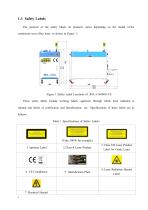
1.3 Safety Labels The position of the safety labels on products varies depending on the model of the continuous-wave fiber laser, as shown in Figure 1: Figure 1 Safety Label Locations of RFL-C8000S-CE These safety labels include warning labels, apertures through which laser radiation is emitted and labels of certification and identification, etc. Specifications of these labels are as follows: Table 1 Specifications of Safety Labels (Take 500W for example) 1.Aperture Label 3.Class 2M Laser Product Label for Guide Laser 6. Laser Radiation Hazard Label
Open the catalog to page 5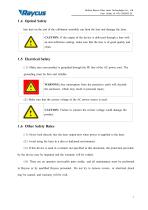
Wuhan Raycus Fiber Laser Technologies Co., Ltd. Any dust on the end of the collimator assembly can bum the lens and damage the laser. (1) Never look directly into the laser output port when power is supplied to the laser. (2) Avoid using the laser in a dim or darkened environment. (3) If this device is used in a manner not specified in this document, the protection provided by the device may be impaired and the warranty will be voided. (4) There are no operator serviceable parts inside, and all maintenance must be performed in Raycus or by qualified Raycus personnel. Do not try to remove covers,...
Open the catalog to page 6
2 Product Description 2.1 Features Compared with traditional lasers, Raycus CW fiber laser electric- optical conversion, lower power consumption and excellent beam quality. The fiber laser is compact and ready to use. It can be used as a stand- alone unit or easily inserted into user’ s apparatus. Main Features: Excellent beam quality High quality fiber output High Power Stability Continuously tunable output power, quick switching response Slow rise and slow fall, Waveform editing Maintenance free operation High wall plug efficiency Applications: Cutting, Welding Scientific research 2.2 Package...
Open the catalog to page 7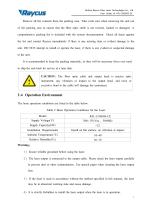
Wuhan Raycus Fiber Laser Technologies Co., Ltd. Remove all the contents from the packing case. Take extra care when removing the unit out of the packing case to ensure that the fiber optic cable is not twisted, hauled or damaged. A comprehensive packing list is included with the system documentation. Check all items against the list and contact Raycus immediately if there is any missing item or evident damage to the unit. DO NOT attempt to install or operate the laser, if there is any evident or suspected damage to the unit. It is recommended to keep the packing materials, as they will be necessary...
Open the catalog to page 8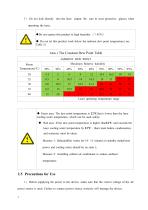
5) Do not look directly into the laser output. Be sure to wear protective glasses when A ♦Do not expose this product to high humidity (> 95%) ♦ Do not let this product work below the ambient dew point temperature.(see Table 3) Table 3 The Constant Dew Point Table ♦ Green area: The dew point temperature is 22°Cthat is lower than the laser cooling water temperature, which can be used safely; ♦ Red area: If the dew point temperature is higher than22°C and exceeds the laser cooling water temperature by 22°C , there must bedew condensation, and measures must be taken. Measure 1: Dehumidifier works...
Open the catalog to page 9
Wuhan Raycus Fiber Laser Technologies Co., Ltd. 2) Failure to follow the instructions may cause malfunction and damage to the device, such damage is not covered by warranty. 3) It is very important to ensure the cleanness of the calibrated laser output head, otherwise it will cause irreparable damage to the laser. 4) Please inspect the output head carefully for dust or other contaminations. Use appropriate lens paper to clean it if necessary. Do not touch the output lens at any time; as well as remember to cap the output head when it is not in use, and make sure the cap is clean; 5 ) Failure...
Open the catalog to page 10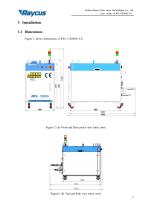
Wuhan Raycus Fiber Laser Technologies Co., Ltd. User Guide of RFL-C8000S-CE 3 Installation 3.1 Dimensions Figure 2 shows dimensions of RFL-C8000S-CE. Figure 2 (a) Front and Rear panel view (unit: mm) Figure2 (b) Top and Side view (unit: mm) 11
Open the catalog to page 12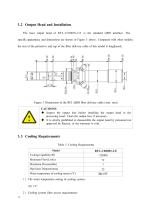
The laser output head of RFL-C8000S-CE is the standard QBH interface. The specific appearance and dimensions are shown in Figure 3 above. Compared with other models, the size of the protective end cap of the fiber delivery cable of this model is lengthened. ♦ Inspect the output lens before installing the output head to the processing head. Clean the output lens if necessary. ♦ It is strictly prohibited to disassemble the output head by personnel not approved by Raycus, or the warranty is void. Table 5 Cooling Requirements 1) The water temperature setting of cooling system: 22±1°C 2) Cooling system...
Open the catalog to page 13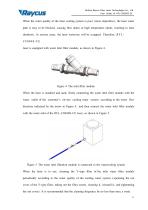
Wuhan Raycus Fiber Laser Technologies Co., Ltd. User Guide of RFL-C8000S-CE When the water quality of the laser cooling system is poor ( more impurities), the laser water path is easy to be blocked, causing flow alarm or high temperature alarm, resulting in laser shutdown. In serious cases, the laser waterway will be scrapped. Therefore, R F L C8000S-CE laser is equipped with water inlet filter module, as shown in Figure 4. Figure 4 The inlet filter module When the laser is installed and used, firstly connecting the water inlet filter module with the water outlet of the customer' s on- site cooling...
Open the catalog to page 14
3) Cooling water requirements:
Open the catalog to page 15
It is recommended to use purified water. In order to prevent mould growing that may lead to pipe blockage, we recommend to add alcohol about 10% of the total volume. If the product is used in an environment that ambient temperature is between - 10 ℃ and 0℃ , we recommend to use 30% alcohol, and replace it every two months. If the product is used in an environment that ambient temperature is below - 10℃ , please to use dual- system chillers ( with heating function) and ensure uninterrupted operation of the cooling system. 4 ) Requirements for output cable cooling system: Rate of liquid flow: 1.7-2.0...
Open the catalog to page 16All Wuhan Raycus Fiber Laser Technologies Co.,Ltd catalogs and technical brochures
 User Instruction RFL-P30MX
20 Pages
Archived catalogs
 RESHAPE FIBER LASER
16 Pages
 CW Fiber Lasers
2 Pages

- Pulsed laser
- Cooled laser
- Visible laser
- Precision laser
- Industrial laser
- Air-cooled laser
- Continuous wave laser
- Continuous laser
- Marking laser
- Laser for medical applications
- High-power laser
- Q-switched laser
- Single-mode laser
- Laboratory laser
- Infrared laser
- Adjustable laser
- Engraving laser
- Cutting laser
- Direct diode laser