
- Catalogs
- WICK-Machinery GmbH
- Automatic filling and closing machine Minican pharma


Automatic filling and closing machine Minican pharma

Automatic filling and closing machine Minican pharma
- Indexing Table: Available with 8, 12, or 16 stations for various processing needs.
- Filling Stations: Configurable with 1 to 4 stations for liquid filling.
- Application Stations: Includes stations for applying rubber stoppers, droppers, alu caps, or screw caps.
- Crimping/Screw Capping Station: For securing caps onto containers.
- Laminar flow for sterile environments.
- Check weigher for weight verification.
- Labelling machine for product identification.
- Ink Jet Coder for printing information on containers.
- Bottle washing machine for cleaning containers.
- Filling range: 0.1 – 2000 ml, with an optional extension up to 3000 ml.
- Output range: 20, 40, 60, 80, and 120 bottles per minute.
- Labelling units and check weighers for enhanced processing.
- Carton packers and complete data processing systems for packaging and data management.
- Inspection systems and validation packages for quality assurance.
- Engineering support for turnkey projects.
- Mass Flow Meter: Includes components like filling hose, flow speed regulation, and a flow meter.
- Peristaltic Pump: Another effective dosing option.
Catalog excerpts
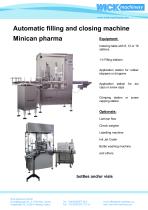
Automatic filling and closing machine Minican pharma Equipment: Indexing table with 8, 12 or 16 stations Application station for rubber stoppers or droppers Application station caps or screw caps Crimping station or screw capping station Optionals: Laminar flow Check weigher Labelling machine Ink Jet Coder Bottle washing machine and others for bottles and/or vials
Open the catalog to page 1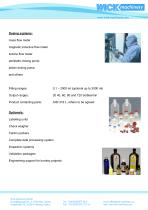
Dosing systems: mass flow meter magnetic inductive flow meter turbine flow meter peristaltic dosing pump piston dosing pump and others Filling ranges: Output ranges: Product contacting parts: AISI 316 L, others to be agreed Optionals: Labelling units Check weigher Carton packers Complete data processing system Inspection systems Validation packages Engineering support for turnkey projects
Open the catalog to page 2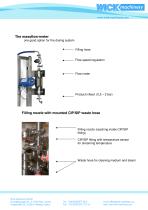
The massflow-meter one good option for the dosing system Filling hose Flow speed regulation Flow meter Filling nozzle with mounted CIP/SIP waste hose Filling nozzle (reaching inside CIP/SIP fitting) CIP/SIP fitting with temperature sensor for streaming temperature Waste hose for cleaning medium and steam
Open the catalog to page 3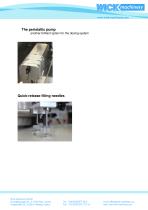
The peristaltic pump another brilliant option for the dosing system Quick-release filling needles
Open the catalog to page 4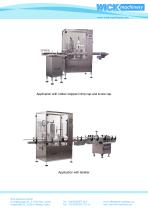
Application with rubber stopper/crimp cap and screw cap Application with labeller
Open the catalog to page 5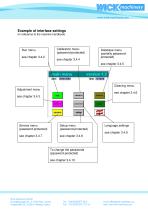
Example of interface settings (in reference to the machine handbook) Calibration menu (password-protected) see chapter 3.4.4 Database menu (partially passwordprotected) see chapter 3.4.5 Cleaning menu Adjustment menu see chapter 3.4.6 see chapter 3.4.3 Service menu (password-protected) Setup menu (password-protected) Language settings see chapter 3.4.9 To change the passwords (password-protected) see chapter 3.4.10
Open the catalog to page 6All WICK-Machinery GmbH catalogs and technical brochures
 Crimper FP 120
1 Page
 Series FG
2 Pages
 Capping machine EKS ROPP
1 Page
 Filling and closing machines
3 Pages


- Fully automatic filling machine
- Liquids filling line
- Volumetric dosing unit
- Liquids dispensing system
- Bottle filling system
- Semi-automatic filling system
- Sealer
- Hydraulic crimping machine
- Sachet filling machine
- Automatic capping machine
- Bottle capping machine
- Can filling line
- Pasty product filling line
- Pneumatic filling machine
- Filling and capping machine
- Screw capping machine
- Automatic filling and capping machine
- Pneumatic dispensing system
- Piston dosing unit
- Cup filling line