
- Catalogs
- Volume Graphics GmbH
- VGSTUDIO MAX


VGSTUDIO MAX

VGSTUDIO MAX
- Comprehensive Analysis: Provides tools for metrology, defect detection, material properties, and simulations, integrating into digital workflows.
- Efficiency: Handles large data sets with automation for repetitive tasks and supports the .vgl format for data sharing.
- Modular Design: Offers add-on modules for specific analyses such as material, geometry, and simulation.
- Data Integrity: Protects against data manipulation and supports various 3D formats including voxel, point cloud, mesh, and CAD.
- CT Reconstruction: Converts CT images into 3D data sets, supporting various CT types and improving image quality.
- Material and Geometry Analysis: Includes modules for porosity analysis, fiber composite material analysis, and more.
- Simulation: Offers modules for structural mechanics and transport phenomena simulations.
Catalog excerpts

VGSTUDIO MAX High-End Industrial CT Software
Open the catalog to page 1
Voxel Data Analysis & \feualeation From design to serial production, VGSTUDIO MAX enables you to keep the quality high by getting full insight into your products. At every step of the production process. All over the world.
Open the catalog to page 2
Volume Graphics Enabling better products By choosing Volume Graphics software, you can rely on more than 20 years of experience in the development of software for non-destructive testing. Today, a broad range of global customers, e.g., from the automotive, aerospace, and electronics industries, use Volume Graphics software for quality assurance in product development and production. For an ever-growing community of users around the world, Volume Graphics is the software of choice. Since 2020, Volume Graphics has been part of Hexagon, a global leader in sensor, software, and autonomous solutions....
Open the catalog to page 3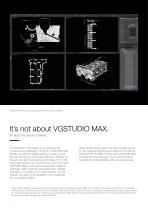
VGSTUDIO MAX covers all your requirements in a single software. It’s not about VGSTUDIO MAX. It’s about the results it delivers. The demands on the quality of your products are numerous and challenging. The tools in VGSTUDIO MAX provide you with the reliable results you need to make the right decisions to meet these demands. Whether you are using the all-encompassing technology of CT or other 3D data formats such as point cloud, mesh, and CAD, VGSTUDIO MAX covers all your requirements related to metrology, defect detection and assessment, material properties, or simulations in a single software....
Open the catalog to page 4
Peace of Mind Included VGSTUDIO MAX gives you results you can use right away, including insightful graphics and comprehensive reports. It is built from the ground up to handle even large data sets. When dealing with repetitive tasks, powerful automation functions are at your side to help you speed up your work. Analyzing periodic structures of an object becomes a breeze with the easy replication of analyses. When you choose VGSTUDIO MAX, you get the peace of mind that comes with knowing that you have a team of experts with a deep understanding of your tasks at your side. This begins even before...
Open the catalog to page 5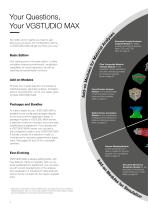
Your starting point is the basic edition. It offers innovative measuring instruments, visualization capabilities for visual inspections as well as reporting and presentation functions. Add-on Modules Choose from a wide selection of modules for material analysis, geometry analysis, simulation, and CT reconstruction. And if your needs grow, so does VGSTUDIO MAX. Basic Edition No matter which insights you need to gain about your products, the configuration options in VGSTUDIO MAX will get you there your way.* Your Questions, Your VGSTUDIO MAX s Extended Porosity/Inclusion Analysis Module for defect...
Open the catalog to page 6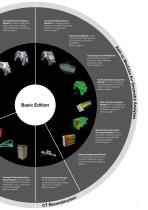
Porosity/Inclusion Analysis Module for the non-destructive defect discovery in castings, including prediction of pore cuts. More on page 21 Coordinate Measurement Module for measurements on even the most difficult-to-access surfaces of a component. More on page 14 Basic Edition CAD Import Module for the import of native CAD files such as CATIA V5 and Creo/Pro/ ENGINEER. More on page 16 CAD Import with PMI Module for the additional import of Product and Manufacturing Information (PMI). More on page 16 Nominal/Actual Comparison Module for the comparison of manufactured parts with CAD, mesh, or...
Open the catalog to page 7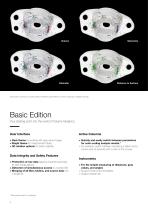
Use active columns to quickly switch between parameters for color-coding your analysis results. Basic Edition Your starting point into the world of Volume Graphics. User Interface Active Columns > ark theme for working with gray value images D > right theme for measurement tasks B > D rotation options for better usability 3 > uickly and easily switch between parameters Q for color-coding analysis results.* > or example, switch between visualizing a defect by its F volume and its diameter with a click of the mouse. Data Integrity and Safety Features > rotection of raw data against unwanted exchangP...
Open the catalog to page 8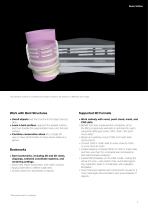
Basic Edition The cylindrical surface of a bottleneck has been unrolled to be viewed in a ‘flattened’ slice image. Work with Bent Structures > nroll objects and then scroll into the object slice by U slice. > evel a bent surface, segment the leveled surface, L and then transfer the segmentation back onto the bent surface. > ombine consecutive slices into a single 2D C view to have all information in these slices visible at a glance. > ork natively with voxel, point cloud, mesh, and W CAD data. > enefit from less measurement uncertainty, since B the fitting of geometry elements is optimized for...
Open the catalog to page 9
Basic Edition Mathematical Calculations on Voxel Data > Add, subtract, and average voxel data sets. > Combine data sets that, e.g., have been scanned using different techniques into one meaningful data set. > Create a “golden” surface from the mean value of several scans. Combined Analyses > Combine the results of successive analyses.** > Combine, e.g., a wall thickness analysis with a porosity/inclusion analysis to classify a defect according to its size in relation to the local wall thickness. Animation Options > Create high-quality renderings. > The object exploder animates exploded views...
Open the catalog to page 10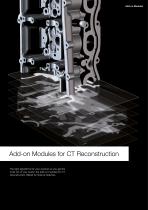
Add-on Modules Add-on Modules for CT Reconstruction The right algorithms for your scanner so you get the most out of your scans: the add-on modules for CT reconstruction offered by Volume Graphics.
Open the catalog to page 11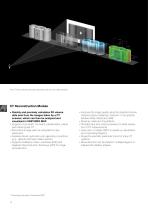
The CT Reconstruction Module seamlessly fits into your daily workflow. CT Reconstruction Module > uickly and precisely calculates 3D volume Q data sets from the images taken by a CT scanner, which can then be analyzed and visualized in VGSTUDIO MAX > upports cone beam, fan beam, parallel beam, planar, S and helical (spiral) CT > econstructs large parts by using field of view R extensions > eatures robust, automatic scan geometry corrections F (e.g., detector shift and rotation axis tilt) > upports Feldkamp, Davis, and Kress (FDK) and S Algebraic Reconstruction Technique (ART) for image reconstruction...
Open the catalog to page 12All Volume Graphics GmbH catalogs and technical brochures
 New in VGSTUDIO MAX 3.4
12 Pages
 VGMETROLOGY
8 Pages
 VGSTUDIO
6 Pages
 VGinLINE
8 Pages
 VG Academy Training Courses
2 Pages


- Automation software solution
- Analysis software solution
- Process software
- Real-time software
- Windows software
- Computer-aided design software
- 3D software solution
- Industrial software
- Measurement software
- Visualization software solution
- Quality software
- Simulation software solution
- Automated software
- Reporting software
- Creation software
- Test software
- 2D software
- High-performance software
- Data analysis software
- Inspection software