

- Company
- Products
- Catalogs
- News & Trends
- Exhibitions
PORTABLE BALANCER “BALANSET-1A”
PORTABLE BALANCER “BALANSET-1A”
Vibration Measurement: Measure vibration using the Vibrometer mode to ensure the primary vibration is the 1x vibration component. Check the mechanism's condition if overall vibration is significantly higher than the 1x component. Stability in measured values is crucial; variations over 10-15% suggest resonance issues.
Balancing Method: Use the influence coefficient method (3-run method) for rotor balancing. Conduct trial runs to assess the effect of trial mass on vibration changes. The program calculates the correction weights' mass and location.
Important Considerations: Maintain constant rotation speed during measurements. Install correction weights at the same radius as trial weights. Remove trial mass after each test run.
Pre-Balancing Recommendations: Ensure no significant static imbalance by manually rotating the rotor and checking for equilibrium.
Sensor Installation: Install vibration sensors at selected points and connect to the USB interface. Use magnets or threaded studs for mounting. Connect the optical tacho sensor to the USB interface and apply a reflective mark on the rotor.
Single-Plane Balancing: Enter initial data and settings in the program. Use the "Balancing settings" tab to input influence coefficients, trial weight mass, and weight attachment methods. Perform two runs for "New Rotor" balancing to calibrate the system.
Measurement Process: Conduct initial measurements (Run#0) to determine vibration parameters. Install trial weight and perform Run#1 to assess changes. Use the "Result" tab to calculate corrective weight mass and angle.
Additional Features: Use polar graphs for result visualization. Restore session data if interrupted. Consider mandrel eccentricity elimination for precise balancing.
Attention: After Run#1, remove trial weights and install corrective weights. Adjust angular positions based on trial weight installation.
Single-Plane Balancing: Conduct a test run (RunTrim) after installing the correction weight to evaluate balance quality. Influence coefficients are calculated during calibration runs and can be saved for future use. A balancing report is generated post-balancing.
Saved Coefficients Balancing: Initial data input is required, ensuring sensors are installed as during initial balancing. The "Saved coeff" option is selected for using stored coefficients.
Index Balancing: This method addresses mandrel eccentricity by rotating the rotor 180 degrees and conducting an additional start to calculate true rotor imbalance.
Two-Plane Balancing: Vibration sensors and an optical phase angle sensor are installed. The program starts from the main window, and settings are entered in the "Balancing settings" tab.
Key Considerations: Ensure stable rotor speed before measurements. Corrective weights should be installed accurately to avoid errors. Balancing tolerances should comply with ISO 1940 standards.
Weight Attachment Methods: Two methods are described: the 'Circum' method, which displays corrective weight masses and angles, and the 'Fixed positions' method, which shows blade numbers and required weights.
Corrective Weight Installation: After measurements, corrective weights are installed based on calculated parameters. The angular position for weight addition/removal is determined in a polar coordinate system.
Balancing Quality Check: A test run ('RunTrim') is conducted to assess balancing quality. If residual vibration and unbalance meet tolerance requirements, the process is complete; otherwise, adjustments continue.
Influence Coefficients: The document explains how to save and use influence coefficients for future balancing. These coefficients are calculated from calibration runs and stored for reuse.
Correction Plane Adjustment: The 'Change correction planes' function allows recalculating weights and angles for different correction planes, useful for complex rotor shapes.
Saved Coefficients Balancing: This method uses pre-determined coefficients for re-balancing, requiring only one tuning start and a test start.
Mandrel Eccentricity Elimination: Index balancing is used to eliminate mandrel eccentricity errors by rotating the rotor 180 degrees and conducting an additional run.
Charts Mode: The document describes how to plot various vibration charts, including overall vibration, 1x vibration, and harmonic analysis charts.
Harmonical Analysis: The document describes the process of plotting vibration charts using harmonical analysis. It involves selecting the 'Harmonical analysis' mode and using a phase angle sensor to synchronize measurements with rotor frequency.
Spectral Analysis: To plot a spectrum chart, the 'F5-Spectrum' tab is used. The process involves measuring vibration on two channels, with results displayed as time function and spectrum of vibration.
Rotor Balancing: The annex provides detailed information on rotor balancing, explaining the importance of symmetrical mass distribution to avoid imbalance.
Fundamentals of Vibration: Vibration is described as a reaction to cyclic excitation forces, with various causes including centrifugal, geometric, aerodynamic, and electromagnetic forces.
Resonance and Structural Considerations: The document explains the concept of resonance, where the frequency of rotor rotation approaches the natural frequency of oscillations, potentially leading to structural damage.
Operating Modes and Sensor Usage: For mechanisms operating above resonance frequency, supports are considered mobile, and vibration accelerometers are used. In pre-resonance mode, supports are rigid, and force sensors are employed.
Mathematical Models: Linear models are used for rigid rotors, where vibration is directly proportional to mass changes. Flexible rotors require nonlinear models due to deformation and changes in mass distribution.
Balancing Methods and Devices: Balancing aligns the central axis of inertia with the rotor's rotation axis. Two main methods are used: processing rotor axles and adjusting corrective masses.
Balancing Technique: Balancing addresses vibration from rotor mass asymmetry. It requires technically sound mechanisms without resonances at operating speeds.
Quality Assessment: Balancing quality is assessed by comparing residual imbalance with ISO 1940-1-2007 standards.
Catalog excerpts

PORTABLE BALANCER “BALANSET-1A” A Dual-Channel PC-Based Dynamic Balancing System
Open the catalog to page 1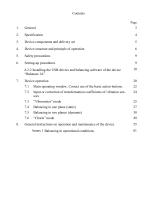
3. Device components and delivery set 5 4. Device structure and principle of operation 6 6.2.2 Installing the USB drivers and balancing software of the device 10 7.1 Main operating window. Correct use of the basic action buttons. 22 7.2 Input or correction of transformation coefficients of vibration sen- 24 7.4 Balancing in one plane (static) 27 7.5 Balancing in two planes (dynamic) 38 8. General instructions on operation and maintenance of the device 55 Annex 1 Balancing in operational conditions 61
Open the catalog to page 2
Balanset-IA balancer provides single- and two-plane dynamic balancing services for fans, grinding wheels, spindles, crushers, pumps and other rotating machinery. Balanset-1A balancer includes two vibration sensors (accelerometers), laser phase sensor (tachometer), 2-channels USB interface unit with per-amplifiers, integrators and ADC acquired module, notebook (optionally) and Windows based balancing software. Balancing software provides the correct balancing solution for single-plane and two-plane balancing automatically. Balanset-1A is simple to use for non-vibration experts. All balancing results...
Open the catalog to page 3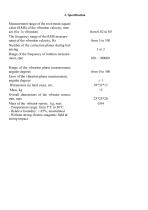
Measurement range of the root-mean-square value (RMS) of the vibration velocity, mm/ sec (for 1x vibration) The frequency range of the RMS measurement of the vibration velocity, Hz Number of the correction planes during balancing Range of the frequency of rotation measurement, rpm Range of the vibration phase measurement, angular degrees Error of the vibration phase measurement, angular degrees Dimensions (in hard case), cm, Mass, kg Overall dimensions of the vibrator sensor, mm, max Mass of the vibrator sensor, kg, max - Temperature range: from 5°C to 50°C - Relative humidity: < 85%, unsaturated...
Open the catalog to page 4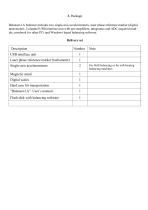
Balanset- 1A balancer includes two single-axis accelerometers, laser phase reference marker (digital tachometer), 2-channel USB interface unit with per-amplifiers, integrators and ADC acquired module, notebook (or other PC) and Windows based balancing software.
Open the catalog to page 5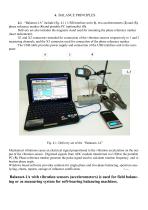
4. BALANCE PRINCIPLES 4.1. “Balanset-1A” include (fig. 4.1) USB interface unit (1), two accelerometers (2) and (3), phase reference marker (4) and portable PC (optionally) (5). Delivery set also includes the magnetic stand used for mounting the phase reference marker (laser tachometer). X1 and X2 connectors intended for connection of the vibration sensors respectively to 1 and 2 measuring channels, and the X3 connector used for connection of the phase reference marker. The USB cable provides power supply and connection of the USB interface unit to the computer. Fig. 4.1. Delivery set of the “Balanset-1A”...
Open the catalog to page 6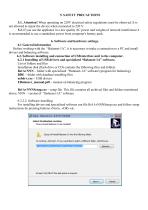
5. SAFETY PRECAUTIONS 5.1. Attention! When operating on 220V electrical safety regulations must be observed. It is not allowed to repair the device when connected to 220 V. 5.2. If you use the appliance in a low quality AC power and weights of network interference it is recommended to use a standalone power from computer's battery pack. 6. Software and hardware settings. 6.1 General information Before working with the “Balanset-1A”, it is necessary to make a connection to a PC and install drivers and balancing software. 6.2. Software installing and connection of USB interface unit to the computer....
Open the catalog to page 7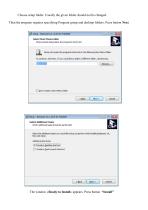
Choose setup folder. Usually the given folder should not be changed. Then the program requires specifying Program group and desktop folders. Press button Next. The window «Ready to Install» appears. Press button “Install
Open the catalog to page 8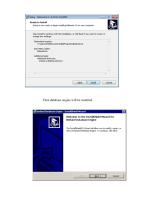
Then database engine will be installed.
Open the catalog to page 9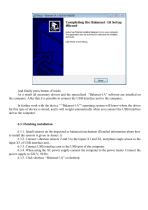
And finally press button «Finish» As a result all necessary drivers and the specialized “Balanset-1A” software are installed on the computer. After that it is possible to connect the USB interface unit to the computer. In further work with the device " “Balanset-1A”" operating system will know where the driver for this type of device is stored, and it will weight automatically when you connect the USB interface unit to the computer. 6.3.1. Install sensors on the inspected or balanced mechanism (Detailed information about how to install the sensors is given in Annex 1) 6.3.2. Connect vibration...
Open the catalog to page 12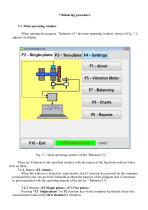
7 Balancing procedure. 7.1. Main operating window. When running the program “Balanset-1A” the main operating window, shown in Fig. 7.1, appears on display. Fig. 7.1. Main operating window of the “Balanset-1A” There are 9 buttons in the specified window with the names of the functions realized when click on them. 7.1.1. Button «F1-About». When this button is clicked (or, equivalently, the F1 function key pressed on the computer keyboard) the user can get brief information about the purpose of the program and, if necessary, to get acquainted with the operating manual of the device “Balanset-1A”....
Open the catalog to page 13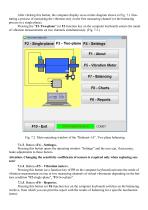
After clicking this button, the computer display saves mimic diagram shown in Fig. 7.1 illustrating a process of measuring the vibration only on the first measuring channel (or the balancing process in a single plane). Pressing the “F3-Two-plane” (or F3 function key on the computer keyboard) selects the mode of vibration measurements on two channels simultaneously. (Fig. 7.2.) Fig. 7.2. Main operating window of the “Balanset-1A”. Two plane balancing. 7.1.3. Button «F4 – Settings». Pressing this button opens the operating window “Settings” and the user can, if necessary, make adjustments to these...
Open the catalog to page 14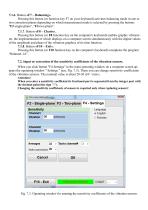
7.1.6. Button «F7 – Balancing». Pressing this button (or function key F7 on your keyboard) activates balancing mode in one or two correction planes depending on which measurement mode is selected by pressing the buttons "F2-single-plane", "F3-two-plane". 7.1.7. Button «F8 – Charts». Pressing this button (or F8 function key on the computer's keyboard) enables graphic vibrometer, the implementation of which displays on a computer screen simultaneously with the digital values of the amplitude and phase of the vibration graphics of its time function. 7.1.8. Button «F10 – Exit». Pressing this button...
Open the catalog to page 15All VIBROMERA catalogs and technical brochures
- Adhesive tape
- Dynamic balancing system
- Industrial adhesive tape
- Rotor balancing machine
- Two-plane balancing machine
- Universal balancing machine
- Non-contact tachometer
- Compact balancing machine
- Indicator stand
- Machine monitoring vibration sensor
- Shaft balancing machine
- Single-plane balancing machine
- Preventive maintenance vibration sensor
- MEMS vibration sensor
- Indicator stand with magnetic base
- Articulated indicator stand
- Portable balancing device