
- Catalogs
- Viavi Solutions UK Ltd..
- Xgig 16-lane Exerciser/Analyzer

Xgig 16-lane Exerciser/Analyzer
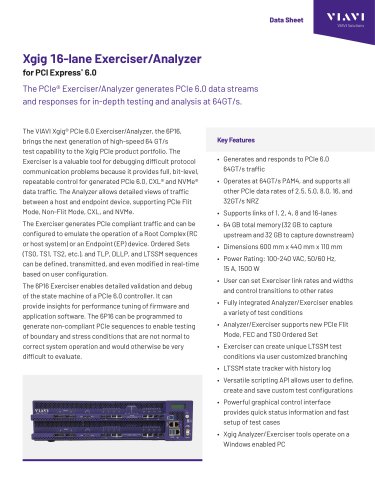
Xgig 16-lane Exerciser/Analyzer
The Xgig 16-lane Exerciser/Analyzer for PCI Express 6.0 by VIAVI is designed for generating and analyzing PCIe 6.0 data streams at 64GT/s. It is a crucial tool for debugging protocol communication issues, offering full control over PCIe 6.0, CXL, and NVMe data traffic.
Specifications
- Supports PCIe 6.0 traffic at 64GT/s PAM4 and other data rates (2.5, 5.0, 8.0, 16, 32GT/s NRZ).
- Compatible with 1, 2, 4, 8, and 16-lane links.
- 64 GB total memory for capturing upstream and downstream data.
- Dimensions: 600 mm x 440 mm x 110 mm.
- Power Rating: 100-240 VAC, 50/60 Hz, 15 A, 1500 W.
Key Features
- Emulates Root Complex or Endpoint device operations.
- Supports PCIe Flit Mode, Non-Flit Mode, CXL, and NVMe.
- Allows real-time modification of Ordered Sets and sequences.
- Includes a versatile scripting API for custom test configurations.
- Graphical control interface for quick setup and status monitoring.
User Interface
The user interface facilitates easy test setup and execution, with icons for settings, compliance tests, and configuration space. It provides control over link settings, timeouts, and test data rates.
Analyzer Functionality
The Analyzer captures and decodes complex test scenarios, supporting PCIe 6.0, CXL, and NVMe. It alerts users to protocol errors and provides deep protocol insights with the Xgig Expert tools.
Test Applications
The Exerciser supports various test applications, including generating TLP packets, injecting errors, and controlling link state changes. It allows for custom test suite definitions and execution sequences.
Ordering Information
Includes part numbers for the PCIe 6.0 16-Lane Analyzer/Exerciser Platform, license keys, and various accessories such as Analyzer Interposers and DUT Carriers.
Catalog excerpts
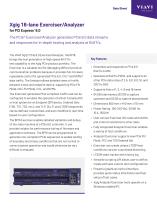
Data Sheet VIAVI Solutions The PCIe® Exerciser/Analyzer generates PCIe 6.0 data streams and responses for in-depth testing and analysis at 64GT/s. The VIAVI Xgig® PCIe 6.0 Exerciser/Analyzer, the 6P16, brings the next generation of high-speed 64 GT/s test capability to the Xgig PCIe product portfolio. The Exerciser is a valuable tool for debugging difficult protocol communication problems because it provides full, bit-level, repeatable control for generated PCIe 6.0, CXL® and NVMe® data traffic. The Analyzer allows detailed views of traffic between a host and endpoint device, supporting PCIe Flit Mode, Non-Flit Mode, CXL, and NVMe. The Exerciser generates PCIe compliant traffic and can be configured to emulate the operation of a Root Complex (RC or host system) or an Endpoint (EP) device. Ordered Sets (TS0, TS1, TS2, etc.), and TLP, DLLP, and LTSSM sequences can be defined, transmitted, and even modified in real-time based on user configuration. The 6P16 Exerciser enables detailed validation and debug of the state machine of a PCIe 6.0 controller. It can provide insights for performance tuning of firmware and application software. The 6P16 can be programmed to generate non-compliant PCIe sequences to enable testing of boundary and stress conditions that are not normal to correct system operation and would otherwise be very difficult to evaluate. • Generates and responds to PCIe 6.0 64GT/s traffic • Operates at 64GT/s PAM4, and supports all other PCIe data rates of 2.5, 5.0, 8.0, 16, and 32GT/s NRZ • 64 GB total memory (32 GB to capture upstream and 32 GB to capture downstream) • User can set Exerciser link rates and widths and control transitions to other rates • Fully integrated Analyzer/Exerciser enables a variety of test conditions • Analyzer/Exerciser supports new PCIe Flit Mode, FEC and TS0 Ordered Set • Exerciser can create unique LTSSM test conditions via user customized branching • LTSSM state tracker with history log • Versatile scripting API allows user to define, create and save custom test configurations • Powerful graphical control interface provides quick status information and fast setup of test cases • Xgig Analyzer/Exerciser tools operate on a Windows enab
Open the catalog to page 1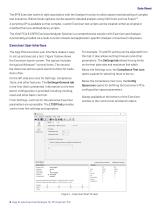
Data Sheet The 6P16 Exerciser works in tight association with the Analyzer function to allow capture and decoding of complex test scenarios. Bidirectional captures can be saved for detailed analysis using VIAVI tools such as Expert™. A scripting API is available so that complex, custom Exerciser test scripts can be created; either as original or modified from pre-defined library scripts. The VIAVI PCIe 6.0 6P16 Exerciser/Analyzer Solution is a comprehensive solution with Exerciser and Analyzer functionality provided via a multi-function chassis and application-specific Analyzer or Exerciser Interposers....
Open the catalog to page 2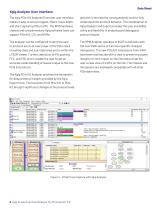
Data Sheet Xgig Analyzer User Interface The Xgig PCIe 6.0 Analyzer/Exerciser user interface makes it easy to set up triggers, filters, trace depth, and start capturing PCIe traffic. The 6P16 hardware chassis and complementary Xgig software tools can support PCIe 6.0, CXL and NVMe. and with it the need for strong analysis tools to fully understand the protocol behavior. The combination of Xgig Analyzer and Expert provides the user incredible utility and flexibility in analyzing and debugging protocol issues. The analyzer can be configured to alert the user to protocol errors at every layer of...
Open the catalog to page 3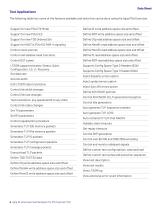
Data Sheet Test Applications The following table lists some of the features available and tests that can be done using the Xgig PCIe Exerciser. Support for new PCIe Flit Mode Define IO write address space size and offset Define ROM write address space size and offset Define Cfg read address space size and offset Support for 64GT/s PCIe 6.0 PAM-4 signaling Define Mem64 read address space size and offset Control clock sources Define Mem32 read address space size and offset Control and validate reset functions Define IO read address space size and offset Define ROM read address space size and offset...
Open the catalog to page 4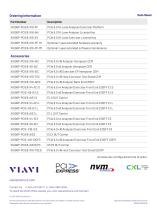
Data Sheet Ordering Information Accessories configured at time of order. To reach the VIAVI office nearest you, visit viavisolutions.com/contact Product specifications and descriptions in this document are subject to change without notice. Patented as described at viavisolutions.com/patents
Open the catalog to page 5All Viavi Solutions UK Ltd.. catalogs and technical brochures
 E500 Data Center Cabinet
2 Pages
 UAT 978 MHz Option
2 Pages
 ATC-5000NG
2 Pages
 180 DSP-Lite
2 Pages
 VIAVI T-BERD/MTS
3 Pages
 NITRO GEO
11 Pages
 MAP-220C LightDirect Chassis
2 Pages
 US Operator-Approved
2 Pages
 TeraVM O-CU Simulator
4 Pages
 NITRO Wireless
2 Pages
 MAP-300
3 Pages
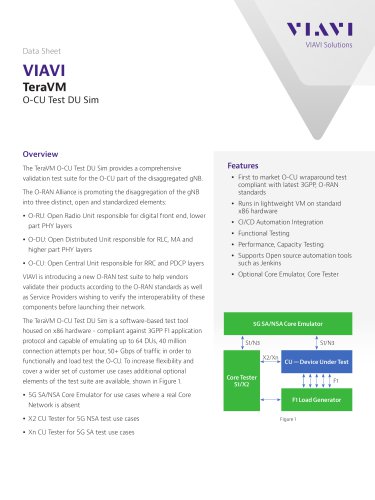 TeraVM O-CU Test DU Sim
5 Pages
 TeraVM
2 Pages


- Management software solution
- Measuring machine
- Microscope
- Optical microscope
- Industrial gateway
- Simulation software solution
- Automatic test kit
- Network software
- Wireless gateway
- Test set
- IoT gateway
- Inspection microscope
- Optical measurement system
- Control analyzer
- High-performance analyzer
- Continuous monitoring module
- Electrical network analyzer
- Crystal oscillator
- Control measurement system
- Flow software