- Catalogs
- Velocio Networks
- eBranch PLC

eBranch PLC
eBranch PLC
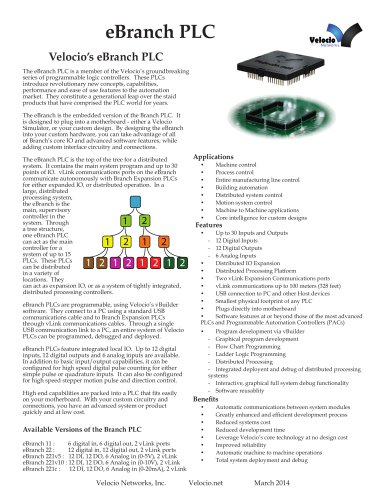
The eBranch PLC by Velocio Networks is an advanced programmable logic controller designed for seamless integration into custom hardware, offering core IO and advanced software features for automation systems.
The eBranch PLC supports up to 30 IO points, including 12 digital inputs, 12 digital outputs, and 6 analog inputs. It features two vLink communication ports for expanded IO or distributed operations, allowing it to serve as a supervisory controller in systems with up to 15 PLCs.
Programming is facilitated through Velocio's vBuilder software, which supports graphical program development using flow chart and ladder logic programming. This software enables distributed processing and system debugging from a single PC.
- Distributed IO expansion and processing platform
- USB connection for programming and debugging
- Compact physical design
- Advanced software capabilities comparable to high-end PLCs
- Efficient development process
- Reduced system costs and development time
- Enhanced reliability and automatic machine operations
- Machine and process control
- Manufacturing line control
- Building automation
- Distributed system control
Power requirements are 4.75 - 5.5VDC with a maximum current of 300mA. Digital inputs accept DC voltage from 3 to 30 VDC, with specific thresholds for high and low signals.
The eBranch can be mounted on a Velocio Simulator or a custom motherboard. It connects to expansion units via vLink cables, supporting distances up to 100 meters with extenders.
The eBranch PLC offers a compact, cost-effective solution for advanced automation needs, with robust features for distributed processing and easy integration into custom systems.
- Signal Input: 3 to 30VDC
- Pulse Counter Input Frequency: Up to 100 KHz (typical), up to 250 KHz (maximum)
- Digital Outputs: Sinking transistor, 3 to 30VDC, 500 mA maximum
- Motion Output Pulse Frequency: 0 to 100 KHz (typical), 0 to 250 KHz (maximum)
- Analog Inputs: 0 to 5VDC, 0 to 10VDC, 0 to 20 mA, 12-bit resolution
- Communications: USB Device (mini USB connector), Two vLink connectors, Maximum Expansion Levels: 3, Maximum number of PLCs: 15
- Physical Dimensions: 2.5”H x 2.5”W x 0.55” deep (to end of header pins), 2.5”H x 2.5”W x 0.32” deep (to header pin exposure)
- Environmental: Operating temperature: -40 to 85°C
- Application Program Limits: Program Memory: 34K Words, Maximum rungs or function blocks: 4K, Maximum Subroutines: 68, Maximum Tagnames: 950
- Main Program Data Memory: Bits: 2,048, Unsigned 8-bit integers: 512, Unsigned 16-bit integers: 512, Signed 16-bit integers: 512, Signed 32-bit integers: 256, Floating point numbers: 256
- Object Memory: Object words: 4,096, Object bits: up to 65,536, Object 8-bit integers: up to 8,192, Object signed 16-bit: up to 4,096, Object unsigned 16-bit: up to 4,096, Object signed 32-bit: up to 2,048, Object floating point: up to 2,048, Maximum objects: 292
- Connector Type: 0.025” square post headers
- Connector Spacing: 0.1”
- Ports Included: eBranch 11: Ports C, D, power and 2 vLink; eBranch 22: Ports B, C, D, E, power and 2 vLink; eBranch 221: Ports A, B, C, D, E, power and 2 vLink
Catalog excerpts
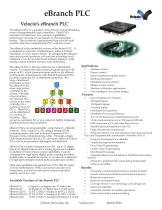
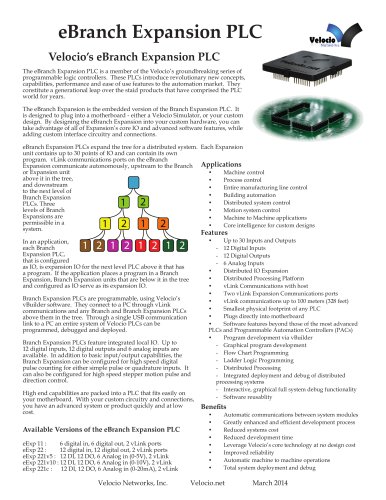
eBranch PLCVelocio's eBranch PLC The eBranch PLC is a member of the Velocio's groundbreaking series of programmable logic controllers. These PLCs introduce revolutionary new concepts, capabilities, performance and ease of use features to the automation market. Urey constitute a generational leap over the staid products that have comprised the PLC world for years. The eBranch is the embedded version of the Branch PLC. It is designed to plug into a motherboard - either a Velocio Simulator, or your custom design. By designing the eBranch into your custom hardware, you can take advantage of all of Branch's core IO and advanced software features, while adding custom interface circuitry and connections. The eBranch PLC is the top of the tree for a distributed system. It contains the main system program and up to 30 points of IO. vLink communications ports on the eBranch communicate autonomously with Branch Expansion PLCs for either expanded IO, or distributed operation. In a large, distributed processing system, the eBranch is the main, supervisory controller in the system. Through a tree structure, one eBranch PLC can act as the main controller for a system of up to 15 PLCs. These PLCs can be distributed in a variety of locations. They can act as expansion IO, or as a system of tightly integrated, distributed processing controllers. • Machine control • Process control • Entire manufacturing line control • Building automation • Distributed system control • Motion system control • Machine to Machine applications • Core intelligence for custom designs • Distributed Processing Platform • Two vLink Expansion Communications ports • vLink communications up to 100 meters (328 feet) • USB connection to PC and other Host devices eBranch PLCs are programmable, using Velocio's vBuilder software. They connect to a PC using a standard USB communications cable and to Branch Expansion PLCs through vLink communications cables. Through a single USB communication link to a PC, an entire system of Velocio PLCs can be programmed, debugged and deployed. eBranch PLCs feature integrated local IO. Up to 12 digital inputs, 12 digital outputs and 6 analog inputs are available. In addition to basic input/output capabilities, it can be configured for high speed digital pulse counting for either simple pulse or quadrature inputs. It can also be configured for high speed stepper motion pulse and direction control. High end capabilities are packed into a PLC that fits easily on your motherboard. With your custom circuitry and connections, you have an advanced system or product quickly and at low cost. eBranch 11 : 6 digital in, 6 digital out, 2 vLink ports eBranch 22 : 12 digital in, 12 digital out, 2 vLink ports eBranch 221v5 : 12 DI, 12 DO, 6 Analog in (0-5V), 2 vLink eBranch 221v10 : 12 DI, 12 DO, 6 Analog in (0-10V), 2 vLink eBranch 221c : 12 DI, 12 DO, 6 Analog in (0-20mA), 2 vLink • Smallest physical footprint of any PLC • Plugs directly into motherboard • Software features at or beyond those of the most advanced PLCs and Programmable Automation Controllers (PACs) • Program development via vBuilder - Graphical program development - Flow Chart Programming - Ladder Logic Programming - Distributed Processing - Integrated deployent and debug of distributed processing systems - Interactive, graphical full system debug functionality - Software reusablity • Automatic communications between system modules • Greatly enhanced and efficient development process • Reduced systems cost • Reduced development time • Leverage Velocio's core technology at no design cost • Improved reliability • Automatic machine to machine operations • Total system deployment and debug
Open the catalog to page 1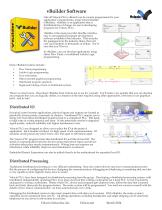
vBuilder Software Like all Velocio PLCs, eBranch can be custom programmed for your application’s requirements, using Velocio Builder (vBuilder). vBuilder is an application that is distributed free of charge, for use in developing programs for Velocio PLCs. vBuilder is the most powerful, flexible, intuitive, easy to use graphical program development software available in the industry. That includes the packages from the industry titans, that will cost you hundreds to thousands of dollars. We’re sure that you’ll love it. In vBuilder, you can develop applications using either Flow Chart, or traditional...
Open the catalog to page 2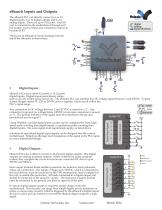
eBranch Inputs and Outputs The eBranch PLC can directly connect to 6 or 12 digital inputs, 6 or 12 digital outputs and 0 or 6 analog inputs. There are up to 5 IO ports. Each IO port is connected to the motherboard through an 8 pin header. Each of these port connectors connect to 6 points of IO. digital analog signal direction The layout of eBranch IO ports (looking from the top of the eBranch), is shown here. Digital Inputs : eBranch PLCs have either 6 (1 port) or 12 (2 ports) digital inputs. Digital inputs sense binary status, such as on/off, switch open/closed, etc. The eBranch PLC can interface...
Open the catalog to page 3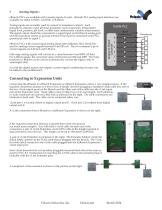
Analog Inputs : eBranch PLCs are available with 6 analog inputs (1 port). eBranch PLC analog input interfaces are available for either 0-5VDC, 0-10VDC or 0-20mA. eBranch PLCs with current input analog input ports (eBranch 221c) should be used for analog current signals between 0 and 20 mA. The two common type of current signals are 4-20 mA and 0-20 mA. Full range analog signals will convert to a value between 0 and 4095 (12 bits). For 4-20mA inputs, the converted value will be between 820 and 4095. The Scale function in vBuilder can be used to automatically convert the signal value to meaningful...
Open the catalog to page 4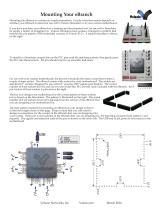
Mounting Your eBranch Mounting the eBranch is a relatively simple proposition. Exactly what that entails depends on whether your eBranch is intend for use with a Velocio Simulator or in your custom motherboard. If you have purchase your eBranch as a training and development tool, for use with a Simulator, its simply a matter of plugging it in. Velocio Simulators have sockets, arranged in a pattern that matches the pin pattern of the embedded versions of Velocio PLCs. A typical simulator is shown on the right. To install in a Simulator, simply line up the PLC pins with the matching sockets, then...
Open the catalog to page 5All Velocio Networks catalogs and technical brochures
 Wall Plug Power Supplies
1 Page
 Status
1 Page
 Command HMIs
6 Pages
 eSimulators
4 Pages
 Branch Expansion PLC
6 Pages
 eAce PLC
5 Pages
 eBranch Expansion PLC
6 Pages
 Branch PLC
13 Pages
 Ace PLCs
20 Pages