

ipotweb

ipotweb
- Real-Time Data Management: Connect machines to the cloud for real-time management of loading operations, allowing for the reception of movement data and dispatch of job orders.
- Loading Movements Tracking: Detailed tracking of loading movements, including start and end times, loading duration, weight, target weight, number of weighings, vehicle ID, product type, customer, and destination.
- Fleet Management: Tools for managing fleet operations, including the ability to set filters, print delivery dockets, and export data in various formats.
- Load 'n Sign Service: A feature that allows for the digital signing of delivery dockets by truck drivers, enhancing accountability and record-keeping.
- Automated Reporting: Automated reports can be generated and sent via email, providing vital data for analysis, sales, and invoicing purposes.
- Geofencing and Alerts: The system supports geofencing, sending alerts when machines exit predefined boundaries, ensuring operational control.
- Automatic Data Forwarding: Raw data from weighing devices can be automatically forwarded to remote servers for real-time updates without filtering or interpretation.
Catalog excerpts

Connect your machines to the ipotweb.com cloud for the management of your loading sites’ loads in real time, allowing you to receive the movements performed by each machine and send job orders to them
Open the catalog to page 1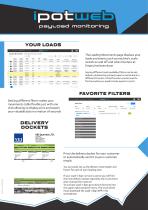
YOUR LOADS Home Fleet management Loading Movements Device Manager The Loading Movements page displays your loads and events such as machine’s scale switch on and off and when the Zero at Empty has been done Loading Movements #504 (Grand Total 1.330t) My Filter Loading time STEVE GARRET MANSON PAVEL PINE TREE WORK PAVING EXPERTS ROSEMARY DEPOT ROSEMARY DEPOT SAND GRAVEL 035 GRAVEL 010 TILTOP QUARRY MANSON PAVEL PINE TREE Having different tools available, filters can be set, delivery dockets be printed, exports can be done in different formats. A find function can be sued to find out what you need...
Open the catalog to page 2
The Machines Fleet data is organized by Loading Site saving weighing and wireless device sw version, both devices ID, machine code and machine last connection in date and time L ore Loading site entry allows to save different data files for each loading site. Loading site can be mapped with LAT and LNG and a virtual fence be created in order to receive an alert message when a machine goes out of it MACHINES FLEET MANAGEMENT A map of your loading site showing where each machine is. An alarm message will be sent when one goes out of the geofence you have created Home Fleet management Loading Movements...
Open the catalog to page 3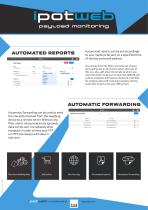
AUTOMATED REPORTS Edit Report Name Type Filter Emerly weekly ~| Qpdf ▼ Emerly weekly report ▼ Loading site Hour Days Report type Automated reports can be set accordingly to your needs to be sent on a specified time of the day and email address You choose from the filters you have set, choose the Loading site or all of them, select the type of file, .csv, .xlsx, .pdf, enter the emails to whom you want the report to be sent to and click CREATE; job is done, recipients will receive a bunch of vital data for analysis, sales and invoicing purposes, setting automatic imports into your ERP system Automatic...
Open the catalog to page 4All VEI catalogs and technical brochures
 trueload
4 Pages
 load-n-sign
4 Pages
 vkiosk
4 Pages

Archived catalogs
 helper21
2 Pages
 helper7
4 Pages
 Millennium
2 Pages
 helper mini
2 Pages
 MILLENNIUM 5
16 Pages