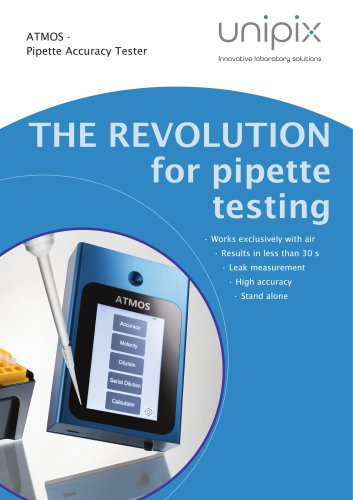
ATMOS
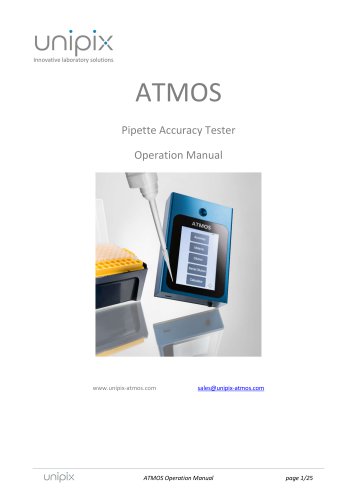
ATMOS
The ATMOS Pipette Accuracy Tester by UniPix GmbH is designed for precise measurement of air displacement pipettes without liquid, using a calibrated internal reference cavity to measure pipette leak rates. It is powered by an internal Lithium-Polymer battery, allowing over 6 hours of continuous operation. The device should not be used with liquid in the pipette tip to avoid damage.
To operate the ATMOS, press the main switch to turn it on. It performs a self-test and displays a home screen with functions such as Accuracy, Molarity, Dilution, Serial Dilution, Calculator, and Settings. The device automatically turns off after 3 minutes of inactivity, which can be adjusted in the settings.
Accuracy Function: Measures pipette accuracy by selecting the pipette size and initiating measurement. The procedure involves inserting the pipette tip, pressing 'Start', and following the color-coded phases for piston operation. Results include measurement number, volume displacement, and leak rate.
Molarity Function: Calculates molar concentration with user input values.
Dilution Function: Assists in calculating values for diluting solutions, with adjustable measurement units.
Serial Dilution Function: Simplifies preparation of serial dilutions for up to six concentrations.
Calculator Function: Provides basic arithmetic operations.
The settings screen allows adjustments to date, time, and sleep duration. The 'Info' button provides instrument details, and a self-test function checks pressure readings. The ReadATMOS program enables data download via USB, with options to set the device clock and clear memory.
The manual includes technical specifications such as accuracy, repeatability, dimensions, and operational conditions. Troubleshooting guidance addresses common issues like no power and software errors.
The document outlines warranty information and proper disposal methods, emphasizing separate disposal of batteries and electronic devices.
Catalog excerpts
ATMOS Pipette Accuracy Tester Operation Manual ATMOS Operation Manual
Open the catalog to page 1
Imprint Information in this document is subject to change without notice. No part of this document may be reproduced or transmitted without the express written permission of UniPix GmbH. While every precaution has been taken in the preparation of this document, the publisher and the author assume no responsibility for errors or missions, or for damages resulting from the use of information contained in this document or from the use of programs and source code that may accompany it. In no event shall the publisher and the author be liable for any loss of profit, or any other commercial damage...
Open the catalog to page 2
ATMOS Operation Manual
Open the catalog to page 3
The Pipette Accuracy Tester ATMOS is designed for the specific use of testing and calibrating air displacement laboratory pipettes and no other use is recommended. The user must read and understand this manual before operation. This instrument should only be used in a laboratory environment. Do not open or attempt to repair the instrument without expressed and explicit instructions from UniPix. Do not use the instrument in an atmosphere with a danger of explosion. Do not allow unauthorized and/or untrained operators to use this device. Do not recharge the instrument in a liquid or humid environment....
Open the catalog to page 4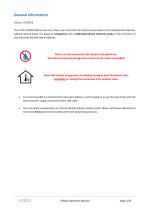
General Information About ATMOS The UniPix ATMOS Pipette Accuracy Tester is an instrument for precise measurement of air displacement pipettes, without need of liquid. It is based on comparison with a calibrated internal reference cavity in the instrument. It also measures the leak rate of pipettes. Never use the instrument with liquid in the pipette tip. This will permanently damage the instrument (no repair is possible)! Allow the internal temperature to stabilize during at least 30 minutes after unpacking or moving the instrument from another room. It is recommended to verify that the instrument...
Open the catalog to page 5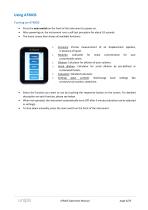
Using ATMOS Turning on ATMOS Press the main switch on the front of the instrument to power on. After powering on, the instrument runs a self-test procedure for about 10 seconds. The home screen then shows all available functions: Accuracy: Precise measurement of air displacement pipettes, in absence of liquid. Molarity: Calculator for molar concentration for your customizable values. Dilution: Calculator for dilution of your solution. Serial dilution: Calculator for serial dilution by pre-defined or customized factors. Calculator: Standard calculator. Settings (gear symbol): See/change...
Open the catalog to page 6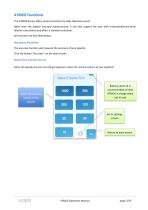
ATMOS Functions The ATMOS device offers various functions for daily laboratory work. Apart from the pipette accuracy measurement, it can also support the user with molarity/dilution/serial dilution calculations and offers a standard calculator. All functions are described below. Accuracy Function The accuracy function will measure the accuracy of your pipette. Click the button “Accuracy” on the main screen. Pipette Size Selection Screen Select the pipette size you are testing (important: select the nominal volume of your pipette!): Battery status (it is recommended to keep ATMOS in charge when...
Open the catalog to page 7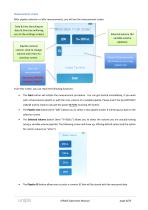
Measurement screen After pipette selection or after measurements, you will see the measurement screen. Date & time (touching on date & time line will bring you to the settings screen) Selected volume (for variable volume pipettes) Pipette nominal volume. Click to change volume and return to previous screen. Pipette ID (touch inside the frame to set a new pipette ID) Start the measurement (insert tip BEFORE pressing “Start”) From this screen, you can reach the following functions: The Start button will initiate the measurement procedure. You can get started immediately, if you work with a fixed...
Open the catalog to page 8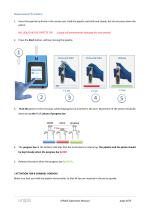
Measurement Procedure 1. Insert the pipette tip firmly in the center port. Hold the pipette vertically and steady, but do not press down the piston. (Liquid will permanently damage the instrument) 2. Press the Start button, without moving the pipette. Push the piston to the first stop, while keeping the tip inserted in the port. Movement of the piston should be done during the BLUE phase of progress bar. 4. The progress bar at the bottom indicates that the instrument is measuring. The pipette and the piston should be kept steady when the progress bar is RED. 5. Release the piston when the progress...
Open the catalog to page 9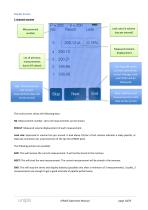
Results Screen 1-channel version Leak rate (in volume loss per second) Measurement number Measured volume displacement List of previous measurements (up to 10 values) End: Stop the series (current data will be stored. Average value and STDEV will be displayed) Skip: This will remove the current measurement (data will not be stored) Next: Start the next measurement (current data will be stored) The result screen shows the following data: Nb: Measurement number. Up to 10 measurements can be shown. RESULT: Measured volume displacement of each measurement. Leak rate: Expressed in volume loss per...
Open the catalog to page 10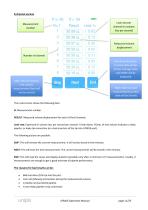
8-channel version Leak rate per channel (in volume loss per second) Measurement number Measured volume displacement Number of channel End: Stop the series (current data will be stored. Average value and STDEV will be displayed) Skip: This will remove the current measurement (data will not be stored) Next: Start the next measurement (current data will be stored) The result screen shows the following data: N: Measurement number. RESULT: Measured volume displacement for each of the 8 channels. Leak rate: Expressed in volume loss per second per channel. A leak above 1%/sec of test volume indicates...
Open the catalog to page 11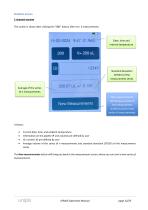
Statistics Screen 1-channel version This screen is shown after clicking the “END” button after min. 3 measurements. Date, time and internal temperature Standard deviation (STDEV) of the measurement series Average of the series of n measurements New measurements: Will bring you back to the measurement screen to start a new series of measurements. Current date, time, and ambient temperature Information on the pipette (P and volume) pre-defined by user ID: numeric ID pre-defined by user Average volume of the series of n measurements and standard deviation (STDEV) of the measurement series The New...
Open the catalog to page 12