
- Catalogs
- UniPi.technology
- Unipi Neuron


Unipi Neuron
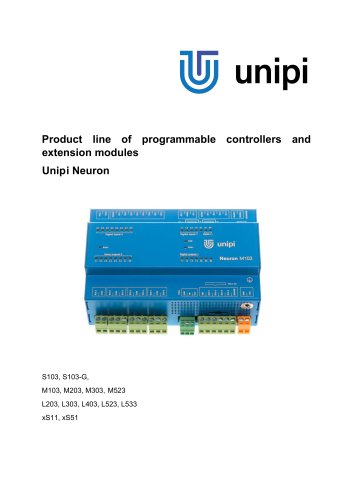
Unipi Neuron
UniPi Neuron is a series of compact, programmable controllers designed for automation and monitoring in various settings, including residential, commercial, and light industrial environments. The product line includes controllers and extension modules with different input/output configurations, suitable for applications such as home automation and complex systems control.
Installation must comply with standards and regulations, ensuring power is off during handling, using appropriate wire gauges, and maintaining short cable lengths. Devices should be installed in stable, closed distribution boxes accessible only to authorized personnel.
Neuron products are categorized into groups, each with its own processor for event handling and communication. Control units feature CPUs and memory for custom programming, while extension modules increase input/output capacity via RS485 communication.
Control units support custom programs on an open Linux platform and offer high-speed communication. Extension modules expand input/output capabilities and use the Modbus protocol for communication.
Communication parameters can be configured via hardware (DIP switch) or software settings, with hardware settings taking precedence. Default settings include a baud rate of 19,200 bps and Modbus address 15.
Each Neuron model has specific configurations for digital inputs/outputs, analog inputs/outputs, and communication interfaces like Ethernet and RS485. The devices are CE marked and comply with various EU directives and standards.
Neuron devices have CE marking and comply with several EU directives and standards, ensuring safety and compatibility.
The software section covers Modbus register mapping, serial bus configurations, and function descriptions for digital and analog inputs/outputs.
The document outlines the specifications and features of the UniPi Neuron devices, including digital inputs and outputs, relay outputs, and serial link indications. It describes the connector types and their purposes, such as power supply connections (+24V and GND), digital and analog inputs and outputs, and RS485 communication interfaces.
The dimensions for different types of UniPi Neuron devices (Type S, M, and L) are mentioned, although specific measurements are not detailed in the provided text.
The Neuron devices are designed for mounting on a 35 mm DIN EN 50022 rail. Proper mounting involves attaching the device to the rail using a metal spring mechanism. Adequate air circulation is necessary, with a minimum of 80 mm space required between the device and the distribution box walls. If air circulation is insufficient, a ventilation fan should be installed.
The device requires a 24 V DC power supply connected to the +24V and GND screw connectors. The protective ground conductor must also be connected to ensure safety.
RS-485 and 1-Wire communication interfaces are described. RS-485 requires terminators on both ends of the line for proper operation. The 1-Wire bus is used for passive data collection from sensors and requires specific wiring configurations for optimal performance.
Digital inputs are used for connecting devices like switches and sensors, with logic states indicated by LEDs. Digital outputs are accessible through specific connectors and can be configured for PWM mode. Flyback diodes are recommended for certain connections to prevent damage.
Analog inputs can read voltage, current, or resistance, with configurations set via software. Analog outputs are used for regulating external devices and can output signals in voltage or current form. Specific formulas are provided for calculating the necessary register values for desired output settings.
For reliable operation, follow the recommended wiring configurations, ensure proper grounding, and adhere to the specified power supply requirements. The document emphasizes the importance of correct installation and configuration to prevent damage and ensure optimal performance.
- Galvanic Isolation: Not available for some outputs, available for others.
- Output Types: Transistor output (open collector), relay outputs, RS485 interface.
- Switched Voltage and Current: 5-50 V DC, 750 mA continuous/1 A pulse for transistor outputs; 250 V AC/30 V DC, 5 A for relay outputs.
- Switching Speed: Max 200 kHz for transistor outputs.
- Protection: Integrated electrostatic discharge protection for analog inputs and outputs.
- Modes: Voltage (0-10 V), current (0-20 mA), resistance measurements.
- Resolution: 12 bits for Group 1, 24 bits for resistance in Group 2,3.
- Accuracy: ±0.5% for Group 1, ±0.2% for Group 2,3.
- Modes: Voltage source (0-10 V), current source (0-20 mA).
- Resolution: 12 bits.
- Accuracy: ±0.5%.
- Type: Electromechanical unprotected relay.
- Switched Voltage and Current: 250 V AC/30 V DC, 5 A.
- Lifetime: Mechanical: 5,000,000 cycles; Electrical: 100,000 cycles.
- Galvanic Isolation: Yes, 1000 V.
- Baud Rates: Up to 115,200 bps.
- Temperature: Operating: 0°C to +55°C; Storage: -25°C to +70°C.
- Protection: IP20.
- Installation: On DIN rail 35 mm.
Catalog excerpts
Product line of programmable controllers and extension modules Unipi Neuron
Open the catalog to page 1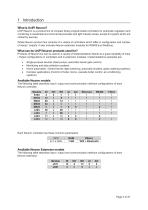
UniPi Neuron is a product line of compact freely programmable controllers for automatic regulation and monitoring in residential and commercial premises and light industry areas, except for system which are critical for security. Whole Neuron product line consists of a variety of controllers which differ in configuration and number of inputs / outputs. It also includes Neuron extension modules for RS485 bus (Modbus). Products of Neuron line can be used in a variety of implementations thanks to a great variability of Input / Output configurations in controllers and in extension modules. Implementations...
Open the catalog to page 4
Devices of Neuron product line have CE marking and ES Declaration of Conformity. They are compliant with CSN EN 6095-1 ed. 2, CSN EN 61000-6-3 ed. 2, CSN EN 55014-1 ed. 3, CSN EN 55022 ed. 3 and with EMC standards. Products are also compliant with government orders and EU directives including all amendments: • GD no. 17/2003 Coll. as amended, 2006/95/EC - including amendments • GD no. 616/2006 Coll. as amended, 2004/108/ES - including amendments Device is to be distributed as a development board.
Open the catalog to page 5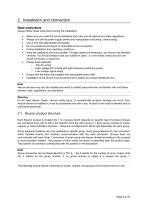
2 Installation and connection Basic instructions Always follow these instructions during the installation: • • • • • • Make sure you meet the actual standards and rules and all regional and state regulations. Always turn off the power supply before any manipulation (mounting / demounting). Use a wire with appropriate wire gauge. Do not exceed screw torque of removable screw connectors. Follow installation and operating conditions. Keep the cabling as short as possible. If longer cables are necessary, you should use shielded versions. You should always route your cables in pairs: i.e. one neutral...
Open the catalog to page 6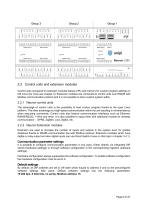
2.2 Control units and extension modules Control units compared to extension modules feature CPU and memory for custom program settings on OS Linux (for more see chapter 3). Extension modules are connected to control units over RS485 with Modbus communication protocol and it is not possible to store custom system within. 2.2.1 Neuron control units The advantage of control units is the possibility to load custom program thanks to the open Linux platform. The other advantage is a high-speed communication within the unit resulting in minimal latency when executing commands. Control units also feature...
Open the catalog to page 7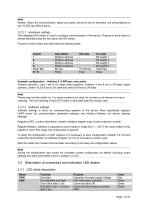
Models, where the communication speed and parity cannot be set by hardware, are preconfigured to use 19 200 bps without parity. The integrated DIP switch is used to configure communication of the device. Purpose of each switch is always described atop the box above the DIP switch. Purpose of each switch also describes the following table:
Open the catalog to page 8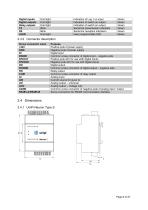
2.4.1 UniPi Neuron TypeS
Open the catalog to page 9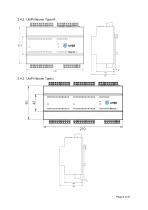
2.4.3 UniPi Neuron Type L
Open the catalog to page 10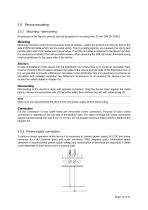
2.5 Device mounting 2.5.1 Mounting / demounting All products of the Neuron product line are designed for mounting onto 35 mm DIN EN 50022. Mounting Mounting of product onto the rail should be done as follows – attach the product onto the rail, first by the side of DIN rail holder which has the metal spring. Then by pulling against, you squeeze the spring and pull the other side of the holder over the rail edge. If no DIN rail holder is attached to the Neuron product it is necessary to attach it first with provided screws. When attaching the DIN rail holder, the metal spring must be positioned...
Open the catalog to page 11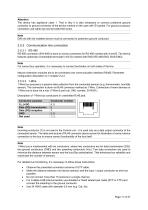
The device has appliance class 1. That is why it is also necessary to connect protective ground conductor to ground connector of the device marked on the case with © symbol. For ground conductor connection use cable eye and provided M4 screw. DIN rail with the installed device must be connected to protective ground conductor. RS-485 connection (EIA-485) is done on screw connectors for RS-485 marked with A and B. The device features optionally connectable terminator (100 Q) marked with END (RS-485-END, BUS-END). For correct bus operation, it is necessary to connect terminator on both sides of...
Open the catalog to page 12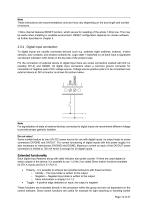
Note These instructions are recommendations only and may vary depending on the bus length and number of sensors. 1-Wire channel features RESET function, which serves for resetting of the whole 1-Wire bus. This may be useful when installing in unstable environment. RESET configuration depends on chosen software as further described in chapter 3. 2.5.4 Digital input connection To digital inputs are usually connected devices such e.g. switches (light switches, buttons), motion sensors, door contacts, and window contacts etc. Logic state 1 (switched on) of each input is signalized via relevant indication...
Open the catalog to page 13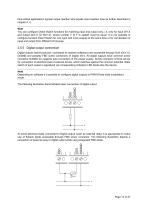
time-critical applications (typical output reaction time equals input reaction time as further described in chapter 4.1). Note You can configure Direct Switch functions for matching input and output only, i.e. only for input DiY.X and output DoY.X (or RoY.X), where number Y (if Y is stated) must be equal. It is not possible to configure function Direct Switch for one input and more outputs at the same time or for combination of input and output from different I/O Groups. 2.5.5 Digital output connection Digital outputs (semiconductor, connected as opened collectors) are accessible through DoX...
Open the catalog to page 14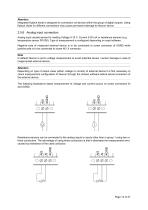
Attention Integrated flyback diode is designed for connection od devices within the group of digital outputs. Using flyback diode for different connections may cause permanent damage to Neuron device. 2.5.6 Analog input connection Analog input usually serves for reading Voltage 0-10 V, Current 0-20 mA or resistance sensors (e.g. temperature sensor Pt1000). Type of measurement is configured depending on used software. Negative pole of measured external device is to be connected to screw connector of AGND while positive pole is to be connected to screw AIY.X connector. Note In default Neuron is...
Open the catalog to page 15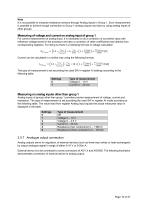
Note It is not possible to measure resistance sensors through Analog inputs in Group 1. Such measurement is possible to achieve trough connection to Group 1 analog outputs and also by using analog inputs of other groups. Measuring of voltage and current on analog input of group 1 For correct measurement of analog input, it is necessary to do a correction of converted value with reference voltage stored in the processor and also a correction of other coefficients read directly from corresponding registers. For doing so there is a following formula of voltage calculation. ݑȰݑȰݐݐݐݐ1ݑpݑpݑpݑpݑpݑpݑpݑ...
Open the catalog to page 16All UniPi.technology catalogs and technical brochures
 Unipi Extension xS52
3 Pages
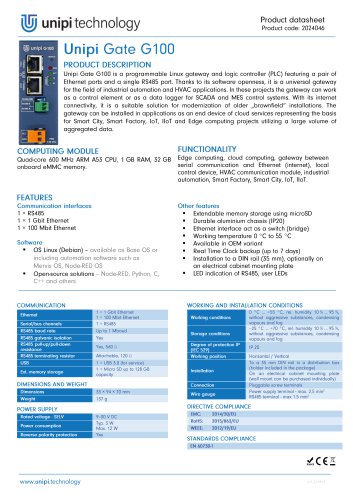 Unipi Gate G100
1 Page
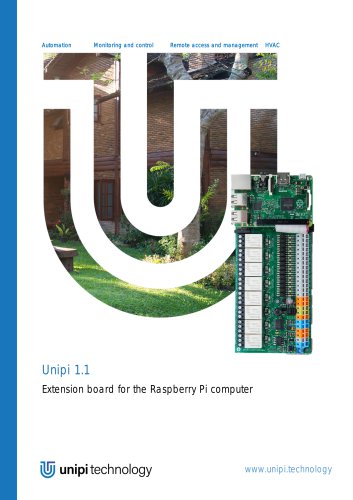 Unipi 1.1
14 Pages
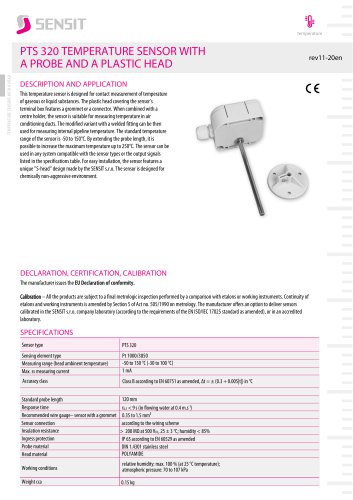
- Automation software solution
- Resistance temperature sensor
- Cloud-based software
- Interface software
- Waterproof temperature sensor
- Industrial gateway
- Single-board computer
- Humidity and temperature probe
- Ethernet gateway
- Programmable logic controller
- Programming software
- Serial gateway
- Development software
- Relative humidity and temperature sensor
- DIN rail gateway
- IoT gateway
- RS-485 gateway
- Waterproof humidity and temperature sensor
- IP65 temperature transducer