


A13T

A13T
A13T is a digital temperature and humidity meter featuring a date and clock display. It is designed for ease of use, reliability, and low power consumption, suitable for various environments such as homes, labs, offices, hotels, schools, shopping malls, hospitals, airports, and restaurants.
- Temperature and humidity measurement
- Selectable temperature unit (℃/℉)
- Time clock with date display (YYYY-MM-DD-Week-Time, 12/24-hour format selectable)
- On-time alarm and alarm clock functionality
- Temperature range: -10 to 50℃ (14 to 122°F)
- Humidity range: 20 to 95% RH
- Resolution: 0.1℃, 1% RH
- Accuracy: 0 to 40℃: ±1℃, other: ±2℃; 32 to 104°F: ±2°F, other: ±4°F
- Sampling rate: 10 seconds
- Battery: 1.5V (AAA)
- Storage temperature: -20 to 60℃ (-4 to 140°F)
- Storage humidity: 20 to 80% RH
- Features buttons for mode selection, temperature unit switching, and adjustments
- Includes a QR code, wall mount bracket, and battery cover
- Short press to switch between time and alarm clock
- Long press to set up time, date, and alarm
- Time Mode: During setup, the colon between hour and minute flickers. Long press MODE to enter setup, sequence: 12/24-Hour-Minute-Year-Month-Day-Confirm.
- Alarm Clock Mode: During setup, a solid colon appears. Long press MODE to enter setup, adjust hour and minute, then confirm.
- Settings automatically save if no operation occurs within 10 seconds.
- Reset the time clock at first use or after battery replacement.
- Recycle empty batteries properly.
Catalog excerpts
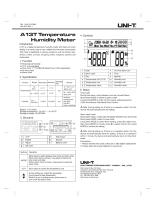
A13T Temperature Humidity Meter A13T is a digital temperature humidity meter with date and clock display. It is handy, easy-to-use, reliable and low power consumption. This meter is applicable in various occasions, such as homes, labs, offices, hotels, schools, shopping malls, hospitals, airports and restaurants. Temperature/humidity ℃/℉ unit selectable Time clock: YYYY-MM-DD-Week-Time (12/24 selectable) On time alarm Alarm clock Ambient environment: (40~80%: ±5%RH, Other: ±8%RH) Battery: 1.5V (AAA) Storage temperature: -20~60℃ (-4~140°F) Storage humidity: 20~80%RH On time alarm icon Sampling Resolution Accuracy rate AM/PM Humidity icon Temperature icon Humidity unit Temperature value Humidity value 5. Setup Time mode During time setup, colon between hour and minute flickers Short press MODE to switch to alarm mode Long press MODE to enter into time setup, setting sequence: 12/24-Hour-Minute-Year-Month-Day-Confirm. Note: During setting up, if there is no operation within 10s, the device will automatically save the setting. Alarm clock mode During alarm setup, a solid colon will appear between hour and minute. Short press MODE: switch to time mode Long press MODE to enter alarm setting, press to adjust hour, then press MODE to minute, press to adjust minute, then press MODE to confirm the setting. Wall mount Bracket Battery cover Buttons Operation Short press to switch between time clock and alarm clock When time clock is shown, long press to setup the time clock and date. When alarm clock is shown, long press to setup the alarm clock. Short press to switch the temperature unit. During setting up, adjust the parameter. (Long press for fast adjustment) When it is not in setting mode, short press to turn on/off the alarm clock. Note: During setting up, if there is no operation within 10s, the device will automatically save the setting. If there is no operation within 1 minute, the device will automatically return to time clock mode. Precautions 1. Please reset the time clock at first use or after battery replacement
Open the catalog to page 1All UNI-TREND TECHNOLOGY (CHINA) CO., LTD. catalogs and technical brochures


- Data logger
- Calibration system
- Indentation hardness tester
- Temperature datalogger
- Digital pyrometer
- Portable tester
- Digital tester
- USB datalogger
- °C thermometer
- Real-time analyzer
- Digital display hardness tester
- IR pyrometer
- Thickness gauge
- Voltage testing system
- Multimeter
- Portable calibrator
- Digital multimeter
- Portable pyrometer
- Portable detector
- Temperature calibration system