
- Catalogs
- UE SYSTEMS
- Remote Access Sensor


- Company
- Products
- Catalogs
- News & Trends
- Exhibitions
Remote Access Sensor

Remote Access Sensor
1. Use the Click-Bond Mounting Stud Kit, which includes a solvent wipe, acrylic adhesive, and two Click Bond units, to attach the stud to the testing point.
2. Thread the Remote Access Sensor (RAS) onto the stud and connect the cables.
3. Connect one end of the BNC-to-BNC cable to the RAS and the other end to a Remote Access Module (RAM).
4. For testing, plug your Ultraprobe into the RAM and perform the inspection.
Usage and Benefits:
The RAS is ideal for inspecting enclosed or hard-to-reach bearings, such as motors in closed cabinets. It allows for easy data collection by mounting the sensor on the test point and running a cable to an accessible area where a RAM can be connected.
Optional Equipment:
UE Systems offers a Switch Box that allows testing of up to 8 bearings simultaneously by switching channels. Standard cables are available in various lengths, with custom lengths available upon request.
Required Equipment:
- UE RAM: Adaptor for Ultraprobe models 9,000, 10,000, or 15,000.
- BNC-to-BNC Cable: Available in standard lengths (3 to 75 feet) and custom lengths.
- Click-Bond Mounting Stud Kit: Includes tools and adhesive for mounting.
- UE RAS Switch Box: Facilitates remote testing of multiple points.
Specifications:
Transducer: Piezoelectric, stainless steel housing with female BNC connector.
Dimensions: Diameter 1.0" (2.54 cm), Length 2.4" (6.1 cm).
Frequency Response: 20 kHz – 100 kHz.
Operating Temperature: 32° – 140°F (0° – 60°C).
Material: 16 gauge, 304 stainless steel.
IP Rating: IP65.
Electrical Connections: BNC, with inputs for 4 to 8 RAS Sensors, switchable.
Output: Single RAM Output Connection.
For more information, contact UE Systems Europe or visit their website.
Catalog excerpts

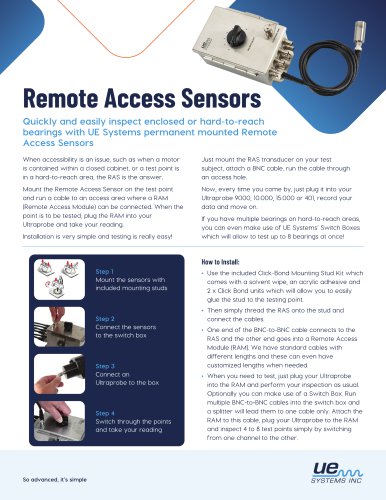
Remote Access Sensors Quickly and easily inspect enclosed or hard-to-reach bearings with UE Systems’ permanent mounted Remote Access Sensors. When accessibility is an issue, such as when a motor is contained within a closed cabinet, or a test point is in a hard-to-reach area, the RAS is the answer. Mount the Remote Access Sensor on the test point and run a cable to an access area where a RAM (Remote Access Module) can be connected. When the point is to be tested, plug the RAM into your Ultraprobe and take your reading. Installation is very simple and testing is really easy! Just mount the RAS transducer on your test subject, attach a BNC cable, run the cable through an access hole. Now, every time you come by, just plug it into your Ultraprobe 9000, 10.000, 15.000 or 401, record your data and move on. If you have multiple bearings on hard-to-reach areas, you can even make use of UE Systems’ Switch Boxes which will allow to test up to 8 bearings at once! Step 1 - Mount the sensors with Step 2 - Connect the sensors included mounting studs to the switch box • Use the included Click-Bond Mounting Stud Kit which comes with a solvent wipe, an acrylic adhesive and 2 x Click Bond units which will allow you to easily glue the stud to the testing point. • Then simply thread the RAS onto the stud and connect the cables. • One end of the BNC-to-BNC cable connects to the RAS and the other end goes into a Remote Access Module (RAM). We have standard cables with different lengths and these can even have customized lengths when needed. • When you need to test, just plug your Ultraprobe into the RAM and perform your inspection as usual. Optionally you can make use of a Switch Box. Run multiple BNC-to-BNC cables into the switch box and a splitter will lead them to one cable only. Attach the RAM to this cable, plug your Ultraprobe to the RAM and inspect 4 to 8 test points simply by switching from one channel to the other.
Open the catalog to page 1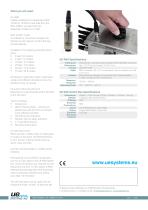
What you will need: UE RAM Adaptor enabling the Ultraprobe 9.000, 10.000 or 15.000 to read data from the RAS. RAM is included with the Ultaprobe 10.000 and 15.000. BNC-to-BNC Cable To establish a connection between the Remote Access Sensor and the Remote Access Module. Available in the following standard dimensions: • 3 feet / 0.9 meters • 4 feet / 1.2 meters • 15 feet / 4.5 meters • 25 feet / 7.6 meters • 50 feet / 15.2 meters • 75 feet / 22.8 meters UE Systems might also create customized cables with different dimensions than the standard ones, at request. Click-Bond Mounting Stud Kit Mounting...
Open the catalog to page 2All UE SYSTEMS catalogs and technical brochures




Archived catalogs
 Ultra-Trak 750
2 Pages
 Ultraprobe 9000
2 Pages
 Ultraprobe 2000
2 Pages
 Ultraprobe 100
2 Pages
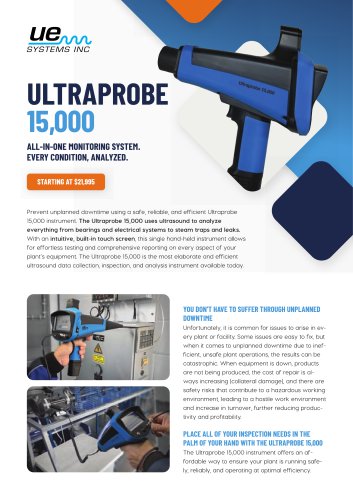
 Ultraprobe 15,000
4 Pages
 Ultraprobe 10,000
4 Pages
 Ultraprobe 3000
2 Pages
 Ultraprobe Accessories
2 Pages
 Ultrasound Applications
2 Pages
 ULTRAPROBE 15.000 IS
2 Pages
 ULTRAPROBE 9000ATEX
2 Pages
 ULTRAPROBE 2000ATEX
2 Pages
 ULTRAPROBE 10.000
4 Pages
 4Cast
4Cast2 Pages
 ULTRAPROBE 15.000
4 Pages
 OnTrak
2 Pages
 UltraView
2 Pages


- Digital imager
- Visible imager
- Industrial camera module
- Management software solution
- Analysis software solution
- Full-color camera system
- Windows software
- Detection camera system
- Industrial software
- Waterproof camera module
- Leak monitor
- Reporting software
- Real-time monitoring module
- Portable camera system
- Greasing system
- Planning software solution
- Gas leak detector
- Continuous monitoring module
- Condition monitoring module
- Digital monitoring module