
- Catalogs
- U-Reach Data Solutions Inc.
- NV-BM Series – Slim Version

NV-BM Series – Slim Version
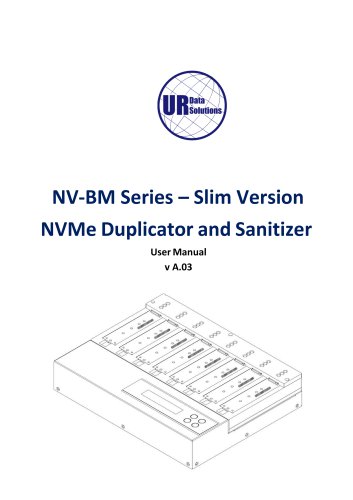
NV-BM Series – Slim Version
U-Reach disclaims liability for damages from product use, including data loss or business interruptions. Customers must ensure product output meets quality requirements. Specifications may change without notice.
A one-year warranty covers parts and labor, excluding consumables. Extended warranties are available. Support is provided for the product's defined life.
U-Reach is not responsible for copyright infringement. Users must ensure legal compliance when copying data.
Read the manual thoroughly before use. Ensure source and target devices have equal capacity. Use approved power sources and operate in a clean, dry environment. Avoid static electricity and ensure proper grounding.
- Copy: Transfers data from source to target devices.
- Compare: Verifies data accuracy between source and target.
- Copy+Compare: Combines copy and compare functions.
- Erase: Offers multiple erasure methods including Quick Erase, Full Erase (NIST 800-88), DoD Erase (DoD 5220.22-M), and Secure Erase.
- Utility: Displays device and system information, updates firmware, and calculates read/write speeds.
- Setup: Configures startup menu, copy area, language, and advanced settings.
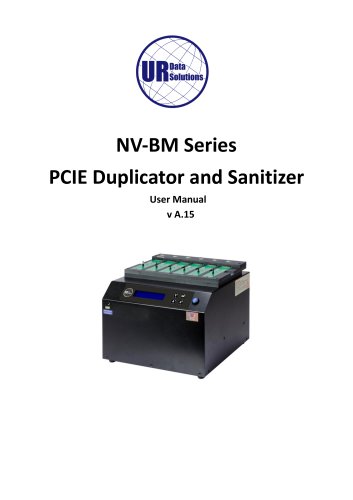
The NV-BM Series features a front view with source ports and an LCD display, and a back view with an SD slot for firmware updates. LED indicators show power, pass, and fail statuses.
- Copy: Connect devices and select "Copy" to start duplication. The LCD displays progress and results.
- Compare: Select "Compare" to verify data accuracy.
- Copy+Compare: Automates the copy and compare process.
- Erase: Connect devices and select from erasure options to sanitize data.
- Utility: Access device information, update system firmware, and test read/write speeds.
Regular maintenance includes ensuring a clean operating environment and verifying device connections and functionality.
Users can select the write speed option to modify the device's original data after verification.
This function calculates the CRC64 value for the source port to verify data accuracy.
Includes submenus for configuring copy areas, skipping bad sectors, and setting the language.
Allows users to select the default function displayed after device initialization.
Offers four copy modes: System and Files, All Partitions, Whole Device, and Percentage, each with specific functions.
Disabling this function allows copying from larger to smaller capacity devices, but may require HDD restart.
Users can set the number of bad sectors to skip, with a recommendation to set it to 0 for critical data.
Allows selection of language options: English, Japanese, or Spanish.
Includes settings for handling unknown formats, erasing master devices, setting erase patterns, and configuring device power-up and power-down times.
Restores all settings to manufacturer defaults.
Provides a step-by-step guide for installing an M.2 SSD, emphasizing careful handling to avoid damage.
Outlines steps for replacing M.2 sockets, including turning off power and handling screws with caution.
Specifications are subject to change without notice.
Catalog excerpts
NV-BM Series – Slim Version NVMe Duplicator and Sanitizer User Manual v A.03
Open the catalog to page 1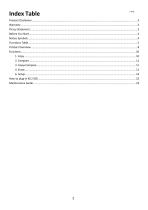
Index Table
Open the catalog to page 2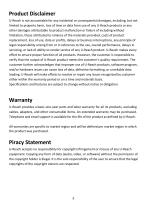
Product Disclaimer U-Reach is not accountable for any incidental or consequential damages, including, but not limited to property harm, loss of time or data from use of any U-Reach products or any other damages attributable to product malfunction or failure of including without limitation, those attributed to reliance of the materials provided, costs of product replacement, loss of use, data or profits, delays or business interruptions, any principle of legal responsibility arising from or in reference to the use, overall performance, delays in servicing, or lack of ability to render service...
Open the catalog to page 3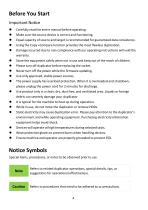
Important Notice • Carefully read the entire manual before operating. • Make sure the source device is correct and functioning. • Equal capacity of source and target is recommended for guaranteed data consistency. • Using the Copy +Compare function provides the most flawless duplication. • Damage incurred due to non-compliance with our operating instructions will void the warranty. • Store the equipment safely when not in use and keep out of the reach of children. • Please turn off duplicator before replacing the socket. • Never turn off the power while the firmware updating. • Use only approved,...
Open the catalog to page 4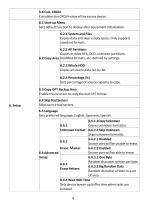
Calculates the CRC64 value of the source device. Sets default function to display after equipment initialization. Copies unknown format(s). Skips unknown format(s). Unknown Format 6.6.2Erase Master 6.6.2.1 Disabled Source port will be unable to erase. Source port will be able to erase. Erase Pattern 6.6.3.1 One Byte Random character written per byte. 6.6.3.2 Big Random Data Random character written in a set of area. 6.6.4 Wait HDD Time Sets device power-up buffer time when tasks are initiated.
Open the catalog to page 6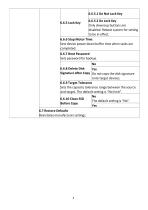
Reinstates manufacturer settings.
Open the catalog to page 7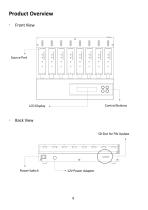
Front View Source Port Control Buttons Back View SD Slot for FW Update Power Switch
Open the catalog to page 8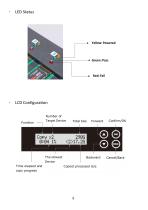
Yellow: Powered Green: Pass Number of Target Device Total Size The slowest Device Time elapsed and copy progress Backward Copied processed size
Open the catalog to page 9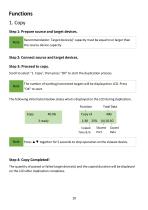
Recommendation: Target device(s)' capacity must be equal to or larger than the source device capacity. Scroll to select "1. Copy", then press "OK" to start the duplication process. The quantity of passed or failed target device(s) and the copied duration will be displayed on the LCD after duplication completes.
Open the catalog to page 10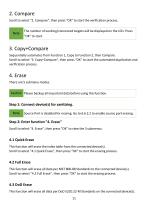
Scroll to select "2. Compare", then press "OK" to start the verification process. The number of working/connected targets will be displayed on the LCD. Press "OK" to start. Sequentially automates from Function 1, Copy to Function 2, then Compare. Scroll to select "3. Copy+Compare", then press "OK" to start the automated duplication and verification process. There are 5 submenu modes. Scroll to select "4. Erase", then press "OK" to view the 3 submenus. This function will erase the index table from the connected device(s). Scroll to select "4.1 Quick Erase", then press "OK" to start the erasing...
Open the catalog to page 11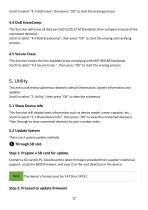
Scroll to select "4.3 DoD Erase", then press "OK" to start the erasing process. 4.4 DoD EraseComp This function will erase all data per DoD 5220.22-M Standards, then compare erasure of the connected device(s). Scroll to select "4.4 DoD EraseComp", then press "OK" to start the erasing and verifying process. 4.5 Secure Erase This function erases the non-loadable areas complying with NIST 800-88 Standards. Scroll to select "4.3 Secure Erase ", then press "OK" to start the erasing process. 5. Utility This menu will reveal submenus related to device information, system information and updates. Scroll...
Open the catalog to page 12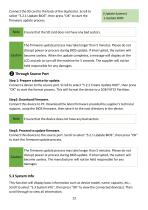
Connect the SD card to the back of the duplicator. Scroll to select "5.2.1 Update BIOS", then press "OK" to start the firmware update process. Note [Update System] 1.Update BIOS Ensure that the SD card does not have any bad sectors. The firmware update process may take longer than 5 minutes. Please do not disrupt power or process during BIOS update. If interrupted, the system will Caution become useless. When the update completes, a message will display on the LCD and ask to turn off the machine for 5 seconds. The supplier will not be held responsible for any damages. ❷ Through Source Port Step...
Open the catalog to page 13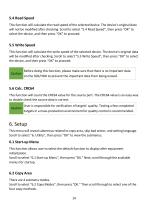
5.4 Read Speed This function will calculate the read speed of the selected device. The device’s original data will not be modified after checking. Scroll to select "5.4 Read Speed”, then press "OK" to select the device, and then press “OK” to proceed. 5.5 Write Speed This function will calculate the write speed of the selected device. The device’s original data will be modified after checking. Scroll to select "5.5 Write Speed”, then press "OK" to select the device, and then press “OK” to proceed. Before doing this function, please make sure that there is no important data on the SSD/HDD to prevent...
Open the catalog to page 14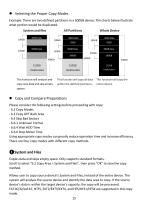
⚫ Selecting the Proper Copy Modes Example: There are two defined partitions in a 500GB device. The charts below illustrate what portion would be duplicated. System and files 100GB Whole Device This function will analyze and copy only data and skip empty spaces. This function will copy all data within the defined partitions. This function will copy the entire device. ⚫ Copy and Compare Preparations Please consider the following settings before proceeding with copy: - 6.2 Copy Modes - 6.3 Copy GPT Back Area - 6.4 Skip Bad Sectors - 6.6.1 Unknown Format - 6.6.4 Wait HDD Time - 6.6.6 Stop Motor Time...
Open the catalog to page 15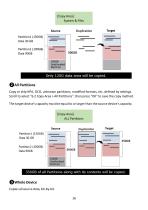
[Copy Area] System & Files ❷All Partitions Copy or skip HPA, DCO, unknown partitions, modified formats, etc. defined by settings. Scroll to select "6.2 Copy Area > All Partitions”, then press "OK" to save the copy method. The target device’s capacity must be equal to or larger than the source device’s capacity. [Copy Area] ALL Partitions ❸Whole Device Copies all source data, bit-by-
Open the catalog to page 16All U-Reach Data Solutions Inc. catalogs and technical brochures
 Carry Series
21 Pages
 SATA III Ultra-High Speed
19 Pages
 Carry Series
18 Pages
 MTS-SASN Series
31 Pages
 MT/MTC Series
31 Pages
 PCIE SSD Duplicator
23 Pages
 Auto-detect Dual-interfaces
23 Pages
 NV-BM600CFX
37 Pages
 NVS200USAS Duplicator
21 Pages
 NV-BM DUC Series
4 Pages
 NV-BM GT11 Series
41 Pages
 NV-BM Series
2 Pages
 NV-BM Series
41 Pages
- Grinding mill
- LED hand lamp
- Vertical pulverizer
- Reporting software
- Punching center
- Creation software
- Waste chopper
- Impact pulverizer
- Rechargeable hand lamp
- Storage software
- Visible illumination
- Hammer grinding mill
- Compact lump breaker
- Portable hand lamp
- Hole punch punching machine
- Lamp illumination
- Automatic grinding mill
- Software solution on site
- Hand lamp with battery
- UV illumination