
- Catalogs
- U-Reach Data Solutions Inc.
- Mini SAS Series SAS-MS118 1-1 Duplicator and Sanitizer

Mini SAS Series SAS-MS118 1-1 Duplicator and Sanitizer
Mini SAS Series SAS-MS118 1-1 Duplicator and Sanitizer
- Copy: Duplicates data with various modes.
- Compare: Verifies data bit by bit.
- Copy+Compare: Combines copying and verifying.
- Erase: Offers multiple erasure methods complying with standards.
- Utility: Provides device info, system updates, and speed tests.
- Setup: Configures copy areas, language, and settings.
- Copy: Steps for data copying, including device preparation.
- Compare: Ensures data accuracy.
- Copy+Compare: Recommended for post-copy accuracy.
- Erase: Secure data erasure methods with precautions.
- Utility: Displays device info and allows updates.
- Displays model and firmware version.
- Measures HDD read/write speeds.
- Unlocks HDDs post-Secure Erase.
- Calculates CRC64 for data verification.
- Offers five copy modes, including system and files, all partitions, whole HDD, percentage, and deep analysis.
- Options for shrinking NTFS partitions, copying GPT backup areas, and handling HPA data.
- Settings for skipping bad sectors, erasing source HDDs, and handling unknown formats.
- Language selection and default settings restoration.
Catalog excerpts
Mini SAS Series SAS-MS118 1-1 Duplicator and Sanitizer User Manual V A.03
Open the catalog to page 1
Product Disclaimer U-Reach is not accountable for any incidental or consequential damages, which includes, but is not constrained to property harm, loss of time or data from use of a U-Reach product, or any other damages attributable to product malfunction or failure (including without limitation, those attributable to: (1) reliance of the materials provided, (2) costs of product replacement, (3) loss of use, data or profits, (4) delays or business interruptions, (5) and any principle of legal responsibility, arising out of or in reference to the use or overall performance or from delays in servicing...
Open the catalog to page 3
Important Notice • Carefully read the entire manual before operating. • Make sure the source device is correct and functioning. • Equal capacity of source and target is recommended for guaranteed data consistency. • Using the Copy+Compare function provides the most flawless duplication. • Damage incurred due to non-compliance with our operating instructions will void the warranty. • Store the equipment safely when not in use and keep out of the reach of children. • Please turn off duplicator before replacing sockets. • Never turn off the power while the firmware updates. • Use only approved,...
Open the catalog to page 4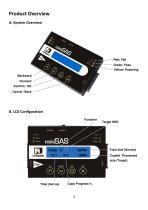
Product Overview A. System Overview Red: Fail Green: Pass Yellow: Powering Backward Forward Confirm / OK Cancel / Back Total size (Source) Copied Processed size (Target) Time (mm:ss) Copy Progress %
Open the catalog to page 5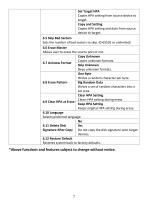
*Above functions and features subject to change without notice.
Open the catalog to page 8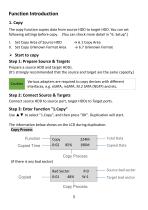
The copy function copies data from source HDD to target HDD. You can set following settings before copy. (You can check more detail in "6. Setup".) I. Set Copy Area of Source HDD -> 6.1 Copy Area II. Set Copy Unknown Format Area -> 6.7 Unknown Format Prepare a source HDD and target HDDs. (It's strongly recommended that the source and target are the same capacity.) Various adapters are required to copy devices with different interfaces, e.g. eSATA, mSATA, M.2 SATA (NGFF) and etc. Connect source HDD to source port, target HDDs to Target ports. Use ▲▼ to select "l.Copy", and then press "OK". Duplication...
Open the catalog to page 9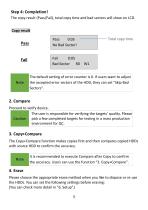
The copy result (Pass/Fail), total copy time and bad sectors will show on LCD. Copy result Total copy time The Copy+Compare function makes copies first and then compares copied HDDs with source HDD to confirm the accuracy. It is recommended to execute Compare after Copy to confirm the accuracy. Users can use the function "3. Copy+Compare". Please choose the appropriate erase method when you like to dispose or re-use the HDDs. You can set the following settings before erasing: (You can check more detail in "6. Setup".)
Open the catalog to page 10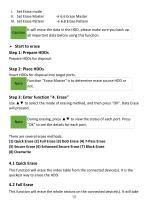
I. Set Erase mode II. Set Erase Master III. Set Erase Pattern Caution → 6.6 Erase Master → 6.8 Erase Pattern It will erase the data in the HDD, please make sure you back up all important data before using this function. ➢ Start to erase Step 1: Prepare HDDs Prepare HDDs for disposal. Step 2: Place HDDs Insert HDDs for disposal into target ports. Function "Erase Master" is to determine erase source HDD or Note not. Step 3: Enter function "4. Erase" Use ▲▼ to select the mode of erasing method, and then press "OK". Data Erase will proceed. Note During erasing, press ▲▼ to view the status of each...
Open the catalog to page 11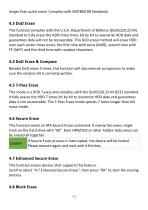
longer than quick erase. Complies with NIST800-88 Standards. This function complies with the U.S.A. Department of Defense (DoD5220.22-M) standard to fully erase the HDD three times bit by bit to overwrite HDD data and guarantees data will not be recoverable. This DoD erase method will erase HDD over each sector three times: the first time with zeros (0x00), second time with FF (0xFF) and the third time with random characters. Besides DoD erase 3 times, this function will also execute comparison to make sure the random bit is correctly written. This mode is a DOD 7-pass and complies with the DoD5220.22-M...
Open the catalog to page 12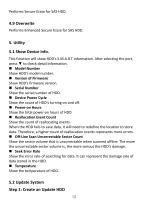
Performs Secure Erase for SAS HDD. Performs Enhanced Secure Erase for SAS HDD. This function will show HDD's S.M.A.R.T information. After selecting the port, press ▼ to check detail information. Show HDD's model number. ■ Version of Firmware Show HDD's firmware version. Show the serial number of HDD. ■ Device Power Cycle Show the count of HDD's turning on and off. Show the total power-on hours of HDD. ■ Reallocation Event Count Show the count of reallocating events. When the HDD fails to save data, it will need to redefine the location to store data. Therefore, a higher count of reallocation...
Open the catalog to page 13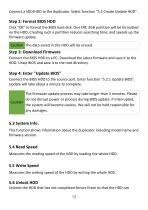
Connect a SDD/HDD to the duplicator. Select function "5.2 Create Update HDD". Step 2: Format BIOS HDD Click "OK" to format the BIOS hard disk. One FAT, 2GB partition will be formatted on the HDD. Creating such a partition reduces searching time, and speeds up the firmware update. Caution The data saved in this HDD will be erased. Step 3: Download Firmware Connect the BIOS HDD to a PC. Download the latest firmware and save it to the HDD. Unzip BIOS and save it to the root directory. Step 4: Enter "Update BIOS" Connect the BIOS HDD to the source port. Enter function "5.2.1 Update BIOS". Update...
Open the catalog to page 14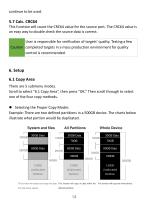
5.7 Calc. CRC64 This function will count the CRC64 value for the source port. The CRC64 value is an easy way to double check the source data is correct. User is responsible for verification of targets’ quality. Testing a few Caution completed targets in a mass production environment for quality control is recommended. 6. Setup 6.1 Copy Area There are 5 submenu modes. Scroll to select "6.1 Copy Area”, then press "OK.” Then scroll through to select one of the four copy methods. ⚫ Selecting the Proper Copy Modes Example: There are two defined partitions in a 500GB device. The charts below illustrate...
Open the catalog to page 15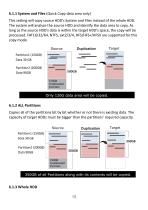
6.1.1 System and Files (Quick Copy data area only) This setting will copy source HDD’s System and Files instead of the whole HDD. The system will analyze the source HDD and identify the data area to copy. As long as the source HDD’s data is within the target HDD’s space, the copy will be processed. FAT16/32/64, NTFS, ext2/3/4, HFS/HFS+/HFSX are supported for this copy mode. Source Only 120G data area will be copied. 6.1.2 ALL Partitions Copies all of the partitions bit by bit whether or not there is existing data. The capacity of target HDDs must be bigger than the partitions’ required capacity....
Open the catalog to page 16All U-Reach Data Solutions Inc. catalogs and technical brochures
 Carry Series
21 Pages
 SATA III Ultra-High Speed
19 Pages
 Carry Series
18 Pages
 MTS-SASN Series
31 Pages
 MT/MTC Series
31 Pages
 PCIE SSD Duplicator
23 Pages
 Auto-detect Dual-interfaces
23 Pages
 NV-BM600CFX
37 Pages
 NVS200USAS Duplicator
21 Pages
 NV-BM Series – Slim Version
24 Pages
 NV-BM DUC Series
4 Pages
 NV-BM GT11 Series
41 Pages
 NV-BM Series
2 Pages
 NV-BM Series
41 Pages
- Grinding mill
- LED hand lamp
- Vertical pulverizer
- Reporting software
- Punching center
- Creation software
- Waste chopper
- Impact pulverizer
- Rechargeable hand lamp
- Storage software
- Visible illumination
- Hammer grinding mill
- Compact lump breaker
- Portable hand lamp
- Hole punch punching machine
- Lamp illumination
- Automatic grinding mill
- Software solution on site
- Hand lamp with battery
- UV illumination