
- Catalogs
- TWK-ELEKTRONIK GmbH
- Rotary encoder TBD Manual

Rotary encoder TBD Manual

Rotary encoder TBD Manual
- This manual is for rotary encoders with a PROFIsafe interface. Follow the owner's system-specific operating instructions, this user manual, and related documents. Protect the device from mechanical damage and operate within specified limits. Only qualified electricians should commission the device.
- The encoders connect directly to PROFIBUS-DP using the SPC3 Siemens PROFIBUS controller. The manual provides foundational knowledge for using encoders with PROFIBUS DP and instructions for Siemens Step7 software.
- Describes network topology, cable specifications, and connection details for PROFIBUS-DP using RS-485 technology. Includes guidelines for wiring, bus termination, and setting up the encoder with a connecting cap.
- Encoders are classified into Class 1 and Class 2 based on functionality. Class 1 transmits only position values, while Class 2 allows parameterization via the bus. Various configurations are available depending on the data format and functionality required.
- Details the process of data exchange between peripheral devices and the master. Explains formats for actual position values and the procedure for setting reference values, emphasizing that the encoder shaft must be stationary during this process.
- Defines programming parameters such as operating mode, measuring units per revolution, and total measuring range. Includes examples for parameterization and remarks on the velocity signal.
- Provides information on standard diagnostic messages, device-related diagnoses, and manufacturer-specific diagnoses. Examples of diagnostic messages are included.
- Guides the integration of the TWK PROFIBUS encoder into the Simatic Step7 environment, covering GSD file installation, address allocation, and parameterization. Example programs are provided for practical understanding.
- Lists the components included in the delivery and references additional literature for further reading.
- Defines technical terms related to encoders to aid user understanding.
Overview: The document outlines the parameterization of Class 1 and Class 2 encoders, detailing bus-specific and DP slave-specific data. It includes specifications for operating modes, measuring units, and total measuring range.
Specifications:
- Bus-specific Data: Includes station status, watchdog factors, minimum station delay responder, and identification numbers.
- DP Slave-specific Data: Class 1 encoder uses 2 bytes, while Class 2 encoder uses 22 bytes for user parameter data.
- Operating Mode: Defines code sequence (CW or CCW), scaling function status, velocity unit, and short diagnostic options.
- Measuring Units per Revolution: Specifies resolution from 1 to 4096 steps per revolution.
- Total Measuring Range: Allows programming of desired total measuring range and single turn resolution.
- Standard Diagnostic Information: Includes manufacturer identification and device-related diagnostics.
- Device-related Diagnosis: Covers alarm messages, operating mode, encoder type, resolution, and measuring range.
- Manufacturer-specific Diagnosis: Details errors such as EEPROM, RAM, and CRC errors, with suggested rectifications.
- GSD File Installation: Instructions for installing GSD files and integrating the encoder into a Siemens S7 control system.
- Module Selection and Address Allocation: Guides on selecting modules, setting I/O addresses, and parameterizing the encoder.
- Example Programs: Provides information on available S7 example programs for working with TWK profibus encoders, including class-specific projects and diagnostic handling.
- Ensure correct parameterization to avoid irreversible operations.
- Diagnostic messages provide critical insights into encoder status and potential errors.
- Integration with Simatic Step7 requires careful configuration of hardware and software settings.
Installation of Example Programs: Prerequisites include generating a project and inserting a control system with hardware configuration. Encoders are connected to a Profibus subnetwork with specified addresses. The installation involves retrieving and opening the example project files in Simatic Manager.
TWKDPCL2 Project: This class 2 project includes programs like Istwert, IstRef, Diag1, and Diag2. IstRef allows reading actual position values and setting preset values. Diag1 and Diag2 handle error diagnostics for class 2 encoders, with a diagnosis range of 63 bytes.
Explanations of Example Programs: Each program folder contains a symbol table with global variables. The cyclical program involves reading actual values, setting reference values, and handling error messages from OB82 and OB86. OB86 is triggered by DP slave failures, while OB82 handles diagnostic requests.
Scope of Delivery: The delivery includes an encoder with a DP interface and pin assignment. Documentation and example programs are available online.
Appendix A: Encoder Terms: Definitions are provided for terms like measuring units per revolution, measuring range, total measuring range in units, code sequence, and preset value.
Catalog excerpts

T-series encoders with PROFIBUS interface Accompanying data sheet TRD 11868 User manual TWK-ELEKTRONIK GmbH Heinrichstrasse 85 [email protected] www.twk.de
Open the catalog to page 1
COPYRIGHT: The Operating Instructions TRD 12770 is owned by TWK-ELEKTRONIK GMBH and is protected by copyright laws and international treaty provisions. © 2013 by TWK-ELEKTRONIK GMBH POB 10 50 63 ■ 40041 Dusseldorf ■ Germany Tel. +49/211/63 20 67 ■ Fax +49/211/63 77 05 [email protected] ■ www.twk.de Date: 19.12.2013 page 2 of 26 document no. TRD 12770 CE
Open the catalog to page 2
Safety instructions 1. Safety instructions 1.1 Scope of validity This user manual applies exclusively to the following rotary encoders with PROFIsafe interface: 1.2 Documentation The following documents must be noted: - The owner's system-specific operating instructions - This user manual - Data sheet number TRD 11868 - The pin assignment enclosed with the device - Installation instruction TZY 10206 enclosed with the device 1.3 Proper use TWK-ELEKTRONIK GmbH's rotary encoders and linear transducers are used to record rotary and linear positions, and make their measured values available as an...
Open the catalog to page 5
General 2. General The PROFIBUS encoders are designed for direct connection to PROFIBUS-DP. The interface is implemented with the SPC3 Siemens PROFIBUS controler. The protocol corresponds to the DP-Slave Class 2 functionality in accordance with the Profibus-Profile for Encoders, No. 3.062. The first part of the user manual deals with the fundamental prerequisites for understanding the use of an encoder in the PROFIBUS DP, whilst the second part provides instructions for use with the Siemens Step7 software, including example software. For a general understanding of the PROFIBUS field bus system...
Open the catalog to page 6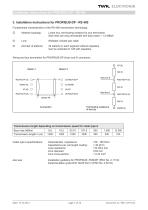
Fundamental characteristics of the RS-485 transmission technology: Linear bus, terminating resistors for bus termination Stub lines are only permissible with baud rates < 1.5 MBit/s Shielded, twisted pair cable 32 stations in each segment without repeaters Can be extended to 126 with repeaters. Wiring and bus termination for PROFIBUS-DP (9-pin sub-D connector): RxD/TxD-P (3) 220 n RxD/TxD-N (8) 390 n DGND (5) Transmission length depending on transmission speed for cable type A Cable type A specifications: Characteristic impedance: Capacitance per unit length coating: Loop resistance: Core diameter:...
Open the catalog to page 7
3.1 Encoder TRD with connecting cap ZKD The connecting cap for triple connection technology is a T-coupler, which is installed in the PROFIBUS. It is equipped with three PG connections, which are subdivided as follows: □ Cable gland M12x1.5 □ Cable gland M16x1.5 □ Cable gland M16x1.5 Voltage supply for the encoder (24 VDC) Bus in (signal data A, B) Bus out (signal data A‘, B‘) The encoder is connected via the 15-pin SUB-D plug. In the event of an error, the encoder can be replaced without time-consuming installation. The connecting cap is disconnected from the encoder by undoing 2 fastening screws...
Open the catalog to page 8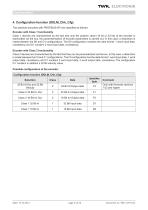
4. Configuration function (DDLM_Chk_Cfg) The absolute encoders with PROFIBUS-DP are classified as follows: Encoder with Class 1 functionality Class 1 devices are characterised by the fact that only the position value (16 bit or 32 bit) of the encoder is transmitted via the bus. No parameterisation of encoder parameters is carried out. In this case, a distinction is made between the D0 and D1 configurations. The D0 configuration contains the data format: 1 word input data, consistency and D1 contains 2 word input data, consistency. Encoder with Class 2 functionality Class 2 devices are characterised...
Open the catalog to page 9
5. Data exchange function (DDLM_Data_Exchange) Input data are data which are transmitted from the peripheral devices to the master or into the bus. Output data are data which are transmitted from the master to the slave subscribers. Reference value control (see below) is listed here as an example of output data. 5.1 Actual position value The actual position value is output in 16- or 32-bit data format (input data), also see configuration of the encoder. The velocity value (configuration F3) is output as 32 bit integer value. The leading sign is positiv for increasing and negativ for decreasing...
Open the catalog to page 10
After bit 31 = 0 has been reset, the absolute encoder operates in normal operating mode. The resulting offset is saved in the encoders non volatile memory an can be read out with the diagnoctic data., (chapter 7). Date: 19.12.2013 page 11 of 26 document no. TRD 12770 CE
Open the catalog to page 11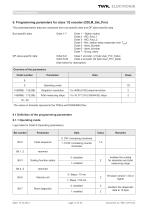
The parameterisation data are comprised from bus-specific data and DP slave-specific data. Bus-specific data: Octet 1-7 Octet 1 - Station status Octet 2 - WD_Fact_1 Octet 3 - WD_Fact_2 Octet 4 - Min. station delay responder (min TSDR) Octet 5 - Ident_Number Octet 6 - Ident_Number Octet 7 - Group_Ident Octet 8-9 Class 1 encoder ( 2 byte User_Prm_Data) Octet 8-29 Class 2 encoder (22 byte User_Prm_Data) Date: 19.12.2013 page 12 of 26 document no. TRD 12770 CE
Open the catalog to page 12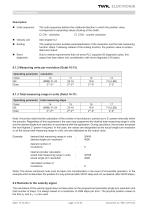
■ Code sequence: The code sequence defines the rotational direction in which the position value corresponds to ascending values (looking at the shaft). □ CW - clockwise □ CCW - counter clockwise The scaling function enables parameterisation of the resolution and the total measuring function: steps. Following release of the scaling function, the position value is recalcu lated and output. Due to market requirements that not every PLC supports 63 diagnostic bytes, this aspect has been taken into consideration with short diagnostic (16 bytes). 6.1.2 Measuring units per revolution (Octet 10-13) Note:...
Open the catalog to page 13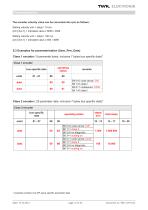
The encoder velocity value can be converted into rpm as follows: Setting velocity unit = steps / 10 ms: rpm [min-1] = indicated value x 6000 / 4096 Setting velocity unit = steps / 100 ms: rpm [min-1] = indicated value x 600 / 4096 6.3 Examples for parameterisation (User_Prm_Data) Class 1 encoder ( 9 parameter bytes, inclusive 7 bytes bus specific data)1 Date: 19.12.2013 page 14 of 26 document no. TRD 12770 CE example contains only DP-slave specific parameter data
Open the catalog to page 14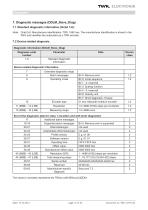
7. Diagnostic messages (DDLM_Slave_Diag) 7.1 Standard diagnostic information (Octet 1-6): Note: Octet 5,6: Manufacturer identification: TRD: 1962 hex. The manufacturer identification is stored in the PNO and identifies the subscriber as a TWK encoder. The values in brackets represents the TRDxx-xx8192RxxxxC2ZD01. Date: 19.12.2013 page 15 of 26 document no. TRD 12770 CE
Open the catalog to page 15All TWK-ELEKTRONIK GmbH catalogs and technical brochures
 Rotary encoder TBN58/C3 manual
50 Pages
 Rotary encoder TBN58/C3
22 Pages
 Rotary encoder TBD
12 Pages
 Rotary encoder TBE58
16 Pages
 Rotary encoder KRP - Manual
19 Pages
 Rotary encoder KRP
7 Pages
 Rotary encoder TBN58/S4 SIL2
22 Pages
 Rotary encoder TBN50/C3 manual
20 Pages
 Rotary encoder TBN50/C3
22 Pages
 Rotary encoder HBN/S3 SIL2
16 Pages
 Product range 2022
64 Pages
 Image brochure TWK
28 Pages
 Inclinometer NBA51
6 Pages
 Incremental encoder FOI
7 Pages
 Rotary encoder TBA42
16 Pages
 Rotary encoder TRA42
16 Pages
 Rotary encoder TRN58/S4 SIL2
22 Pages
 Rotary encoder TRN58/C3 manual
50 Pages
 Rotary encoder TRN58/C3
22 Pages
 Rotary encoder TRN42/S4 SIL2
22 Pages
 Manual TRN50/C3
86 Pages
 Rotary encoder TRN50/C3
22 Pages
 Rotary encoder TRN42/C3 manual
86 Pages
 Rotary encoder TRN42/C3
22 Pages
 Rotary encoder TBN42/S4 SIL2
22 Pages
 Rotary encoder TBN42/C3 manual
86 Pages
 Rotary encoder TBN42/C3
22 Pages
 Rotary encoder TRE58
16 Pages
 Rotary encoder TRT manual
40 Pages
 Rotary encoder TRT
14 Pages
 Switching cam encoder NOCE
14 Pages
 Switching cam encoder NOCA
17 Pages
 Vibration sensor NVT/S3 PLd
12 Pages
 Vibration sensor NVA
12 Pages
 Inclinometer NBN
17 Pages
 Incremental encoder TBI42
6 Pages
 Vibration sensor NVA/S3 PLd
15 Pages
 Rotary transducer PMR411
1 Page
 Rotary encoder TRT/S3 SIL2
13 Pages
 Rotary transducer VP12
1 Page
 Switching cam encoder NOCN
22 Pages
 Inclination sensor NBT manual
21 Pages
 Inclination sensor NBT
10 Pages
 Inclinometer NBA
17 Pages
 Inclinometer NBT/S3 SIL2/PLd
12 Pages
 Inclinometer NBN/S3 SIL2
13 Pages
 Rotary encoder TBE50
16 Pages
 Rotary encoder HBE
14 Pages
 Rotary encoder TRK manual
18 Pages
 Rotary encoder TRK
11 Pages
 Rotary encoder TMN50 manual
22 Pages
 Rotary encoder TMN50
6 Pages
 Rotary encoder TRK/S3 SIL2
14 Pages
 Rotary encoder TRE42
6 Pages
 Rotary encoder TRE50
6 Pages
 Rotary encoder TRA50
6 Pages
 Rotary encoder TBE42
6 Pages
 Rotary encoder TME42
6 Pages
 Rotary encoder TRD manual
26 Pages
 Rotary encoder TRD
12 Pages
 Rotary encoder TME50
6 Pages
 Rotary encoder TBN36
6 Pages
 Rotary encoder TMA50
6 Pages
 Rotary encoder TMN42 manual
22 Pages
 Rotary encoder TMN42
6 Pages
 Rotary encoder TMA42
6 Pages
 Rotary encoder TBA50
16 Pages
 Rotary encoder TBE36 manual
22 Pages
 Rotary encoder TBE36
6 Pages
 Rotary encoder TBN42
6 Pages
 Rotary encoder TBN37
8 Pages
 Rotary encoder TBA37
7 Pages
 Rotary encoder TBB50
16 Pages
 Rotary encoder PBA12
2 Pages
 Rotary encoder TBA36
6 Pages
 Rotary encoder TKA60
2 Pages
 Rotary encoder TKN46 manual
22 Pages
 Rotary encoder TKN46
7 Pages




- Incremental encoder
- Incremental rotary encoder
- Absolute rotary encoder
- Tilt sensor
- Industrial rotary encoder
- Magnetic rotary encoder
- Displacement transducer
- Linear displacement sensor
- Digital inclination sensor
- Aluminum rotary encoder
- Stainless steel rotary encoder
- Single-turn rotary encoder
- MEMS inclination sensor
- Flange rotary encoder
- Ultra-rugged rotary encoder
- Multi-axis tilt sensor
- SSI angular encoder
- Multi-turn rotary encoder
- Analog displacement transducer