
- Catalogs
- TOPWAY LCD
- LM3122AGG-2


- Company
- Products
- Catalogs
- News & Trends
- Exhibitions
LM3122AGG-2

LM3122AGG-2
- Display Specifications: The LCD module operates in FSTN, Negative, Transmissive mode with a viewing angle of 12 H and a green LED backlight. The display color changes between light gray and dark gray based on data input.
- Mechanical Specifications: The module has an outline dimension of 246.0 x 55.2 x 12.5 mm.
- Block Diagram: The module includes a 202 x 32 pixel LCD panel with components like SBN1661G and SBN0080G or their equivalents.
- Terminal Functions: The module has 20 pins with specific functions, including power supply, data input, and reset signals.
- Supply voltage ranges from 0 to 4.3V, with operating temperatures between 0 to 50°C and storage temperatures from -20 to 70°C.
- DC Characteristics: Operating voltage is between 3.1V to 3.5V, with an operating current of up to 11.0 mA.
- LED Backlight Circuit: Forward voltage is typically 5.0V with a forward current of 90 mA.
- AC Characteristics: Includes timing specifications for address hold, setup, and data hold times.
- Viewing angles are specified at 60 degrees along both x and y axes, with a contrast ratio defined by the brightness of selected versus unselected segments.
- Basic Setting: Includes settings for duty cycle, display on/off, and other operational parameters.
- Resetting the LCD Module: Describes the reset process and initial status of the module post-reset.
- Display Data RAM Memory Map: Details the memory map for display data across different sections of the module.
- Display Command: Lists instructions for controlling the display, including commands for display on/off, setting addresses, and more.
- Guidelines include avoiding mechanical shock, excessive force, and static electricity. Recommendations for cleaning, mounting, and storage are also provided to prevent damage and ensure reliability.
Catalog excerpts
LM3122AGG-2 LCD Module User Manual Preliminary release www.topwaydisplay.com www.topwaysz.com Document Name: LM3122AGG-2-Manual-Rev0.1 Page: 1 of 11
Open the catalog to page 1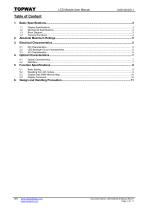
LCD Module User Manual www.topwaydisplay.com www.topwaysz.com Document Name: LM3122AGG-2-Manual-Rev0.1 Page: 2 of 11
Open the catalog to page 2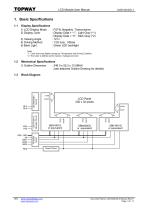
LCD Module User Manual Display Specifications 1) LCD Display Mode : FSTN, Negative, Transmissive 2) Display Color : Display Data = “1” : Light Gray (*1) : Display Data = “0” : Dark Gray (*2) 3) Viewing Angle : 12 H 4) Driving Method : 1/32 duty, 1/5bias 5) Back Light : Green LED backlight Note: *1. Color tone may slightly change by Temperature and Driving Condition. *2. The Color is defined as the inactive / background color Mechanical Specifications 1) Outline Dimension : 246.0 x 55.2 x 12.5MAX (see attached Outline Drawing for details) Block Diagram LCD Power & Booster Circuit www.topwaydisplay.com...
Open the catalog to page 3
LCD Module User Manual 1.4 Terminal Functions Pin Pin I/O Descriptions No. Name 1 VSS Power Negative Power Supply, Ground (0V) 2 VDD Power Positive Power Supply 3 VDD 4 A0 Input A0 = H; DB0 – DB7 = Display Data A0 = L; DB0 – DB7 = Instruction Data 5 /WR1 Input Write Enable Signal for left section of the LCD module 6 VDD Power Positive Power Supply 7 VDD 8 /WR2 Input Write Enable Signal for middle section of the LCD module 9 DB0 Input Data bus for display data or instruction data : : 16 DB7 17 RES Input Reset signal (*2) Resetting: rising edge and falling edge of RES Normal Running: RES=Low 18...
Open the catalog to page 4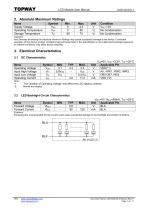
LCD Module User Manual 2. Absolute Maximum Ratings Items Supply Voltage Operating Temperature Storage Temperature Condition VSS = 0V No Condensation No Condensation Cautions: Any Stresses exceeding the Absolute Maximum Ratings may cause substantial damage to the device. Functional operation of this device at other conditions beyond those listed in the specification is not implied and prolonged exposure to extreme conditions may affect device reliability. Items Operating Voltage Input High Voltage Input Low Voltage Operating Current Note: *1. *2. The variation of Operating Voltage may affect the...
Open the catalog to page 5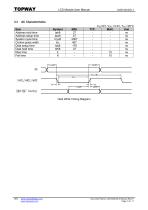
LCD Module User Manual Item Address hold time Address setup time System cycle time Control pulse width Data setup time Data hold time Rise time Fall time Host Write Timing Diagram www.topwaydisplay.com www.topwaysz.com Document Name: LM3122AGG-2-Manual-Rev0.1 Page: 6 of 11
Open the catalog to page 6
LCD Module User Manual Optical Characteristics Item Viewing Direction Viewing Angle x Viewing Angle y On Time Off Time Contrast LCD Operating Voltage 4.2 Vop=typ. Vop=typ. Vop=typ. X,Y = 0, Vop=typ. X,Y = 0, Vop=typ. X,Y = 0, Vop=typ. X,Y = 0 4.2.1 Viewing Direction Viewing Direction = direction (Φ) that provide the best display result, when Θ = 30° 4.2.2 Viewing Angle Viewing Angle x = total viewing angle along x-axis (Θ1) Viewing Angle y = total viewing angle along y-axis (Θ2) www.topwaydisplay.com www.topwaysz.com
Open the catalog to page 7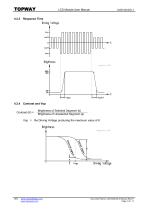
LCD Module User Manual Response Time Brightness of Selected Segment (b) Brightness of Unselected Segment (a) Vop = the Driving Voltage producing the maximum value of K www.topwaydisplay.com www.topwaysz.com Document Name: LM3122AGG-2-Manual-Rev0.1 Page: 8 of 11
Open the catalog to page 8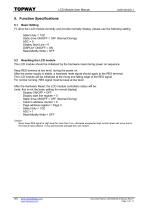
LCD Module User Manual 5. Function Specifications 5.1 Basic Setting To drive the LCD module correctly and provide normally display, please use the following setting Select duty = 1/32 Static drive ON/OFF = OFF (Normal Driving) ADC = 0 Display Start Line = 0 DISPLAY ON/OFF = ON Read-Modify-Write = OFF 5.2 Resetting the LCD module The LCD module should be initialized by the hardware reset during power on sequence. Keep RES terminal at low level, during the power on. After the power supply is stable, a hardware reset signal should apply to the RES terminal. The LCD module will be initialized at...
Open the catalog to page 9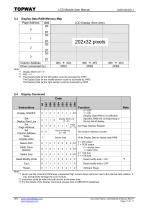
LCD Module User Manual LCD Display (front view) Note: *1. Display Start Line = 0 *2. ADC = 0 *3. The Display Data for the left section could be accessed by /WR1. The Display Data for the middle section could be accessed by /WR2. The Display Data for the right section could be accessed by /WR3. Display Command Display ON/OFF Set Display Start Line Set Page Address Set Column Address Write Display Data Display Start Line (0 ~31) 0 = OFF 1 = ON (Display Data RAM is not affected) Specifies RAM line corresponding to the top line of display Set Page Address Register Set Column Address Counter Display...
Open the catalog to page 10
LCD Module User Manual The LCD panel is made by glass. Any mechanical shock (eg. dropping form high place) will damage the LCD module. Do not add excessive force on the surface of the display, which may cause the Display color change abnormally. The polarizer on the LCD is easily get scratched. If possible, do not remove the LCD protective film until the last step of installation. Never attempt to disassemble or rework the LCD module. Only Clean the LCD with Isopropyl Alcohol or Ethyl Alcohol. Other solvents (eg. water) may damage the LCD. When mounting the LCD module, make sure that it is free...
Open the catalog to page 11All TOPWAY LCD catalogs and technical brochures
 TOPWAY Smart LCD SGTools Handbook
108 Pages
 10.1" TFT LCD Module
1 Page
 MONO Product
2 Pages
 LMT050DNCFWU-NNA-2
15 Pages
 LMT080TDGP01
16 Pages
 HKT035BTB-1D
36 Pages
 HMT050AMC-C
17 Pages
 HMT043ATA-6C
31 Pages
 TM035PDHG09
42 Pages
 TM035PDHG03
31 Pages
 TM028HDZP01
28 Pages
 LM256160DCW-1
14 Pages
 LM12896FCW-1
17 Pages
 LM12832KCW
13 Pages
 LM2088EFW-9
12 Pages
 LM240160YCW
18 Pages
 LM6093ACW
14 Pages
 HMT104ATA-C
11 Pages
 HMT101ATA-D
36 Pages
 HKT080ATA-C
1 Page
 HMT080ATA
1 Page
 HKT070DTA-1C
11 Pages
 HMT070DTA-D
1 Page
 HKT070DMC-2C
19 Pages
 HMT070ETD-C
31 Pages
 HMT070ETD-1D
34 Pages
 HMT056ATA-C
1 Page
 HMT050CB-1C
31 Pages
 HMT050DTA-D
1 Page
 HKT050ATA-C
1 Page
 HMT043ATA-7C
32 Pages
 HMT043GTA-1D
37 Pages
 HKT043BMC-2C
17 Pages
 HMT043ATA-3C
11 Pages
 HMT043BMC-C
1 Page
 HMT043ATA-4C
11 Pages
 HKT043BMC-C
1 Page
 HKT043ATA-1C
12 Pages
 HMT035ATA-D
13 Pages
 HMT028ATB-C
12 Pages
 HKT104ATA-C
31 Pages
 HMT068BTA-C
33 Pages
 HMT070ATA-1C
32 Pages
 HMT080ATA-C
33 Pages
 HMT090ATA-C
30 Pages
 HMT101ATA-C
33 Pages
 HMT050ATA-2C
31 Pages
 HMT043ATA-2C
32 Pages
 IC Raio RA6963 LCD Controller
42 Pages
 IC Epson S1D13L01 LCD Controller
118 Pages
 IC EPSON S1D13700 LCD Controller
133 Pages
 EPSON S1D13709 LCD Controller
192 Pages
 Samsung S6B0108 LCD Driver
23 Pages
 Avant SBN0064G LCD Driver
37 Pages
 Avant SBN6400G LCD Driver
34 Pages
 EPSON SED1335 LCD Controller
95 Pages
 SGS-THOMSON ST7282
23 Pages
 Raio RA6963 LCD Controller
42 Pages
 Raio RA8875 TFT LCD Controller
174 Pages
 Raio RA8835 LCD Controller
93 Pages
 RAIO RA8803 LCD Controller
8 Pages
 HMT035ATA-1C
1 Page
 Smart LCD introduction
14 Pages
 Topway company introduction
14 Pages
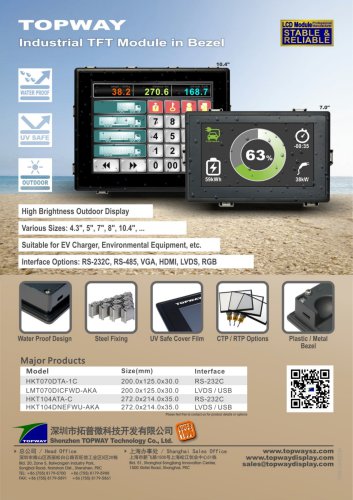 TFT module in bezel
1 Page
 Topway TFT LCD
1 Page
 LM12864L Series
1 Page
 LM12864T Series
1 Page
 LM12864F Series
1 Page
 LM6060C Series
1 Page
 LM12864M Series
1 Page
 LM6029A Series
1 Page
 LM6059B Series
1 Page
 LM24048A Series
1 Page
 LM13232A Series
1 Page
 LM160160A Series
1 Page
 LMB402C Series
1 Page
 LMB242A Series
1 Page
 LMB204C Series
1 Page
 LM3121 Series
1 Page
 LMB404A Series
1 Page
 HMT043FC-1C
1 Page
 LM3123 Series
1 Page
 LMB204B Series
1 Page
 LMB202E Series
1 Page
 LMB202D Series
1 Page
 LMB164A Series
1 Page
 LMB162G Series
1 Page
 LMB162H Series
1 Page
 LMB162N Series
1 Page
 LMB162A Series
1 Page
 LMB0820D Series
1 Page
 LMB0820C Series
1 Page
 LMB0820A Series
1 Page
 LMB081N Series
1 Page
 LMB081A Series
1 Page
 LMB162X series
1 Page
 LMT057DNAFWU-AAN series
1 Page
 LMT057DNAFWU-AAA series
1 Page
 LMT104SDH01 Series
1 Page
 TOPWAY Product List (Y2012)
4 Pages
 TFT LCD module
1 Page
 Without controller
1 Page
 Chinese fonts
1 Page
 Built-in controller
1 Page
 Character module
1 Page



- Touch monitor
- LCD screen
- Industrial monitor
- Industrial display panel
- HDMI monitor
- TFT display module
- VESA mounting monitor
- Color display panel
- Touch screen display panel
- LED display panel
- High-brightness monitor
- IPS display panel
- TFT-LCD monitor
- Control display system
- Electronic display panel
- Backlit display panel
- LED-backlit display panel
- Wall-mount monitor