
- Catalogs
- TOPWAY LCD
- LM2088EFW-9


- Company
- Products
- Catalogs
- News & Trends
- Exhibitions
LM2088EFW-9

LM2088EFW-9
- Display Specifications: The LCD module operates in STN, Negative, Transmissive mode with a light gray display for data '1' and dark blue for data '0'. It features a viewing angle of 6 H and uses a 1/240 duty, 1/14 bias driving method with a white LED backlight.
- Mechanical Specifications: The module's dimensions are 160.0 x 109.0 x 11.2 mm.
- Block Diagram: Includes a 320 x 240 pixel LCD panel, segment and common drivers, a booster and power circuit, and a backlight circuit.
- Details the pin functions including power supply, input/output signals, and mode selection.
- Specifies limits for supply voltage, input voltage, and operating/storage temperatures. Exceeding these may damage the device.
- DC Characteristics: Operating voltage is 4.5 to 5.5 V with a typical current of 24.4 mA.
- LED Backlight Circuit: Forward voltage is 5.0 V with a typical current of 145 mA.
- AC Characteristics: Provides timing requirements for 8080 mode operations.
- Reset Timing: Specifies timing for oscillator stability and reset pulse duration.
- Display Contrast: Adjusted using a variable resistor (25k to 50k recommended).
- Resetting: Requires hardware reset via /RST terminal.
- Jumper Functions: Includes interfacing and clock divider settings.
- Display Pixel Map: Describes pixel arrangement and mapping.
- Command Summary: Lists commands for system setup, power save, display control, and more.
- Initialization Setting Example: Provides a sequence for initializing the LCD module after reset.
- Advises on proper handling and design considerations to ensure device reliability.
The document outlines configuration settings for an LCD module, specifically the LM2088EFW-9. Key parameters include horizontal and vertical character sizes set to 8, character bytes per row, total character bytes per row including horizontal blanking, and lines per frame. The horizontal address range of the virtual screen is also specified.
Display Settings:
The display can be turned on with a specific command, and attributes such as screen block settings and cursor visibility can be adjusted. Detailed instructions are provided for setting cursor types and directions, as well as display overlay formats.
Scrolling and Gray Scale:
Horizontal scroll positions can be set, although no scroll is applied in the example. The gray scale depth is selectable, with a default of 1 bit-per-pixel.
Cursor and Memory Operations:
Instructions for setting cursor addresses and writing to display memory are provided, with parameters specified for each operation.
Additional Information:
For further details, the document refers to the S1D13700 datasheet and a separate design and handling precaution document. The manual is available on the Topway Display website.
Catalog excerpts

LM2088EFW-9 LCD Module User Manual Document Name: LM2088EFW-9-Manual-Rev0.1 Page: 1 of 11
Open the catalog to page 1
LCD Module User Manual Document Name: LM2088EFW-9-Manual-Rev0.1 Page: 2 of 11
Open the catalog to page 2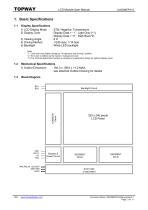
LCD Module User Manual Display Specifications 1) LCD Display Mode : STN, Negative, Transmissive 2) Display Color : Display Data = “1” : Light Gray (*1) : Display Data = “0” : Dark Blue(*2) 3) Viewing Angle :6H 4) Driving Method : 1/240 duty, 1/14 bias 5) Backlight : White LED backlight Note: *1. Color tone may slightly change by Temperature and Driving Condition. *2. The Color is defined as the inactive / background color *3. Fine Contrast adjustment function is necessary in application design for optimal display result Mechanical Specifications 1) Outline Dimension : 160.0 x 109.0 x 11.2 MAX....
Open the catalog to page 3
LCD Module User Manual Power Power Input Input Input Input Descriptions 0V Power Supply, GND Positive Power Supply LCD Contrast Reference Input Write enable input, active LOW Read enable input, active LOW Chip Select Signal /CS=LOW: Data IO is enabled Data Type Select A0=H: command write, display data or cursor add read A0=L: status flag read, display data or parameter write Reset Signal: /RES = L, Reset the LCD Module /RES = H, Normal Running I/O Output Power Power Power Input - 8-bit bi-directional data bus Wait signal (*1) Power Booster Output for V0 Positive Power Supply for LED backlight...
Open the catalog to page 4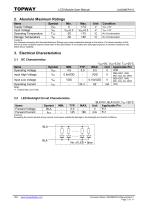
LCD Module User Manual 2. Absolute Maximum Ratings Items Supply Voltage Input Voltage Operating Temperature Storage Temperature Condition VSS = 0V VSS = 0V No Condensation No Condensation Cautions: Any Stresses exceeding the Absolute Maximum Ratings may cause substantial damage to the device. Functional operation of this device at other conditions beyond those listed in the specification is not implied and prolonged exposure to extreme conditions may affect device reliability. DC Characteristics VSS=0V, VDD=5.0V, TOP=25C MAX. Unit Applicable Pin VDD 5.5 V Items Operating Voltage Input High Voltage...
Open the catalog to page 5
LCD Module User Manual Item /CS setup time A0 setup time /WR, /RD falling edge to /WAIT driven low D[7:0] setup time to /WR rising edge (write cycle) /RD falling edge to D[7:0] driven (read cycle) /CS hold time A0 hold time /RD, /WR rising edge to WAIT# high impedance D[7:0] hold time from /WR rising edge (write cycle) D[7:0] hold time from /CS rising edge (read cycle) /WAIT rising edge to valid Data /RD, /WR pulse inactive time /WAIT pulse active time = System clock period = 2Ts + 5 = 1Ts + 7 (for 5.0V) = 1Ts (for a read cycle followed by a read or write cycle) = 2Ts + 2 (for a write cycle followed...
Open the catalog to page 6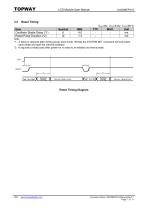
LCD Module User Manual Reset Timing Item Oscillator Stable Delay (*1) Reset Pulse Duration (*2) note: *1. A delay is required after exiting power save mode. Writing the SYSTEM SET command will exit power save mode and start the internal oscillator. *2. It requires a reset pulse after power-on in order to re-initialize its internal state. Reset Timing Diagram Document Name: LM2088EFW-9-Manual-Rev0.1 Page: 7 of 11
Open the catalog to page 7
LCD Module User Manual 4. Function Specifications VDD VOUT Power Supply 4.1 Adjusting the Display Contrast A Variable-Resistor must be connected to the LCD module for providing a reference to V0. Adjusting the VR will result the change of LCD display contrast. The recommended value of VR is 25k to 50k 4.2 Resetting the LCD module The LCD module should be initialized by hardware reset, using /RST terminal. Jumper Functions Interfacing Setting Jumper JP9 JP8 Function Description Open Close 8080 mode selected Close Open 6800 mode selected Clock Divider Setting Jumper JP4 JP5 JP6 JP7 Open Close Open...
Open the catalog to page 8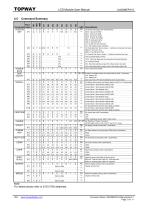
POWER SAVE DISP ON/OFF SCROLL CGRAM ADR HDOT SCR CSRW GRAY SCALE MWRITE ParaCommand meter SYSTEM SET P1 LCD Module User Manual HEX Descriptions 40 Init device and display (with 8 parameters) ** M0=0: internal CG ROM M0=1: internal CG RAM M2=0: 8-pixel char height M2=1: 16-pixel char height W/S=0: single panel drive W/S=1: dual panel drive IV=0: Screen top-line correction IV=1: No screen top-line correction FX=Horizontal Char Size in pixels – 1 (define the horizontal char size) MOD=0: 16-line AC drive MOD=1: two frame AC drive Set display overlay format (with 1 parameters) Write to display memory...
Open the catalog to page 9
LCD Module User Manual 4.6 Initialization Setting Example The following setting should be issue to LCD module after hardware reset. (example could be adjusted if necessary.) Command Parameter SYSTEM SET P1 DISP ON/OFF SCROLL CSRDIR OVLAY HDOT SCR GRAY SCALE CSRW Memory Data : Memory Data Descriptions Init device and display (with 8 parameters) M0=0: internal CG ROM M2=0: 8-pixel char height W/S=0: single panel drive IV=1: No screen top-line correction FX=7: the horizontal char size=7+1=8 WF=1: two frame AC drive FY=7: the vertical char size=7+1=8 C/R: Character Bytes per Row TC/R: Total Char...
Open the catalog to page 10
LCD Module User Manual 5. Design and Handling Precaution Please refer to "LCD-Module-Design-Handling-Precaution.pdf". Document Name: LM2088EFW-9-Manual-Rev0.1 Page: 11 of 11
Open the catalog to page 11All TOPWAY LCD catalogs and technical brochures
 TOPWAY Smart LCD SGTools Handbook
108 Pages
 10.1" TFT LCD Module
1 Page
 MONO Product
2 Pages
 LMT050DNCFWU-NNA-2
15 Pages
 LMT080TDGP01
16 Pages
 HKT035BTB-1D
36 Pages
 HMT050AMC-C
17 Pages
 HMT043ATA-6C
31 Pages
 TM035PDHG09
42 Pages
 TM035PDHG03
31 Pages
 TM028HDZP01
28 Pages
 LM256160DCW-1
14 Pages
 LM12896FCW-1
17 Pages
 LM12832KCW
13 Pages
 LM3122AGG-2
12 Pages
 LM240160YCW
18 Pages
 LM6093ACW
14 Pages
 HMT104ATA-C
11 Pages
 HMT101ATA-D
36 Pages
 HKT080ATA-C
1 Page
 HMT080ATA
1 Page
 HKT070DTA-1C
11 Pages
 HMT070DTA-D
1 Page
 HKT070DMC-2C
19 Pages
 HMT070ETD-C
31 Pages
 HMT070ETD-1D
34 Pages
 HMT056ATA-C
1 Page
 HMT050CB-1C
31 Pages
 HMT050DTA-D
1 Page
 HKT050ATA-C
1 Page
 HMT043ATA-7C
32 Pages
 HMT043GTA-1D
37 Pages
 HKT043BMC-2C
17 Pages
 HMT043ATA-3C
11 Pages
 HMT043BMC-C
1 Page
 HMT043ATA-4C
11 Pages
 HKT043BMC-C
1 Page
 HKT043ATA-1C
12 Pages
 HMT035ATA-D
13 Pages
 HMT028ATB-C
12 Pages
 HKT104ATA-C
31 Pages
 HMT068BTA-C
33 Pages
 HMT070ATA-1C
32 Pages
 HMT080ATA-C
33 Pages
 HMT090ATA-C
30 Pages
 HMT101ATA-C
33 Pages
 HMT050ATA-2C
31 Pages
 HMT043ATA-2C
32 Pages
 IC Raio RA6963 LCD Controller
42 Pages
 IC Epson S1D13L01 LCD Controller
118 Pages
 IC EPSON S1D13700 LCD Controller
133 Pages
 EPSON S1D13709 LCD Controller
192 Pages
 Samsung S6B0108 LCD Driver
23 Pages
 Avant SBN0064G LCD Driver
37 Pages
 Avant SBN6400G LCD Driver
34 Pages
 EPSON SED1335 LCD Controller
95 Pages
 SGS-THOMSON ST7282
23 Pages
 Raio RA6963 LCD Controller
42 Pages
 Raio RA8875 TFT LCD Controller
174 Pages
 Raio RA8835 LCD Controller
93 Pages
 RAIO RA8803 LCD Controller
8 Pages
 HMT035ATA-1C
1 Page
 Smart LCD introduction
14 Pages
 Topway company introduction
14 Pages
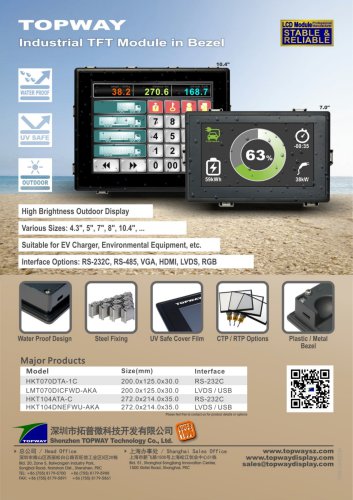 TFT module in bezel
1 Page
 Topway TFT LCD
1 Page
 LM12864L Series
1 Page
 LM12864T Series
1 Page
 LM12864F Series
1 Page
 LM6060C Series
1 Page
 LM12864M Series
1 Page
 LM6029A Series
1 Page
 LM6059B Series
1 Page
 LM24048A Series
1 Page
 LM13232A Series
1 Page
 LM160160A Series
1 Page
 LMB402C Series
1 Page
 LMB242A Series
1 Page
 LMB204C Series
1 Page
 LM3121 Series
1 Page
 LMB404A Series
1 Page
 HMT043FC-1C
1 Page
 LM3123 Series
1 Page
 LMB204B Series
1 Page
 LMB202E Series
1 Page
 LMB202D Series
1 Page
 LMB164A Series
1 Page
 LMB162G Series
1 Page
 LMB162H Series
1 Page
 LMB162N Series
1 Page
 LMB162A Series
1 Page
 LMB0820D Series
1 Page
 LMB0820C Series
1 Page
 LMB0820A Series
1 Page
 LMB081N Series
1 Page
 LMB081A Series
1 Page
 LMB162X series
1 Page
 LMT057DNAFWU-AAN series
1 Page
 LMT057DNAFWU-AAA series
1 Page
 LMT104SDH01 Series
1 Page
 TOPWAY Product List (Y2012)
4 Pages
 TFT LCD module
1 Page
 Without controller
1 Page
 Chinese fonts
1 Page
 Built-in controller
1 Page
 Character module
1 Page



- Touch monitor
- LCD screen
- Industrial monitor
- HDMI monitor
- Industrial display panel
- VESA mounting monitor
- TFT display module
- Color display panel
- Touch screen display panel
- LED display panel
- High-brightness monitor
- IPS display panel
- Control display system
- Electronic display panel
- Backlit display panel
- TFT-LCD monitor
- Wall-mount monitor
- LED-backlit display panel