
- Catalogs
- TOPWAY LCD
- HKT043BMC-2C


- Company
- Products
- Catalogs
- News & Trends
- Exhibitions
HKT043BMC-2C

HKT043BMC-2C
The TOPWAY HKT043BMC-2C is a Smart TFT Module designed for industrial, medical, and power electronics applications. It features a 32-bit MCU, a graphics engine, and a 4.3” screen with 480x272 resolution and 65k color depth. The module operates between -20 to +70°C and supports RS485 interface.
The module includes RS485 for differential signal communication and USB for preloading TML and image files, suspending display functions during transfer.
Power supply voltage ranges from -0.3 to 26.0 V, with an operating temperature of -20 to 70°C. Exceeding these limits may damage the device.
Operating voltage is 6.0 to 26.0 V with typical currents of 200 mA. The communication baud rate is software adjustable.
Supports TML/XML files for GUI and RS485/Modbus RTU commands. A quick start guide is available for setup and real-time data display.
Viewing angle is 60-70 degrees, contrast ratio 400-500, response times 10-30 ms, and luminance 300 cd/m2.
Ensure adjustable V0 and VCOM for contrast, avoid exceeding maximum ratings, and maintain a static-free environment. Store at 0-40°C and <80% RH.
Guidelines emphasize spacing and support to prevent damage. Ensure flat, clean countersink areas and maintain specified gaps for mounting.
The product is warranted for general electronic use, not recommended for critical applications without a liability agreement. Warranty excludes defects from manufacturing or external forces post-inspection.
Provides XML examples for Modbus RTU Master, detailing screen variable mapping to Modbus addresses with attributes like vpaddr, slaveID, mbaddr, and mblen.
Catalog excerpts

HKT043BMC-2C LCD Module User Manual Release Date - Preliminary Draft release - Update section 1.1 Raoyao Raoyao Document Name: HKT043BMC-2C-Manual-Rev0.2 Page: 1 of 16
Open the catalog to page 1
LCD Module User Manual Document Name: HKT043BMC-2C-Manual-Rev0.2 Page: 2 of 16
Open the catalog to page 2
LCD Module User Manual 1 Basic Specification TOPWAY HKT043BMC-2C is a Smart TFT Module with 32bit MCU on board. Its graphics engine provides numbers of outstanding features. It supports TOPWAY TML for preload and pre-design display interface that simplify the host operation and development time. Suitable for industry control, instrumentation, medical electronics, power electric equipment applications. General Specification Screen Size(Diagonal) : Resolution : Color Depth : Pixel Configuration : Display Mode : Viewing Direction : Outline Dimension : Active Area : Backlight : Command I/F: Power...
Open the catalog to page 3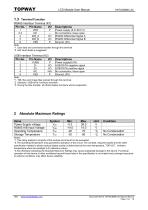
LCD Module User Manual Terminal Function RS485 Interface Terminal (K1) Pin No. Pin Name I/O 1 2,3 4 5 6 Descriptions Power supply (6.0~26.0 V) No connection, leave open RS485 Differential Signal A RS485 Differential Signal B Ground, (0V) Note. *1. User data and commands transfer through this terminal *2. HW hand shake is suggested USB Interface Terminal (K2) Pin No. Pin Name I/O 1 2 3 4 5 Descriptions Power supply(5.0V) USB DATA negative signal USB DATA positive signal No connection, leave open Ground, (0V) Note. *1. TML files and image files preload through this terminal *2. Standard “USB-drive”...
Open the catalog to page 4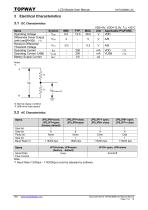
LCD Module User Manual Items Operating Voltage Differential Driver Output (with load)R=50Ω (*1) Receiver Differential Threshold Voltage Operating Current Operating Current (USB) Battery Supply Current VSS=0V, VDD=12.0V, TOP =25C Unit Applicable Pin/FUNC V VDD B *2.Normal display condition *3.USB-drive (high-speed) Items Start bit Data bit Parity bit Stop bit Baud Rate(*1) Items Serial Data Flow Control JP10=close, JP9=open (factory default) busy Note. *1.Baud Rate (1200bps~115200bps) could be adjusted by software. Document Name: HKT043BMC-2C-Manual-Rev0.2 Page: 5 of
Open the catalog to page 5
LCD Module User Manual Basic Operation Function Descriptions HKT043BMC-2C TML/XML files Picture files ICONS files Custom Memories Touch Panel VP variables Control and Draw Engine TML files, images, icons are stored inside the flash memory area. They are pre-loaded into the HKT043BMC-2C via USB. The GUI’s appearance and responses are based on the preloaded TML files The Control- and Drawing- Engine executes RS485 / Modbus RTU commands. Document Name: HKT043BMC-2C-Manual-Rev0.2 Page: 6 of 16
Open the catalog to page 6
LCD Module User Manual Quick Start Guide Install TOPWAY Graphics Editor Import pictures 2. design UI flow Connect to Slave 5. Show real time data Modbus configuration Descriptions The HKT043BMC-2C needs to add the configuration file "modbus.xml" to the project generated by the TOPWAY RGTools to describe the relationship between the screen variables and the registers of the Modbus Slave device. Please refer to Appendix A for "Modbus.xml" formating. Document Name: HKT043BMC-2C-Manual-Rev0.2 Page: 7 of 16
Open the catalog to page 7
LCD Module User Manual 5 Optical Characteristics Item Contrast ratio Color chromaticity Luminance uniformity Note: *1. Definition of Contrast Ratio The contrast ratio could be calculate by the following expression: Contrast Ratio (CR) = Luminance with all pixels white / Luminance with all pixels black *2 Definition of Viewing Angle *3 Definition of response time *4 Definition of Luminance Uniformity Luminance uniformity (Lu)= Min. Luminance form pt1~pt9 / Max Luminance form Pt1~pt9
Open the catalog to page 8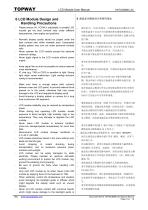
LCD Module User Manual 6 LCD Module Design and Handling Precautions Please ensure V0, VCOM is adjustable, to enable LCD module get the best contrast ratio under different temperatures, view angles and positions. Normally display quality should be judged under the best contrast ratio within viewable area. Unexpected display pattern may com out under abnormal contrast ratio. Never operate the LCD module exceed the absolute maximum ratings. Never apply signal to the LCD module without power supply. Keep signal line as short as possible to reduce external noise interference. IC chip (e.g. TAB or...
Open the catalog to page 9
LCD Module User Manual the electric circuit of LCD module. Only clean LCD with a soft dry cloth, Isopropyl Alcohol or Ethyl Alcohol. Other solvents (e.g. water) may damage the LCD. Never add force to components of LCD module. It may cause invisible damage or degrade the module's reliability. When mounting LCD module, please make sure it is free from twisting, warping and bending. Do not add excessive force on surface of LCD, which may cause the display color change abnormally. LCD panel is made with glass. Any mechanical shock (e.g. dropping from high place) will damage the LCD module. Protective...
Open the catalog to page 10
LCD Module User Manual double side adhesive. The countersink area should be flat and clean to ensure the double side adhesive installation result. The Bezel is recommend to keep a gap (≥0.3mm each side) around the cover lens for tolerance. It is recommended to provide an additional support bracket with gasket for backside support when necessary (e.g. TFT module without mounding structure). They should only provide appropriate support and keep the module in place. The mounting structure should be strong enough to prevent external uneven force or twist act onto the module Figure 2 7.3 Additional...
Open the catalog to page 11
LCD Module User Manual (between the bezel and RTP).The suggested figures are B≥0.50mm; C≥0.50mm. (Figure 4) The bezel side wall should keep space E= 0.2 ~ 0.3mm from the RTP. (Figure 4) Figure 4 In general design, RTP V.A. should be bigger than the TFT V.A. and RTP A.A. should be bigger than the TFT A.A. (Figure 5) 在设计面框与 RTP 组装时,应考虑到面框内侧与 RTP 外 侧的间距 E≥0.2mm. (附图 4) 通常设计时: RTP 的可视区 V.A. 应不小于 TFT 的可视区 V.A. 及 RTP 的动作区 A.A. 应不小于 TFT 的动作区 A.A. (附图 5) Warranty This product has been manufactured to our company’s specifications as a part for use in your company’s general electronic products. It is guaranteed...
Open the catalog to page 12All TOPWAY LCD catalogs and technical brochures
 TOPWAY Smart LCD SGTools Handbook
108 Pages
 10.1" TFT LCD Module
1 Page
 MONO Product
2 Pages
 LMT050DNCFWU-NNA-2
15 Pages
 LMT080TDGP01
16 Pages
 HKT035BTB-1D
36 Pages
 HMT050AMC-C
17 Pages
 HMT043ATA-6C
31 Pages
 TM035PDHG09
42 Pages
 TM035PDHG03
31 Pages
 TM028HDZP01
28 Pages
 LM256160DCW-1
14 Pages
 LM12896FCW-1
17 Pages
 LM12832KCW
13 Pages
 LM2088EFW-9
12 Pages
 LM3122AGG-2
12 Pages
 LM240160YCW
18 Pages
 LM6093ACW
14 Pages
 HMT104ATA-C
11 Pages
 HMT101ATA-D
36 Pages
 HKT080ATA-C
1 Page
 HMT080ATA
1 Page
 HKT070DTA-1C
11 Pages
 HMT070DTA-D
1 Page
 HKT070DMC-2C
19 Pages
 HMT070ETD-C
31 Pages
 HMT070ETD-1D
34 Pages
 HMT056ATA-C
1 Page
 HMT050CB-1C
31 Pages
 HMT050DTA-D
1 Page
 HKT050ATA-C
1 Page
 HMT043ATA-7C
32 Pages
 HMT043GTA-1D
37 Pages
 HMT043ATA-3C
11 Pages
 HMT043BMC-C
1 Page
 HMT043ATA-4C
11 Pages
 HKT043BMC-C
1 Page
 HKT043ATA-1C
12 Pages
 HMT035ATA-D
13 Pages
 HMT028ATB-C
12 Pages
 HKT104ATA-C
31 Pages
 HMT068BTA-C
33 Pages
 HMT070ATA-1C
32 Pages
 HMT080ATA-C
33 Pages
 HMT090ATA-C
30 Pages
 HMT101ATA-C
33 Pages
 HMT050ATA-2C
31 Pages
 HMT043ATA-2C
32 Pages
 IC Raio RA6963 LCD Controller
42 Pages
 IC Epson S1D13L01 LCD Controller
118 Pages
 IC EPSON S1D13700 LCD Controller
133 Pages
 EPSON S1D13709 LCD Controller
192 Pages
 Samsung S6B0108 LCD Driver
23 Pages
 Avant SBN0064G LCD Driver
37 Pages
 Avant SBN6400G LCD Driver
34 Pages
 EPSON SED1335 LCD Controller
95 Pages
 SGS-THOMSON ST7282
23 Pages
 Raio RA6963 LCD Controller
42 Pages
 Raio RA8875 TFT LCD Controller
174 Pages
 Raio RA8835 LCD Controller
93 Pages
 RAIO RA8803 LCD Controller
8 Pages
 HMT035ATA-1C
1 Page
 Smart LCD introduction
14 Pages
 Topway company introduction
14 Pages
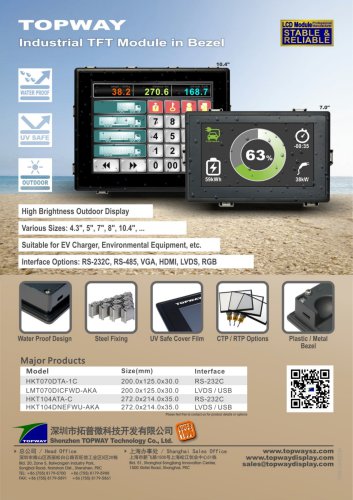 TFT module in bezel
1 Page
 Topway TFT LCD
1 Page
 LM12864L Series
1 Page
 LM12864T Series
1 Page
 LM12864F Series
1 Page
 LM6060C Series
1 Page
 LM12864M Series
1 Page
 LM6029A Series
1 Page
 LM6059B Series
1 Page
 LM24048A Series
1 Page
 LM13232A Series
1 Page
 LM160160A Series
1 Page
 LMB402C Series
1 Page
 LMB242A Series
1 Page
 LMB204C Series
1 Page
 LM3121 Series
1 Page
 LMB404A Series
1 Page
 HMT043FC-1C
1 Page
 LM3123 Series
1 Page
 LMB204B Series
1 Page
 LMB202E Series
1 Page
 LMB202D Series
1 Page
 LMB164A Series
1 Page
 LMB162G Series
1 Page
 LMB162H Series
1 Page
 LMB162N Series
1 Page
 LMB162A Series
1 Page
 LMB0820D Series
1 Page
 LMB0820C Series
1 Page
 LMB0820A Series
1 Page
 LMB081N Series
1 Page
 LMB081A Series
1 Page
 LMB162X series
1 Page
 LMT057DNAFWU-AAN series
1 Page
 LMT057DNAFWU-AAA series
1 Page
 LMT104SDH01 Series
1 Page
 TOPWAY Product List (Y2012)
4 Pages
 TFT LCD module
1 Page
 Without controller
1 Page
 Chinese fonts
1 Page
 Built-in controller
1 Page
 Character module
1 Page



- LCD display panel
- Touch monitor
- LCD screen
- Industrial monitor
- HDMI monitor
- Industrial display panel
- VESA mounting monitor
- TFT display module
- Color display panel
- Touch screen display panel
- LED display panel
- High-brightness monitor
- IPS display panel
- TFT-LCD monitor
- Control display system
- Electronic display panel
- Backlit display panel
- Wall-mount monitor
- LED-backlit display panel