
- Catalogs
- Teledyne LeCroy Europe
- Signal Integrity Studio

- Products
- Catalogs
- News & Trends
- Exhibitions
Signal Integrity Studio

Signal Integrity Studio
Signal Integrity Studio is a comprehensive software package designed for signal integrity analysis. It integrates S-parameter measurements, channel and equalizer modeling, eye diagramming, and jitter analysis. Available as standalone software or as an option for the LeCroy SPARQ series network analyzer, it allows users to analyze the effects of impedance mismatches, losses, and equalization on signal integrity.
- Seamless integration with LeCroy SPARQ S-parameter measurements.
- Full signal integrity analysis of equalized receiver signals.
- Fast eye diagramming and advanced jitter analysis.
- Co-simulation of measured and/or modeled network characteristics.
- De-embedding and emulation of channel and fixture responses.
- Emulation of CTLE, DFE, FFE equalizers, and PLL.
- Available as standalone software with a USB license key or as an option for LeCroy SPARQ.
Signal Integrity Studio begins analysis with a serial data pattern from a built-in simulator. It supports various waveform types and allows configuration of impairments like noise and jitter. The software integrates with LeCroy SPARQ for real-time S-parameter measurement and simulation, providing immediate insights into signal integrity characteristics.
Users can configure equalizer settings through a GUI, including pre-emphasis, de-emphasis, CTLE, FFE, and DFE filters. The software rapidly generates eye diagrams for analysis, supporting up to 11 measurements and mask testing for compliance.
Signal Integrity Studio offers extensive jitter analysis tools, including Tj, Rj, Dj measurements, jitter spectrum, and more. These tools provide deep insights into signal integrity issues.
Signal Integrity Studio is available as a standalone version (SISTUDIO) or as an option for LeCroy SPARQ (SPARQ-SISTUDIO). Both versions include a USB license key for standalone operation, allowing users to perform analysis without SPARQ hardware.
Catalog excerpts

Signal Integrity Studio • Seamless integration with LeCroy SPARQ™ S-parameter • Full signal integrity analysis of equalized receiver signal • Advanced jitter analysis and/or modeled network • Available as standalone software option installed on a LeCroy Signal Integrity Studio enhances the modeling and simulation capabilities of the LeCroy SPARQ application, adding eye and jitter measurements. End-to-end Signal Integrity Workstation Signal Integrity Studio combines S-parameter measurements, channel and equalizer modeling and eye diagramming and jitter analysis in a single affordable software package. "SI Studio" is available as a standalone version or as an option for a LeCroy SPARQ series network analyzer. With Signal Integrity Studio, users analyze the effects that impedance mismatches, losses, emphasis and equalization choices have on signal integrity characteristics of a device under test. S-parameters measured from an imported Touchstone file are used to emulate or de-embed a channel. Models for emphasis and equalization and a simulated waveform are configured by the user, and the resulting eye diagram can be viewed and analyzed to provide insight into the eye closure and jitter characteristics of the visit www.LeCroy.com/SIStudio
Open the catalog to page 1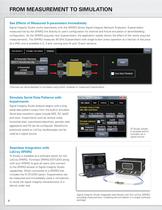
FROM MEASUREMENT TO SIMULATION LBOIAI lAIEVSnBEIAIEI/li 10 SIIAlnrV±IOI/l See Effects of Measured S-parameters Immediately Signal Integrity Studio works seamlessly with the SPARQ Series Signal Integrity Network Analyzers. S-parameters measured live by the SPARQ link directly to user's configuration for channel and fixture emulation or de-embedding configuration. As the SPARQ acquires new S-parameters, the application rapidly shows the affect of the newly acquired measurements. The SPARQ measures 40 GHz S-parameters with single button press operation at a fraction of the price of a VNA, and is...
Open the catalog to page 2
Determine Optimal Equalizer Settings Users can open up closed eyes via a simple GUI for configuring pre-emphasis, de-emphasis, continuous time linear equalization (CTLE), feed forward equalization (FFE) or decision feedback equalization (DFE) filters, and standard or customizable PLL settings. Users can configure settings manually, or allow the software to configure automatically. Training Controls _ Auto Find Upper Level # Pre curs or Taps Decision Level Lower Level Equalizer and pre/de-emphasis (not shown) are easily modeled via SI Studio's "EyeDoctor II" dialogs. Rapidly Measure Eye Diagrams...
Open the catalog to page 3
ORDERING INFORMATION AND FEATURES Standalone Operation Customers who purchase either SPARQ-SISTUDIO or SISTUDIO can access Signal Integrity Studio capabilities via a USB license key that ships with each order. Users can make measurements with the SPARQ, and then use the application software with its Studio features while "untethered" from the SPARQ. This mode of operation allows users to recalculate their S-parameters and re-analyze eye and jitter characteristics without the SPARQ hardware. Standalone operation is a new feature, released with SPARQ software version 6.5.0.5. Ordering Information...
Open the catalog to page 4All Teledyne LeCroy Europe catalogs and technical brochures
 T3DSO4000L-HD
19 Pages
 WaveRunner 8000HD
20 Pages
 HDO6000B
20 Pages
 T3DSOH1000 /T3DSOH1000-ISO
15 Pages
 T3DAQ1-16
16 Pages
 T3MIL50 Milli Ohm Meter
6 Pages
 T3PM1006 Digital Power Meter
8 Pages
 Current Probes
4 Pages
 WavePro HD
20 Pages
 WaveRunner 9000
20 Pages
 PeRT3 Phoenix System
16 Pages
 DDR Test Suite
12 Pages
 LabMaster 10 Zi-A
28 Pages
 WaveRunner 8000
24 Pages
 wavesurfer 510
20 Pages
 MDA800 Motor Drive Analyzers
8 Pages
 MIPI M-PHY Protocol Analyzer
4 Pages
 Transmission Line Probes
2 Pages
 WaveSurfer 10 Oscilloscope
12 Pages
 Summit T24 Analyzer
2 Pages
 SierraNet M168
4 Pages
 LabMaster 10 Zi Oscilloscopes
36 Pages
 LabMaster 9 Zi-A Oscilloscopes
36 Pages
 WaveMaster 8 Zi-A Oscilloscopes
36 Pages
 SDA 8 Zi-A Serial Data Analyzers
36 Pages
 DDA 8 Zi-A Disk Drive Analyzers
36 Pages
 WavePro 7 Zi-A Oscilloscopes
28 Pages
 SDA 7 Zi-A Serial Data Analyzers
28 Pages
 DDA 7 Zi-A Disk Drive Analyzers
28 Pages
 HRO 12-bit Oscilloscopes
8 Pages
 HDO8000 High Definition
20 Pages
 HDO6000 / HDO6000-MS High
20 Pages
 WaveRunner 6 Zi Oscilloscopes
28 Pages


Archived catalogs
 HDO4000 / HDO4000-MS High
16 Pages
 Summit T3-16 Analyzer
2 Pages
 Voyager M3i
8 Pages
 WaveSurfer 3000 Oscilloscopes
12 Pages
 WaveJet 300A Oscilloscopes
8 Pages
 Differential Amplifiers
2 Pages
 Current Probes
7 Pages
 HFP SERIES ACTIVE PROBES
4 Pages
 LeCroy Kibra 480 Analyzer
4 Pages
 Vehicle Bus Analyzers
2 Pages
 ArbStudio
8 Pages
 PeRT3 Eagle System
8 Pages
 SPARQ
SPARQ12 Pages
 LogicStudio
8 Pages




- Power supply unit
- DC power supply
- Concentration analyzer
- Automatic analyser
- Benchtop analyser
- Single-output power supply
- Portable analyzer
- Generator
- Digital analyzer
- Multimeter
- Digital multimeter
- Programmable power supply
- Power quality analyzer
- Power meter
- DC/DC power supply
- Data acquisition unit
- High-performance analyzer
- Trace analyzer
- 1000 V multimeter
- Frequency multimeter