
- Catalogs
- Teledyne LeCroy Europe
- LogicStudio

- Products
- Catalogs
- News & Trends
- Exhibitions
LogicStudio

LogicStudio
- 100 MHz, 1 GS/s, 16 channels
- 3.75 ns pulse capture
- I2C, SPI, UART protocol analysis
- History mode and live analog waveform display
- Powerful and flexible triggering
- Easy documentation and sharing tools
The LogicStudio™ 16 Channel Logic Analyzer offers a high-performance, user-friendly solution for debugging. It transforms a PC into a comprehensive debug machine with features like timing cursors, history mode, and protocol decoding. The interface is intuitive, allowing easy navigation and operation with basic mouse controls.
LogicStudio enhances functionality when connected to a WaveJet™ 300A oscilloscope, displaying analog waveforms alongside digital and serial ones. It supports oscilloscopes from LeCroy, Tektronix, and Agilent, making it a versatile tool for mixed signal analysis.
Supports decoding and triggering for I2C, SPI, and UART serial data buses, allowing users to isolate specific data patterns or addresses.
Advanced triggering options include edge, logic level, parallel bus, and serial bus triggers, providing robust solutions for complex debugging tasks.
- Input Channels: 16
- Sample Rate: 1 GS/s on 8 Ch, 500 MS/s on 16 Ch
- Minimum Detectable Pulse Width: 3.75 ns
- Memory: 40 kpts on 8 Ch, 20 kpts on 16 Ch
- Trigger Types: Edge, pattern, pulse width, pattern width, I2C, SPI, UART
- Threshold Selections: TTL, CMOS, user-defined
- Maximum Survivable Input Voltage: ±40 VDC
- Input Impedance: 150 kΩ parallel 12 pF
Product Code: LogicStudio 16
Includes: Digital Leadset, Micro Hooks, USB Cable, BNC Cable, Welcome Card
LogicStudio is warranted for one year, with no charge for return shipping and long-term support. Upgrades to the latest software are provided at no charge.
Compatible with various models from LeCroy, Tektronix, and Agilent.
Catalog excerpts
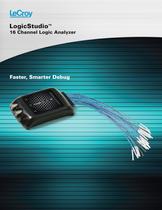
Faster, Smarter Debug LogicStudio™ 16 Channel Logic Analyzer
Open the catalog to page 1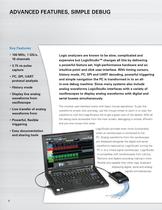
2 Key Features • 100 MHz, 1 GS/s, 16 channels • 3.75 ns pulse capture • I2C, SPI, UART protocol analysis • History mode • Display live analog waveforms from oscilloscope • Live transfer of analog waveforms from • Powerful, flexible triggering • Easy documentation and sharing tools Logic analyzers are known to be slow, complicated and expensive but LogicStudio™ changes all this by delivering a powerful feature set, high-performance hardware and an intuitive point and click user-interface. With timing cursors, history mode, I2C, SPI and UART decoding, powerful triggering and simple navigation the...
Open the catalog to page 2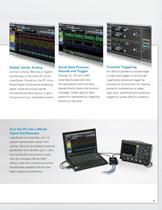
Digital, Serial, Analog Connect LeCroy, Tektronix or Agilent oscilloscope to the same PC as the LogicStudio 16 and turn the PC into a Mixed Signal Oscilloscope displaying digital, serial and analog signals simultaneously allowing you to get a full picture of your embedded system. 3 Serial Data Protocol Decode and Trigger Decode I2C, SPI and UART serial data busses and view the appropriate clock and data signals directly below the protocol message. Isolate specific data patterns or addresses by triggering directly on that data. Powerful Triggering For difficult problems a simple edge or logic...
Open the catalog to page 3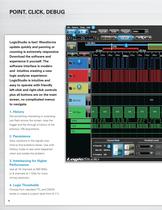
Point, Click, Debug Point, Click, Debug 4 LogicStudio is fast! Waveforms update quickly and panning or zooming is extremely responsive. Download the software and experience it yourself. The software interface is modern and intuitive creating a new logic analyzer experience. LogicStudio is intuitive and easy to operate with friendly left-click and right-click controls plus all buttons are on the main screen, no complicated menus to navigate. 1. History Did something interesting or surprising just flash across the screen, stop the trigger and flip through a history of the previous 100 acquisitions....
Open the catalog to page 4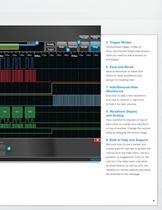
5 5. Trigger Modes Oscilloscope trigger modes of Auto, Normal and Single help ensure what you need to see is always on the display. 6. Save and Recall Save screenshots to share with others or save waveforms and setups for recalling later. 7. Add/Remove/Hide Waveforms One click to add a new waveform, one click to remove it, right-click to hide it for later viewing. 8. Waveform Display and Scaling View waveforms stacked on top of each other or overlay one waveform on top of another. Change the vertical scale by dragging the bottom edge. 9. Built-in Help and Support Not sure how to use a certain...
Open the catalog to page 5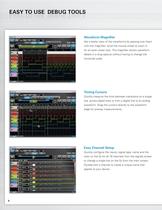
easy to Use Debug tols easy to Use Debug tools 6 Waveform Magnifier Get a better view of the waveforms by passing over them with the magnifier, scroll the mouse wheel to zoom in for an even closer look. The magnifier shows waveform details in a long capture without having to change the horizontal scale. Timing Cursors Quickly measure the time between transitions on a single line, across digital lines or from a digital line to an analog waveform. Snap the cursors directly to the waveform edge for precise measurements. Easy Channel Setup Quickly configure the inputs, signal type, name and the color...
Open the catalog to page 6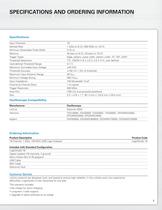
specificatio ns and ordering informatio n specifications and ordering information 7 Specifications Input Channels 16 Sample Rate 1 GS/s on 8 Ch, 500 MS/s on 16 Ch Minimum Detectable Pulse Width 3.75 ns Memory 40 kpts on 8 Ch, 20 kpts on 16 Ch Trigger Types Edge, pattern, pulse width, pattern width. I2C, SPI, UART Threshold Selections TTL, CMOS (1.8 V, 2.5 V, 3.3 V, 5 V), user defined User-defined Threshold Range 0–7 V Maximum Survivable Input Voltage ±40 VDC Threshold Accuracy ±150 mV + 5% of threshold Maximum Input Dynamic Range 40 Vp-p Minimum Voltage Swing 500 mVp-p Input Impedance 150 kÙ...
Open the catalog to page 7
1-800-5-LeCroy www.lecroy.com Local sales offices are located throughout the world. Visit our website to find the most convenient location. © 2010 by LeCroy Corporation. All rights reserved. Specifications, prices, availability, and delivery subject to change. without notice. Product or brand names are trademarks or requested trademarks of their respective holders. Logic-StudioDS-09Dec10 PDF
Open the catalog to page 8All Teledyne LeCroy Europe catalogs and technical brochures
 T3DSO4000L-HD
19 Pages
 WaveRunner 8000HD
20 Pages
 HDO6000B
20 Pages
 T3DSOH1000 /T3DSOH1000-ISO
15 Pages
 T3DAQ1-16
16 Pages
 T3MIL50 Milli Ohm Meter
6 Pages
 T3PM1006 Digital Power Meter
8 Pages
 Current Probes
4 Pages
 WavePro HD
20 Pages
 WaveRunner 9000
20 Pages
 PeRT3 Phoenix System
16 Pages
 DDR Test Suite
12 Pages
 LabMaster 10 Zi-A
28 Pages
 WaveRunner 8000
24 Pages
 wavesurfer 510
20 Pages
 MDA800 Motor Drive Analyzers
8 Pages
 MIPI M-PHY Protocol Analyzer
4 Pages
 Transmission Line Probes
2 Pages
 WaveSurfer 10 Oscilloscope
12 Pages
 Summit T24 Analyzer
2 Pages
 SierraNet M168
4 Pages
 LabMaster 10 Zi Oscilloscopes
36 Pages
 LabMaster 9 Zi-A Oscilloscopes
36 Pages
 WaveMaster 8 Zi-A Oscilloscopes
36 Pages
 SDA 8 Zi-A Serial Data Analyzers
36 Pages
 DDA 8 Zi-A Disk Drive Analyzers
36 Pages
 WavePro 7 Zi-A Oscilloscopes
28 Pages
 SDA 7 Zi-A Serial Data Analyzers
28 Pages
 DDA 7 Zi-A Disk Drive Analyzers
28 Pages
 HRO 12-bit Oscilloscopes
8 Pages
 HDO8000 High Definition
20 Pages
 HDO6000 / HDO6000-MS High
20 Pages
 WaveRunner 6 Zi Oscilloscopes
28 Pages


Archived catalogs
 HDO4000 / HDO4000-MS High
16 Pages
 Summit T3-16 Analyzer
2 Pages
 Voyager M3i
8 Pages
 WaveSurfer 3000 Oscilloscopes
12 Pages
 WaveJet 300A Oscilloscopes
8 Pages
 Differential Amplifiers
2 Pages
 Current Probes
7 Pages
 HFP SERIES ACTIVE PROBES
4 Pages
 LeCroy Kibra 480 Analyzer
4 Pages
 Vehicle Bus Analyzers
2 Pages
 Signal Integrity Studio
4 Pages
 ArbStudio
8 Pages
 PeRT3 Eagle System
8 Pages
 SPARQ
SPARQ12 Pages




- Power supply unit
- DC power supply
- Concentration analyzer
- Automatic analyser
- Benchtop analyser
- Single-output power supply
- Portable analyzer
- Generator
- Digital analyzer
- Multimeter
- Digital multimeter
- Programmable power supply
- Power quality analyzer
- Power meter
- DC/DC power supply
- Data acquisition unit
- High-performance analyzer
- Trace analyzer
- 1000 V multimeter
- Frequency multimeter