
- Catalogs
- Tapeswitch
- PCU Programmable Safety Control Unit

PCU Programmable Safety Control Unit
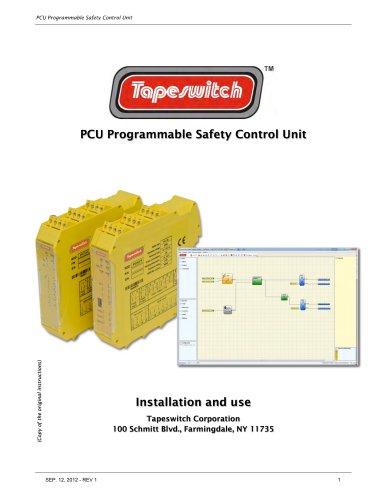
PCU Programmable Safety Control Unit
This document provides comprehensive instructions for the installation and use of the PCU Programmable Safety Control Unit by Tapeswitch Corporation. It includes safety instructions, applicable standards, and a list of abbreviations and symbols used throughout the manual.
The PCU is designed to enhance safety in industrial environments by integrating with machine control systems. It includes various modules and configurations to suit different safety requirements.
The PCU system comprises multiple modules, each with specific functions and configurations. These include the PCU/1, PCU8I2/1, PCU8IE/1, PCUEU/1, PCU2E/1, PCU4E/1, PCU2SR/1, and PCU4SR/1 modules.
Installation involves mechanical fastening, calculating safety distances for connected ESPEs, and making electrical connections. Detailed instructions are provided for connection cables, USB input, and configuration memory.
The document outlines the various signals and inputs, such as MASTER ENABLE, NODE SEL, and RESTART_FBK, and their roles in the system.
Details on output circuits, including OUT STATUS, OUT TEST, and OSSD outputs, are provided. The characteristics of safety relays and internal contact diagrams are also included.
The PCU's technical specifications cover safety level parameters, general data, and mechanical dimensions. Each module's specific characteristics are detailed.
Troubleshooting guides for each module are included, with diagrams to assist in identifying and resolving issues.
Instructions for installing and using the PCU Safety Designer Software are provided, including hardware and software requirements, project creation, validation, and configuration management.
Guidelines for testing the system and monitoring I/O status in real-time are included, along with password protection measures.
The document describes various object function blocks, such as OUTPUT OBJECTS (OSSD, STATUS), INPUT OBJECTS (E-STOP, E-GATE), and OPERATOR FUNCTION BLOCKS (LOGICAL OPERATORS).
This manual serves as a detailed guide for the installation, configuration, and operation of the PCU Programmable Safety Control Unit, ensuring compliance with safety standards and optimal performance in industrial settings.
The PCU complies with European Directives such as the Machinery Directive, Electromagnetic Compatibility Directive, and Low Voltage Directive. It adheres to standards like CEI EN 61131-2, ISO 13489-1, EN 61496-1, IEC 61508, and IEC 62061, ensuring functional safety and reliability.
Important safety instructions emphasize the need for compliance with applicable standards and thorough risk analysis. The programming and configuration of the PCU are the responsibility of the installer or user, and a complete safety test is required after installation or modification.
The PCU supports multiple digital inputs and outputs, each conforming to EN 61131-2 standards. It includes a USB 2.0 connector for configuration via a PC and an optional PCM for backup memory. The PCM allows for configuration transfer and restoration in case of unit replacement.
The document outlines procedures for using the PCM for configuration loading and restoration. It emphasizes the importance of switching off the PCU before inserting or removing the PCM to prevent data loss. The document also describes the MULTIPLE LOAD function for configuring multiple units without a PC.
The PCU requires specific input signals (MASTER_ENABLE1 and MASTER_ENABLE2) to operate. NODE_SEL inputs are used for addressing slave units. The RESTART_FBK input monitors external device feedback, ensuring safe operation. The OUT STATUS and OUT TEST outputs provide status indications and monitor for short circuits.
Regular system tests and checks are recommended to ensure proper operation. This includes verifying cable connections, LED indicators, sensor positioning, and the secure mounting of the PCU. A checklist is provided for post-installation verification.
The document warns against using the same physical address for multiple units and highlights the risk of data loss during PCM operations. It also advises on the placement of restart commands outside danger areas.
The document outlines the meaning of different LED indicators for various PCU models such as PCU4E/1, PCU2SR/1, PCU4SR/1, and others. Each model has specific LED behaviors indicating normal operation, faults, and errors.
Detailed troubleshooting tables are provided for different PCU models. These tables describe LED indications for various errors such as internal faults, configuration errors, OSSD output errors, and communication errors. Remedies include restarting the system, checking connections, and returning units for repair.
The PSD software is used to configure the logic diagram of connections between the PCU and system components. The document provides installation instructions, including hardware and software requirements, and a step-by-step guide to installing and launching the software.
The PSD software includes a standard toolbar with functions for creating new projects, changing configurations, saving projects, and more. It also features a textual toolbar for additional configuration options. The software allows users to create logic diagrams using a drag-and-drop interface, with tools for object selection, configuration, and connection.
Users can create and configure projects by selecting system components, dragging them into the design area, and connecting them. The document provides guidance on using the software's features to set properties, duplicate objects, and manage project composition.
The document outlines the process of designing a project using the PCU/1 unit, which connects to safety blocks like E-GATE and E-STOP. Inputs and outputs are configured based on these blocks, and a properties window allows for block activation and test parameter configuration. The project can be saved at any stage using the SAVE icon.
After completing the project design, validation is necessary to ensure programming consistency with the PCU system. Successful validation assigns a sequential number to inputs and outputs, which is recorded in the report and monitor. Validation does not guarantee compliance with all safety requirements.
A system composition printout with block properties can be generated. The Performance Level (PL) and related parameters are defined according to ISO 13849-1, but the actual PL must consider all connected devices.
The PCU/1 connects to a PC via a USB cable. Configuration is sent to the PCU/1 after successful validation. Projects can be downloaded from the PCU/1 to the PSD, and a configuration log records up to five events.
The system composition can be checked, displaying connected modules, firmware versions, and node numbers. A monitor provides real-time I/O status, with diagnostics indicated by color codes.
Passwords are required for uploading and saving projects. Level 1 passwords allow viewing and uploading, while Level 2 passwords enable full project control. Passwords can be changed, and forgotten passwords require contacting Tapeswitch for an unlock file.
After uploading the project, the system must be tested by changing the status of each safety device to verify output changes. This ensures correct installation and operation of safety components.
The document details various function blocks like OSSD (safety outputs), E-STOP (emergency stop), and E-GATE (safety gate device), including their parameters and reset options. It emphasizes the importance of correct configuration and testing for safety compliance.
This function block checks the status of a manual key device. If the key is not turned, the output is 0 (FALSE); otherwise, it is 1 (TRUE).
Verifies the state of inputs from a safety light curtain. If the protected area is occupied, the output is 0 (FALSE); otherwise, it is 1 (TRUE).
Checks the status of a safety pedal device. If the pedal is not pressed, the output is 0 (FALSE); otherwise, it is 1 (TRUE).
Verifies the status of inputs from a mode selector. If only one input is 1 (TRUE), the corresponding output is also 1 (TRUE); otherwise, all outputs are 0 (FALSE).
Checks the status of inputs from a safety photocell. If the beam is occupied, the output is 0 (FALSE); otherwise, it is 1 (TRUE).
Verifies the status of inputs from a two-hand control switch. Both buttons must be pressed within 500 ms for the output to be 1 (TRUE); otherwise, it is 0 (FALSE).
Verifies the status of a non-safety sensor. If the beam is occupied, the output is 0 (FALSE); otherwise, it is 1 (TRUE).
Checks the status of inputs from a safety mat. If a person stands on the mat, the output is 0 (FALSE); otherwise, it is 1 (TRUE).
The document provides detailed technical specifications and operational procedures for the PCU Programmable Safety Control Unit. It includes descriptions of various functional blocks, their parameters, and operational guidelines.
Includes AND, NAND, OR, NOR, XOR, XNOR operations with parameters to set the number of inputs (2 to 8).
Includes D Flip Flop, SR Flip Flop for saving and managing data states based on input conditions.
Includes pulse counter and timer for generating signals for user-defined periods.
Includes Fieldbus Input for non-safety inputs and options to add descriptions and project details in diagrams.
The document includes warnings about reset configurations and the importance of using consecutive inputs for certain functions. It also emphasizes the need for power-on tests at machine start-up.
Generates a TRUE output activated by the rising edge of the input, maintaining this state for a set time between 10 ms and 1093.3 s.
This operator's output follows the input signal but switches to FALSE if the input remains TRUE beyond the set time.
Applies a delay to the signal, setting the output to TRUE after the set time following a change in the input signal.
Includes Concurrent Muting, Sequential Muting, and Muting "L" and "T" with parameters for timeout, enable modes, direction, and muting close type.
Allows override of the muting input when not active and at least one sensor is occupied.
Includes configurations for output delay with manual mode using logical DELAY and USER MANUAL RESTART functions.
Lists various PCU units and expansion modules with their model descriptions and codes.
Tapeswitch Corp. provides a 12-month warranty against defects in material or workmanship, subject to conditions such as proper use and compliance with instructions.
Catalog excerpts
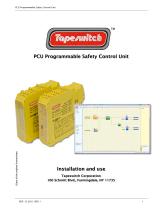
PCU Programmable Safety Control Unit (Copy of the original instructions) PCU Programmable Safety Control Unit Installation and use Tapeswitch Corporation 100 Schmitt Blvd., Farmingdale, NY 11735
Open the catalog to page 1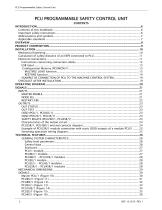
PCU Programmable Safety Control Unit
Open the catalog to page 2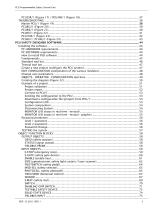
PCU Programmable Safety Control Unit
Open the catalog to page 3
PCU Programmable Safety Control Unit
Open the catalog to page 4
PCU Programmable Safety Control Unit
Open the catalog to page 5
PCU Programmable Safety Control Unit INTRODUCTION Contents of this handbook This handbook describes how to use the PCU programmable safety module and its expansion units ("SLAVES"); it includes: • a description of the system • method of installation • connections • signals • troubleshooting • use of the configuration SW Important safety instructions This safety alert symbol indicates a potential personal safety hazard. Failure to comply with instructions bearing this symbol could pose a very serious risk to personnel. This symbol indicates an important instruction. PCU/1 is built to the following...
Open the catalog to page 6
PCU Programmable Safety Control Unit PCM = PCUMCM/1 Configuration Memory: memory chip for PCU/1 (accessory) PCI = PCUECI/1 Safety Communication: proprietary bus for expansion units PSD = PCU Safety Designer: PCU configuration SW running in Windows OSSD = Output Signal Switching Device: solid state safety output MTTFd = Mean Time to Dangerous Failure PFHd = Probability of a dangerous failure per Hour SIL = Safety Integrity Level SILCL = Safety Integrity Level Claim Limit PCU complies with the following European Directives: • 2004/108/EC "Electromagnetic Compatibility Directive" and is built to...
Open the catalog to page 7
PCU Programmable Safety Control Unit OVERVIEW PCU is a modular safety controller. It consists of a master unit (PCU/1), which can be configured using the PSD graphic interface, and a number of expansion units connected to the PCU/1 via the proprietary PCI bus. The PCU/1 can also be used as a stand-alone device. It has 8 safety inputs and 2 independent programmable dual channel outputs. The following expansions are available: I/O expansions (PCU8I2/1), input only expansions (PCU8IE/1, PCUEU/1 and PCU16IE/1), output only expansions (PCU2E/1 and PCU4E/1), guided contact safety relay output modules...
Open the catalog to page 8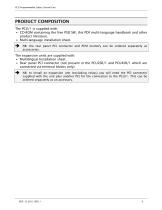
PCU Programmable Safety Control Unit • CD-ROM containing the free PSD SW, this PDF multi-language handbook and other product literature. • Multi-language installation sheet. ^ NB: the rear panel PCI connector and PCM memory can be ordered separately as accessories. The expansion units are supplied with: • Multilingual Installation sheet. • Rear panel PCI connector (not present in the PCU2SR/1 and PCU4SR/1 which are connected via terminal blocks only). ^ NB: to install an expansion unit (excluding relays) you will need the PCI connector supplied with the unit plus another PCI for the connection...
Open the catalog to page 9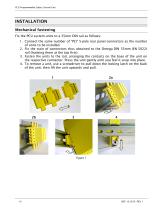
PCU Programmable Safety Control Unit Fix the PCU system units to a 35mm DIN rail as follows: 1. Connect the same number of "PCI" 5-pole rear panel connectors as the number of units to be installed. 2. Fix the train of connectors thus obtained to the Omega DIN 35mm (EN 5022) rail (hooking them at the top first). 3. Fasten the units to the rail, arranging the contacts on the base of the unit on the respective connector. Press the unit gently until you feel it snap into place. 4. To remove a unit, use a screwdriver to pull down the locking latch on the back of the unit; then lift the unit upwards...
Open the catalog to page 10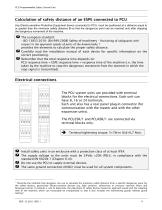
PCU Programmable Safety Control Unit Any Electro-sensitive Protective Equipment device connected to PCU, must be positioned at a distance equal to or greater than the minimum safety distance S so that the dangerous point can be reached only after stopping the dangerous movement of the machine. - ISO 1 3855:201 0- (EN 999:2008) Safety of machinery - Positioning of safeguards with respect to the approach speeds of parts of the human body. 1 provides the elements to calculate the proper safety distance. ! Carefully read the installation manual of each device for specific information on the correct...
Open the catalog to page 11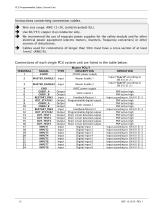
PCU Programmable Safety Control Unit ^ Wire size range: AWG 1 2^30, (solid/stranded) (UL). ^ Use 60/75°C copper (Cu) conductor only. ^ We recommend the use of separate power supplies for the safety module and for other electrical power equipment (electric motors, inverters, frequency converters) or other sources of disturbance. ^ Cables used for connections of longer than 50m must have a cross-section of at least 1mm2 (AWG16).
Open the catalog to page 12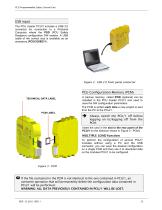
PCU Programmable Safety Control Unit USB input The PCU master PCU/1 includes a USB 2.0 connector for connection to a Personal Computer where the PSD (PCU Safety Designer) configuration SW resides. A USB cable of the correct size is available as an accessory (PCUCUSBC/1). Figure 2 - USB 2.0 front panel connector PCU Configuration Memory (PCM) TECHNICAL DATA LABEL A backup memory, called PCM (optional) can be installed in the PCU master PCU/1 and used to save the SW configuration parameters. The PCM is written each time a new project is sent from the PC to the PCU/1. Always switch the PCU/1 off...
Open the catalog to page 13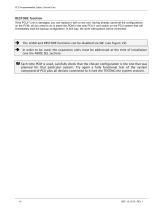
PCU Programmable Safety Control Unit RESTORE function If the PCU/1 unit is damaged, you can replace it with a new one; having already saved all the configurations on the PCM, all you need to do is insert the PCM in the new PCU/1 and switch on the PCU system that will immediately load the backup configuration. In this way, the work interruptions will be minimized. The LOAD and RESTORE functions can be disabled via SW. (see Figure 29) In order to be used, the expansion units must be addressed at the time of installation (see the NODE SEL section). Each time PCM is used, carefully check that the...
Open the catalog to page 14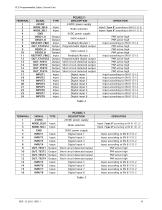
PCU Programmable Safety Control Unit
Open the catalog to page 15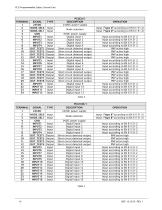
PCU Programmable Safety Control Unit
Open the catalog to page 16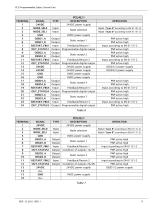
PCU Programmable Safety Control Unit
Open the catalog to page 17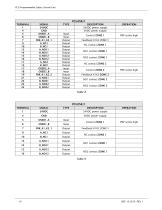
PCU Programmable Safety Control Unit
Open the catalog to page 18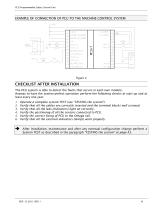
PCU Programmable Safety Control Unit EXAMPLE OF CONNECTION OF PCU TO THE MACHINE CONTROL SYSTEM The PCU system is able to detect the faults that occurs in each own module. Anyway to have the system perfect operation perform the following checks at start up and at least every one year: 1. Operate a complete system TEST (see "TESTING the system") 2. Verify that all the cables are correctly inserted and the terminal blocks well screwed. 3. Verify that all the leds (indicators) light on correctly. 4. Verify the positioning of all the sensors connected to PCU. 5. Verify the correct fixing of PCU to...
Open the catalog to page 19All Tapeswitch catalogs and technical brochures
 PSCU/1 Control Uni
2 Pages
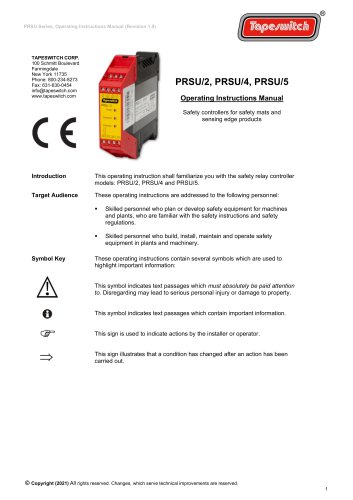 PRSU/2, PRSU/4, PRSU/5
14 Pages
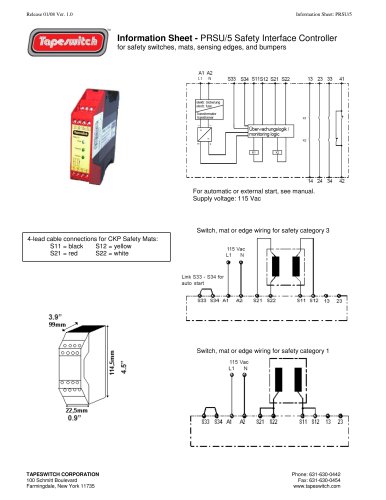
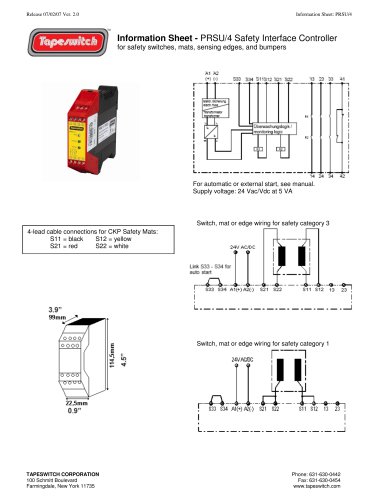
Archived catalogs
 Safety & Signaling Products
12 Pages
 Light Curtain Catalog
12 Pages
 Safety Interlock Catalog
20 Pages
 Short Form Catalog
12 Pages
 Switch products
24 Pages
 Sensing Edge Catalog
15 Pages
 Sensing Bumper Catalog
10 Pages
 Safety and Sensing Mat Catalog
18 Pages
 Safety Interface Module Catalog
12 Pages
 Light Curtains & Laser Scanner
14 Pages
 Safety & Signal Mats Catalog
19 Pages


- Force sensor
- Tension/compression force transducer
- Single-pole switch
- Strain gauge force sensor
- Technology switch
- Compression force transducer
- Safety electric switch
- Electronic pedal
- IP67 switch
- Rubber mat
- Touch switch
- Polymer mat
- Metal switch
- Hermetic switch
- Interface module
- Button type resistive load cell
- Industrial switch
- Lever switch
- Heavy-duty switch
- Stainless steel switch