- Catalogs
- Synopsys, Inc.
- ImSym—Imaging System Simulator

ImSym—Imaging System Simulator
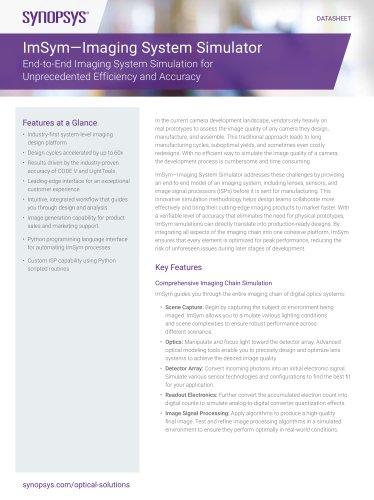
ImSym—Imaging System Simulator
ImSym—Imaging System Simulator is a comprehensive tool designed to streamline the camera development process by providing an end-to-end simulation of imaging systems. It addresses the inefficiencies of traditional prototype-based methods by offering a virtual environment to model lenses, sensors, and image signal processors (ISPs) before manufacturing.
- Comprehensive Imaging Chain Simulation: Simulates the entire imaging process from scene capture to image signal processing, allowing for robust performance testing across various scenarios.
- Accelerated Design Cycles: Reduces design time by up to 60 times compared to traditional methods, leveraging the accuracy of CODE V and LightTools.
- Integrated Workflow: Provides an intuitive interface that guides users through design and analysis, supporting Python scripting for automation.
- Realistic Simulations: High-fidelity simulations reduce the need for physical prototypes, minimizing material waste and environmental impact.
- Specify Inputs: Define scene parameters, stray light sources, and detector settings to ensure system performance meets expectations.
- Generate Principal Image: Use CODE V IMS to calculate and visualize the principal image, optimizing lens design.
- Generate Stray Light Eigenfunctions: Set up models in LightTools to minimize stray light and identify disruptive sources.
- Combine Focal Plane Flux: Evaluate the combined effects of stray light and principal image on the detector.
- Detect Input Flux: Model detector efficiency and noise, ensuring performance standards are met.
- Process the Detected Image: Simulate ISP performance, applying calibration, demosaicing, and other effects.
- Efficiency: Significantly reduces development time and costs, accelerating time-to-market.
- Collaboration: Centralized platform fosters team collaboration with real-time updates and version control.
- User-Friendly: Intuitive interface and comprehensive support resources make it accessible even to those with limited optical design experience.
ImSym revolutionizes camera system development by providing a complete, system-level imaging design platform. It enables precise, production-ready simulations, ensuring high-quality imaging products reach the market faster.
Catalog excerpts

• Industry-first system-level imaging design platform • Design cycles accelerated by up to 60x • Results driven by the industry-proven accuracy of CODE V and LightTools • Leading-edge interface for an exceptional customer experience • Intuitive, integrated workflow that guides you through design and analysis • Image generation capability for product sales and marketing support • Python programming language interface for automating ImSym processes • Custom ISP capability using Python scripted routines In the current camera development landscape, vendors rely heavily on real prototypes to assess the image quality of any camera they design, manufacture, and assemble. This traditional approach leads to long manufacturing cycles, suboptimal yields, and sometimes even costly redesigns. With no efficient way to simulate the image quality of a camera, the development process is cumbersome and time consuming. ImSym—Imaging System Simulator addresses these challenges by providing an end-to-end model of an imaging system, including lenses, sensors, and image signal processors (ISPs) before it is sent for manufacturing. This innovative simulation methodology helps design teams collaborate more effectively and bring their cutting-edge imaging products to market faster. With a verifiable level of accuracy that eliminates the need for physical prototypes, ImSym simulations can directly translate into production-ready designs. By integrating all aspects of the imaging chain into one cohesive platform, ImSym ensures that every element is optimized for peak performance, reducing the risk of unforeseen issues during later stages of development. Key FeaturesComprehensive Imaging Chain Simulation ImSym guides you through the entire imaging chain of digital optics systems: • Scene Capture: Begin by capturing the subject or environment being imaged. ImSym allows you to simulate various lighting conditions and scene complexities to ensure robust performance across different scenarios. • Optics: Manipulate and focus light toward the detector array. Advanced optical modeling tools enable you to precisely design and optimize lens systems to achieve the desired image quality. • Detector Array: Convert incoming photons into an initial electronic signal. Simulate various sensor technologies and configurations to find the best fit for your application. • Readout Electronics: Further convert the accumulated electron count into digital counts to simulate analog-to-digital converter quantization effects. • Image Signal Processing: Apply algorithms to produce a high-quality final image. Test and refine image processing algorithms in a simulated environment to ensure they perform optimally in real-world conditions.
Open the catalog to page 1
Simulated image Stray light simulation Lens and sensor effects Streamline Collaboration Engineers can model imaging systems within a single, intuitive environment. This centralized approach eliminates the need for disparate tools and fosters a cohesive development process. The shared environment facilitates seamless team collaboration through shared models and simulations. Real-time updates and version control ensure that all team members are working with the latest data. Increase Efficiency Software modeling reduces development time from weeks to days and from hours to minutes. The powerful...
Open the catalog to page 2
Generate principal image Generate principal image + stray light Generate detected image Generate post-processed final image Lens system Stray light Evaluate each stage of the image-forming process for efficient troubleshooting Identify the step or component that offers the most effective way to achieve image quality Improve team communication and speed component updates Ensure that system performance meets customer expectations ImSym Platform Accuracy of results driven by industry-leading CODE V and LightTools Figure 1: ImSym accelerates design cycles Detailed Workflow Step 1: Specify Inputs You...
Open the catalog to page 3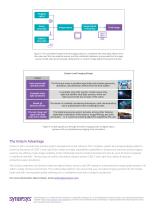
Imaging optics Scene stray light Image sensor Image Signal Processing Additive stray light Figure 2: The simulated image from the imaging optics is combined with stray light effects from the scene and from an external source, and the combined irradiance is processed by the image sensor model and post processed using built-in or custom Image Signal Processing routines System-Level Imaging Design ImSym Input scene with � spectral profile The flat input scene is modeled spectrally, and includes geometric, aberration, and diffraction effects from the lens system. Complete stray light simulation A...
Open the catalog to page 4All Synopsys, Inc. catalogs and technical brochures
 Synopsys IP Portfolio
16 Pages
 RSoft Photonic Device Tools
2 Pages
 LynxNXT Automation System
3 Pages
 Synopsys TestMAX
2 Pages
 PrimeSim
2 Pages