- Catalogs
- Synopsys, Inc.
- Feature Comparison of Simpleware Software Products Version W-2024.12

Feature Comparison of Simpleware Software Products Version W-2024.12
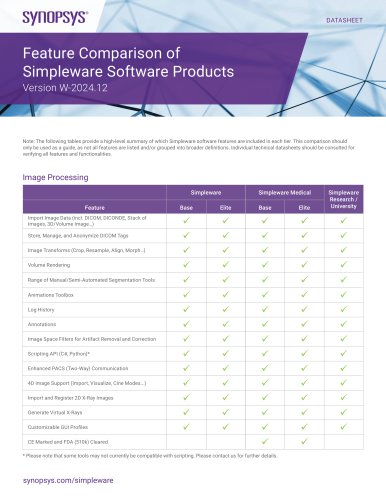
Feature Comparison of Simpleware Software Products Version W-2024.12
Catalog excerpts
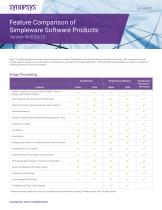
synopsys'Feature Comparison of Simpleware Software ProductsVersion W-2024.12 Note: The following tables provide a high-level summary of which Simpleware software features are included in each tier. This comparison should only be used as a guide, as not all features are listed and/or grouped into broader definitions. Individual technical datasheets should be consulted for verifying all features and functionalities. Image Processing * Please note that some tools may not currently be compatible with scripting. Please contact us for further details.
Open the catalog to page 1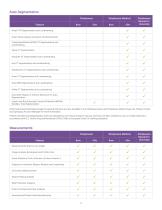
Auto Segmentation Simpleware Simpleware Research / University Heart CTA Segmentation and Landmarking Heart Valve Analysis (Location and Dimensions) Craniomaxillofacial (CMF) CT Segmentation and Landmarking Shoulder CT Segmentation and Landmarking Hip Revision CT Segmentation and Landmarking Knee CT Segmentation and Landmarking Knee MRI Segmentation and Landmarking Ankle CT Segmentation and Landmarking Automatic Region of Interest Detection for Auto Segmentation Simpleware Medical Import and Run Externally Trained AI Models (MONAI Bundles, Total Segmentator) Fully Customized Automated Image Processing...
Open the catalog to page 2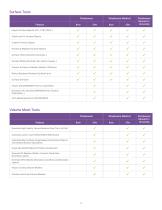
Surface Tools Simpleware Feature Import Surface Objects (STL, STEP, IGES…) Check and Fix Surface Objects Create Primitive Shapes Position & Register Surface Objects Surface Filters (Smooth, Decimate…) Surface Editing (Extrude, Clip, Hollow, Sweep…) Convert Surfaces to Masks, Masks to Surfaces Robust Booleans Between Surface Parts Surface Deviation Simpleware Research / University Import SOLIDWORKS® Parts or Assemblies Dynamic Link with SOLIDWORKS® (Pull, Position, Orientation…) Push Measurements to SOLIDWORKS® Simpleware Medical Volume Mesh Tools Simpleware Feature Simpleware Medical Simpleware...
Open the catalog to page 3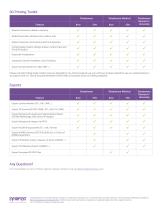
3D Printing Toolkit Simpleware Feature Dataset Conversion (Mask to Surface) Model Preparation (Emboss Text, Hollow, Cut) Model Connectors (Connectors and Pin & Sockets) Cutting Guide Creation (Design a Base, Cutting Track and Pin/Drill Guides) Grayscale Visualization Inspection (Check Printability, Color Proofing) Export Surface Mesh (STL, OBJ, 3MF …) Simpleware Medical Simpleware Research / University Please note that Cutting Guide Creation tools are intended for non-clinical research use only, and have not been cleared for use as a medical device in accordance with U.S. Food & Drug Administration...
Open the catalog to page 4All Synopsys, Inc. catalogs and technical brochures
 Synopsys IP Portfolio
16 Pages
 RSoft Photonic Device Tools
2 Pages
 LynxNXT Automation System
3 Pages
 Synopsys TestMAX
2 Pages
 PrimeSim
2 Pages