


- Products
- Catalogs
- News & Trends
- Exhibitions
Leaflet How to Use Bluetooth
Leaflet How to Use Bluetooth
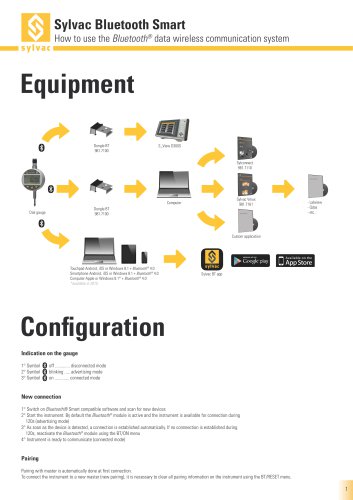
- Gauge Indications:
- Symbol off: Disconnected mode
- Symbol blinking: Advertising mode
- Symbol on: Connected mode
- New Connection Procedure:
- Activate Bluetooth® Smart compatible software and scan for new devices.
- Start the instrument; Bluetooth® module is active for 120 seconds (advertising mode).
- Automatic connection upon device detection; if not connected within 120 seconds, reactivate Bluetooth® via BT/ON menu.
- Instrument enters connected mode, ready for communication.
- Pairing: Automatic with the master on first connection. For new pairing, clear existing pairing information using BT/RESET menu.
- Connection Types:
- 1 to 8 dial gauges per Sylconnect
- 1 to 16 dial gauges per dongle
- Radio Frequency: Bluetooth 4.0 - 2.4GHz
- Robustness: FHSS
- Latency: Less than 6ms from not connected state to data transmission
- Range: Up to 15m in open space, 1-5m in industrial environments
- Autonomy: Varies by mode
- Continuous: Always connected, 4 values/sec, up to 2 months
- Saver: Sends value only on position change, up to 5 months
- Blind/Push: Value sent by instrument or requested by computer, up to 7 months
- Compatible with Android, iOS, Windows 8.1, and Apple devices with Bluetooth® 4.0
- No dongle required for certain configurations
- Detailed specifications available at www.sylvac.ch/bluetooth
Catalog excerpts

Sylvac Bluetooth Smart How to use the Bluetooth® data wireless communication system Dial gauge Custom application Touchpad Android, iOS or Windows 8.1 + Bluetooth® 4.0 Smartphone Android, iOS or Windows 8.1 + Bluetooth® 4.0 Computer Apple or Windows 8.1* + Bluetooth® 4.0 *available in 2015 Configuration Indication on the gauge 1° Symbol 2° Symbol 3° Symbol New connection 1° Switch on Bluetooth® Smart compatible software and scan for new devices 2° Start the instrument. By default the Bluetooth® module is active and the instrument is available for connection during 120s (advertising mode) 3° As soon as the device is detected, a connection is established automatically. If no connnection is established during 120s, reactivate the Bluetooth® module using the BT/ON menu 4° Instrument is ready to communicate (connected mode) Pairing Pairing with master is automatically done at first connection. To connect the instrument to a new master (new pairing), it is necessary to clear all pairing information on the instrument using the BT/RESET menu.
Open the catalog to page 1
Swiss manufacturer of precision measuring instruments since 1969 Specifications Radio frequency Latency (from not connected state to send data) Open space : up to 15m Industrial environment : 1-5m Autonomy depending on measuring mode : - Continuous : always connected with 4 values/sec - Saver : the instrument sends value only when the position has changed - Blind / Push : the value is sent from the instrument (button) or requested from the computer Up to 2 months Up to 5 months Up to 7 months Detailed specifications on www.sylvac.ch/bluetooth 2) 1 ... 8 dial gauge(s) per dongle Vmux light (direct...
Open the catalog to page 2All SYLVAC catalogs and technical brochures
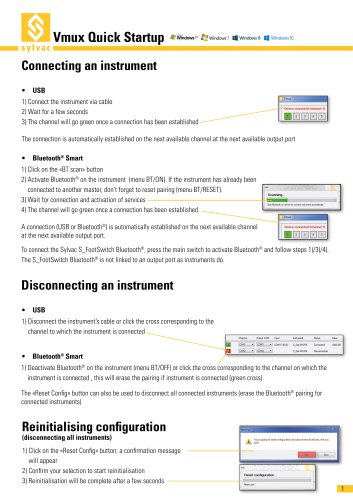 Vmux
Vmux6 Pages
 Catalogue E13 EN
321 Pages
 Feeler Gage SMART
2 Pages
 Wireless transmission
10 Pages
 Applications
1 Page
 Catalogo e9.1
277 Pages
 e8
e820 Pages
 Catalogue Sylvac E9 EN (2016)
249 Pages
 Catalogue edition 8
209 Pages
 Program Summary
20 Pages
 Booklet of the company
12 Pages
 PS16 V1 brochure
12 Pages
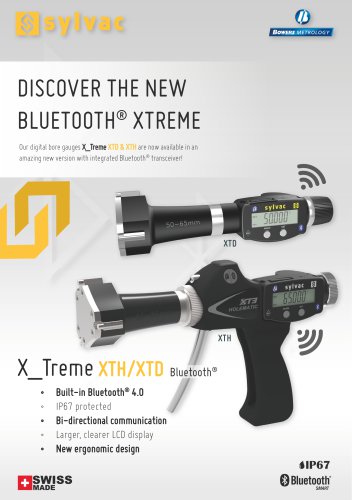 Flyer Xtreme Bluetooth
2 Pages
 Flyer UL4
2 Pages
 Flyer D400S
2 Pages
 Flyer D70S/H/I
2 Pages
 Flyer Sylvac BT Smart App
2 Pages
 New products 2014
29 Pages
 Leaflet S_Mike PRO BT
2 Pages
 Leaflet S_Cal EVO BT
2 Pages
 Leaflet Bluetooth Smart
2 Pages
 Leaflet S_Dial PRO Basic
2 Pages
 Sylvac 2014
219 Pages




- Display module
- LCD display panel
- Touch monitor
- LCD screen
- Measuring machine
- Process software
- USB monitor
- IP65 monitor
- Touch screen display panel
- Electronic display panel
- Outdoor display panel
- Micrometer
- Automatic measurement system
- RS-232 display panel
- Optical measurement system
- Optimization software
- Compact display panel
- Desktop monitor
- Graphic display panel
- Data acquisition software