

857254

857254
This manual provides detailed guidance on the Global 8 and Global 8 - Ethernet torque tool controllers by Sturtevant Richmont, covering installation, operation, and communication with various torque tools, including Ethernet-capable versions.
The Global 8 controller is compatible with multiple tools, such as SLTC-FM 2.4 GHz preset clicker-type torque wrenches and 1100-Series Exacta 2 digital torque wrenches. It supports communication with Tool Manager software for setup and data analysis.
Instructions for installing the Global 8 controller and associating it with compatible tools are provided. Emphasis is placed on understanding tool specifications and programming the controller accordingly.
The manual details establishing radio communication between tools and the Global 8 controller, including programming for control functions, input/output communications, and Ethernet network configurations.
Operational guidelines ensure safe use of the Global 8 system, with safety warnings to prevent misuse and ensure compliance with specifications.
While Sturtevant Richmont does not manufacture battery-powered tools, the manual provides partial support for compatible models, emphasizing the need for manufacturer support for programming and adjustments.
This section addresses common queries related to tool compatibility, programming, and troubleshooting.
Torque specifications for the 1100-Series Exacta 2 tools are outlined, including acceptable torque directions and minimum and maximum torque values.
Descriptions of various components of the Global 8 unit, such as the cabinet, antenna housing, LEDs, user interface, and connectors, are provided.
The Global 8 integrates various tools into assembly line operations, evaluating torque applications as conforming or nonconforming based on preset specifications.
Warnings include avoiding disassembly and improper cable handling, while cautions emphasize operating within specified voltage ranges and ensuring proper installation.
Considerations include proximity for radio communication, clean power source availability, and ensuring accessibility and visibility of the operator interface.
The Global 8 unit requires tools to be "learned" by the unit, with specific processes for different tools.
Each tool group must be programmed with specifications and characteristics, with access secured by a password or key lock.
Procedures for programming tools, including setting torque specifications and using the AUTOCAL function for PST 1000 tools, are described.
Procedures for using the Global 8 unit with various tools, including pneumatic tools and digital tools, are outlined.
This function simplifies programming by using one tool to tighten multiple batches of fasteners with the same torque requirement.
The Global 8 can automatically change from group to group as batches are completed.
This function allows the unit to ignore cycles, batches, and reject signals during maintenance situations.
The PST 1000 has several modes for monitoring pneumatic tools, with algorithms stored in memory for comparison.
Functions for summarizing and changing radio communications are provided.
Users can reset the batch count or total count of batches through the user interface.
The default password can be changed to any four-digit number for security purposes.
The Global 8 features a 10-pin receptacle for 24VDC I/O systems, allowing group selection via inputs and triggering external events through outputs.
Once programmed, the Global 8 operates automatically, displaying the current group, tool type, and batch count.
Ethernet-capable units include a network card and HMI, supporting Atlas-Copco Open Protocol (ACOP).
Instructions for configuring the unit's IP address and subnet mask are provided.
Instructions for navigating and saving subnet mask settings are provided.
Similar navigation and saving process as Subnet Mask.
Set service port value, typically 4545 for ACOP protocol.
Sets time for client acknowledgment.
Defines retry limit if acknowledgment isn't received.
Sets interval for receiving messages before socket closure.
Closes socket if no communication within set time.
Toggle between sending revision or spaces in messages.
Change alpha-numeric fields for torque records.
Connects via 9-pin DSUB, select baud rate.
Enables bar code reader connection, select baud rate.
Change 4-digit numeric password.
Uses code39 system for commands and data sections.
Examples of command structures for various functions are provided.
The Global 8 - Ethernet IP units feature a network card with connectors for various functions.
Upon power-up, the HMI displays firmware version and IP address.
The menu includes sub-menus for network settings and other configurations.
Details on programming IP address, subnet mask, gateway, and connection type are provided.
The unit can transmit up to 103 output bytes, with various characteristics.
Instructions for programming the total number of bytes per transmission and selecting output data items are provided.
The unit can receive up to 40 input bytes, covering various data characteristics.
Instructions for setting the message address for each input data characteristic are provided.
The unit includes a password protection feature to prevent unauthorized changes.
The unit can display the status of the network card and network to help diagnose communication issues.
The Global 8 units with PFCS compliance include a network card with connectors for communication settings.
The HMI consists of a 2-line LCD display and keypad for programming and connectivity status.
Upon connection and power-up, the unit displays firmware information and enters operating mode.
Accessed by pressing the Enter button, the program mode requires a password to modify settings.
The unit can communicate via RS-232 or Ethernet.
Users can set the IP address, subnet mask, gateway, and other settings for Ethernet communication.
Each tool managed by the Global 8 can have a unique machine name.
The ACK timeout, retry limit, and keep-alive timer are adjustable.
PFCS communication can be toggled on or off.
The default password can be changed to prevent unauthorized access.
Users can choose whether to transmit rejected torque results to the PFCS.
Catalog excerpts

Sturtevant Richmont Global Reach. Local Support. Sturtevant Richmont Div. of Ryeson Corp. 555 Kimberly Drive Carol Stream, IL 60188 Phones: 847/455-8677 800/877-1347 Fax: 847/455-0347 URL: www.srtorque.com E-mail: [email protected] Global 8 and Global 8 - Ethernet Instruction Manual For S/R Product Part Numbers 10479, 10477, 10476, 10473 and 10494 with 4.21 firmware If using the Global 8 with 1100-Series Exacta 2 tools, read new FAQ on head and extension length before programming unit! Part No: 857254 Revised 110926
Open the catalog to page 1
Thank you for making the Global 8/Global 8 - Ethernet part of your plants' torque tool control technology. This manual contains the information necessary to become familiar with, install and use the Global 8 family of products. The Global 8 controller is the same across the family, both in the number of tools it controls and the methodology used to communicate with them. Those versions that are Ethernet-capable extend the communications capabilities, incorporating a circuit board that has multiple external connectors and the ability to work with a specified protocol. The Global 8 also communicates...
Open the catalog to page 2
Table of Contents Section Number Section Title . . . . . . . . . . . . . . . . . . . . . . . . . . . . . . . . . . . . . . . . . . . . . . . . . . . . . Page 1. Nomenclature . . . . . . . . . . . . . . . . . . . . . . . . . . . . . . . . . . . . . . . . . . . . . . . . . . . . . . 3 2. Principles of Operation . . . . . . . . . . . . . . . . . . . . . . . . . . . . . . . . . . . . . . . . . . . . . . . 9 3. Safety; Warnings and Cautions . . . . . . . . . . . . . . . . . . . . . . . . . . . . . . . . . . . . . . . . 13 4. Installation . . . . . . . . . . . . . . . . . . . . . . . . . . . . . ....
Open the catalog to page 3
Notes on Battery Powered Tools Sturtevant Richmont does not manufacture battery-powered tools. Some tools of this type will communicate partially with the Global 8 series controllers through either design compatibility from the manufacturer (Panasonic brand, limited range of models) or by third-party modification. Partial support for use with these tools is provided herein, but we have no control over the design and design modifications of the battery tool manufacturers. For battery tools the primary support for the tool programming, adjustment, use and communication is the manufacturer of the...
Open the catalog to page 4
1 Nomenclature 1.1 Definitions 1100-Series Exacta 2 The digital torque wrenches from the Sturtevant Richmont “Exacta” family of tools designed to work with the Global 8 controller. These torque wrenches have a 2.4 GHz radio transceiver that can communicate with the Global 8 transceiver. They are capable of providing both attribute and variable data on the torques applied during use. See FAQ on head length before using this tool with the Global 8. Wireless Clicker-type Preset Torque Wrenches (SLTC-FM 2.4 GHz) The clicker-type torque wrench from the Sturtevant Richmont line of FM Switch Wrenches...
Open the catalog to page 5
Name (Common to all components) Each tool associated with the Global 8 has a name assigned to it, regardless of tool type. This assignment is made during programming. The most common approach for assigning a name is to use an abbreviation for the joint the tool will be used on. Tmr Bmp (Applies to PST 1000) This is a specification pertinent to air tools used with the PST 1000. It is a maximum amount of time that the air tool may be run without the operation being treated as an attempt to tighten a fastener. This specification is designed to compensate for accidental tool operation when a fastener...
Open the catalog to page 6
Thr 1 (Applies to PST 1000) This is a pressure setting applicable to the PST 1000. Below this pressure the PST 1000 will not record and store data; above this pressure data will be recorded and stored. This specification is entered during programming or via Autocal (preferred). Thr 2 (Applies to PST 1000) This is pressure setting applies to the PST 1000. The PST 1000 evaluates air pressure above this setting to be that of a tool in use and tightening a fastener. A tightening that results in air pressure above Thr 1 but below Thr 2 will be ignored. This specification is entered during programming...
Open the catalog to page 7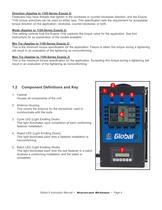
Direction (Applies to 1100-Series Exacta 2) Fasteners may have threads that tighten in the clockwise or counter-clockwise direction, and the Exacta 1100 torque wrenches can be used on either type. This specification sets the requirement for acceptable torque direction on the application; clockwise, counter-clockwise, or both. Mode (Applies to 1100-Series Exacta 2) This setting controls how the Exacta 1100 captures the torque value for the application. See tool instructions for an explanation of the modes available. Min Trq (Applies to 1100-Series Exacta 2) This is the minimum torque specification...
Open the catalog to page 8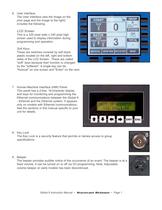
6. User Interface The User Interface (see the image on the prior page and the image to the right) includes the following: LCD Screen This is a 320 pixel wide x 240 pixel high screen used to display information during programming and operation. Soft Keys These are switches covered by soft black plastic located on the left, right and bottom sides of the LCD Screen. These are called "soft" keys because their function is changed by the "software". A single key can be "Autocal" on one screen and "Enter" on the next. 7. Human-Machine Interface (HMI) Panel. This panel has a 2-line, 16-character display...
Open the catalog to page 9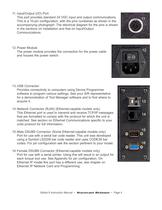
11. Input/Output (I/O) Port This port provides standard 24 VDC input and output communications. This is a 10-pin configuration, with the pins numbered as shown in the accompanying photograph. The electrical diagram for the pins is shown in the sections on Installation and that on Input/Output Communications. 12. Power Module The power module provides the connection for the power cable and houses the power switch. 13. USB Connector Provides connectivity to computers using Device Programmer software to program various settings. See your S/R representative for a demonstration of Tool Manager software...
Open the catalog to page 10All Sturtevant Richmont catalogs and technical brochures
 big-heads-brochure
3 Pages
 lit-064-torque-screwdriver
12 Pages
 lit-187-wireless-tools-catalog
16 Pages
 lit-076-manual-tools-catalog
28 Pages
 lit-193-calibration-catalog
16 Pages
 857129
2 Pages
 857176
2 Pages
 857123
2 Pages
 857121
2 Pages
 857045
2 Pages
 857046
2 Pages
 857122
2 Pages
 855291
2 Pages
 855248
2 Pages
 855247
2 Pages
 855279
2 Pages
 855278
2 Pages
 855277
2 Pages
 855275
2 Pages
 850234
2 Pages
 850214
2 Pages
 850238
2 Pages
 857284
20 Pages
 857280
4 Pages
