- Catalogs
- SPRINGCARD
- Using the M519 in SpringProx Legacy mode


Using the M519 in SpringProx Legacy mode
Using the M519 in SpringProx Legacy mode
- Overview: This document provides guidance on using the M519 module in SpringProx Legacy mode, a dual-interface OEM module supporting NFC/RFID HF and optional contact operations. It is intended for developers familiar with SpringProx products, offering setup and operational instructions using the SpringProx Legacy SDK available on GitHub.
- Target Platforms: The focus is on integration within PC environments (Linux or Windows) due to the diverse nature of embedded systems.
- Related Documents: Essential documents include the M519 Data Sheet and Getting Started Guides.
- Related Literature: References ISO standards relevant to smart cards and contactless communication.
- Glossary: Defines key terms such as APDU, PCD, PICC, and others related to communication protocols and standards.
- M519-SRK Quick-start: Instructions for setting up the M519-SRK Starter Kit using various interfaces (USB to Serial, JST 8-pin, USB interface) with warnings about power configurations to avoid damage.
- M519-SUV Quick-start: Describes the M519-SUV antenna setup for integration with equipment using USB or Serial interfaces, with specific configurations depending on the variant.
- Details the configuration of the M519’s non-volatile memory and testing connections, emphasizing the limitations in Legacy mode where only contactless interfaces are supported.
- Explains the specific features and implementations of the SpringProx library in the M519, including NFC/RFID HF functionalities.
- Guides users on downloading, exploring, and building the SpringProx Legacy SDK from GitHub, including an overview of sample applications.
- Serial Interface: The M519 module supports communication over a serial link using RX and TX lines, operating at 0/3.3V. It can interface with RS-232, RS-422, or RS-TTL (0/5V), but not RS-485 due to the full-duplex requirement of the SpringProx Legacy protocol.
- Power Supply: Requires a 3.3V power supply. Specific pins must be connected to a 3.3V source capable of delivering at least 500mA, while GND signals should be grounded.
- Handshaking and Configuration Signals: The /WAKEUP and /SUSPEND signals are not used in SpringProx Legacy mode and should be left unconnected. The /RESET signal is optional. Configuration signals MODE0 and MODE1 should be set to HIGH or left unconnected for SpringProx Legacy mode.
- Configuring for SpringProx Legacy Operation: Initially configured for the SpringCard Direct protocol, the M519 can switch to SpringProx Legacy by writing the value H01 to register H02C0 in the module's non-volatile memory.
- Testing Connection: Instructions for testing the connection on Linux and Windows using terminal software. The M519 should echo a specific startup string to confirm correct configuration and connection.
- Using with SpringProx Library 1.80: Compatibility considerations when using the M519 with the SpringProx Library version 1.80, highlighting the need for application adjustments due to differences in startup strings and version numbers.
- Features and Protocols: Supports Binary and ASCII protocols but not OSI 3964 or Bus protocols. Features a specific bit map indicating supported functionalities, such as ISO/IEC 14443 and 15693, ASCII and Binary protocols, and USB VCP profile.
- The M519 utilizes the NXP PN5190 chipset for its NFC/RFID HF interface, differing from previous models. The PN5190 has a unique API, restricting dynamic register access by the host application.
- Mifare Classic Keys: The PN5190 includes E2PROM with secure storage for Mifare Classic keys, emulated by SpringCore firmware.
- ICODE1 Support: The M519 does not support NXP's proprietary modulation for early ICODE1 chips but supports ISO/IEC 15693 modulation for current ICODE-SLI chips.
- Performance Timings: The M519 generally operates faster than SpringProx devices but may be slower in certain scenarios.
- The SpringProx Legacy SDK is available on GitHub, including projects for Linux, Windows using MinGW and GCC, and Windows using Visual Studio 2022.
- Building Libraries and Examples: Instructions for building projects on various platforms, requiring specific tools and steps to compile the libraries and sample applications.
- Sample Applications: Demonstrates communication with the M519, card detection, protocol activation, and card operations. Users are warned that running these samples may overwrite existing card data.
The document includes disclaimers about the accuracy and applicability of the information, as well as copyright and trademark notices. SPRINGCARD SAS holds the rights to the content, and reproduction without permission is prohibited.
Catalog excerpts

Application Note Using the M519 in SpringProx Legacy mode Headquarters, Europa SpringCard SAS 2, voie la Cardon Parc Gutenberg 91120 Palaiseau FRANCE SpringCard Inc. 185 Alewife Brook Parkway, ste 210 Cambridge, MA 02138 USA Email: [email protected] SPRINGCARD, the SPRINGCARD logo are registered trademarks of SPRINGCARD SAS. All other brand names, product names, or trademarks belong to their respective holders. Information in this document is subject to change without notice. Reproduction without written permission of SPRINGCARD is forbidden.
Open the catalog to page 1
Document Identification Category Reference & Version Application notes SpringCore / M519 PNA23189-AA 10/10/2023 Public M519, SpringProx, Legacy, USB, serial, SDK Revision History Version SPRINGCARD, the SPRINGCARD Logo are registered trademarks of SPRINGCARD SAS. ALL other brand names, product names, or trademarks belong to their respective holders. Information in this document is subject to change without notice. Reproduction without written permission of SPRINGCARD is forbidden.
Open the catalog to page 2
SPRINGCARD, the SPRINGCARD logo are registered trademarks of SPRINGCARD SAS. All other brand names, product names, or trademarks belong to their respective holders. Information in this document is subject to change without notice. Reproduction without written permission of SPRINGCARD is forbidden.
Open the catalog to page 3
1 Introduction 1.1 Overview This document describes the principle of using the M519 and its derivatives as a coupler, using the legacy protocol of the SpringProx products (K531, K632, K663, CSB4). The M519 is an advanced dual-interface OEM module, supporting contactless operation (NFC/RFID HF, ISO/IEC 14443 and 15693) through an external antenna, and, through an optional interface board, contact (ISO/IEC 7816) operation. The M519 supports various operating modes: Smart Reader, RFID Scanner (keyboard wedge), PC/SC Coupler, SpringProx Legacy, and more. Although the PC/SC Coupler mode is both the...
Open the catalog to page 4
springcard1.2 Target platforms — a foreword It is difficult to present the integration of a product such as the M519 within an embedded target in the general case, as each embedded target has its own specific features (bare-metal microcontroller, cooperative micro-kernel, pre-emptive micro-kernel, use of DMA and/or DPC, etc.). Since this SDK is dedicated to upgrading existing projects, with developers who already have an experience with SpringProx development, we have chosen to focus this SDK onto the PC world (Linux or Windows). Of course the M519 may easily be used together with virtually any...
Open the catalog to page 5
1.4 Related Literature The present document makes use of concepts and vocabulary that are taken from existing standards and specifications. Please refer to the original documents for a complete understanding. ISO/IEC 7816 is an international standard that defines the characteristics and requirements for integrated circuit cards (ICCs) or smart cards, as well as their interfaces with devices. This standard encompasses physical, electrical, communication, and application-specific aspects of smart cards, providing a comprehensive framework for their design and use. It defines two protocols: T=0...
Open the catalog to page 6
SPRINGCARD, the SPRINGCARD logo are registered trademarks of SPRINGCARD SAS. All other brand names, product names, or trademarks belong to their respective holders. Information in this document is subject to change without notice. Reproduction without written permission of SPRINGCARD is forbidden.
Open the catalog to page 7
springcord2 Hardware setup2.1 Quick-start for the M519-SRK The M519-SRK “Starter Kit” is a mother board for the M519 and various peripherals (antenna, smart card interfaces). It is designed to Let the implementer/developer evaluate the M519 in various configurations easily. Warning: setting a wrong hardware configuration or applying a wrong power level is likely to damage the M519 or the host. Please refer to [PMD23175] for details. 2.1.1 Using the M519-SRK through the FTDI USB to Serial bridge In this setup, the M519 is operated through its Serial interface, yet it is connected to the host through...
Open the catalog to page 8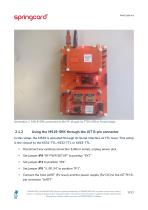
Illustration 1: M519-SRK connected to the PC though its FTDI USB to Serial bridge Using the M519-SRK through the JST 8-pin connector In this setup, the M519 is operated through its Serial interface at TTL level. This setup is the closest to the K531-TTL, K632-TTL or K663-TTL. • Disconnect any existing connection (USB or serial), unplug power jack, Set jumper JP4 “RF PWR SETUP” to position “EXT” Set jumper JP5 “V_RF_IN” to position “JP1”, Connect the host UART (3V level) and the power supply (5V DC) to the JST PH 8pin connector “UART”. SPRINGCARD, the SPRINGCARD logo are registered trademarks...
Open the catalog to page 9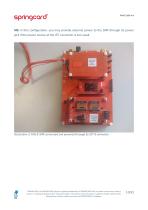
NB: in this configuration, you may provide external power to the SRK through its power jack if the power source at the JST connector is too weak. Illustration 2: M519-SRK connected and powered through its JST 8 connector SPRINGCARD, the SPRINGCARD logo are registered trademarks of SPRINGCARD SAS. All other brand names, product names, or trademarks belong to their respective holders. Information in this document is subject to change without notice. Reproduction without written permission of SPRINGCARD is forbidden.
Open the catalog to page 10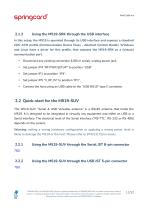
springcord2.1.3 Using the M519-SRK through the USB interface In this setup, the M519 is operated through its USB interface and exposes a standard CDC ACM profile (Communication Device Class - Abstract Control Model). Windows and Linux have a driver for this profile, that exposes the M519-SRK as a (virtual) communication port. • Disconnect any existing connection (USB or serial), unplug power jack, • Set jumper JP4 “RF PWR SETUP” to position “USB” • Set jumper JP5 “V_RF_IN” to position “JP1”, • Connect the host using an USB cable to the “USB M519” type C connector. The M519-SUV “Serial & USB Versatile...
Open the catalog to page 11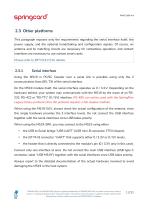
2.3 Other platforms This paragraph exposes only the requirements regarding the serial interface itself, the power supply, and the optional handshaking and configuration signals. Of course, an antenna and its matching circuits are necessary for contactless operation, and contact interfaces are necessary to use contact smart cards. Please refer to [PFT22217] for details. Serial interface Using the M519 in PC/SC Coupler over a serial link is possible using only the 2 communication lines (RX, TX) of the serial interface. On the M519 module itself, the serial interface operates as 0 / 3.3.V. Depending...
Open the catalog to page 12All SPRINGCARD catalogs and technical brochures
 Prox’N’ Drive
4 Pages
 SPRINGPASS
12 Pages
 Prox’N’Roll PC/SC HSP
4 Pages
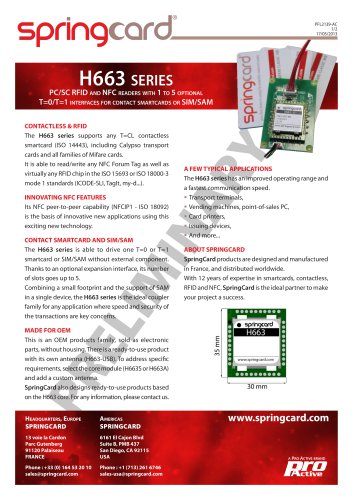 H663 series
2 Pages
 Prox’N’ Drive
5 Pages
 Puck Base RFID Scanner
16 Pages
 Lecteur NFC/RFID HF USB
11 Pages