


SpatiX Baseline Data Processing Software 2025- 0912
1 /55Pages
SpatiX Baseline Data Processing Software 2025- 0912
1 /55Pages
Catalog excerpts
SpatiX Baseline Data Processing Software 20250912 SpatiX surveying and mapping data processing software An instruction manual
Open the catalog to page 1
Chapter 1 Software Installation and Uninstallationl Introduction to 1.1 Software1 Chapter II Simple Data Processing Process5 2.1 Static GNSS data processing5 2.2 Dynamic GNSS data processing10 Chapter 3 Metipost Data Processing Software16 Chapter 4 Static Baseline Solution36 4.2.3 Observation data file name42 4.2.4 Observation data in RINEX format42
Open the catalog to page 2
4.3 Static Baseline Solution Settings42 4.5 Baseline Processing Results Test44 4.6 Factors Affecting Baseline Solution Results and Coping Methods46 The function and steps of 5.1 network adjustment.48 5.2.1 Extract baseline vector network51 5.2.2 Report of adjustment51 Chapter 6 Dynamic Baseline Solution52 Preparation for 6.1 Baseline solution52 SpatiX surveying and mapping data processing software MetriPost is mainly to process the static baseline of GNSS static observation data, and to constrain the whole network adjustment by the static baseline solution result, and to obtain the final result...
Open the catalog to page 3
software, the user can easily customize the ellipsoid projection parameters and select different coordinate systems and define the precision units according to the requirements. The entire process, including baseline solution, net adjustment and other operations, is carried out in the project file under the save path.In terms of function, the software has functions such as baseline solution, closed loop and repeated baseline inspection, and net adjustment processing. Using this software for baseline calculation, you can easily set the calculation conditions and calculation type of any baseline....
Open the catalog to page 4
1.3 Uninstall Software Shortcut Uninstall Find the installation folder of MetriPost in the "Start" menu bar, click "unins000.exe", click "Yes", the software starts to uninstall, and the software uninstall is complete. Chapter II Simple Data Processing Process This chapter mainly explains the simple process of metipost data processing software to solve GNSS static data, so that users can quickly understand the use of the software in a short time. The following is a brief description of the data processing process, and for other more detailed usage, please refer to the following sections. 2.1 Static...
Open the catalog to page 5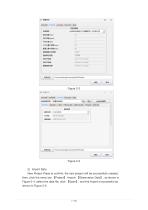
2) Import Data New Project Press to confirm, the new project will be successfully created, 【Project】-Import 【Observation Data】, as shown in Figure 2-4, select the data file, click 【Open】, and the import is successful as then, click the menu bar shown in Fi
Open the catalog to page 7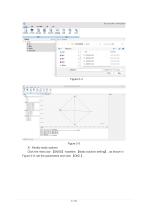
3) Modify static options Click the menu bar [GNSS] -baseline [static solution setting] , as shown in Figure 2-6, set the parameters and click [OK ] .
Open the catalog to page 8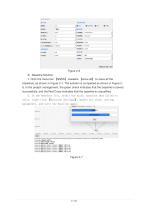
4) Baseline Solution 1. Click the menu bar 【GNSS】-baseline 【solve all】 to solve all the baselines, as shown in Figure 2-7. The solution is completed as shown in Figure 28. In the project management, the green check indicates that the baseline is solved successfully, and the Red Cross indicates that the baseline is unqualified. 2. In the baseline list, select the static baseline that failed to solve, right-click 【Solution Settings】, modify the static setting parameters, and solve the baseline again.
Open the catalog to page 9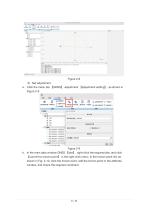
a. Click the menu bar [GNSS] -adjustment [adjustment setting] , as shown in b. In the main data window GNSS [site] , right-click the required site, and click [convert to known point] in the right-click menu. In the known point list, as shown in Fig. 2-10, click the known point, edit the known point in the attribute window, and check the required constraint.
Open the catalog to page 10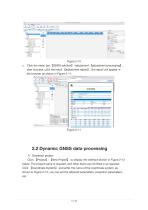
【GNSS solution】-adjustment 【adjustment processing】, after success, click the result 【adjustment report】, the report will appear in the browser as shown in Figure 2-11. 2.2 Dynamic GNSS data processing 1) Grassroot project Click 【Project】-【New Project】 to display the interface shown in Figure 2-12 below. The project name is required, and other items can be filled in as required. Click 【Coordinate System】 and enter the name of the coordinate system, as shown in Figure 2-13, you can set the ellipsoid parameters, projectio
Open the catalog to page 11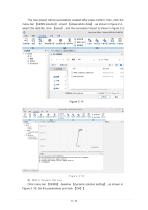
The new project will be successfully created after press confirm, then, click the 【GNSS solution】-import 【observation data】, as shown in figure 2-4, select the data file, click 【open】, and the successful import is shown in figure 2-5. menu bar Figure 2-15 3) Modify Dynamic Options 【GNSS】-baseline 【dynamic solution setting】, as shown in Figure 2-16. Set the parameters and click 【OK】
Open the catalog to page 13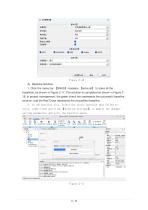
1. Click the menu bar [GNSS] -baseline [solve all] to solve all the baselines, as shown in Figure 2-17. The solution is completed as shown in Figure 218. In project management, the green check box represents the successful baseline solution, and the Red Cross represents the unqualified baseline. 2. In the baseline list, select the static baseline that failed to solve, right-click and click [Solution Settings] to modify the dynamic setting parameters and solve the baseline again. Star Survey Office - StarProj-2025-09-12-090728 -fcg:(m) 75lnfl: vEjStiJft as.fi:
Open the catalog to page 14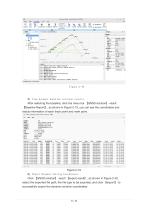
5) View dynamic baseline solution results. After selecting the baseline, click the menu bar 【GNSS solution】-result 【Baseline Report】, as shown in Figure 2-19, you can see the coordinates and status information of each track point and mark point. Figure 2-19 6) Export Dynamic Solving Coordinates 【GNSS solution】-result 【export result】, as shown in Figure 2-20, select the exported file path, the file type to be exported, and click 【export】 to Click successfully export the dynamic solutio
Open the catalog to page 15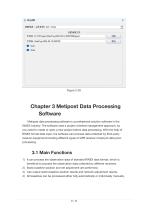
Chapter 3 Metipost Data Processing Software Metipost data processing software is a professional solution software in the GNSS industry. The software uses a project-oriented management approach, so you need to create or open a new project before data processing. With the help of RINEX format data input, the software can process data collected by third-party receiver equipment,Including different types of GPS receiver mixed job data postprocessing. 3.1 Main Functions 1) It can process the observation data of standard RINEX data format, which is beneficial to process the observation data collected...
Open the catalog to page 16- Industrial control system
- SpatiX GNSS receiver
- Compact receiver
- Monitoring control system
- Industrial receiver
- Digital control system
- Automatic control system
- Rugged receiver
- Serial receiver
- Wireless receiver
- SpatiX RTK receiver
- USB receiver
- SpatiX surveying receiver
- Multi-frequency receiver
- Automation control system
- Bluetooth receiver
- Tracking receiver
- GNSS module
- Construction site receiver