
- Catalogs
- Sourcetronic GmbH
- Manual ST2822 LCR Meter Series

Manual ST2822 LCR Meter Series

Manual ST2822 LCR Meter Series
Catalog excerpts

Dual Handheld LCR Meter Instruction Manual SOURCETRONIC GMBH www.Sourcetronic.com © 2010 SOURCETRONIC GmbH – All rights reserved. Contact: [email protected] – Tel. +49 421 277 9999
Open the catalog to page 1
Safety Summary The following safety precautions are applicable to both operating and maintenance personnel and must be observed during all phases of operation, service, and repair of this instrument. DO NOT OPERATE IN A FLAMMABLE OR EXPLOSIVE ATMOSPHERE Do not operate the instrument in the presence of much dust, direct sunlight, high humidity, strong electromagnetic radiation, etc. NON-PROFESSIONALS SHOULD NOT OPEN STE REAR COVER Maintaining, substituting parts or adjusting the instrument should be made by professional maintenance personnel. Please contact relevant distributor or Sourcetronics...
Open the catalog to page 2
DO NOT REMOVE OR MODIFY STE INSTRUMENT Some replacements and unauthorized modifications might cause irreversible damage to the instrument. SAFETY WARNING Strictly follow the relevant safety statements in this manual involving safety, personnel injury, damage to the instrument, operation and environmental conditions causing poor test.
Open the catalog to page 3
Safety Guidelines To ensure that you use this device safely, follow the safety guidelines listed below: This meter is for indoor use, altitude up to 2,000 m. For short-time outdoor use, precautions should be taken to avoid direct sunlight, water and moisture, electromagnetic radiation, dust and explosion. The warnings and safety precautions should be read and well understood before the instrument is used. Use the meter only as specified in this manual. Confirm that the circuits have been powered off and all capacitors in the circuits been discharged before measuring in-circuit components. Discharge...
Open the catalog to page 4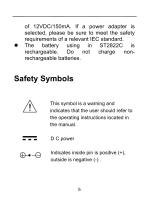
of 12VDC/150mA. If a power adapter is selected, please be sure to meet the safety requirements of a relevant IEC standard. The battery using in ST2822C is rechargeable. Do not charge nonrechargeable batteries. Safety Symbols This symbol is a warning and indicates that the user should refer to the operating instructions located in the manual. D C power Indicates inside pin is positive (+), outside is negative (-) .
Open the catalog to page 5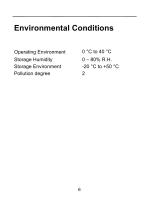
Operating Environment Storage Humidity Storage Environment Pollution degree
Open the catalog to page 6
Introduction ST2822 series are designed for measuring inductance, capacitance and resistance components. The instrument can be powered by a 9V battery or external power adapter. The meter is not only applicable to the application occasion of bench meters but also conveniently used in the flow inspect and handheld measurement occasions. ST2822 series provide the primary parameter of up to 40,000 readings, secondary parameter of 0.0001 reading resolution, the maximum measuring frequency of up to 100kHz, constant internal resistance of 100Ω and testing level of 0.6Vrms. The auto range can rapidly...
Open the catalog to page 10
the selections of the key tone, auto power-off and storage. All ST2822 series are equipped with the function of remote communication. The test data can be transferred to PC through a Mini USB connection, great for applications that require remote control and data acquisition. Package Contents ST2822 series are equipped with the following contents: • ST2822/ST2822A/ST2822C handheld LCR meter • Instruction manual • Mini USB Interface Cable • Red / Black Banana plugs—Crocodile clip Test Leads • Short-circuit plate • *9V Alkaline battery or 8.4 rechargeable battery • *AC adapter • *ST26027A Kelvin...
Open the catalog to page 11
* This can be purchased as optional accessories. All contents are subject to actual package list or box. Please locate them from the original packaging to ensure nothing is missing. If in the case that an item is missing, please contact Sourcetronic or relevant distributor immediately.
Open the catalog to page 12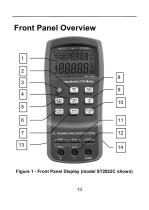
Front Panel Overview Figure 1 - Front Panel Display (model ST2822C shown)
Open the catalog to page 13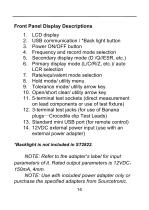
LCD display USB communication / *Back light button Power ON/OFF button Frequency and record mode selection Secondary display mode (D /Q//ESR, etc.) Primary display mode (L/C/R/Z, etc.)/ auto LCR selection Rate/equivalent mode selection Hold mode/ utility menu Tolerance mode/ utility arrow key Open/short clear/ utility arrow key 5-terminal test sockets (direct measurement on lead components or use of test fixture) 3-terminal test jacks (for use of Banana plugs—Crocodile clip Test Leads) Standard mini USB port (for remote control) 12VDC external power input (use with an external power adapter)...
Open the catalog to page 14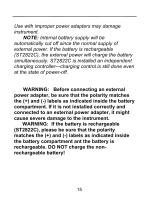
Use with improper power adapters may damage instrument. NOTE: Internal battery supply will be automatically cut off since the normal supply of external power. If the battery is rechargeable (ST2822C), the external power will charge the battery simultaneously. ST2822C is installed an independent charging controller---charging control is still done even at the state of power-off. WARNING: Before connecting an external power adapter, be sure that the polarity matches the (+) and (-) labels as indicated inside the battery compartment. If it is not installed correctly and connected to an external...
Open the catalog to page 15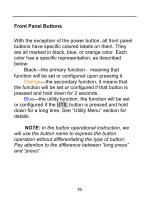
Front Panel Buttons With the exception of the power button, all front panel buttons have specific colored labels on them. They are all marked in black, blue, or orange color. Each color has a specific representation, as described below: Black—the primary function,meaning that function will be set or configured upon pressing it. Orange—the secondary function, it means that the function will be set or configured if that button is pressed and hold down for 2 seconds. Blue—the utility function, the function will be set or configured if the UTIL button is pressed and hold down for a long time. See...
Open the catalog to page 16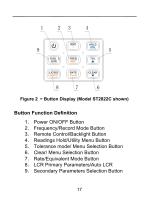
Figure 2 –Button Display (Model ST2822C shown) Button Function Definition 1. Power ON/OFF Button 2. Frequency/Record Mode Button 3. Remote Control/Backlight Button 4. Readings Hold/Utility Menu Button 5. Tolerance mode/ Menu Selection Button 6. Clear/ Menu Selection Button 7. Rate/Equivalent Mode Button 8. LCR Primary Parameters/Auto LCR 9. Secondary Parameters Sel
Open the catalog to page 17All Sourcetronic GmbH catalogs and technical brochures
 MPK-256
20 Pages
 Manual MPK-256 Microohmmeter
24 Pages
 Manual ST2829 LCR Meter Series
119 Pages
 Manual ST2827 LCR Meter Series
118 Pages
 Manual ST2830 LCR Meter Series
127 Pages
 Manual ST500 Frequency Inverter
180 Pages
 Measurement Technology
20 Pages

- Industrial tester
- Electronic filter
- Automatic test kit
- Multimeter
- Benchtop tester
- Digital multimeter
- Test set
- Frequency inverter
- AC electronic filter
- Insulation testing system
- Industrial test kit
- Industrial multimeter
- 1000 V multimeter
- Frequency multimeter
- AC/DC multimeter
- Three-phase electronic filter
- 3-phase frequency converter
- Benchtop test equipment
- Production tester
- Transformer tester