
- Catalogs
- SOLIDWORKS
- WHAT’S NEW IN SOLIDWORKS 2017


- Products
- Catalogs
- News & Trends
- Exhibitions
WHAT’S NEW IN SOLIDWORKS 2017

WHAT’S NEW IN SOLIDWORKS 2017
Allows direct opening of proprietary 3D CAD data from various platforms while retaining file associativity. This feature enhances collaboration and accelerates design changes.
Introduces tools like Asset Publisher and Magnetic Mates to expedite equipment layouts and manage sub-assemblies efficiently, improving the design speed of large assemblies.
Features like the Advanced Hole Wizard and enhanced Wrap Feature simplify modeling processes, making them faster and requiring fewer actions.
Visualize Boost offers network rendering for faster speeds, supporting various VR platforms, thus improving the workflow between modeling and rendering.
Enhancements in drawing creation include linking BOM table elements and mirroring views, streamlining the process.
Facilitates the transition from 2D to MBD with features like geometry comparison and STEP 242 export, supporting model-based enterprises.
Automatic schematic creation and a unified PCB design environment enhance productivity in electrical design.
Expanded simulation capabilities address more design scenarios, including nonlinear contact and multi-parameter optimization.
Features like 3MF import/export and instant costing estimates extend SOLIDWORKS capabilities within the manufacturing ecosystem.
Enhancements in PDM and eDrawings improve data management and collaboration, including augmented reality support and improved viewing options.
Catalog excerpts
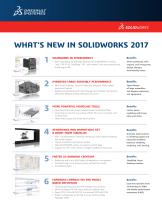
• Open proprietary 3D CAD data directly into SOLIDWORKS including Work seamlessly with anyone, and incorporate design changes dramatically faster. Creo®, CATIA® V5, SolidEdge®, NX™, and Inventor® and retain associativity to the original file IMPROVED LARGE ASSEMBLY PERFORMANCE • New Asset Publisher, Ground Mates and Magnetic Mates speed equipment layouts • Replace sub-assembly with multi-body part and maintain downstream references; Replace missing references all at once Speed design of large assemblies and layouts machinery and equipment. MORE POWERFUL MODELING TOOLS • New Advanced Hole Wizard creates/reuses customized holes • Wrap Feature now for any surface; Offset 3D Curve on surface with Faster, easier modeling with fewer picks and clicks. multiple faces • Sheet Metal support for three-bend corners RENDERINGS AND ANIMATIONS GET A BOOST FROM VISUALIZE • New “Visualize Boost”: Network rendering made simple for blazing fast render speeds • Import animations and motion studies • Map SOLIDWORKS camera navigation and hot keys • Support for HTC® Vive™, Oculus, Google® Cardboard, Samsung® Benefits Dramatic improvement in rendering speed and improved workflow between modeling, rendering, and viewing. FASTER 2D DRAWING CREATION • Reference and link to BOM table cell elements in annotations • Parametrically mirror drawing views without the model • Pre-defined layers Simplified, faster drawing creation. EXPANDED CAPABILITIES FOR MODEL BASED DEFINITION Compare geometry and 3D PMI between two revisions Define DimXpert 3D PMI more easily for drafted parts Export STEP 242 with 3D PMI to automate CAM and CMM Attach multiple files to 3D PDF to build Technical Data Packages (TDP) Ease the transition from 2D drawings
Open the catalog to page 1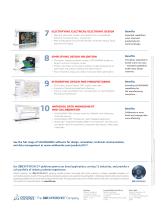
ELECTRIFYING ELECTRICAL/ELECTRONIC DESIGN • Electrical: Automatic creation of schematic from a spreadsheet • Electrical: Compound parts – accessories • PCB: Unified design environment between schematic editing, board Expanded capabilities mean improved productivity for electrical design. SIMPLIFYING DESIGN VALIDATION • Simulation: Display simulation results in SOLIDWORKS model; arc length control for nonlinear contact • Plastics: Part Mass can be used in addition to gate temperature for gate freeze and pressure holding time determination • Flow: Parametric Study now allows multi-parameter optimization...
Open the catalog to page 2All SOLIDWORKS catalogs and technical brochures
 SOLIDWORKS VISUALIZE
6 Pages
 SOLIDWORKS Solutions
6 Pages
 SOLIDWORKS PDM
2 Pages
 SOLIDWORKS Premium_2016
6 Pages
 SOLIDWORKS Composer
2 Pages
 SolidWorks Plastics
2 Pages
 SOLIDWORKS ENTERPRISE PDM
4 Pages
 3D COMPONENT DESIGNER
2 Pages
 INDUSTRY INNOVATION
3 Pages
 3D SCULPTOR
2 Pages
 SOLIDWORKS ELECTRICAL SUITE
6 Pages
 SOLIDWORKS Simulation Suite
4 Pages
 SOLIDWORKS MBD
4 Pages
 3DVIA COMPOSER
4 Pages
 SW_Plastics_DS_2013
4 Pages


Archived catalogs
 SOLIDWORKS PREMIUM 2011
4 Pages
 SOLIDWORKS Simulation_2016
6 Pages
 2017 SWK PDM
4 Pages
 PROJECT PLANNER
2 Pages
 SOLIDWORKS Subscription
2 Pages
 SOLIDWORKS Flow Simulation
4 Pages
 SOLIDWORKS CircuitWorks
4 Pages
 SOLIDWORKS EPDM
4 Pages
 SolidWorks Simulation_2014
6 Pages
 DRAFTSIGHT
2 Pages
 SW2014 Datasheet EPDM
4 Pages
 SW2014 Datasheet Top Ten
2 Pages
 EPDM
EPDM4 Pages
 hcv
hcv2 Pages
 em
em2 Pages
 SW_Electrical_DS_2013
4 Pages
 Business Innovation
6 Pages
 SolidWorks Premium_2013
8 Pages
 SOLIDWORKS SIMULATION 2010
6 Pages
 SOLIDWORKS PREMIUM_2015
6 Pages
 SolidWorks Routing
2 Pages
 PhotoWorks Product Overview
2 Pages
 COSMOSWorks Designer
2 Pages
 SolidWorks 2008
2 Pages




- SOLIDWORKS management software
- SOLIDWORKS automation software
- Analysis software solution
- SOLIDWORKS process software
- SOLIDWORKS real-time software
- Windows software
- SOLIDWORKS CAD software
- SOLIDWORKS cloud software
- SOLIDWORKS control software
- SOLIDWORKS design software
- Monitoring software solution
- Industrial software
- SOLIDWORKS 3D software
- SOLIDWORKS interface software
- Visualization software solution
- SOLIDWORKS quality software
- SOLIDWORKS simulation software
- Programming software solution
- Automated software
- SOLIDWORKS development software