
- Catalogs
- Solidat Applied Technologies Ltd.
- MonoScan User Manual


MonoScan User Manual

MonoScan User Manual
Catalog excerpts
MonoScan User's Manual >
Open the catalog to page 1
MonoScan Users Manual ii > This manual is delivered subject to the following conditions and restrictions: This manual contains proprietary information belonging to Solid Applied Technologies Ltd. Such information is supplied solely for the purpose of assisting explicitly and properly authorized users of MonoScan. The text and graphics are for the purpose of illustration and reference only. The specifications on which they are based are subject to change without notice. No part of its contents may be used for any other purpose, disclosed to any person or firm or reproduced by any means, electronic...
Open the catalog to page 2
MonoScan must be installed, connected and operated according to the instructions in this Manual. Installation in hazardous area should be according to this manual and relevant control drawings. For more information consult with your distributor. If installed incorrectly or used for applications for which it is not intended, application-related dangers may arise. Only qualified personnel are authorized to install and operate MonoScan. Do not open the MonoScan unit. If the unit is opened, the warranty is null and void. Modifications and repairs to MonoScan are permissible only when the manufacturer...
Open the catalog to page 3
MonoScan Users Manual viii >
Open the catalog to page 8
MonoScan is an ultrasonic, continuous-level measurement gauge of mono-block construction (combining the sensor and electronic components in a single unit). MonoScan measures the height of both liquids and solids accurately. It can be used for the following measurement tasks: Liquid tanks with calm surfaces Solids tanks that are dust-free Open channel flow measurement MonoScan has a range of up to 15 m (49.21 ft) with an accuracy of 0.25% within that range. MonoScan is available in three models: MonoScan L for liquids (Standard Range/Short Range) MonoScan S for solids (Standard Range/Short Range)...
Open the catalog to page 9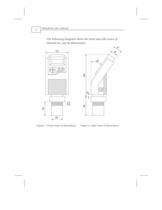
MonoScan Users Manual 2 The following diagrams show the front and side views of MonoScan, and its dimensions: > Figure 1: Front View of MonoScan Figure 2: Side View of MonoScan size="-1">
Open the catalog to page 10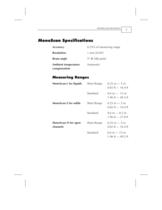
Accuracy 0.25% of measuring range Resolution 1 mm (0.04") Beam angle 5 @ 3db point Ambient temperature compensation Automatic > MonoScan L for liquids Short Range Standard 0.25 m З 5 m 0.82 ft 16.4 ft 0.6 m ח 15 m 1.96 ft 49.2 ft MonoScan S for solids Short Range Standard 0.25 m ח 5 m 0.82 ft 16.4 ft 0.6 m ח 8.5 m 1.96 ft 27.8 ft MonoScan O for open channels Short Range Standard 0.25 m ח 5 m 0.82 ft 16.4 ft 0.6 m ח 15 m 1.96 ft 49.2 ft >
Open the catalog to page 11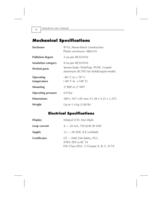
MonoScan Users Manual 4 > Enclosure IP 65, Mono-block construction. Plastic enclosure: ABS+UV Pollution degree 2 (as per IEC61010) Insulation category II (as per IEC61010) Wetted parts Sensor body: PolyProp. PVDF, Coated aluminum (ECTFE) for Solid/Liquid model. Operating temperature -40 C to + 70 C (-40 F to +158 F) Mounting 2" BSP or 2" NPT Operating pressure 0.9 bar Dimensions 289 x 107 x 85 mm (11.38 x 4.21 x 3.35") Weight Up to 1.4 kg (3.08 lb) > Display Integral LCD, four digits. Loop current 4 җ 20 mA, 750 @ 28 VDC Supply 12 28 VDC (CE certified) Certificates CE ח EMC,FM-Safety, FCC. ATEX:...
Open the catalog to page 12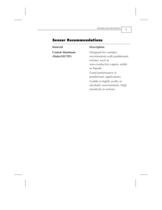
Material Description Coated Aluminum (Halar Designed for complex environments with problematic echoes, such as non-conductive vapors, solids or liquids. Good performance in problematic applications. Usable in highly acidic or alcoholic environments. High sensitivity to echoes. ECTFE) >
Open the catalog to page 13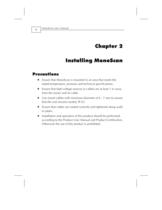
MonoScan Users Manual 6 > Ensure that MonoScan is mounted in an area that meets the stated temperature, pressure and technical specifications. Ensure that high-voltage sources or cables are at least 1 m away from the sensor and its cable. Use round cables with minimum diameter of 6 - 7 mm to ensure that the unit remains sealed, IP 65. Ensure that cables are routed correctly and tightened along walls or pipes. Installation and operation of this product should be performed, according to the Product User Manual and Product Certification. Otherwise the use of this product is prohibited. >
Open the catalog to page 14
NOTE: If the device enters the blocking distance (dead zone), it will not measure correctly. > NOTE: Even the slightest difference in angle may affect echo quality. >
Open the catalog to page 15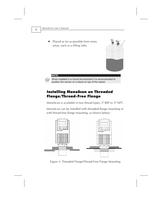
MonoScan Users Manual 8 Placed as far as possible from noisy areas, such as a filling inlet. > NOTE: When installed in a humid environment it is recommended to position the sensor on a tripod on top of the vessel. MonoScan is available in two thread types, 2" BSP or 2" NPT. MonoScan can be installed with threaded-flange mounting or with thread-free flange mounting, as shown below: Figure 3: Threaded Flange/Thread-Free Flange Mounting >
Open the catalog to page 16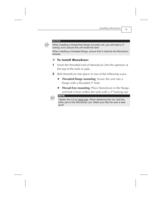
NOTES: When installing a thread-free flange mounted unit, you will need a 2" locking nut to secure the unit inside the tank. When installing a threaded flange, ensure that it matches the MonoScan threads. > NOTE: Tighten the nut by hand only . When tightening the nut, hold the lower part of the MonoScan unit. Make sure that the seal is leak proof. >
Open the catalog to page 17
MonoScan Users Manual 10 > If the level of the measured surface falls within the dead-zone area, you should use an extension pipe to mount MonoScan. When using an extension pipe, ensure that: The sensor is positioned in the center of the pipe. The pipe extension is parallel to the side/tank walls. The internal pipe diameter is at least 3" wide. When installing the MonoScan with extension pipes, follow these specifications: Pipe Length Internal Pipe Diameter 0.50 m (1.64 ft) 3" > NOTE: It is always recommended to use interference signal feature (Pr.03) to locate interfering signals when using...
Open the catalog to page 18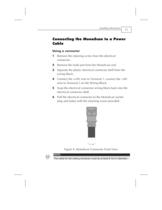
Using a connector 1 Remove the retaining screw from the electrical connector. 2 Remove the male part from the MonoScan unit. 3 Separate the plastic electrical connector shell from the wiring block. 4 Connect the +24V wire to Terminal 1, connect the -24V wire to Terminal 2 on the Wiring Block. 5 Snap the electrical connector wiring block back into the electrical connector shell. 6 Pull the electrical connector to the MonoScan socket plug and fasten with the retaining screw provided. Figure 4: MonoScan Connector Front View > NOTE: The cable for the mating connector must be at least 6 mm in diameter....
Open the catalog to page 19All Solidat Applied Technologies Ltd. catalogs and technical brochures
 MonoScan Data Sheet
2 Pages
 SMARTSCAN 50
2 Pages
 GAUGER 485
2 Pages
 GAUGER GSM
2 Pages
 Gauger420 - User Manual
67 Pages
 GaugerGSM / 485 - User Manual
94 Pages
 Complete_Product_line_Brochure
13 Pages
 Diesel Tank Monitoring Solution
12 Pages
 Gauger Line Brochure
10 Pages
 Sewer monitoring system
1 Page
 OEM options for GaugerGSM
3 Pages
 GaugerGSM - product highlights
13 Pages
 GaugerGSM - Highlights
11 Pages
 Wireless solution Poster
1 Page
 General purpose Poster
1 Page
 SmartScan User Manual
145 Pages
 MicroScan User Manual
51 Pages
 SmartScan
2 Pages
 MicroScan™
2 Pages


- Flowmeter
- Volume flow monitor
- Liquid flow monitor
- Gas flow monitor
- Level probe
- Liquid level sensor
- In-line flow meter
- Analog level sensor
- Level transmitter
- Liquid level transmitter
- Ultrasonic flow monitor
- Digital output level sensor
- Vessel level sensor
- Analog level transmitter
- Liquids level gauge
- Digital output level transmitter
- Storage tank level transmitter
- Explosion-proof level sensor
- Electronic level gauge
- Explosion-proof level transmitter