
- Catalogs
- Solidat Applied Technologies Ltd.
- Interface Control Document (ICD) for GaugerGSM


Interface Control Document (ICD) for GaugerGSM

Interface Control Document (ICD) for GaugerGSM
Catalog excerpts
Solid Applied Technologies Ltd. 1 www.solidAT.com ICD for GaugerGSM [email protected] Interface Control Document (ICD) For GaugerGSM Date Revision Software version Part number Feb 2011 V2.1 GaugerGSM 2.2.20 GaugerGSM
Open the catalog to page 1
______________________________________________________________________________ ICD for GaugerGSM page 2 of 13 Notices This ICD is delivered subject to the following conditions and restrictions: • The ICD contains proprietary information belonging to Solid Applied Technologies Ltd. The information is published solely for the purpose of assisting authorized users of GaugerGSM. • Some features of GaugerGSM are firmware dependent. These features may be described in this ICD but may not apply to all GaugerGSM versions. • No part of this ICD may be used for any other purpose, or disclosed to any person...
Open the catalog to page 2
______________________________________________________________________________ ICD for GaugerGSM page 4 of 13 1. What is GaugerGSM? GaugerGSM is a mono-block ultrasonic level meter integrated with a GSM cellular modem. The system measures distance and temperature in tanks and calculates level and volume. GaugerGSM detects events such as full level, theft, level crossings, refill and more. GaugerGSM transmits measured and calculated data to one predefined destination. The information is transmitted by SMS or GPRS messages over a GSM network. Supported GSM frequencies are 850/900/1800/1900MHz....
Open the catalog to page 4
______________________________________________________________________________ ICD for GaugerGSM page 5 of 13 2. Scope of this ICD This ICD is intended for developers of monitoring software and describes three possible interfaces between GaugerGSM and the monitoring software: (1) GaugerGSM transmits SMS which are received and handled by the monitoring software. (2) GaugerGSM transmits GPRS messages which are received and handled by the monitoring software. (3) GaugerGSM transmits SMS messages which are received by a SolidAT software utility (Log & Forward). The SMS are stored by the utility as...
Open the catalog to page 5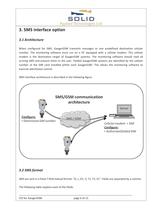
______________________________________________________________________________ ICD for GaugerGSM page 6 of 13 3. SMS interface option 3.1 Architecture When configured for SMS, GaugerGSM transmits messages to one predefined destination cellular number. The monitoring software must run on a PC equipped with a cellular modem. This cellular modem is the destination target of GaugerGSM systems. The monitoring software should read all arriving SMS and present them to the user. Fielded GaugerGSM systems are identified by the cellular number of the SIM card installed within each GaugerGSM. This allows...
Open the catalog to page 6
______________________________________________________________________________ ICD for GaugerGSM page 7 of 13 Field Description Format D Measured distance xx.xxx meter/feet L Measured level xx.xxx meter/feet D1 If S1=5, refill start at… If S1=6, refilled quantity is… For all other S1: xx.xxx meter/feet or xxxxxx.x liter/gallon xx.xxx meter/feet or xxxxxx.x liter/gallon 0 V Measured volume xxxxxx.x liter/gallon T1 Internal temperature xx.x Celsius or Fahrenheit T2 External temperature xx.x Celsius or Fahrenheit (minus if no sensor) S1 Equipment status Digits (See Equipment status chapter below)...
Open the catalog to page 7
______________________________________________________________________________ ICD for GaugerGSM page 8 of 13 4. GPRS interface option 4.1 Architecture When configured for GPRS, GaugerGSM acts as a TCP client and transmits all messages to one predefined server destination. Server definition includes IP address and port number. The monitoring software must be connected to the Internet and must own a fixed, globally known IP address and an allowed port number. The monitoring software should do the following: • Open a listening raw TCP socket • Accept incoming connections from GaugerGSM systems...
Open the catalog to page 8
______________________________________________________________________________ ICD for GaugerGSM page 9 of 13 4.2 GPRS message format GPRS messages are sent in a fixed 8-field textual format: “N, D, L, D1, V, T1, T2, S1”. Fields are separated by a comma which may not be used as part of any field. The following table explains each of the fields. Field Description Format N Friendly name Up to 30 characters D Measured distance xx.xxx meter/feet L Measured level xx.xxx meter/feet D1 If S1=5, refill start at… If S1=6, refilled quantity is… For all other S1: xx.xxx meter/feet or xxxxxx.x liter/gallon...
Open the catalog to page 9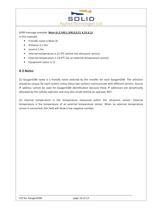
______________________________________________________________________________ ICD for GaugerGSM page 10 of 13 GPRS message example: Main-St,2.500,1.500,0,0,21.4,23.6,11 In this example: • Friendly name is Main-St • Distance is 2.5m • Level is 1.5m • Internal temperature is 21.4C (within the ultrasonic sensor) • External temperature is 23.6C (on an external temperature sensor) • Equipment status is 11 4.3 Notes (1) GaugerGSM name is a friendly name selected by the installer for each GaugerGSM. The selection should be unique for each system unless these two systems communicate with different servers....
Open the catalog to page 10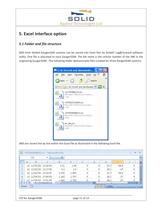
______________________________________________________________________________ ICD for GaugerGSM page 11 of 13 5. Excel interface option 5.1 Folder and file structure SMS from fielded GaugerGSM systems can be stored into Excel files by SolidAT Log&Forward software utility. One file is allocated to each GaugerGSM. The file name is the cellular number of the SIM in the originating GaugerGSM. The following folder demonstrates files created for three GaugerGSM systems. . SMS are stored line by line within the Excel file as illustrated in the following Excel file.
Open the catalog to page 11
______________________________________________________________________________ ICD for GaugerGSM page 12 of 13 The Excel columns are explained in the next table. Excel column Description Note A Time zone Multiplied by four B Date C Time D D Description as in the SMS option E L F D1 G V H T1 I T2 J S1 5.2 Notes (1) The Log&Forward utility appends each new SMS to the existing lines in the Excel file. The monitoring software is free to modify the files, for example delete an SMS record that was read. (2) The Log&Forward utility creates a new file if one does not exist for an originating GaugerGSM....
Open the catalog to page 12All Solidat Applied Technologies Ltd. catalogs and technical brochures
 MonoScan Data Sheet
2 Pages
 SMARTSCAN 50
2 Pages
 GAUGER 485
2 Pages
 GAUGER GSM
2 Pages
 Gauger420 - User Manual
67 Pages
 GaugerGSM / 485 - User Manual
94 Pages
 Complete_Product_line_Brochure
13 Pages
 Diesel Tank Monitoring Solution
12 Pages
 Gauger Line Brochure
10 Pages
 Sewer monitoring system
1 Page
 OEM options for GaugerGSM
3 Pages
 GaugerGSM - product highlights
13 Pages
 GaugerGSM - Highlights
11 Pages
 Wireless solution Poster
1 Page
 General purpose Poster
1 Page
 SmartScan User Manual
145 Pages
 MicroScan User Manual
51 Pages
 MonoScan User Manual
88 Pages
 SmartScan
2 Pages
 MicroScan™
2 Pages


- Flowmeter
- Volume flow monitor
- Liquid flow monitor
- Gas flow monitor
- Level probe
- Liquid level sensor
- In-line flow meter
- Analog level sensor
- Level transmitter
- Liquid level transmitter
- Ultrasonic flow monitor
- Digital output level sensor
- Vessel level sensor
- Analog level transmitter
- Liquids level gauge
- Digital output level transmitter
- Storage tank level transmitter
- Explosion-proof level sensor
- Electronic level gauge
- Explosion-proof level transmitter