
- Catalogs
- Smiths Detection
- IONSCAN SENTINEL II NON-CONTACT, WALK-THROUGH PORTAL FOR EXPLOSIVES OR NARCOTICS DETECTION


IONSCAN SENTINEL II NON-CONTACT, WALK-THROUGH PORTAL FOR EXPLOSIVES OR NARCOTICS DETECTION

IONSCAN SENTINEL II NON-CONTACT, WALK-THROUGH PORTAL FOR EXPLOSIVES OR NARCOTICS DETECTION
- Previous Start: First Sunday of April (April 1, 2007)
- New Start: Second Sunday of March (March 11, 2007)
- Previous End: Last Sunday of October (October 28, 2007)
- New End: First Sunday of November (November 4, 2007)
- Turn the system ON and allow it to load fully.
- Exit the SC software to display the desktop.
- Access the date and time settings by right-clicking the time display.
- Uncheck "Automatically adjust clock for daylight savings changes."
- Adjust the time ahead by one hour and apply changes.
- Repeat the process on November 4 to revert to Standard Time by setting the time back one hour.
Catalog excerpts
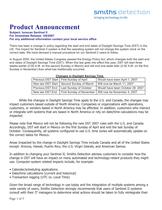
Subject: Ionscan Sentinel II For Immediate Release: 3/8/2007 For any additional information contact your local service office There has been a change in policy regarding the start and end dates of Daylight Savings Time (DST) in the US. The impact for Sentinel II system is that the operating system will not change the system clock on the correct date. We have devised a manual procedure for our Sentinel II users to follow. In August 2005, the United States Congress passed the Energy Policy Act, which changes both the start and end dates of Daylight Savings Time (DST). When this law goes into effect this year, DST will start three weeks earlier (2:00 A.M. on the second Sunday in March) and will end one week later (2:00 A.M. on the first Sunday in November) than what has traditionally occurred. Changes in Daylight Savings Time Previous DST Start First Sunday of April Would have been April 1, 2007 New law DST Start Second Sunday of March Will now be March 11, 2007 Previous DST End Last Sunday of October Would have been October 28, 2007 New law DST End First Sunday of November Will now be November 4, 2007 >
Open the catalog to page 1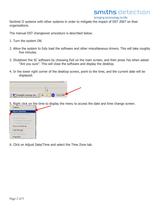
Page 2 of 5 Sentinel II systems with other systems in order to mitigate the impact of DST 2007 on their organizations. The manual DST changeover procedure is described below. 1. Turn the system ON. 2. Allow the system to fully load the software and other miscellaneous drivers. This will take roughly five minutes. 3. Shutdown the SC software by choosing Exit on the main screen, and then press Yes when asked Are you sureӔ. This will close the software and display the desktop. 4. In the lower right corner of the desktop screen, point to the time, and the current date will be displayed. 5. Right...
Open the catalog to page 2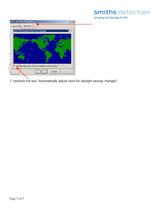
Page 3 of 5 7. Uncheck the box Automatically adjust clock for daylight savings changesӔ. >
Open the catalog to page 3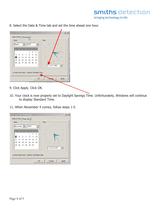
Page 4 of 5 8. Select the Date & Time tab and set the time ahead one hour. 9. Click Apply. Click OK. 10. Your clock is now properly set to Daylight Savings Time. Unfortunately, Windows will continue to display Standard Time. 11. When November 4 comes, follow steps 1-5. >
Open the catalog to page 4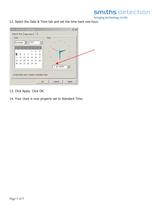
Page 5 of 5 12. Select the Date & Time tab and set the time back one hour. 13. Click Apply. Click OK. 14. Your clock is now properly set to Standard Time. >
Open the catalog to page 5All Smiths Detection catalogs and technical brochures
 B-SCAN 16HR-DV
2 Pages
 HI-SCAN 10080 XCT
2 Pages
 HI-SCAN 100100T
2 Pages
 CTX 5800
2 Pages
 B-SCAN 16HR-FB
2 Pages
 CTX 9800 DSi
2 Pages
 HI-SCAN 6040i
2 Pages
 IONSCAN 600
2 Pages
 HCVG
HCVG2 Pages

Archived catalogs
 HCVM e35T
2 Pages
 ACE-ID
2 Pages
 biocheck
2 Pages
 GID 3
GID 32 Pages
 PrimeAlert
2 Pages
 LCD-NEXUS
2 Pages
 NIDS
NIDS2 Pages
 UV-Light Tray Disinfection
2 Pages
 TRACE-PRO
2 Pages
 LCD 3.3
2 Pages
 Bio-Seeq PLUS
2 Pages


- Management software solution
- Analysis software solution
- Process software
- Real-time software
- Cloud-based software
- Gas detector
- 3D software solution
- Industrial software
- Smiths inspection system
- Quality software
- Simulation software solution
- Automated software
- Rack-mount server
- Monitoring detector
- Smiths automatic inspection system
- Portable detector
- EDM software
- Storage server
- Inspection machine
- Network server