


Electric Actuator

Electric Actuator
- Ball Screw Drive (LEFS): Available in sizes 16, 25, 32, 40 with a maximum stroke of 2000 mm, speed of 2000 mm/s, and work load of 65 kg. Positioning repeatability is ±0.02 mm.
- Belt Drive (LEFB): Available in sizes 16, 25, 32 with a maximum stroke of 3000 mm and speed of 2000 mm/s. Not suitable for vertical applications.
- Motors: Options include Step Motor (Servo/24 VDC), Servo Motor (24 VDC), and AC Servo Motor.
- Motor mounting options: top, parallel, and bottom configurations.
- Clean room specifications available for both series.
- Equipped with seal bands to prevent grease splashing and entry of foreign matter.
- Optional non-magnetizing lock mechanism and drop prevention in case of power failure.
- Controllers available for step data input, pulse input, and programless operation.
- Easy Mode and Normal Mode settings for configuration.
- Fieldbus-compatible Gateway Unit allows connection of up to 12 controllers.
- Use standard cables for fixed parts and robotic cables for moving parts.
- Proper mounting using the body mounting reference plane is advised.
- Ensure workpieces do not interfere with actuator movement.
Catalog excerpts

Electric Actuator Slider Type Servo Motor (24 VDC) Type Ball Screw Drive Max. work load: Positioning repeatability: Clean room specification also available Clean room specification Motor top/ parallel type Belt Drive AC Servo Motor Type ∗ Not applicable to UL. Ball Screw Drive Positioning repeatability: ± mm (High precision type) Improved high speed transfer ability Max. speed: mm/s 2 High acceleration/deceleration: 20000 mm/s Pulse input type With internal absolute encoder (For LECSB/C/S) Clean room specification also available Belt Drive Clean room specification 11-LEFS Motor top/ parallel type Motor bottom mounting type Motor bottom mounting type also available Step Motor (Servo/24 VDC) Controller/Driver Servo Motor (24 VDC) ̈Step data input type Series LECP6/LECA6 ̈Step data input type Series JXC73/83 ̈Fieldbus compatible Network Series JXC २1 Series JXC92/93 ̈Programless type Series LECP1 ̈Pulse input type Series LECPA AC Servo Motor Driver ̈For absolute encoder țPulse input type Series LECSB țCC-Link direct input type Series LECSC țSSCNET # type Series LECSS țSSCNET #/H type Series LECSS-T țMECHATROLINK type Series LECY २ ̈For Incremental encoder țPulse input type/ Positioning type Series
Open the catalog to page 1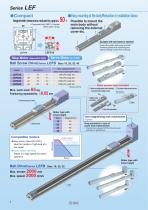
•Compact Height/width dimensions reduced by approx. % >Easy mounting of the body/Reduction in installation labour Possible to mount the main body without removing the external cover etc. Step Motor (Servo/24 vdc) Servo Motor (24 vdc) Ball Screw Drive/Ser/es LEFS Size: 16, 25, 32, 40 * Except LECPA Max. work load: kgPositioning repeatability: ± mm -Motor parallel type available!- © Motor mounting position can be selected © Top surface of table and motor are level. from two directions (Right or Left). Right side parallel ^ Left side parallel Ball screw Compatible motors •Step motor (Servo/24 VDC)...
Open the catalog to page 2
AC Servo Motor Ball Screw Drive/Series LEFS Size: 25, 32, 40 High output motor (100/200/400 W) Improved high speed transfer ability High acceleration/deceleration compatible: 20000 mm/s2 Pulse input type With internal absolute encoder (For LECSB/C/S) (Step motor ^ Belt Drive/Series LEFB Size: 25, 32, 40 Max. speed: mm/s Clean room specification Support Guide/Series LEFG A support guide is designed to support work pieces with significant overhang. ISO Class 4*1 (ISO14644-1)! • Built-in vacuum piping • Possible to mount the main body without removing the external cover etc. • As the dimensions...
Open the catalog to page 3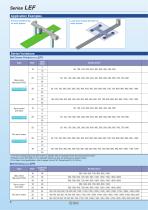
Series Variations Ball Screw Drive/Series LEFS
Open the catalog to page 4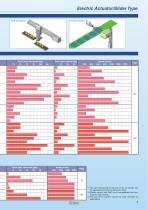
Electric Actuator/Slider Type Pick and place Work load: Horizontal [kg] 20 30 40 50 Vertical transfer Work load: Vertical [kg] 10 20 30 ∗1 The size corresponds to the bore of the air cylinder with an equivalent force (for the ball screw drive). ∗2 Please consult with SMC as all non-standard and nonmade-to-order strokes. ∗3 The belt drive actuator cannot be used vertically for applica
Open the catalog to page 5
Simple Setting to Use Straight Away © Easy Mode for Simple Setting If you want to use it right away, select “Easy Mode.” <When a PC is used> Controller setting software • Step data setting, test operation, move jog and move for the constant rate can be set and operated on one screen. Setting of jog and speed of the constant rate <When a TB (teaching box) is used> • Simple screen without scrolling promotes ease of setting and operating. • Pick up an icon from the first screen to select a function. • Set up the step data and check the monitor on the second screen. Example of setting the step data...
Open the catalog to page 6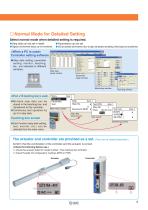
Normal Mode for Detailed Setting Select normal mode when detailed setting is required. b Step data can be set in detail. b Signals and terminal status can be monitored. b Parameters can be set. b JOG and constant rate movement, return to origin, test operation and testing of forced output can be performed. Controller setting software b Step data setting, parameter setting, monitor, teaching, etc., are indicated in different windows. Step data setup window Parameter setup window Monitoring window b Multiple step data can be stored in the teaching box, and transferred to the controller. b Continuous...
Open the catalog to page 7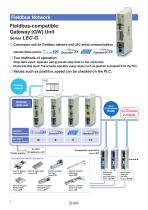
Fieldbus Network Fieldbus-compatible Gateway (GW) Unit Series LEC-G Conversion unit for Fieldbus network and LEC serial communication Applicable Fieldbus protocols: Two methods of operation Step data input: Operate using preset step data in the controller. Numerical data input: The actuator operates using values such as position and speed from the PLC. Values such as position, speed can be checked on the PLC. PLC Fieldbus network Serial communication Applicable Fieldbus protocols Max. number of connectable controllers Power supply Compatible controllers Series LEC Compatible electric actuators...
Open the catalog to page 8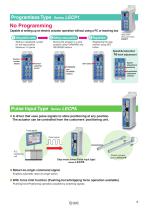
Programless Type No Programming Capable of setting up an electric actuator operation without using a PC or teaching box 1 Setting position number Setting a registered number for the stop position Maximum 14 points 2 Setting a stop position Moving the actuator to a stop position using FORWARD and REVERSE buttons Registering the stop position using SET button 16-level adjustment Position number display Pulse Input Type Speed adjustment switches Position selecting switch FORWARD and REVERSE buttons Acceleration adjustment switches b A driver that uses pulse signals to allow positioning at any position....
Open the catalog to page 9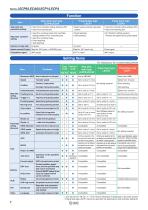
A: Can be set from TB Ver. 2.** (The version information is displayed on the initial screen) * Programless type LECP1 cannot be used with the teaching box and controller setting
Open the catalog to page 10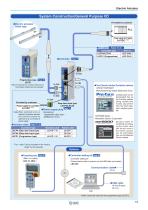
Electric Actuator Power supply for controller 24 VDC Note) Note) When conformity to UL is required, the electric actuator and controller should be used with a UL1310 Class 2 power supply. The * mark: Can be included in the “How to Order” for the actuator. / Vi Power supply for I/O signal 24 VDC Note) Controller type Cockpit parts can be downloaded free via the Pro-face website. Using cockpit parts makes adjustment from the Touch Operator Interface possible. Sample screens for monitoring and changing the current value and the set value of the electric actuator can be downloaded free via the Mitsubishi...
Open the catalog to page 11All SMC catalogs and technical brochures
 In-line Type Vacuum Ejector
6 Pages
 Serie HRR
64 Pages
 Série VP/VG
33 Pages
 Série XL
27 Pages
 Série ACG/ARG/AWG
45 Pages
 Série JXC5H/6H
36 Pages
 LEJS100-X400 series
15 Pages
 JMB series
13 Pages
 JCM series
21 Pages
 PF3A7*H
40 Pages
 PF3W
PF3W34 Pages
 Compact Guide Cylinder with Lock
36 Pages
 Water Treatment
16 Pages
 Food & Packaging Industry
4 Pages
 Digital Gap Checker
26 Pages
 Vacuum Pad
16 Pages
 One-touch Fittings
224 Pages
 Soft Start-up Valve
16 Pages
 Rotary Actuator
40 Pages
 Compact Guide Cylinder
18 Pages
 Compact Slide
24 Pages
 Air Cylinder
124 Pages
 LEFB, LEFG-BS series
180 Pages
 JMGP series
16 Pages
 ISO Cylinder
32 Pages
 IZD10
IZD1020 Pages
 IZH10
IZH108 Pages
 Fan Type Lonizer
28 Pages
 Check Valves
4 Pages
 Compact Cylinder/Clean series
16 Pages
 3 port solenoid Valve
74 Pages
 Vacuum Ejector Series ZM
20 Pages
 Series ZL
20 Pages
 Series CM2
92 Pages
 Series IDGA/IDG
56 Pages
 Platform Cylinder Series CXT
14 Pages
 IDH-A
IDH-A12 Pages
 CP96-C96-B
74 Pages
 CVQ
CVQ24 Pages
 HY
HY52 Pages
 VNA
VNA10 Pages
 Series MXY
28 Pages
 Series MXP
39 Pages
 Air Slide Table
132 Pages
 Compact Cylinder Series CQ2
138 Pages
 S0700
S0700112 Pages
 SYJ
SYJ96 Pages
 SY - NEW
164 Pages
 VF
VF60 Pages
 C(D)55 series
24 Pages
 C(D)Q2 series
216 Pages
 MGP series
36 Pages
 11-LEFS series
19 Pages
 LECS series
16 Pages
 LECPA series
4 Pages
 KQ series
80 Pages
 IDF series
16 Pages
 ZP series
69 Pages
 MHF series
32 Pages
 MHZ series
68 Pages
 CRB series
44 Pages
 MGJ series
7 Pages
 AC series
98 Pages
 VH series
14 Pages
 LVA series
43 Pages
 VDW series
28 Pages
 LVM series
28 Pages
 VX2 series
32 Pages
 MXH series
32 Pages
 MXF series
12 Pages
 CXW series
48 Pages
 CXS series
76 Pages
 CQS series
40 Pages
 CQM series
28 Pages
 CLQ series
36 Pages


