

SIMULIA Abaqus and SolidWorks

SIMULIA Abaqus and SolidWorks
- Simulation Capabilities: Abaqus provides advanced simulation capabilities for validating the realistic performance of products.
- Interface Development: SolidWorks and SIMULIA have developed an interface for associative geometry transfer, enhancing the workflow between SolidWorks and Abaqus.
- Model Modification: Users can modify models in SolidWorks and propagate changes to Abaqus/CAE without losing analysis features.
- Iterative Design: The interface supports iterative design processes based on analysis results from Abaqus.
Catalog excerpts
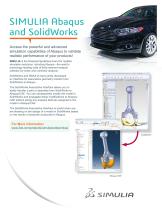
SIMULIA Abaqus and SolidWorks Access the powerful and advanced simulation capabilities of Abaqus to validate realistic performance of your products! SIMULIA is the Dassault Systèmes brand for realistic simulation solutions, including Abaqus—the world’s technology-leading suite of finite element analysis software for linear and nonlinear analysis. SolidWorks and SIMULIA have jointly developed an interface for associative geometry transfer from SolidWorks to Abaqus. The SolidWorks Associative Interface allows you to easily transfer a part or assembly from SolidWorks to Abaqus/CAE. You can subsequently modify the model in SolidWorks and propagate these modifications to Abaqus/ CAE without losing any analysis features assigned to the model in Abaqus/CAE. The SolidWorks Associative Interface is useful when you are iterating on the design of a model in SolidWorks based on the results of analyses conducted in Abaqus.
Open the catalog to page 1Archived catalogs
 SIMULIA
6 Pages
 CATIA ELECTRICAL SOLUTIONS
8 Pages
 SIMULIA ExSight
2 Pages
 Abaqus for CATIA V5
6 Pages
 SIMULIA V6R2013
6 Pages
 SIMULIA DesignSight Thermal
2 Pages
 Isight 5.8
3 Pages
 CATIA Structural Analysis
2 Pages
 CATIA Surface FE Modeling
2 Pages
 CATIA Advanced FE Modeling
2 Pages
 SIMULIA Execution Engine
2 Pages
 CATIA ICEM SHAPE DESIGN
5 Pages
 CATIA ICEM AEROEXPERT
5 Pages
 CATIA for Creative Designers
9 Pages
 power of CATIA
1 Page
 EN O V IA V 6R 2013x
12 Pages
 SIMULIA V6R2013x_2012
7 Pages
 SIMULIA V5-6R2016
6 Pages
 ABAQUS UNIFIED FEA
6 Pages
 fe-safe
6 Pages
 Isight
6 Pages
 SIMULIA
28 Pages
 CST STUDIO SUITE® 2017
32 Pages
 XFlow
XFlow6 Pages
 XFlow 2019x
2 Pages
 Opera
Opera12 Pages
 ABAQUS/CAE 2017
4 Pages
 ABAQUS/STANDARD 2017
3 Pages
 SIMULIA V6R2013x_2015
4 Pages
 Abaqus 6.8
8 Pages


- Management software solution
- Automation software solution
- SIMULIA process software
- Real-time software
- SIMULIA CAD software
- Cloud-based software
- Control software
- SIMULIA design software
- Industrial software
- SIMULIA 3D software
- Measurement software
- SIMULIA interface software
- Visualization software solution
- SIMULIA quality software
- SIMULIA simulation software
- Automated software
- SIMULIA development software
- Network software
- SIMULIA engineering software