

2800 Series

2800 Series
- DC Voltage: Ranges from 200mV to 200V with varying resolutions and maximum input impedances.
- AC Current: Ranges from 20μA to 200mA with specific resolutions and maximum input limits.
- DC Current: Similar ranges and specifications as AC current.
- Display: 7-segment, red LED with a height of 0.56 inches. Overrange is indicated by blinking zeros.
- Power Requirements: AC voltages of 120V, ±10%, 50Hz to 400Hz, 3VA, and DC voltages of 5 DCV.
- Accuracy: At 23°C, ±2°C, accuracy is ± (1.0% of input +5 counts) from 45Hz to 1KHz.
- Environmental: Operating temperature ranges from 0 to 55ºC, storage from -40 to 60°C, with a relative humidity of 0 to 85%, non-condensing.
- A to D Conversion: Utilizes a dual slope technique with a nominal rate of 2.5 samples per second.
- Mechanical: Bezel dimensions are 1.93” x 3.9”, with a depth of 4.72”. The panel cutout is 1.68” x 3.622”.
Catalog excerpts
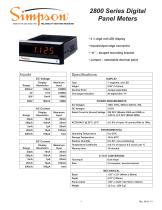
2800 Series Digital Panel Meters • 3 ½ digit red LED display • Input/output edge connector • “U” – shaped mounting bracket • Jumper – selectable decimal point Inputs Range DC Voltage Display Resolution Maximum Input Decimal Point Overrange Indication POWER REQUIREMENTS AC Voltages DC Voltages Display Resolution Maximum Input Rated Circuit to Ground Voltage 250 DCV (Models 2865 and 2869) or -4.06 to +4.5 DCV (Model 2866) Display Resolution Maximum Input Temperature Coefficient Warmup time Relative Humidity Storage Temperature Operating Temperature Dual slope MECHANICAL Bezel Panel cutout
Open the catalog to page 1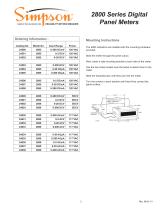
2800 Series Digital Panel Meters Ordering Information Catalog No. Mounting Instructions Input Range The 2800 indicators are installed with the mounting hardware provided. Slide the meter through the panel cutout. Next, insert a side mounting bracket to each side of the meter. Turn the screws in each bracket until they firmly contact the panel surface. Slide the brackets back until they lock into the meter. Use the two holes located near the bezel to attach them to the meter.
Open the catalog to page 2All Simpson catalogs and technical brochures
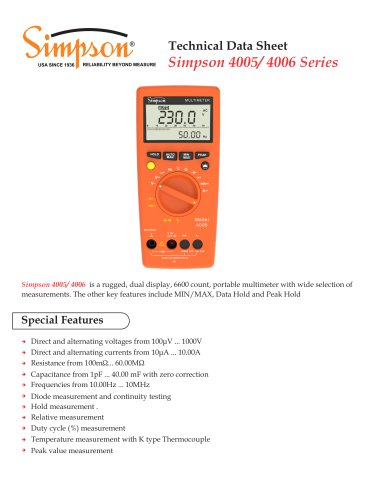 Simpson 4005/ 4006 Series
8 Pages
 Wide-Vue
10 Pages
 S660 Totalizer/Counter
5 Pages
 Amik 200
8 Pages
 Amik 100
6 Pages
 Test Equipment Catalog
29 Pages
 GIMA Series
2 Pages
 Falcon F35 & F45
3 Pages
 MiniMax M240
2 Pages
 mini-max M235 - M245
3 Pages
 Mini M135 & M145
2 Pages

Archived catalogs
 Test Equipment Catalog
29 Pages
 SE Encoders
1 Page
 GIMA Digital Panel Meters
3 Pages
 Panel Instrument Catalog
68 Pages
- Transformer
- Measuring device
- Dry transformer
- Calibration system
- Digital indicator
- Portable tester
- Panel panel meter
- Current transformer
- Industrial tester
- Digital gauge
- Multimeter
- Voltage testing system
- Digital multimeter
- Portable multimeter
- Instrument transformer
- Digital counter
- Process panel meter
- Analog indicator
- Industrial multimeter
- Compact tester