
- Catalogs
- SIGMATEK GmbH & Co KG
- 2018 LASAL Engineering Tool


2018 LASAL Engineering Tool

2018 LASAL Engineering Tool
The LASAL Engineering Tool is a comprehensive software suite designed for modern machine manufacturing, emphasizing modularity and reusability. It integrates all automation tasks into a single platform, significantly reducing development times and facilitating the implementation of Industry 4.0 and Smart Factory concepts.
This section focuses on object-oriented programming (OOP), which simplifies the development process by allowing the reuse of tested application modules. The tool supports multiple programming languages, including ST, LD, SFC, ANSI-C, and Interpreter, and integrates with Matlab Simulink for enhanced functionality. Key features include inheritance and aggregation, which minimize programming efforts, and a graphic representation that provides a clear overview of project components.
LASAL SCREEN offers a user-friendly visualization environment, enabling fast and simple creation of visual interfaces. It supports the integration of visualization objects with program code, ensuring consistency across multi-user projects.
This module is designed for efficient drive designs, providing tools for regulation and control tasks in drive technology. It supports the development of complex motion control applications with minimal programming effort.
Focused on safety applications, this tool provides a platform for safety programming and configuration, ensuring compliance with safety standards and facilitating the development of secure machine functions.
LASAL SERVICE includes tools for remote maintenance, simulation, software updates, and data exchange, simplifying engineering processes and enhancing system reliability.
- Modular and flexible application development through OOP.
- Support for OPC UA for standardized, manufacturer-independent data exchange.
- Graphic representation for clear structuring and efficient project management.
- Integrated debugging tools for rapid development and comprehensive program analysis.
- Data Exchange: LASAL supports manufacturer and platform-independent data exchange via OPC UA, enabling seamless integration into Industry 4.0 environments.
- Remote Maintenance: Worldwide remote diagnostics and maintenance are facilitated through web servers, VNC client/server functions, and FTP client/server capabilities.
- Simulation: The LASAL Runtime System allows Windows-based simulation of control programs and visualizations, enabling testing and development without physical hardware.
- Software Updates: The Bootdisk Manager simplifies software updates, allowing configuration and deployment via boot sticks or remote maintenance.
- Web Server with LRM View: This Java-Applet enables remote control and visualization through standard web browsers, enhancing accessibility without additional software installation.
- OPC UA Client & Server: Facilitates platform-independent data exchange, crucial for implementing Industry 4.0 concepts.
Catalog excerpts
LASAL ENGINEERING TOOL
Open the catalog to page 1
CONTENTS Engineering Tool. LASAL Consistent software design Object-oriented programming Visualization with comfort Efficient drive designs Tools that simplify engineering 2 I LASAL ENGINEERING TOOL
Open the catalog to page 2
For modern machine manufacturing, clearly constructed and modular software is an essential factor for success. ALL-IN-ONE Modularity and reusability are cornerstones for efficient and flexible application development. These properties allow you to quickly program and configure customer-specific machine software. The object-oriented engineering suite LASAL from SIGMATEK provides you with exactly this simple reusability of modularly constructed application code and the flexibility that comes with it. LASAL unifies all automation tasks on one platform and contributes to significantly reduce development...
Open the catalog to page 3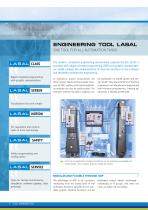
ENGINEERING TOOL LASAL ONE TOOL FOR ALL AUTOMATION TASKS Object-oriented programming with graphic representation The modern, consistent engineering environment expands the IEC 61131-3 standard with object-oriented programming (OOP) and graphic representation. LASAL enables the modularization of machine functions in the software and therewith mechatronic engineering. In mechanics, proven constructions are often reused. Thanks to the modular structure of OOP, existing and tested application modules can also be easily reused. The software machine functions (objects) can be assembled in a toolkit...
Open the catalog to page 4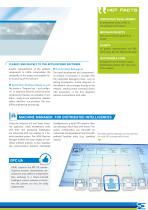
HOT FACTS CONSISTENT DEVELOPMENT All automation tasks unified in one software environment MODULAR OBJECTS that can be flexibly applied and reused CLARITY via graphic representation and efficient extras like the Machine Manager SUSTAINABLE CODE CLEARLY AND QUICKLY TO THE APPLICATIONS SOFTWARE Graphic representation of the software components in LASAL encapsulates the complexity of the project and enables clear structuring of the software. Application Modules Ready-to-use The motto is "Program less – just configure". In extensive libraries, tested function components (classes) are available. In...
Open the catalog to page 5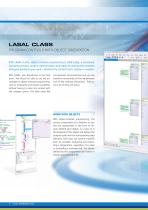
LASAL CLASS PROGRAM CONTROLS WITH OBJECT ORIENTATION With LASAL CLASS, object-oriented programming is child's play. A consistent operating concept, graphic representation and ready-to-use function modules bring you quickly to your goal – whether the control task is simple or complex. With LASAL, user-friendliness is the focal point. You should be able to use the advantages of object-oriented programming, such as modularity and simple reusability, without having to come into contact with the complex syntax. The code reads like conventional structured text and you can therefore concentrate on the...
Open the catalog to page 6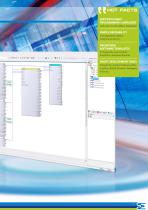
such as ST, LD, SFC, ANSI-C, Interpreter • — through the graphic hardware editor, ■ scripting, Matlab Simulink, debugging
Open the catalog to page 7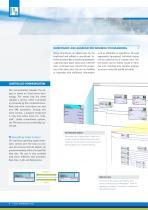
INHERITANCE AND AGGREGATION MINIMIZE PROGRAMMING Using inheritance, an object class can be duplicated and refined or specialized. Inheritance describes a relationship between a general class (base class) and a derived class. A derived class inherits the properties of the base class, but can be modified or expanded with additional information such as attributes or operations. Through aggregation (grouping), individual classes can be combined into a complex class. Tested classes can be clearly stored in libraries and combined into complex program structures using the toolkit principle. The communication...
Open the catalog to page 8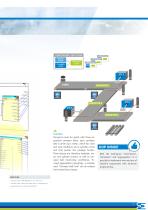
CONVEYOR BELT UNIT CLASS MOTOR CLASS CONVEYOR CLASS CYLINDER CLASS Example Transport route for goods with three sequential conveyor belts: each conveyor belt is driven by a motor, which has start and stop conditions and a cylinder at the end that pushes the package further. Three classes are therefore modeled: motor and cylinder control, as well as conveyor belt (start/stop conditions). Through aggregation (grouping), a complex class "Conveyor Belt Unit" can be created from these three classes. OOP INSIDE With the techniques "inheritance", "derivation" and "aggregation", it is possible to implement...
Open the catalog to page 9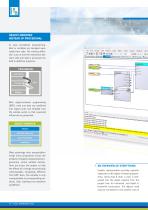
OBJECT-ORIENTED INSTEAD OF PROCEDURAL In pure procedural programming, data or variables are managed separately from code. The missing definition, such as how the interaction between code and data is processed can lead to defective programs. PROCEDURAL Methods (Behavior) Data (Properties) Interfaces With object-oriented programming (OOP), code and data are combined into logical units and shielded from the outside world, so that unwanted influences are prevented. OBJECT-ORIENTED Objects Methods (Behavior) Data (Properties) Interfaces What advantage does encapsulation bring? Every programmer knows...
Open the catalog to page 10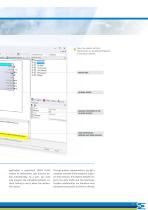
Clear: the objects and their relationships are graphically displayed in the object network. PROJECT TREE NETWORK EDITOR VARIABLE PROPERTIES OF THE SELECTED ELEMENT USER INFORMATION, WARNING AND ERROR MESSAGE application is generated. LASAL CLASS creates all declarations and function bodies automatically. As a user, you must only program the individual methods, without having to worry about the declaration syntax. Through graphic representation, you get a complete overview of the project at a glance: the functions, the relation between objects, the data traffic and the interfaces. Complex relationships...
Open the catalog to page 11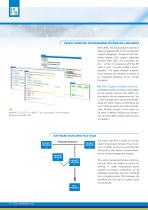
OBJECT-ORIENTED PROGRAMMING IN FAMILIAR LANGUAGES With LASAL, the actual program code of an object is implemented in the conventional program languages: structured text (ST), ladder diagram (LD), graphic sequential function chart (SFC) and instruction list (IL) – all four in compliance with the IEC 61131-3 norm – as well as ANSI-C and interpreter. The object-oriented programming methods are therefore available as an integrated extension of the trusted languages. LASAL Supports Matlab Simulink In Matlab Simulink, existing C code models can be directly inserted into LASAL. During import into the...
Open the catalog to page 12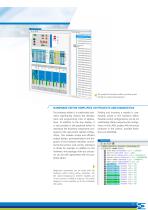
KGKrSffla* 5«JW [Km OC^dew M S*M3 iJt<AS The graphical hardware editor provides great clarity for project development. The hardware editor is a comfortable tool, which significantly reduces the development and programming time of applications. In addition to the tree display, it is also possible in the graphical editor to reproduce the hardware components analogous to the real control cabinet configuration. This enables simple and efficient Finding and inserting a module is comfortably solved in the hardware editor. Possible control configurations can be run realistically. While comparing the...
Open the catalog to page 13All SIGMATEK GmbH & Co KG catalogs and technical brochures
 INNOVATIONS 2025
8 Pages
 PS 101
1 Page
 CP 731
1 Page
 CP 112
1 Page
 CP 311
1 Page
 CP 312
1 Page
 IPC 221
2 Pages
 Control System S-DIAS
12 Pages
 Remtoe Access
4 Pages
 CP 102
1 Page
 C-IPC 171
1 Page
 PC 521
1 Page
 PC 444-W
1 Page
 PVDM 086
1 Page
 PVDM 087
1 Page
 PVAI 011
1 Page
 SCP 111
1 Page
 SDI 101
1 Page
 STO 081
1 Page
 SDM 081
2 Pages
 SNC 021
1 Page
 SRO 021
1 Page
 SSI 021
1 Page
 SIB 061
1 Page
 ST 151
2 Pages
 DC 061-1
2 Pages
 Flexible & SAFe Wireless hmi
4 Pages
 SIGMATEK- Product Catalog
415 Pages
 Human Machine Interface
28 Pages
 Motion Control System
32 Pages
 Smart Factory
8 Pages
 Packaging Technology
8 Pages
 Emergency Stop
4 Pages
Archived catalogs
 Compact Industrie PC
1 Page
 CP 111
1 Page
 HGW 1033
2 Pages
 Human Machine Interfaces
28 Pages
 NEW PRODUCTS
8 Pages
 S-DIAS Axis Module DC 062
2 Pages
 VARAN Stepper Module VST 012
2 Pages
 Energy Management
8 Pages
 Automation System
36 Pages
 2018 S-DIAS Control System
12 Pages
 2021 s-dias control system
12 Pages
 2019 Lasal Engineering Tool
32 Pages
 2020 S-DIAS Control System
12 Pages
 Product catalog
330 Pages