
- Catalogs
- Siglent Technologies Co., Ltd
- SPD3303C_Quick Start_Programmable Linear DC Power Supply_Siglent

- Company
- Products
- Catalogs
- News & Trends
- Exhibitions
SPD3303C_Quick Start_Programmable Linear DC Power Supply_Siglent

SPD3303C_Quick Start_Programmable Linear DC Power Supply_Siglent
Safety Terms and Symbols: Terms like DANGER, WARNING, and CAUTION indicate varying levels of risk. Symbols denote hazardous voltage, protective earth, and power switch.
Brief Introduction: The SPD3303C is a programmable DC power supply with three independent output terminals, offering adjustable and fixed voltage outputs. It includes short circuit and overload protection.
Main Features: The device has three independent output channels with a total power of up to 195W, compatibility with multiple power voltages, the capability to save and recall parameters, and real-time control via USBTMC.
Quick Guide: Includes inspection steps for shipping damage, instrument condition, and accessory completeness. Safety considerations emphasize correct power settings and grounding.
Control Panel Operation: Details the operation of independent, parallel, and series output modes. Explains constant current/voltage modes and how to adjust settings.
Operation Modes:
- CH3 Channel: Connect load to terminals, select voltage via DIP switch, and turn on using ON/OFF button. Overload indicator activates above 3A, switching from CV to CC mode.
- Series Mode (CH1/CH2): Internally links CH1 and CH2, doubling voltage. Connect load between CH2 positive and CH1 negative. Set current to 3A and adjust voltage/current using the knob.
- Parallel Mode (CH1/CH2): Internally links CH1 and CH2, doubling current. Connect load to CH1 terminals. Adjust settings using the knob.
Saving and Recalling Setups: Five setups can be saved and recalled using the SAVE and RECALL buttons.
Software Upgrade: Upgrades are performed via USB using EasyPower software. If normal upgrade fails, a guiding procedure is available.
Remote Control: SCPI commands allow remote control via USBTMC. Commands include querying and setting voltage/current, and controlling output states.
Troubleshooting:
- Short circuits are protected by internal mechanisms.
- Overload indicators are normal at maximum current.
- Voltage/current discrepancies in series mode are expected under high load.
- Repeated attempts may be needed if upgrades fail.
- Startup value shifts are normal as components stabilize.
- Check air switch ratings if it trips on power-on.
Specifications:
- Output Ratings: CH1/CH2 independent: 0-30V/0-3A; series: 0-60V/0-3A; parallel: 0-30V/0-6A; CH3: 2.5V/3.3V/5.0V, 0-3A.
- Performance: Power and load change rates, ripple, noise, and recovery times are specified for both voltage and current modes.
- Environmental: Operating temperature 0-40°C, storage -10-70°C, with specific humidity and altitude limits.
Contact Information: SIGLENT contact details are provided for further assistance.
Catalog excerpts

Quick Start SPD3303C Series Programmable DC Power Supply
Open the catalog to page 1
Copyright Information 1. SIGLENT TECHNOLOGIES CO., LTD. All Rights Reserved. 2. Information in this publication replaces all previous corresponding material. 3. SIGLENT reserves the right to change the specifications and price of the product. 4. Any way of copying, extracting and translating the contents of the manual are not allowed without permission of SIGLENT. Note: SIGLENT is the registered trademark of SIGLENT.
Open the catalog to page 2
General Safety Summary Please review the following safety precautions carefully to avoid personal injury or damage to this product or any product connected to it. To prevent potential danger, please use the instrument as specified. Use proper power cord Only the power cord designed for the instrument and authorized by local country could be used. Power supply AC Input Voltages: 100V/110V/220V/230V ±10%, 50/60Hz. Use proper fuse The fuse types: 100V/110V(T6.3A/250V); 220V/230V (T3.15A/250V); Make sure to use the correct type of fuse before turning on the instrument. Do not connect the power cord...
Open the catalog to page 3
Keep proper ventilation Inadequate ventilation may cause an increase of temperature, which will lead to further damage. Please keep proper ventilation and check the fan and air-vents regularly when using the instrument. Operate condition Location: indoor, no strong light, almost no Interfering pollution; Comparative humidity: <80% Altitude: <2000m Temperature: 0℃ to 40℃ Do not operate in an explosive atmosphere To avoid personal injury or damage to instrument, please do not operate in an explosive atmosphere. Keep surface of the product clean and dry To avoid dust or moisture in the air influence...
Open the catalog to page 4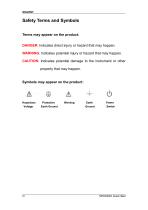
Safety Terms and Symbols Terms may appear on the product: DANGER: Indicates direct injury or hazard that may happen. WARNING: Indicates potential injury or hazard that may happen. CAUTION: Indicates potential damage to the instrument or other property that may happen. Symbols may appear on the product: Hazardous Voltage Protective Earth Ground Earth Ground Power Switch
Open the catalog to page 5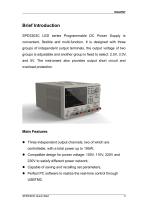
Brief Introduction SPD3303C LED series Programmable DC Power Supply is convenient, flexible and multi-function. It is designed with three groups of independent output terminals, the output voltage of two groups is adjustable and another group is fixed to select: 2.5V, 3.3V, and 5V. The instrument also provides output short circuit and overload protection. Main Features Three independent output channels, two of which are controllable, with a total power up to 195W; Compatible design for power voltage: 100V, 110V, 220V and 230V to satisfy different power network; Capable of saving and recalling...
Open the catalog to page 6
Chapter 1 Quick Guide In this chapter, we mainly introduce the panel and display of SPD3303C, as well as the new machine inspection and attentions at first use. Reading the following steps will give you a quick understanding on operation. General Inspection 1. Inspect the shipping container. Keep the damaged shipping container or cushioning material until the contents of the shipment have been completely checked and the instrument has passed both electrical and mechanical tests. The consigner or carrier will be responsible for damages to the instrument resulting from shipment. SIGLENT would not...
Open the catalog to page 8
Safety Considerations To ensure that the instrument can work normally, please conduct necessary inspection before using the SPD3303C. Input Power Requirement The SPD3303C allows a 50Hz/60Hz frequency, and four levels of AC power: 100V/120V/220V/230V. You can select wanted power voltage with the “DIP Switch ” at the rear panel according to the actual demand. Warning To switch to the wanted power voltage, please disconnect the power cord first. Electrical Check Please use the power cord provided as accessory and connects the instrument to AC power. Check the power as the following steps. 1. Connect...
Open the catalog to page 9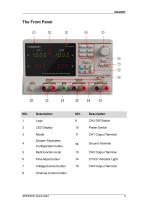
2 LED Display 10 Power Switch 3 Model 11 CH1 Output Terminal System Parameter Configuration button 5 Multi-function knob 13 CH2 Output Terminal 6 Fine Adjust button 14 CV/CC Indicator Light 7 Voltage/Current button 15 CH3 Output Terminal 8 Channel Control button
Open the catalog to page 10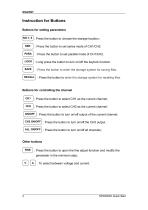
Instruction for Buttons Buttons for setting parameters NO.1- 5 : Press the button to choose the storage location ; SER : Press the button to set series mode of CH1/CH2. : Press the button to set parallel mode of CH1/CH2. LOCK SAVE : Long press the button to turn on/off the keylock function. : Press the button to enter the storage system for saving files. RECALL : Press the button to enter the storage system for recalling files. Buttons for controlling the channel CH1 : Press the button to select CH1 as the current channel; : Press the button to select CH2 as the current channel; ON/OFF : Press...
Open the catalog to page 11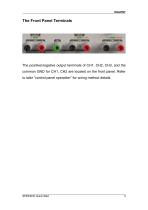
The Front Panel Terminals The positive/negative output terminals of CH1, CH2, CH3, and the common GND for CH1, CH2 are located on the front panel. Refer to later “control panel operation” for wiring method details.
Open the catalog to page 12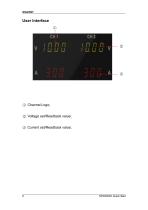
2 ○ Voltage set/Readback value; 3 ○ Current set/Readback value;
Open the catalog to page 13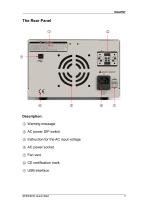
Description: 1 ○ Warning message 2 ○ AC power DIP switch 3 ○ Instruction for the AC input voltage 4 ○ AC power socket 5 ○ Fan vent 6 ○ CE certification mark 7 ○ USB interface
Open the catalog to page 14
Output Checking To make sure the instrument can correctly respond to operation from the front panel, please perform the output checking, which includes voltage checking when all channels are with no load and current checking when short circuit occurs. 1. Output voltage checking (1) With the instrument no load, turn on the power, and make sure the current value displaying is not zero; (2) Check the output voltage of CH1/CH2 Turn on CH1/CH2 channel and the instrument acquiescently works in CV mode. Check whether the voltage value is adjustable from 0V to 32V. 2. Current output check (1) Turn on...
Open the catalog to page 15
Chapter 2 Control Panel Operation In this chapterthe function and operation of SPD3303C control panel will be introduced in detail to give you an all-around understanding of it. Brief introduction Output Summary CH1/CH2 Independent Output CH3 Independent Output Parallel Output Series Output Save and Recall
Open the catalog to page 16All Siglent Technologies Co., Ltd catalogs and technical brochures
 SDS6000A Series
21 Pages
 SDS 7000A Series
21 Pages
 SDL1000X Series
10 Pages
 SSM5000A Series
15 Pages
 Spectrum Analyzer Bandwidth
6 Pages
 Siglent_Product Catalog 2016
48 Pages
 Siglent Selection Guide 2016
10 Pages
 Benefits of deep memory
3 Pages
 SIGLENT Probes Datasheet
7 Pages
 Siglent SDS2000X User Manual
197 Pages
 Siglent SDS2000X Service Manual
59 Pages
 Probe Data Sheet + Siglent
7 Pages
 USB-GPIB User Manual_Siglent
13 Pages
 ISFE User Manual
12 Pages
 Siglent TrueArb Technology
9 Pages
 SDS2000 VS DS2000A_EN_Siglent
10 Pages
 SIGLENT SDS1000CFL
8 Pages
 SIGLENT SHS800 Data Sheet
10 Pages


- AC/DC power supply
- Automation software solution
- Monitoring analyzer
- Analysis software solution
- Automatic analyser
- Windows software
- Computer-aided design software
- Cloud-based software
- Control software
- Benchtop analyser
- Design software solution
- Switched-mode power supply
- Portable analyzer
- Measurement software
- Interface software
- Real-time analyzer
- Tabletop power supply
- Laboratory analyzer