
- Catalogs
- SIEB & MEYER AG
- CNC 8x.00

- Products
- Catalogs
- News & Trends
- Exhibitions
CNC 8x.00
CNC 8x.00
This document provides guidelines for communication between CNC systems and external applications, focusing on controlled remote operations to prevent machine damage. It details the use of communication commands, command objects, and data objects for data exchange with CNC systems.
CNC systems support various transmission protocols, including DDE, NetDDE, and TCP/IP. TCP/IP is preferred for its operating system independence and uses XML strings for communication. The document explains the structure of TCP/IP transmission, involving request and response packages with XML elements.
Key commands include EXECUTE, REQUEST, ADVISESTART, ADVISESTOP, and ADVISE, which facilitate executing statements, transmitting requests, and managing automatic advice notes.
Command objects perform actions like switching screen pages and executing CNC commands. Data objects provide information such as current program names, CNC status, tool data, and system status.
Examples include executing part programs, moving axes, showing tool parameters, and requesting operating data. The document also covers loading files and setting tool parameters.
The appendix contains detailed information on CNC commands, script language, CNC objects, PC objects, and file types, serving as a reference for programming and understanding CNC and PC interactions.
Transmission processes are initiated by the CNC, with retries in case of errors. CNC 8x.00 reserves the interface during one transmission, while CNC 4x.00 has specific waiting times. Parameters are transferred to the camera system via specific commands.
Data transmission via TCP/IP is supported only by CNC 8x.00, requiring configuration by the machine manufacturer. Serial connections require specific configurations.
The document outlines various command objects and procedures for interacting with CNC systems, including commands like SHUTDOWN, PROGRAM, RUNTIMEVALUE, SAVE, SETHANDLE, and STARTEXE.
Ensure synchronization between CNC and client using loader flags. Use automatic advice notes for data objects to receive updates on changes. Follow specific command sequences for efficient CNC operation.
Describes how to request operating data from a CNC system using SMDDE, either via protocol messages or directly from the CNC.
Explains the process of loading a diameter file using the COMMAND object, with verification through system status requests.
Details CNC commands for communication via SMDDE, focusing on DNC Transmission Modes and event message structures.
This document serves as a comprehensive guide for understanding and implementing CNC event messaging, command execution, and script programming, essential for efficient CNC machine operation.
Catalog excerpts
SIEB & MEYER CNC 8x.00 SMDDE Communication between CNC and external applications
Open the catalog to page 1
W Copyright Translation of the original instructions, Copyright © 2017 SIEB & MEYER AG All rights reserved. This manual or extracts thereof may only be copied with the explicit authorization of SIEB & MEYER AG. Trademarks All product, font and company names mentioned in this manual may be trademarks or registered trademarks of their respective companies. SIEB & MEYER worldwide For questions regarding our products and technical problems please contact us. SIEB & MEYER AG Auf dem Schmaarkamp 21 21339 Lueneburg Germany Phone: +49 4131 203 0 Fax: +49 4131 203 2000 [email protected] http://www.sieb-meyer.com...
Open the catalog to page 2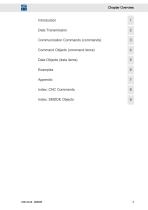
Chapter Overview Communication Commands (commands) 3 Command Objects (command items) 4 Data Objects (data items) 5 Index: SMDDE Objects 9
Open the catalog to page 3
Chapter Overview
Open the catalog to page 4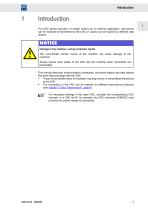
Introduction The CNC allows execution of certain actions by an external application. Instructions can for example be transferred to the CNC or values can be inquired by different data objects. NOTICE Damage to the machine / wrong production results The uncontrolled remote control of the machine can cause damage to the machine! Always ensure clear states of the CNC and the machine when commands are transmitted. This manual describes communication commands, command objects and data objects that allow data exchange with the CNC. ▶ These functionalities allow for example inquiring events or transmitting...
Open the catalog to page 7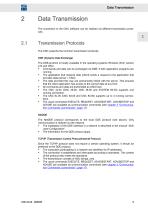
Data Transmission The connection to the CNC software can be realized via different transmission protocols. The CNC supports the common transmission protocols. DDE (Dynamic Data Exchange) The DDE-protocol is locally available in the operating systems Windows (from version ► Commands and data can be exchanged via DDE, if both application programs are running. ► The application that requires data (client) sends a request to the application that provides data (server = CNC). ► The data provided this way are permanently linked with the server. This ensures that the client application has access to...
Open the catalog to page 9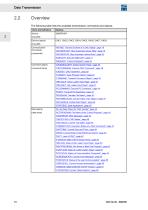
Data Transmission OverviewThe following table lists the available transmission commands and objects: Terms and Definitions
Open the catalog to page 10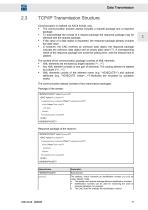
Data Transmission Communication is realized via ASCII format, only. ► The communication process always includes a request package and a response package. ► To acknowledge the receipt of a request package the response package may be identical with the request package. ► If the value of a data object is requested, the response package already includes the data value. ► If, however, the CNC receives an unknown data object, the response package includes the unknown data object and an empty data value ('"'). A corresponding check of the response package can avoid the waiting time, until the timeout...
Open the catalog to page 11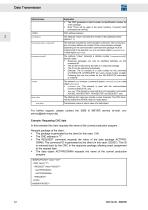
For further support, please contact the SIEB & MEYER service (e-mail: cnc- In this example the client requests the name of the current production program. Request package of the client ► The package is generated by the client (in this case: 124). ► The REQUEST command requests the value of the data package ACTPRO-GRAM. The command ID is generated by the client (in this case: 020327). This ID is returned back by the CNC in the response package allowing exact assignment to the request later. ► The data object ACTPROGRAM requests the name of the current production program. <REQUEST Value="020327">...
Open the catalog to page 12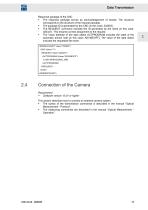
► The response package serves as acknowledgement of receipt. The structure corresponds to the structure of the request package. ► The package ID is generated by the CNC (in this case: 332553). ► The REQUEST command includes the ID generated by the client (in this case: 020327). This ensures correct assignment to the request. ► The Value attribute of the data object ACTPROGRAM includes the state of the automatic advice note (in this case: ADVISEOFF). The value of the data object includes the requested file name. <REQUEST Value="020327"> <ACTPROGRAM Value="ADVISEOFF"> C:\SM_WPROG\DRILL.SM5 </ACTPROGRAM>...
Open the catalog to page 13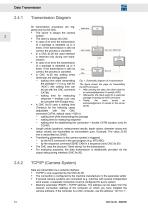
Data Transmission All transmission processes are triggered only by the CNC. ► The server is always the camera system. ► In case of an error the transmission of a package is repeated up to 4 times. If the transmission is still not correct, the process is canceled. ► In a CNC 8x.00 the used interface is reserved only during one transmission. ► In case of an error the transmission of a package is repeated up to 4 times. If the transmission is still not correct, the process is canceled. ► In CNC 4x.00 two waiting times (timeouts) are distinguished: The figure shows the page for transmitting ► After...
Open the catalog to page 14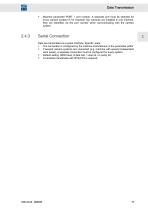
► Machine parameter PORT = port number. A separate port must be selected for every camera system! If, for example, two cameras are installed in one machine, they are identified via the port number when communicating with the camera system. Data are transmitted via a serial interface. Specific notes: ► The connection is configured by the machine manufacturer in the parameter editor ► If several camera systems are connected (e.g. machine with several independent work areas), a separate connection must be configured for every system. ► Default setting: 9600 baud, 8 data bits, 1 stop bit, no parity...
Open the catalog to page 15
Data Transmission
Open the catalog to page 16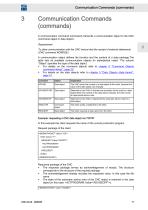
Communication Commands (commands) A communication command (command) transmits a communication object to the CNC (command object or data object). To allow communication with the CNC ensure that the receipt of external statements (CNC command NONDDE). A communication object defines the function and the content of a data package.The table lists all available communication objects (in alphabetical order). The column “Object” specifies the type of the data object. ► For details on the command objects refer to chapter 4 "Command Objects (command items)", page 25. ► For details on the data objects refer...
Open the catalog to page 17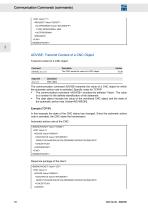
<REQUEST Value="020327"> <ACTPROGRAM Value="ADVISEOFF"> C:\SM_WPROG\DRILL.SM5 </ACTPROGRAM> Command Description Version ADVISE data item The CNC sends the value of a CNC object. 10.08 Argument Description data item Data object Example (TCP/IP) <CNCSTATUS Value="ADVISEON"> <CNCSTATUS Value="ADVISEON">
Open the catalog to page 18All SIEB & MEYER AG catalogs and technical brochures
 Frequency Converter SD2B plus
48 Pages
 Unit Assembly Complying EMC
75 Pages
 Drive Controller SD2
200 Pages
 drivemaster2
318 Pages
 050201
24 Pages
- Automation software solution
- Servo-amplifier
- Interface software
- Reporting software
- EDM software
- Fieldbus servo-drive
- Machine software
- Frequency inverter
- AC servo-amplifier
- Data management software
- EtherCAT servo-amplifier
- Compact servo-amplifier
- Analog servo-amplifier
- CNC
- RS-232 servo drive
- OPC software
- Asynchronous servo drive
- Compact frequency inverter
- IP20 frequency inverter
- Ethernet positioning controller