
- Catalogs
- SIEB & MEYER AG
- 050201

- Products
- Catalogs
- News & Trends
- Exhibitions
050201
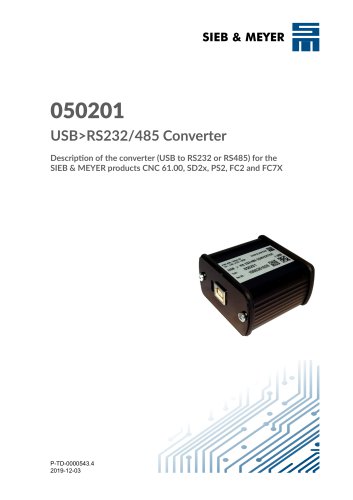
050201
The document serves as a detailed guide for the USB to RS232/485 Converter 050201 by SIEB & MEYER, facilitating the connection of SIEB & MEYER drive components to PCs lacking a serial interface. It covers device versions, applications, and installation procedures.
The converter is compatible with Windows operating systems (Windows 2000 or higher) and includes a USB cable, though a separate serial connection cable is required. It supports various SIEB & MEYER devices such as SD2, PS2, FC2, and CNC 61.00.
- Version 0.000: Comes with basic software, with protocol software loaded upon starting the PC software.
- Version 1.000: Includes a selection switch for device compatibility, supports USB 3.0, and allows connection of two RS232 devices.
- USB Connector: Features a 4-pole female USB connector, type B, providing a 5V voltage supply.
- RS232/485 Connector: Utilizes a 9-pole male submin D connector with specific pin assignments for data transmission and reception.
Instructions are provided for connecting the converter to a PC and SIEB & MEYER drive components using various cable types, emphasizing the use of shielded cables with twisted-pair signal lines.
An RS485 to RS232 Converter (036210054) is available as an optional accessory, facilitating connections between drive amplifiers and the USB>RS232/485 Converter 050201.
Guidance is offered on driver installation and managing security programs, particularly noting the need to deactivate "DOS Exploit" protection in programs like "Spybot - Search & Destroy" to allow device driver installation.
Catalog excerpts
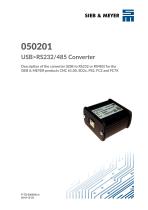
SIEB & MEYER 050201 USB>RS232/485 Converter Description of the converter (USB to RS232 or RS485) for the SIEB & MEYER products CNC 61.00, SD2x, PS2, FC2 and FC7X
Open the catalog to page 1
W Copyright Translation of the original instructions, Copyright © 2019 SIEB & MEYER AG All rights reserved. This manual or extracts thereof may only be copied with the explicit authorization of SIEB & MEYER AG. Trademarks All product, font and company names mentioned in this manual may be trademarks or registered trademarks of their respective companies. SIEB & MEYER worldwide For questions regarding our products and technical problems please contact us. SIEB & MEYER AG Auf dem Schmaarkamp 21 21339 Lueneburg Germany Phone: +49 4131 203 0 Fax: +49 4131 203 2000 [email protected] http://www.sieb-meyer.de...
Open the catalog to page 2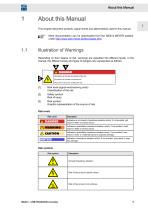
About this Manual This chapter descirbes symbols, signal words and abbreviations used in this manual. More documentation can be downloaded from the SIEB & under http://www.sieb-meyer.de/downloads.html. MEYER website Illustration of Warnings Depending on their degree of risk, warnings are classified into different levels. In the manual, the different levels and types of dangers are represented as follows: [1] Risk level (signal word/warning color) Classification of the risk [2] Safety symbol Risk of injury Graphic representation of the source of risk Risk levels
Open the catalog to page 5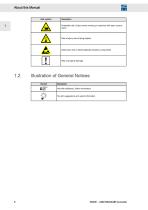
About this Manual Risk symbol 1.2 Illustration of General Notices Symbol
Open the catalog to page 6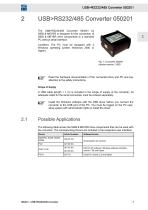
The USB>RS232/485 Converter 050201 by SIEB & MEYER is designed for the connection of SIEB & MEYER drive components to a standard PC without serial interface. Condition: The PC must be equipped with a Windows operating system (Windows 2000 or higher). Read the hardware documentation of the connected drive and PC and pay attention to the safety instructions. A USB cable (length = 1 m) is included in the scope of supply of the converter. An adequate cable for the serial connection must be ordered separately. Install the Windows software with the USB driver before you connect the converter to the...
Open the catalog to page 7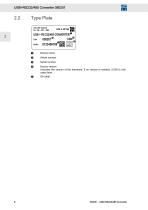
Indicates the version of the hardware; if no version is existent, 0.000 is indicated here.
Open the catalog to page 8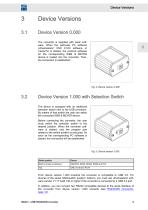
Device Versions 3 Device Versions3.1 Device Version 0.000 The converter is supplied with basic software. When the particular PC software (drivemaster2, CNC 61.00 software or Vector7X) is started, the protocol software for the corresponding SlEB & MEYER device is loaded into the converter. Then, the connection is established. The device is equipped with an additional selection switch next to the USB connector. By means of that switch the user can select the connected SIEB & MEYER device. Before connecting the converter, the user must switch the selection switch to the desired position. When the...
Open the catalog to page 9
Device Versions
Open the catalog to page 10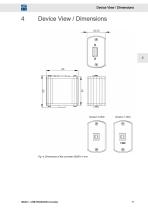
Device View / Dimensions Device View / Dimensions
Open the catalog to page 11
Device View / Dimensions
Open the catalog to page 12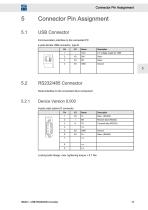
USB Connector Communication interface to the connected PC 4-pole female USB connector, type B Locking bolts flange: max. tightening torque = 0.7 Nm
Open the catalog to page 13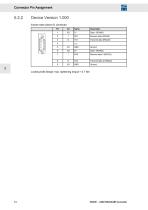
5.2.2 Device Version 1.000 9-pole male submin D connector
Open the catalog to page 14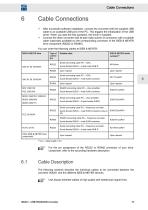
Cable Connections 6 Cable Connections ^ After successful software installation, connect the converter with the supplied USB cable to an available USB port of the PC. This triggers the initialization of the USB driver. When you start the first operation, the driver is installed. ^ Connect the other converter side (9-pole male submin D connector) with a suitable cable (optionally available) to the corresponding connector of the SIEB & MEYER drive component (RS232 or RS485). You can order the following cables at SIEB & MEYER: For the pin assignment of the RS232 or RS485 connector of your drive component,...
Open the catalog to page 15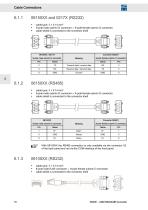
Cable Connections ► 9-pole male submin D connector 9-pole female submin D connector ► cable shield is connected to the connector shell 9-pole male submin D connector ► 9-pole male submin D connector 9-pole female submin D connector ► cable shield is connected to the connector shell 9-pole male submin D connector With 06150XX the RS485 connection is only available via the connector X2 of the back panel and not via the COM interface of the front panel. ► 8-pole male RJ45 connector 9-pole female submin D connector ► cable shield is connected to the connector shell
Open the catalog to page 16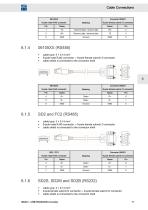
Cable Connections ► 8-pole male RJ45 connector 9-pole female submin D connector ► cable shield is connected to the connector shell ► 8-pole male RJ45 connector 9-pole female submin D connector ► cable shield is connected to the connector shell ► 9-pole female submin D connector 9-pole female submin D connector ► cable shield is connected to the connector shell
Open the catalog to page 17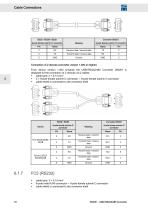
9-pole female submin D connector Connection of 2 devices (converter version 1.000 an higher) From device version 1.000 onwards the USB>RS232/485 Converter 050201 is designed for the connection of 2 devices via 2 cables. ► 2 * 9-pole female submin D connector 9-pole female submin D connector ► cable shield is connected to the connector shell ► 8-pole male RJ45 connector 9-pole female submin D connector ► cable shield is connected to the connector shell
Open the catalog to page 18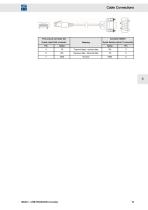
FC2 (only at connector X3) 8-pole male RJ45 connector
Open the catalog to page 19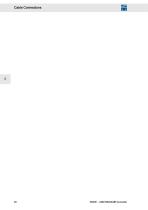
Cable Connections
Open the catalog to page 20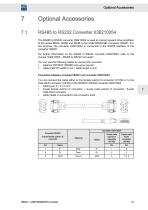
Optional Accessories The RS485 to RS232 converter 036210054 is used to connect several drive amplifiers of the series SD2S, SD2M and SD2B to the USB>RS232/485 Converter 050201. For this purpose, the converter 036210054 is connected to the RS485 interface of the converter 050201. For further information on the RS485 to RS232 converter 036210054, refer to the manual “036210054 - RS485 to RS232 Converter”. You can use the following cables to connect the converter: ► cable for 06150XX (RS485) only upon request ► cable K362101xxxR01 (xxx = cable length in dm) Connection between converter 050201 and...
Open the catalog to page 21
Optional Accessories
Open the catalog to page 22
Driver Installation and Security Programs Spybot - Search & Destroy : DOS Exploit Security programs like “Spybot - Search & Destroy” are used for closing security gaps in Windows by manipulating entries in the “Registry”. If you use the program “Spybot - Search & Destroy” consider the following: As long as the protection with the name “DOS Exploit” is active, no device driver can be installed. First, the protection must be deactivated.
Open the catalog to page 23All SIEB & MEYER AG catalogs and technical brochures
 Frequency Converter SD2B plus
48 Pages
 Unit Assembly Complying EMC
75 Pages
 Drive Controller SD2
200 Pages
 drivemaster2
318 Pages
 CNC 8x.00
106 Pages
- Automation software solution
- Servo-amplifier
- Interface software
- Reporting software
- EDM software
- Fieldbus servo-drive
- Machine software
- Frequency inverter
- AC servo-amplifier
- Data management software
- EtherCAT servo-amplifier
- Compact servo-amplifier
- Analog servo-amplifier
- CNC
- RS-232 servo drive
- OPC software
- Asynchronous servo drive
- Compact frequency inverter
- IP20 frequency inverter
- Ethernet positioning controller