
- Catalogs
- Shimadzu France
- UH-X/FX


UH-X/FX
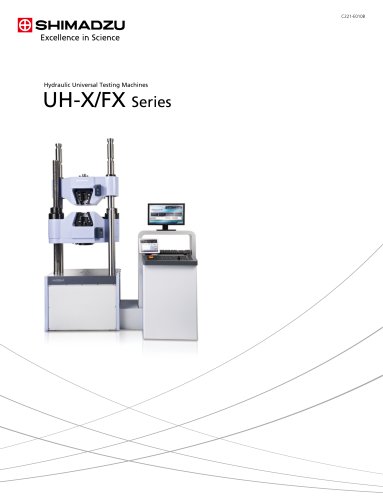
UH-X/FX
- Semi-Auto-Tuning Function: Provides precise stress and strain control, eliminating the need for preliminary tests.
- Large Color LCD Touch Panel: A 10.4-inch screen improves visibility and operation, displaying real-time stress-strain curves.
- Environmentally Friendly Design: The hybrid hydraulic unit reduces energy consumption by 82% and requires up to 50% less hydraulic oil.
- Reliability and Safety: Ultra-high-speed sampling ensures no sudden strength variations are missed, with various automatic control programs included.
- UH-Xh and UH-FXh: Feature computer-controlled hybrid hydraulic servo systems with high-performance front-opening hydraulic grips.
- UH-X and UH-FX: Utilize computer-controlled hydraulic servo systems.
- USB Memory Functionality: Enables tests without a computer, with automatic data saving for analysis.
- Crosshead Elevating Switch Box: Allows fingertip control for crosshead positioning.
- Front-Opening Hydraulic Grips: Ensure efficient specimen recovery and safety.
- Non-Rotating Threaded Columns: Enhance safety during specimen mounting.
- Safety Cover: Provides optional protection from flying specimen debris.
- TRAPEZIUM X Software: Supports intuitive operation with a visual wizard for setting parameters and a Quick Parameter List for efficient testing.
- Report Designer: Allows customizable report layouts with various output formats, enhancing report persuasiveness.
- Single Software: For standard single-direction tests like tensile, compression, and bending.
- Cycle Software: Facilitates endurance testing with repeated force applications.
- Control Software: Allows custom testing routines with complex steps.
- Concrete Software: Designed for concrete testing, compliant with JIS standards.
- Recorder Software: Used with a UH-X measuring controller for data acquisition and manual test control.
- Installation Environment: Avoid areas with large temperature fluctuations, high humidity, dust, vibration, corrosive gases, or direct sunlight.
- Power Supply Requirements: Ensure stable voltage within ±10% fluctuation. Use a constant-voltage supply if necessary.
- Cooling Water: Necessary for optional hydraulic oil cooler installation.
Catalog excerpts
Hydraulic Universal Testing Machines UH-X/FX Series
Open the catalog to page 1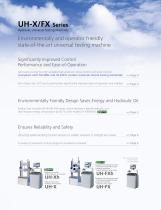
UH-X/FX Series Hydraulic Universal Testing Machines Environmentally and operator friendly state-of-the-art universal testing machine Significantly Improved Control Performance and Ease-of-Operation Semi-auto-tuning function enables high-precision stress control and strain control (compliant with ISO 6892 and JIS Z2241 metallic materials tensile testing standards) Extra large color LCD touch panel screen significantly improves ease-of-operation and visibility Environmentally Friendly Design Saves Energy and Hydraulic Oil Product line includes UH-Xh/UH-FXh series, which features a hybrid hydraulic...
Open the catalog to page 3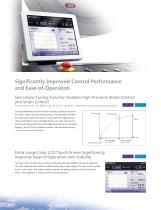
Significantly Improved Control Performance and Ease-of-Operation Semi-Auto-Tuning Function Enables High Precision Stress Control and Strain Control (compliant with ISO 6892 and JIS Z2241 metallic materials tensile testing standards) Control parameters are auto-tuned in real time, based on test force and strain values measured during testing. This eliminates the need for preliminary testing and makes it easy to perform highly precise stress-controlled or strain-controlled testing. The semi-auto-tuning function also allows performing ISO 6892 (precision strain-controlled testing)* and JIS Z2241...
Open the catalog to page 4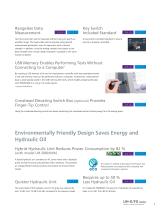
Rangeless Data Measurement Test force and strain can be measured without having to specify an amplifier range. This means data can be acquired using optimal measurement parameters, even for specimens with unknown strength. In addition, since the analog indicator and output to the data recorder have a virtual range, evaluation is possible in the same manner as before. Key Switch Included Standard A key switch is provided standard to ensure security is properly controlled. USB Memory Enables Performing Tests Without Connecting to a Computer* By inserting a USB memory stick into the measurement...
Open the catalog to page 5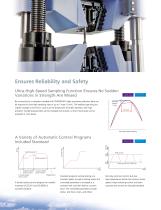
Ensures Reliability and Safety Ultra-High-Speed Sampling Function Ensures No Sudden Variations in Strength Are Missed By connecting to a computer installed with TRAPEZIUM X data processing software, data can be acquired at ultra-high sampling rates of up to 1 msec (1 kHz). This enables capturing any sudden changes in test force, such as at the break point of brittle materials, with high precision. Sampling parameters can be changed during tests, so that critical areas can be analyzed in more detail. Sampling interval 1 msec 50 msec Ultra-high-speed sampling Control value Control value A Variety...
Open the catalog to page 6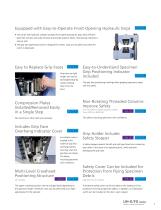
Equipped with Easy-to-Operate Front-Opening Hydraulic Grips The center hole hydraulic cylinder actuated front-opening hydraulic grips allow efficient specimen recovery and scale removal and provide superior safety. Testing long materials is easy as well. The grip face open/close switch is designed for safety. Grips are actuated only while the switch is depressed. Easy to Replace Grip Faces Grip faces are light weight and can be exchanged easily by simply inserting them from the front. (not included on large-capacity models from 2000 to 4000 kN) This allows mounting specimens with confidence....
Open the catalog to page 7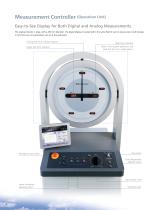
Measurement Controller (Operation Unit) Easy-to-See Display for Both Digital and Analog Measurements The analog indicator is large, with a 450 mm diameter. The digital display is located within the same field of view to ensure even small changes in test force are not overlooked, such as at the yield point. Analog test force indicator (option) Digital test force indicator Emergency stop switch Peak force indicator Allows viewing both yield point and peak test force at a single glance. Key switch Pump Preparation ON/OFF switch Load control knob Lower crosshead elevating switch Operation keys
Open the catalog to page 8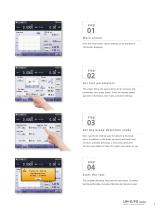
01 Ma i n scre e n From this initial screen, various settings can be specified or information displayed. 02 S e t t e st p a r a m e t e r s This screen allows the easy entering of all necessary test parameters via a single screen. Enter the loading speed, specimen information, test mode, and other settings. 03 S e t t h e b re a k d e t e ct i o n m o d e Next, specify the method used for detecting the break point. In addition to the break sensitivity and break level functions available previously, a new break peak level function was added to make the system even easier to use. 04 S t a r t...
Open the catalog to page 9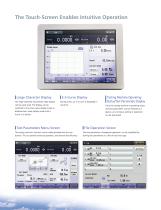
The Touch-Screen Enables Intuitive Operation Large Character Display The large-sized test force/stroke data display can be easily read. The display can be switched to the stress value display mode or displacement value display mode with a touch of a button. S–S Curve Display During a test, an S–S curve is displayed in real time. Test Parameters Menu Screen The testing machine's functions can be visibly operated with the icon buttons. This can prevent erroneous operation, and improve test efficiency. Testing Machine Operating Status/Test Parameters Display Since the testing machine's operating...
Open the catalog to page 10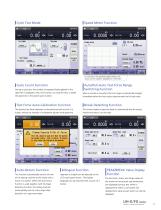
Cycle Test Mode Speed Meter Function In contrast to the specified speed setting, the actual current speed is displayed on the screen. Cycle Count Function During a cycle test, the number of repeated loads applied to the specimen is displayed. Also, this function can stop the test, or break the specimen in the preset cycle number. Test Force Auto-Calibration Function The electrical test force calibration can be performed with a touch of a button, without the necessity of troublesome adjuster knob operations. Auto-Return Function This function automatically returns the ram of the testing machine...
Open the catalog to page 11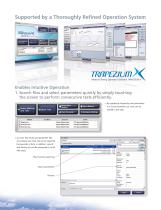
Supported by a Thoroughly Refined Operation System Material Testing Operation Software TRAPEZIUM X Enables Intuitive Operation 1. Search files and select parameters quickly by simply touching the screen to perform consecutive tests efficiently. By registering frequently used parameters in a Quick Parameter List, tests can be started in one step. As more test results and parameter files accumulate over time, file can be searched by keywords or date. In addition, reports and setting lists can be previewed to recall files easily. Files found by searching Search parameters
Open the catalog to page 12All Shimadzu France catalogs and technical brochures
 Quality Control of Hydrogen
24 Pages
 Manual Non-Shift Wedge Grips
3 Pages
 AUTOGRAPH AGX-V2
28 Pages
Archived catalogs
 EZ Test
20 Pages
- Gas analyzer
- Test cabinet
- Industrial camera module
- Concentration analyzer
- Monitoring analyzer
- Analysis software solution
- Liquids analyzer
- Infrared imager
- Windows software
- Microscope
- Shimadzu automatic testing machine
- Shimadzu material testing machine
- Temperature test chamber
- Indentation hardness tester
- Solids analyser
- Shimadzu spectrometer
- Quality control test cell
- Shimadzu digital scale
- Computer-controlled test machine