
- Catalogs
- Shenzhen Ruicom Technology Co., Ltd.
- RUICOM STS Standard Output Tilt Sensor


- Company
- Products
- Catalogs
- News & Trends
- Exhibitions
RUICOM STS Standard Output Tilt Sensor

RUICOM STS Standard Output Tilt Sensor
The STS standard output tilt sensor by RUICOM Technology is engineered for industrial automation control. It boasts a compact design, RS485/RS232 communication interfaces, a high-performance MEMS tilt sensing unit, and a 24-bit high-precision differential A/D converter. It employs a fifth-order digital filtering algorithm for accurate horizontal and pitch angle measurements, ensuring high accuracy and reliability in industrial applications.
This sensor is suitable for building structural health monitoring, industrial automation control systems, and environments requiring long-term stable monitoring in high-precision angle measurement applications.
- Single/dual-axis measurement
- Measurement range: ±180°
- Accuracy: 0.01°
- Industrial-grade reliability
- Multiple standard output interfaces
- Power supply voltage: 9-36 V
- Operating temperature: -40 to +85 ℃
- Measurement range: ±10° to ±180°
- Resolution: 0.001°
- Output signal: TTL/RS232/RS485
- Waterproof rating: IP67
Models are defined by axis, range, output protocol, and installation direction. For example, STS6X10-TTLSP-H indicates X-axis, ±10° range, TTL output, serial communication, horizontal installation.
The red indicator light shows power and connection status, flashing during successful data transmission.
The sensor uses an M12 interface and supports a wide voltage range. It includes a standard 2-meter M12-5 core cable.
Pin definitions cover power, communication, and ground connections.
The data frame format includes identifier, data length, address code, command word, data domain, and checksum. Commands include reading angles, setting zero points, and adjusting communication speed.
Operates in RTU mode with specific data frame formats and timing requirements. Commands include reading angle data and setting zero points, with examples provided for implementation.
The register address 0010 controls the sensor output mode. Writing a nonzero value (e.g., 00FFH) sets the output to relative zero, while a zero value sets it to absolute zero. The last two bytes are a CRC checksum.
To set the sensor address, use the command with the register address 0011. The example provided changes the sensor address to 0004H. Commands must be sent twice to be valid, and the last two bytes are a CRC checksum.
The default baud rate is 9600bps. The register address 0012 controls the baud rate, with options ranging from 4800bps (A0H) to 115200bps (A4H). The example sets the baud rate to 19200bps. Commands must be sent twice to be valid, and the last two bytes are a CRC checksum.
The register address 0009 controls the communication character format. The example sets the format to one start bit, 8 data bits without parity, and one stop bit. This setting is effective after a power cycle. The factory default includes even parity.
Catalog excerpts

STS STANDARD OUTPUT TILT SENSOR Product manual V1.1-20250226
Open the catalog to page 1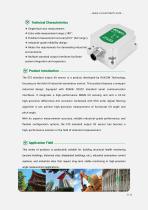
Technical Characteristics ❖ Extra-wide measurement range: ±180°; ❖ Excellent measurement accuracy0.01° (full range); ❖ Industrial-grade reliability design; ❖ Meets the requirements for demanding industrial environments; ❖ Multiple standard output interfaces facilitate system integration and expansion. Product Introduction- The STS standard output tilt sensor is a product developed by RUICOM Technology, focusing on the field of industrial automation control. This product features a compact industrial design. Equipped with RS485/ RS232 standard serial communication interfaces. It integrates a high-performance...
Open the catalog to page 2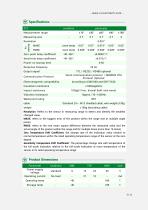
Measurement range Measuring axis Resolution Zero-point temp coefficient Sensitivity temp coefficient Power-on startup time Response frequency Output signal Communication Protocol Electromagnetic compatibility Insulation resistance Impact resistance Vibration resistance Waterproof rating room temp 0.01° room temp 0.008 -40~85C -40~85C TTL / RS232 / RS485 optional Serial communication protocol / MODBUS RTU Protocol Optional 100g@11 ms , triaxial (half-sine wave) Standard 2m - M12 shielded cable, wire weight<130g <158g (excluding cable) Resolution: Refers to the sensor in measuring range to detect...
Open the catalog to page 3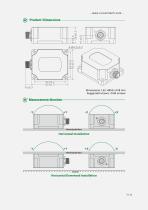
Product Dimensions Mounting Surface Horizontal InstaNation Mounting Surface Horizontal Downward Installation
Open the catalog to page 5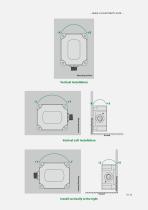
Vertical Left Installation Install vertically to the right
Open the catalog to page 6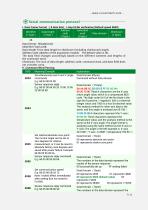
Serial communication protocol I. Data Frame Format : ( 8 data bits), 1 stop bit No verification (Default speed 9600) Data format: Hexadecimal; Data length: From data length to checksum (including checksum) Length; Address code: Address of the acquisition module. The default value is 00; The data field changes accordingly based on the different contents and lengths of the command word; Checksum: The sum of data length, address code, command word, and data field does not consider carry. II. Command Word Parsing__ Simultaneously read X and Y angle 0X04 commands Sensor response reply Set relative/absolute...
Open the catalog to page 7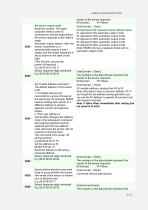
0X8C Set sensor output mode Response system: The upper computer needs to send a command to read the angle before the sensor responds to the relative angle. Automatic output system: After the sensor is powered on, it automatically outputs X and Y angles, and the output frequency is set as shown in the table on the right. (This function can provide power-off memory) results of the sensor response 00 Success FF Failure 00 represents the response format (default value) 01 represents 5Hz automatic output mode 02 represents 15Hz automatic output mode 03 represents 25Hz automatic output mode 04 represents...
Open the catalog to page 8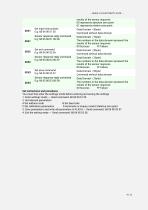
results of the sensor response 00 represents absolute zero point 01 represents relative zero point You must first enter the settings mode before entering and saving the settings 1. Enter settings mode ^ Send command: 68 04 00 51 55 A Set address code B Set baud rate C Set calibration parameters D Automatic or inquiry mode E Relative zero point 3. Save parameters and write all parameters to FLASH ^ Send command: 68 04 00 53 57. 4. Exit the setting mode ^ Send command: 68 04 00 52 56.
Open the catalog to page 9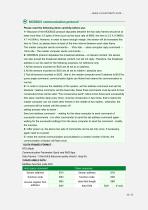
Please read the following items carefully before use: 1> Because of the MODBUS protocol stipulates between the two data frames should be at least more than 3.5 bytes of time (such as the baud rate of 9600, the time is 3.5 X (1/9600) X 11=0.004s). However, in order to leave enough margin, the sensor will be increased this time to 10ms, so please leave at least of the time interval between each data frame. 2> MODBUS protocol stipulates the broadcast address—0 relevant content, the sensor can also accept the broadcast address content, but will not reply. Therefore, the broadcast address 0 can be...
Open the catalog to page 10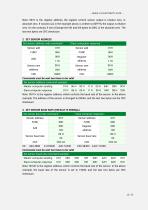
Note: 0010 is the register address, the register control sensor output is relative zero, or absolute zero. If nonzero (as in the example above, is written to 00FFH), the output is relative zero. On the contrary, if zero (Change the 5th and 6th bytes to 00H), is the absolute zero. The last two bytes are CRC checksum. Note: 0012H is the register address, which controls the baud rate of the sensor. In the above example, the baud rate of the sensor is set to 19200, and the last two bytes are CRC checksum.
Open the catalog to page 12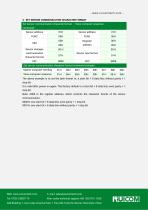
4. SET SENSOR COMMUNICATION CHARACTER FORMAT The above example is to set the byte format to: a start bit + 8 data bits without parity + 1 stop bit It is valid after power on again. The factory default is a start bit + 8 data bits, even parity + 1 stop bit Note: 0009 is the register address, which controls the character format of the sensor communication. 0000H: one start bit + 8 data bits, even parity + 1 stop bit 0001H: one start bit + 8 data bits without parity + 1 stop bit Web: www.ruicomtech.com E-mail: [email protected] Add:Building 1, Lixin Lake Creative Park, 1 Furui Rd, Fuhai St, Bao'an,...
Open the catalog to page 13All Shenzhen Ruicom Technology Co., Ltd. catalogs and technical brochures





























- Tilt sensor
- Digital inclination sensor
- 2-axis tilt sensor
- MEMS inclination sensor
- Multi-axis tilt sensor
- High-precision tiltmeter
- Analog inclination sensor
- IP67 inclination sensor
- 1-axis tilt sensor
- Vibration sensor
- Rugged inclination sensor
- Waterproof tiltmeter
- Angle measurement inclination sensor
- High-resolution inclinometer
- Tilt switch
- RS-485 inclinometer
- Inclination sensor with aluminum housing
- RS-232 inclinometer
- Anti-vibration inclinometer
- CAN inclination sensor